The Beginner's Guide to MCP (Model Context Protocol)
Simple yet powerful protocol changing AI systems' connectivity
The Beginner's Guide to MCP (Model Context Protocol)
Simple yet powerful protocol changing AI systems' connectivity
Not a Medium Member? Read it for free **here**

Image by Author
A few years ago, building AI applications mostly meant prompting. a chatbot and getting text back according to our use case. Very simple it was. Not a thought on memory, tools, external systems and real world interaction.
But modern AI systems are evolving into something much bigger 🤫 How is it you ask?
As you are already aware of most of these below, today AI agents can do many things like:
- search the web
- access databases
- read files
- execute tools
- query APIs
- interact with IDEs
- control workflows
And surprisingly, one of the most important technologies enabling this shift is something many beginners still do not know about:
MCP.
The Model Context Protocol.
Interestingly, MCP is not another LLM. It is not a framework either. (many confuse here, but I got you)
It is a standardized communication protocol that allows AI models to interact with external systems in a structured and reliable way.
Photo by Lucian Alexe on Unsplash
Think of MCP as the USB-C for AI applications.
Just like USB-C standardized how devices connect to hardware, MCP standardizes how AI systems connect to tools, APIs, databases, files, and environments.
And honestly, this changes everything!
So, What Problem Does MCP Solve?
Before MCP, every AI application connected to tools differently. Because one connectivity type didn't fit for all.
Photo by Enzo Tommasi on Unsplash
One application used custom APIs. Another used plugins… Another used wrappers… Another built its own orchestration layer. Everything became very fragmented.
Suppose you wanted your AI assistant to:
- access GitHub
- read local files
- query PostgreSQL
- call Slack APIs
- use a calculator
- browse documentation
Without a common protocol, developers had to manually wire everything together.
This created:
- inconsistent integrations
- security issues
- duplicated engineering effort
- poor scalability
MCP solves this problem by defining a standard interface between:
- AI models
- and external capabilities
The Core Idea Behind MCP
At its core, MCP introduces a simple architecture:
LLM Client ↔ MCP Server ↔ Tools / ResourcesWhere the model does not directly access databases or APIs.
Instead, it does the following:
- The client communicates with MCP
- MCP exposes available capabilities
- The model decides which tool to use
- The server executes safely
- Results return back to the model
This separation is extremely important for:
- modularity
- security
- scalability
- observability
MCP Architecture
A typical MCP flow looks like this:
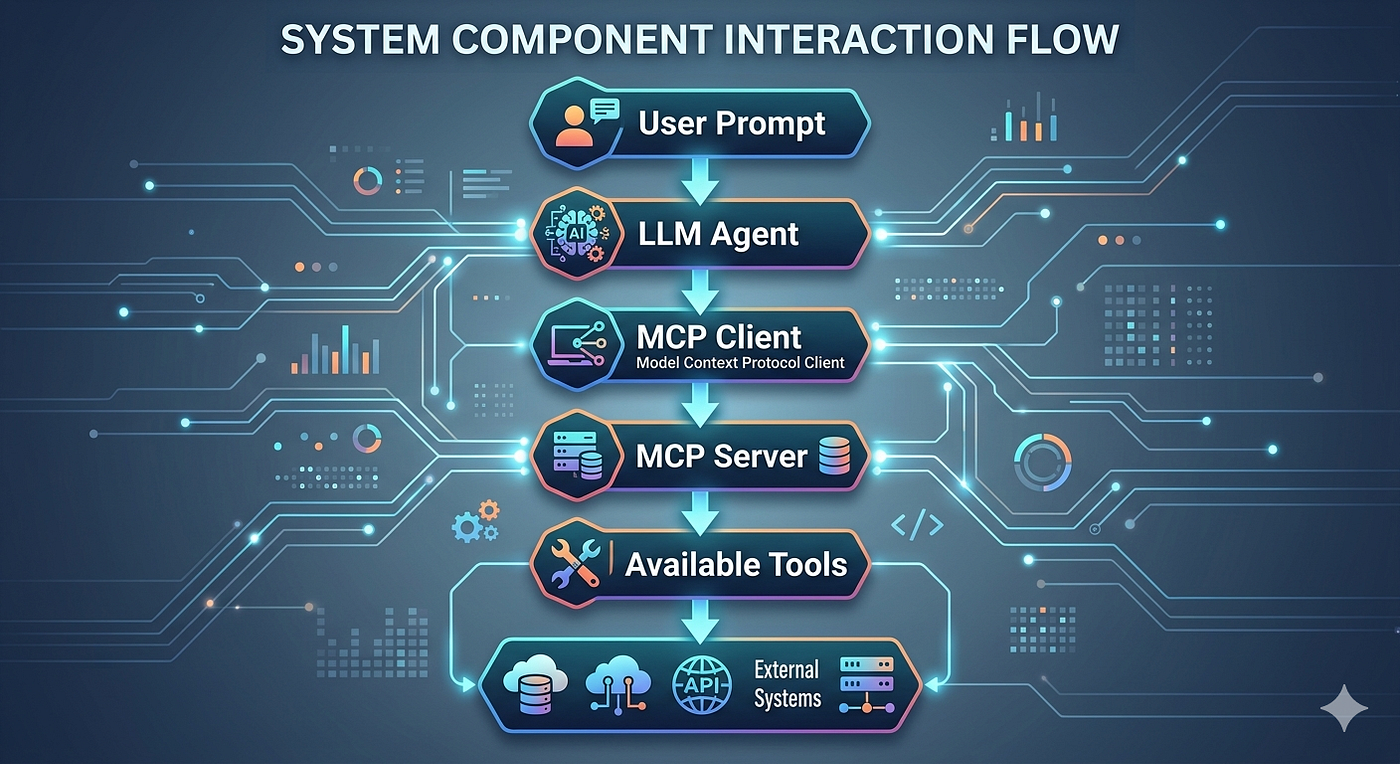
Image by Author
For example:
User:
"Summarize my latest GitHub PRs"
LLM:
→ decides GitHub access is neededMCP:
→ exposes GitHub toolsTool:
→ fetch_pull_requests()LLM:
→ summarizes resultsNotice something important here? The LLM itself does not know GitHub.
It only knows:
- tools exist
- their descriptions
- their schemas
- and when to call them. just that.
This is a hugeee shift in AI architecture.
MCP != APIs
Beginners often confuse MCP with APIs. They are related, but not the same.
In simple terms, you can think of MCP as:
A protocol layer sitting on top of tools and APIs.
MCP Concepts You Must Know
1. Tools
Tools are executable functions.
Like:
- search web
- execute SQL
- run calculator
- fetch weather
- query APIs
Sample Tool Schema would look like:
{
  "name": "get_weather",
  "description": "Gets weather for a city",
  "input_schema": {
    "type": "object",
    "properties": {
      "city": {
        "type": "string"
      }
    }
  }
}
The model reads this schema and decides whether to use it.
2. Resources
Resources provide a readable context.
can be in the form of:
- files
- PDFs
- database records
- documentation
- logs
Unlike tools, resources are usually:
- non executable
- contextual
- informational
Examples:
/docs/api_reference.mdor
database://customer_records3. Prompts
MCP can also expose reusable prompt templates.
Example:
"Summarize meeting notes professionally"This allows organizations to standardize AI behaviors.
You may refer to the below articles on Prompt Engineering:
[embed]The Ultimate Cheat Sheet of Prompt Engineering Techniques From Basics to Advancedmedium.com
Types of MCP Servers
Interestingly, MCP servers can expose completely different ecosystems.
1. File System MCP
Allows models to:
- read files
- write files
- navigate directories
Used for:
- AI coding assistants
- autonomous agents
- research systems
2. Database MCP
Exposes:
- SQL execution
- schema inspection
- analytics
Used for:
- BI assistants
- data querying
- reporting systems
3. Browser MCP
Allows AI systems to:
- browse websites
- extract content
- interact with pages
Used for:
- web agents
- automation systems
- AI researchers
4. IDE MCP
Used inside editors like:
- VSCode
- Cursor
- Windsurf
Allows models to:
- inspect code
- refactor projects
- execute commands
This is why modern AI coding assistants feel aware of your project/repo.
A Simple MCP Server Example (Python)
Now, concepts apart, let us build a tiny conceptual MCP style server.
Will be sharing my article on Fast API here soon…
from fastapi import FastAPI
app = FastAPI()
TOOLS = [
    {
        "name": "calculator",
        "description": "Perform arithmetic operations"
    }
]
@app.get("/tools")
def get_tools():
    return TOOLS
@app.post("/calculator")
def calculator(a: int, b: int):
    return {
        "result": a + b
    }
Here:
/toolsexposes capabilities/calculatorexecutes logic
The AI agent:
- discovers tools
- selects one
- calls it
- uses the result
Real MCP implementations are more sophisticated, but the idea is similar.
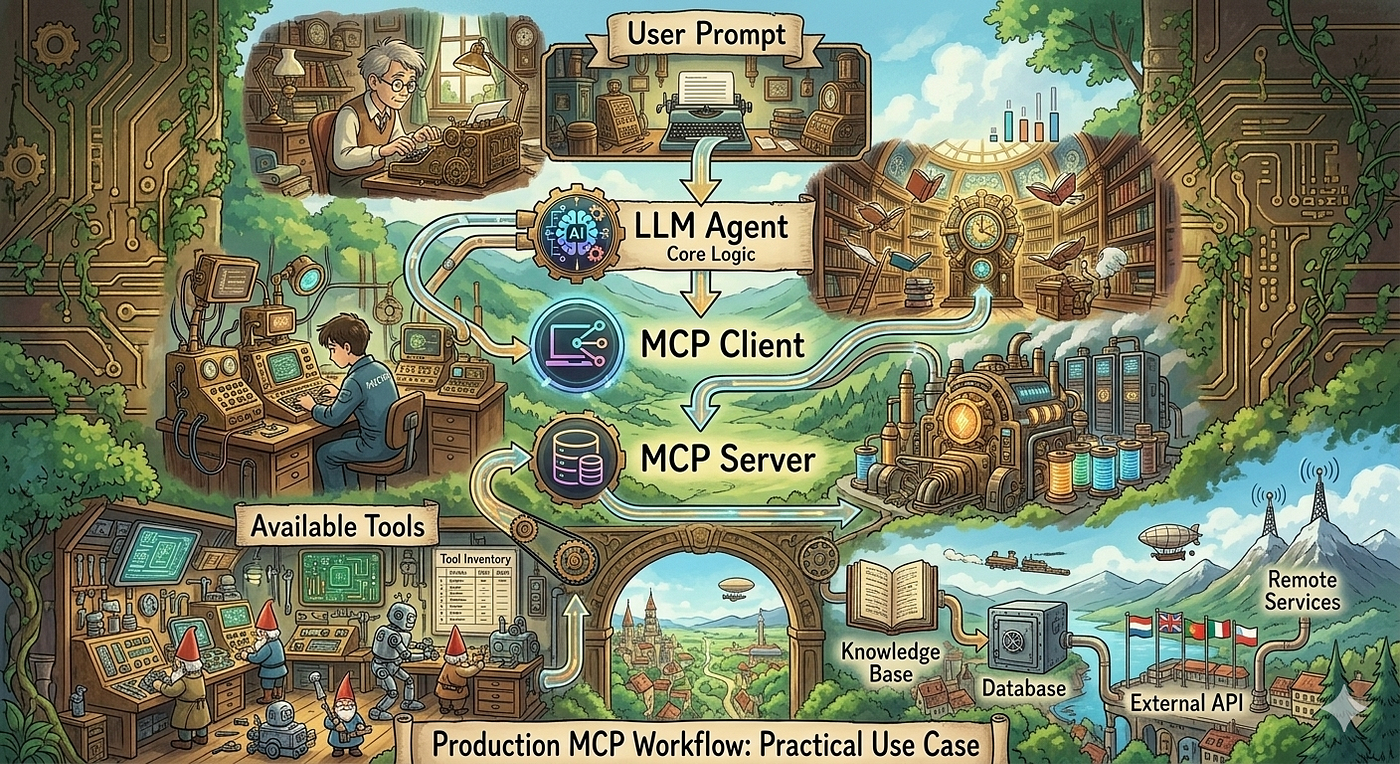
Image by Author
MCP Workflow Example
Suppose a user asks:
"What is 245 * 18?"Without MCP, LLM tries reasoning internally.
With MCP:
- model detects calculator tool
- tool executes exact arithmetic
- response becomes reliable
Workflow:
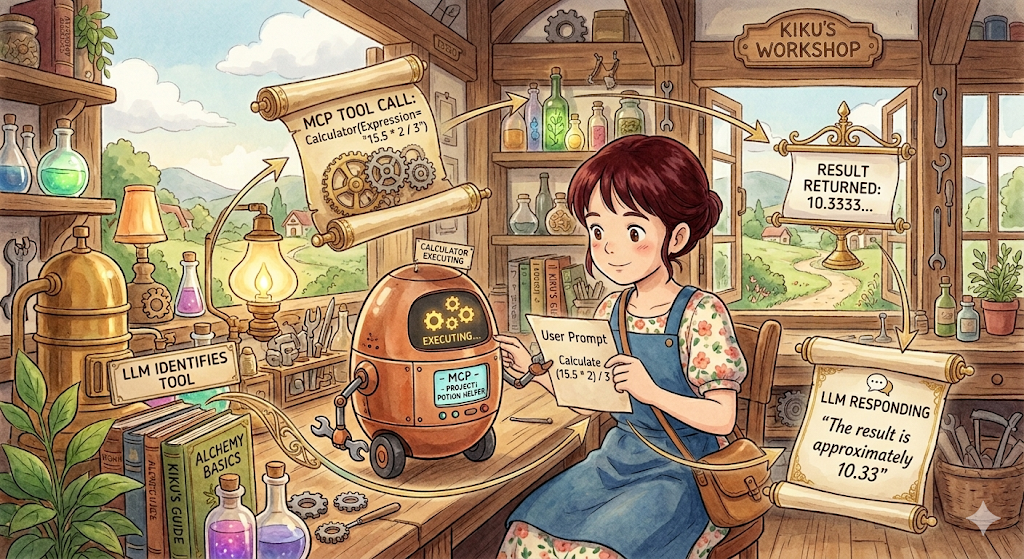
Image by Author
This dramatically reduces hallucinations.
MCP and AI Agents
This is where things become extremely interesting. Modern AI agents are basically:
- LLM reasoning
- memory
- tools
- workflows
- MCP orchestration
Without protocols like MCP, scalable agents become chaotic, isn't it?
MCP introduces:
- interoperability
- tool standardization
- predictable orchestration
Which is why MCP is becoming most crucial in:
- AI IDEs
- autonomous agents
- enterprise copilots
- AI operating systems
MCP vs RAG
Photo by Steve A Johnson on Unsplash
Many people confuse MCP with RAG. They solve different problems.
RAG helps models know.
MCP helps models do.
Modern AI systems often combine both.
Example:
RAG to retrieve documentation
MCP to execute deployment tool
Security in MCP
One of the biggest reasons MCP matters is security. Direct tool access is dangerous for confidential data.
Imagine giving an LLM unrestricted 😬:
- terminal access
- database writes
- production deployment rights
It’ll be a complete… havoc!
MCP introduces controlled interfaces. Few security mechanisms include:
1. permission boundaries
2. tool whitelisting
3. schema validation
4. sandboxing
5. audit logging
This becomes critical in enterprise AI systems.
Real world MCP Applications include AI Coding Assistants like:
- Cursor
- Windsurf
- Claude Desktop integrations
To explore Claude Code capabilities read:
Photo by Bernd 📷 Dittrich on Unsplash
Heard of them right?
They have capabilities like:
- inspect files
- edit code
- run tests
- query docs
There are also systems for Research, Project management etc.,
Prompt engineering taught us how to communicate with intelligence. But MCP teaches intelligence how to interact with the world considering AI posed challenges in real world systems.
This distinction is incredibly important because the future is not just AI generating text.
The future is AI reasoning, using tools, accessing systems, collaborating with humans, and executing workflows safely and protocols like MCP are what make that future possible.
메타데이터
- post_id
- 9bf93b172c18
- slug
- the-beginners-guide-to-mcp-model-context-protocol-9bf93b172c18
- url
- https://medium.com/the-tech-trek-by-tech-chick/the-beginners-guide-to-mcp-model-context-protocol-9bf93b172c18
- canonical_url
- https://medium.com/the-tech-trek-by-tech-chick/the-beginners-guide-to-mcp-model-context-protocol-9bf93b172c18
- author_url
- https://medium.com/@theipocmwanderer
- status
- ok
- fetched_at
- 2026-06-15 20:49:13