You’re Not Bad at Prompting. You’re Just Using the Wrong Model.
Most developers use one model for everything. Here’s why that’s quietly killing their productivity — and their budget.
You’re Not Bad at Prompting. You’re Just Using the Wrong Model.
Most developers use one model for everything. Here’s why that’s quietly killing their productivity — and their budget.

You sit down to debug a nasty async issue. You open your AI tool, paste the code, hit send — and get back a response that’s either too shallow to be useful or so over-explained it buries the actual fix. So you re-prompt, tweak, re-prompt again. Five minutes gone. The bug’s still there.
Here’s what nobody tells you: the problem wasn’t your prompt. It was your model choice.
In 2026, the hardest part of AI-assisted development isn’t writing the prompt — it’s knowing which model to hand it to. And that decision, made dozens of times a day, quietly determines your speed, your costs, and the quality of output you get.
And here’s the part that should actually concern you: AI pricing isn’t getting cheaper for users. Companies are quietly raising plan prices, bumping token multipliers, and moving capable models behind higher tiers. The models you use for free today are the ones you’ll pay for tomorrow. That makes knowing when to use a heavy model — and when not to — one of the most financially relevant skills a developer can build right now.
The Shift Nobody Saw Coming
A few years ago, AI coding tools were a novelty. Now, Google reports that up to 75% of their code is AI-generated. AI isn’t the assistant anymore — it’s embedded in the workflow itself.
But that rise brought a new problem. Where there used to be one or two AI tools to choose from, there are now entire model families — each with different tiers, different pricing, and wildly different capabilities. Copilot alone gives you access to GPT variants, Claude variants, Gemini variants, and more.
Picking the wrong one isn’t harmless. It costs you time, money, and output quality.
What AI Models Actually Are
LLMs — Large Language Models — are systems trained to understand and generate text and code. They predict the next best output based on patterns learned from massive datasets.
But they are not interchangeable. Every model is a trade-off across four dimensions:
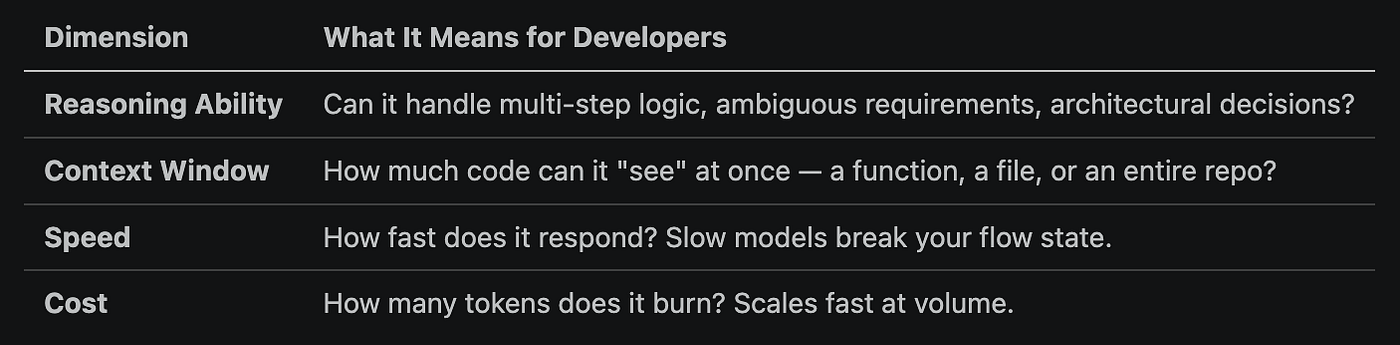
No model maxes out on all four. Every choice is a trade-off — and understanding that trade-off is the actual skill.
Context Window: Size Isn’t Everything
In your AI tool’s model settings, you’ll see two numbers: a context window and a request multiplier. Context window = how much code the model can “see” at once. Multiplier = how much it costs relative to the base plan.
Bigger context genuinely matters in specific situations — loading a full repo for migration, debugging across many files, or understanding a legacy system end-to-end. For most day-to-day tasks though, 200K is more than enough. A larger window doesn’t make a model smarter — it just gives a weaker model more to get confused by.
Case in point: Claude Sonnet (200K) regularly outperforms GPT-5.4-Codex (400K) on complex reasoning tasks. The reasoning quality of the model matters more than the token headroom.
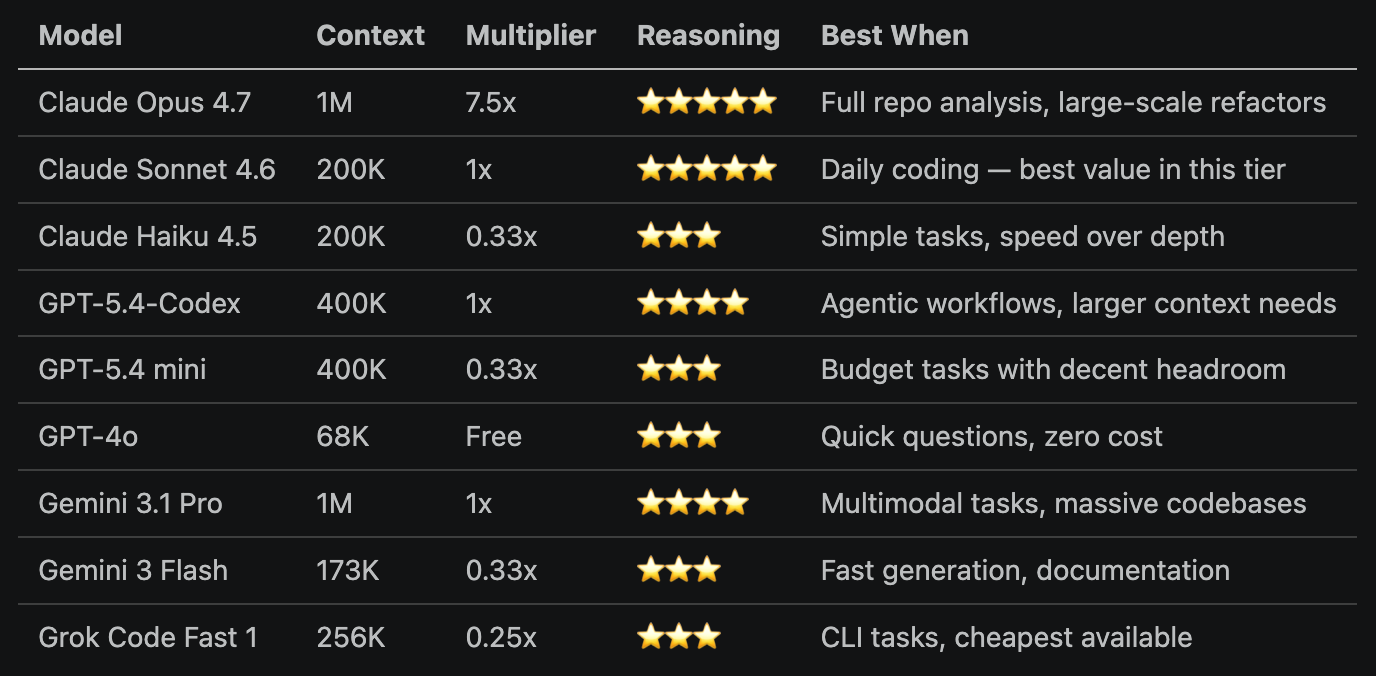
Rule of thumb: Chase context size only when your task genuinely needs it. For everything else, chase reasoning quality.
The Three Tiers That Actually Matter
Forget model names for a moment. Think in tiers.
🟢 Small / Fast Models
Haiku, Flash, GPT-4o, Grok Code Fast
These are built for throughput, not thinking. They’re cheap, sub-second fast, and surprisingly capable — within limits.
- Autocomplete and boilerplate generation
- Syntax fixes, linting, small utility functions
- Quick “what does this do?” questions
- Generating standard test cases
They handle roughly 70–80% of your daily requests if you’re honest about complexity. Use them for everything else and you’re just burning money.
🟡 Mid-Tier Models
Claude Sonnet 4.6, GPT-5.4, Gemini 3.1 Pro
The workhorses. Fast enough to not break flow, capable enough to handle real features. This is where most of your actual development should live.
- Feature implementation across a few files
- API integrations with error handling
- Moderate debugging — logic errors, state bugs, race conditions
- Writing tests that actually catch edge cases
Claude Sonnet 4.6 has become the community default in this tier — delivering roughly 90% of premium-model quality at about 20% of the cost. It’s the model equivalent of a senior dev who also happens to be fast.
🔴 Large / Reasoning Models
Claude Opus 4.6/4.7, GPT-5.4-Codex
These are expensive and slower — and worth every token when the task actually demands it. The key word is when.
- Architectural decisions and system design
- Complex multi-file debugging in large codebases
- Security-critical code that cannot be “almost right”
- Understanding a legacy monolith you’ve inherited and need to migrate
Using Opus to write a for-loop is like hiring a principal engineer to move office furniture. Save the big models for the big problems.
Mapping Tasks to Models — The Section That Pays for Itself
This is the decision you make dozens of times per day. Here’s a clean map:
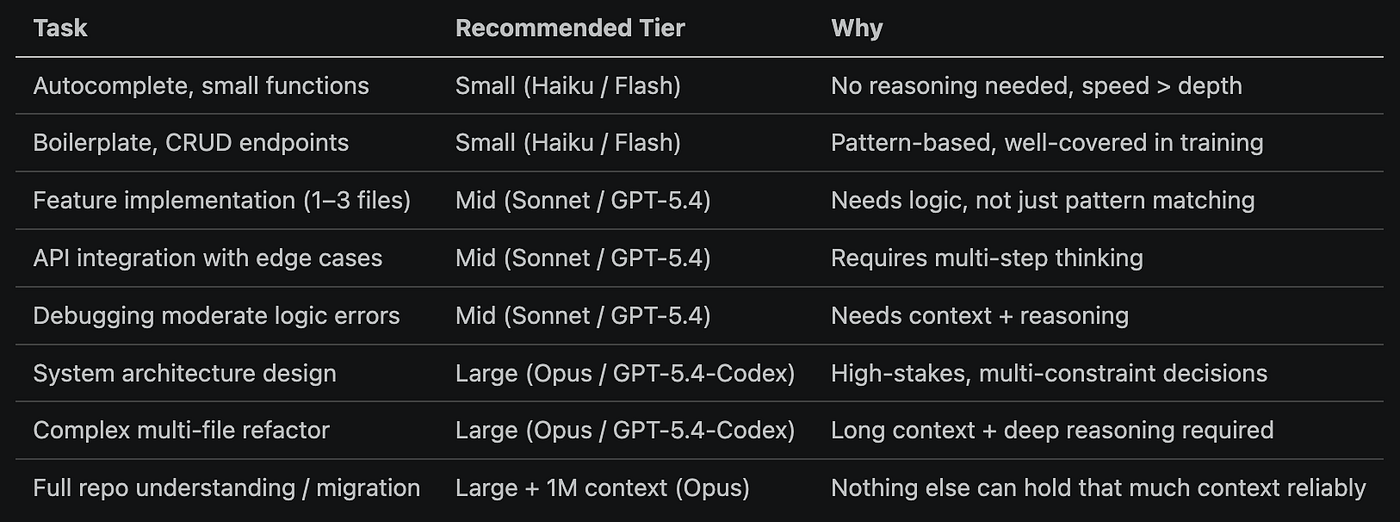
The rule of thumb: if the task fits in one function, use Small. Spans files, use Mid. Spans the system, use Large.
The Multi-Model Workflow (How Pros Actually Do It)
Here’s the misconception that’s costing developers the most: pick a model and use it for everything.
Top developers don’t do that. They run model pipelines — routing each stage of a task to the tier that fits it.
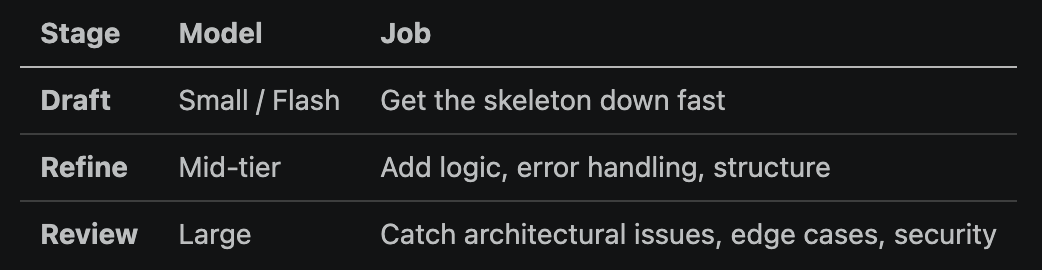
Think of it like a development team: junior dev gets the first pass done, senior dev improves it, staff engineer does the final review. You wouldn’t ask the staff engineer to write the first draft — and you shouldn’t ask Opus to either.
Three Real Scenarios
Scenario 1: “Fix this dropdown alignment bug” Single component, visual issue, known CSS pattern. → Small model. Flash or GPT-4o. Done in seconds, costs almost nothing.
Scenario 2: “Build the onboarding API with email verification and rate limiting” Multi-function feature, needs proper error handling, should be testable. → Mid-tier. Claude Sonnet or GPT-5.4. This is exactly what they’re tuned for.
Scenario 3: “Design a step-tracking system that merges GPS + pedometer data and resolves conflicts” Novel problem, system-level, ambiguous requirements, needs to scale. → Large model. Claude Opus or GPT-5.4-Codex. This earns the premium.
The Decision Framework (Stick This Somewhere You’ll See It)
Before you fire off that prompt, ask three questions:

All yes → Large. Mixed → Mid. All no → Small. That’s it. That’s the whole framework.
The Takeaway
The developers who win with AI in 2026 won’t be the ones who use it most. They’ll be the ones who use the right model at the right moment — and treat model selection as a skill, not an afterthought.
Your mental model, simplified:
Task → Complexity → Model → Output → RefineEvery step is a decision. The first one — what does this task actually require? — is the one most developers skip. Don’t skip it.
The models are going to keep improving. The cost of using them wrong is only going to grow. Build the routing habit now, while it’s still a competitive advantage rather than table stakes.
If this changed how you think about your AI tooling, share it with your team — especially the one reaching for Opus every time they need a regex.
Simform helps engineering teams adopt AI-driven development practices with a structured approach to model selection, workflow design, and execution. Using proven frameworks and accelerators like PeXAI, we enable teams to build scalable, AI-native systems while maintaining control over cost, quality, and performance.
For more updates on the latest tools and technologies, follow the Simform Engineering blog.
메타데이터
- post_id
- 9ca73b5e1764
- slug
- youre-not-bad-at-prompting-you-re-just-using-the-wrong-model-9ca73b5e1764
- url
- https://medium.com/simform-engineering/youre-not-bad-at-prompting-you-re-just-using-the-wrong-model-9ca73b5e1764
- canonical_url
- https://medium.com/simform-engineering/youre-not-bad-at-prompting-you-re-just-using-the-wrong-model-9ca73b5e1764
- author_url
- https://medium.com/@jay_modhawadiya
- status
- ok
- fetched_at
- 2026-06-14 11:28:49