Tracking reading activity in Prepd
Track your reading progress in Prepd.
Tracking reading activity in Prepd
Track your reading progress in Prepd.
With the “mark as read” feature, Prepd helps you set and reach reading goals. Read below to learn how to track your reading activity.
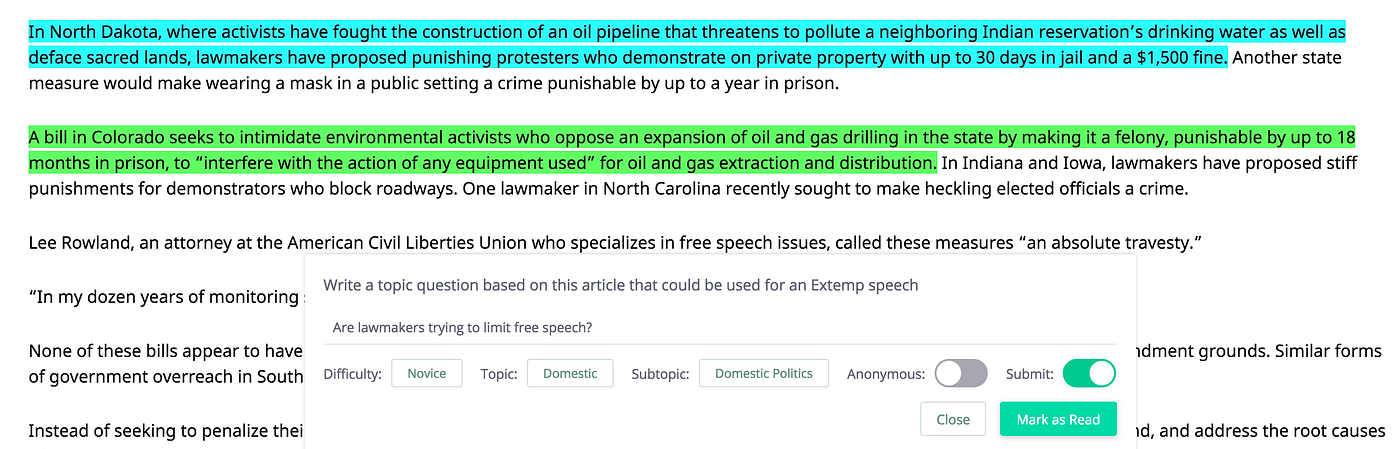
Whenever you finish reading an article, click on the “Mark as Read” button located in the bottom navigation bar.
One of five comprehension exercises will appear. You will have to complete the exercise in order to get credit for reading the article. The comprehension exercise is not meant to be difficult or time consuming; it should only take a minute or two to complete. Its purpose is to make you pause, internalize what you read, think critically about it, and then articulate some sort of an insight. This process develops memory retention and critical thinking.

There are five different comprehension exercises available in Prepd:
- Significance Statement — Why does the subject of this article matter in general? Why does it matter to you in particular?
- Analysis of an Argument — Identify a claim, warrant, and impact in the article.
- Article Summary — In your own words, write a brief summary of the article.
- Three new facts — List three new facts that you’ve learned from reading the article.
- HWWWW — Identify a how, what, where, when, and why in the article.
Once you’ve completed the comprehension exercise and marked the article as read, you’ll receive credit for having read the article. Your reading history is visible in your profile, which anyone on your team can access from the Dashboard.

메타데이터
- post_id
- 9ca98f888eac
- slug
- tracking-reading-activity-in-prepd-9ca98f888eac
- url
- https://medium.com/prepd/tracking-reading-activity-in-prepd-9ca98f888eac
- canonical_url
- https://medium.com/prepd/tracking-reading-activity-in-prepd-9ca98f888eac
- author_url
- https://medium.com/@Prepd
- status
- ok
- fetched_at
- 2026-06-10 08:17:25