Running SQL scripts in Python
using pyodbc package
Running SQL scripts in Python
using pyodbc package

Objective:
Use Python to execute and run SQL queries from the desired database.
Overview:
PYODBC is an open source Python module that makes accessing ODBC databases simple.
In this blog, we will be using the pyodbc package in Python to connect to our SQL Server and run/execute SQL queries.
To simplify the PYODBC process in Python:
- Start the server connection
- Execute the changes
- Commit the changes
- Close the server connection
Architectural Diagram
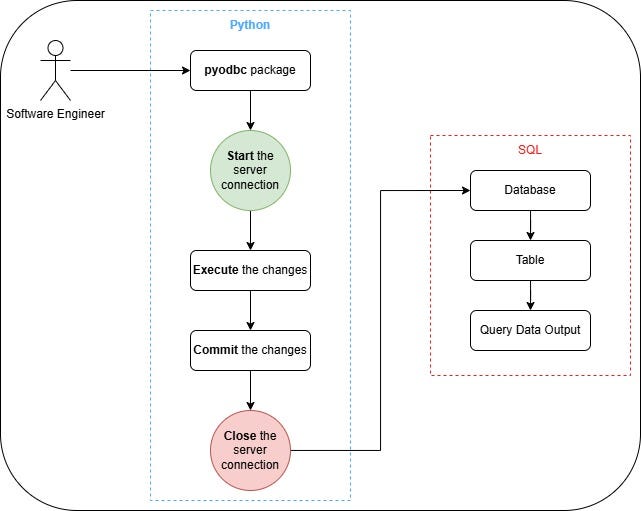
Process diagram (image by author)

User Flow Diagram (image by author)
Pre-requisites
- Must have an SQL Server already setup
- Must have an existing Database in SQL
- Must have Python installed
- (Optional) have Jupyter Notebook installed in Python
Code Structure:
################################################################
                    # Start the connection
################################################################

conn = pyodbc.connect('Driver={ADD OBDC SERVER HERE};'
                      'Server=ADD SQL SERVER HERE;'
                      'Database=ADD DATABASE NAME HERE;'
                      'Trusted_Connection=Yes;')
cursor = conn.cursor()

################################################################
                    # Create Table
################################################################

sql ='''
    ADD SQL QUERY HERE
  '''

################################################################
                    # Execute, Commit & Close changes
################################################################

# Execute the changes
cursor.execute(sql)
# Commit the changes
conn.commit()
# Close the connection once done
conn.close()
Install the required packages:
import pyodbc
import pandas as pd
import numpy as np
import warnings
import sqlite3
import pandoc

warnings.filterwarnings("ignore")
## Check available ODBC servers
#pyodbc.drivers()Create Table
# Start the connection
conn = pyodbc.connect('Driver={SQL Server};'
                      'Server=localhost;'
                      'Database=krisdb;'
                      'Trusted_Connection=Yes;')
cursor = conn.cursor()

# Create Table
sql ='''CREATE TABLE EMPLOYEE(
   FIRST_NAME CHAR(20) NOT NULL,
   LAST_NAME CHAR(20),
   AGE INT,
   SEX CHAR(1),
   INCOME FLOAT
);'''

# Execute the changes
cursor.execute(sql)

# Commit the changes
conn.commit()

# Close the connection once done
conn.close()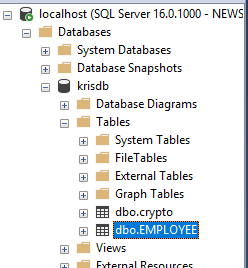
Created table (image by author)
Insert Data
# Start the connection
conn = pyodbc.connect('Driver={SQL Server};'
                      'Server=localhost;'
                      'Database=PythonSQL;'
                      'Trusted_Connection=Yes;')
cursor = conn.cursor()

# Run the insert script
sql_insert = """
            INSERT INTO EMPLOYEE
                (FIRST_NAME, LAST_NAME, AGE, INCOME)
            VALUES
                ('C','C',24,40000),
                ('D','D',25,50000)
            """

cursor.execute(sql_insert)
conn.commit()
conn.close()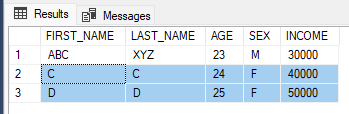
Insert script results (image by author)
Update Data
# Start the connection
conn = pyodbc.connect('Driver={SQL Server};'
                      'Server=localhost;'
                      'Database=PythonSQL;'
                      'Trusted_Connection=Yes;')
cursor = conn.cursor()

# Run the Update script
sql_update = """
            UPDATE EMPLOYEE
            SET SEX = 'M'
            WHERE FIRST_NAME = 'ABC'
            """

cursor.execute(sql_update)
conn.commit()
conn.close()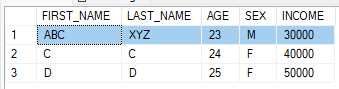
Update query (image by author)
Order By
Start the connection:
# Start the connection
conn = pyodbc.connect('Driver={SQL Server};'
                      'Server=localhost;'
                      'Database=PythonSQL;'
                      'Trusted_Connection=Yes;')
cursor = conn.cursor()
Run the Order By script:
sql = """ SELECT * FROM EMPLOYEE ORDER BY AGE """
cursor.execute(sql)
for i in cursor :
    print(i)
# Ascending order
sql = """ SELECT * FROM EMPLOYEE ORDER BY AGE ASC """
cursor.execute(sql)
for i in cursor :
print(i)# Group By
sql = """
SELECT SEX, count(1)
FROM EMPLOYEE
GROUP BY SEX
"""
cursor.execute(sql)
for i in cursor :
print(i)Close the connection
# Close the connection
conn.close()
Delete Data
# Start the connection
conn = pyodbc.connect('Driver={SQL Server};'
                      'Server=localhost;'
                      'Database=PythonSQL;'
                      'Trusted_Connection=Yes;')
cursor = conn.cursor()

# Run DELETE command
sql = """
    DELETE FROM EMPLOYEE
    WHERE FIRST_NAME = 'A'
    """
cursor.execute(sql)

# View changes in the DB
sql = """
SELECT *
FROM EMPLOYEE
"""
cursor.execute(sql)
for i in cursor:
    print(i)

conn.commit()
conn.close()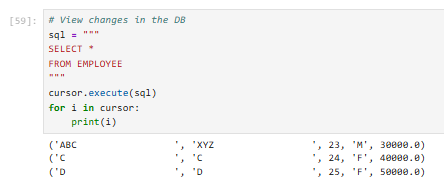
Python: Delete query (image by author)
SQL: Result of running the Delete query (image by author)
Drop Table
# Start the connection
conn = pyodbc.connect('Driver={SQL Server};'
                      'Server=localhost;'
                      'Database=PythonSQL;'
                      'Trusted_Connection=Yes;')
cursor = conn.cursor()

# Run DROP command
sql = """
    DROP TABLE EMPLOYEE
    """
cursor.execute(sql)

conn.commit()
conn.close()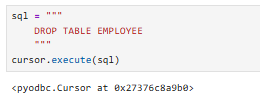
Python: Deleting the table (image by author)
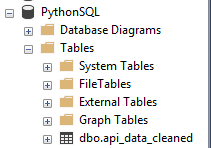
SQL: result of the EMPLOYEE table being dropped
메타데이터
- post_id
- 9caa4d90efa9
- slug
- running-sql-scripts-in-python-9caa4d90efa9
- url
- https://towardsdev.com/running-sql-scripts-in-python-9caa4d90efa9
- canonical_url
- https://towardsdev.com/running-sql-scripts-in-python-9caa4d90efa9
- author_url
- https://medium.com/@chavez.kris3
- status
- ok
- fetched_at
- 2026-07-20 03:01:46







