PaddleOCR-VL-1.5: Achieving SOTA Document Parsing with a 0.9B Vision-Language Model
Mastering “in-the-wild” document parsing: How we optimized a compact 0.9B model to handle distortion, text spotting, and seal recognition…
PaddleOCR-VL-1.5: Achieving SOTA Document Parsing with a 0.9B Vision-Language Model
Mastering “in-the-wild” document parsing: How we optimized a compact 0.9B model to handle distortion, text spotting, and seal recognition with 94.5% accuracy.
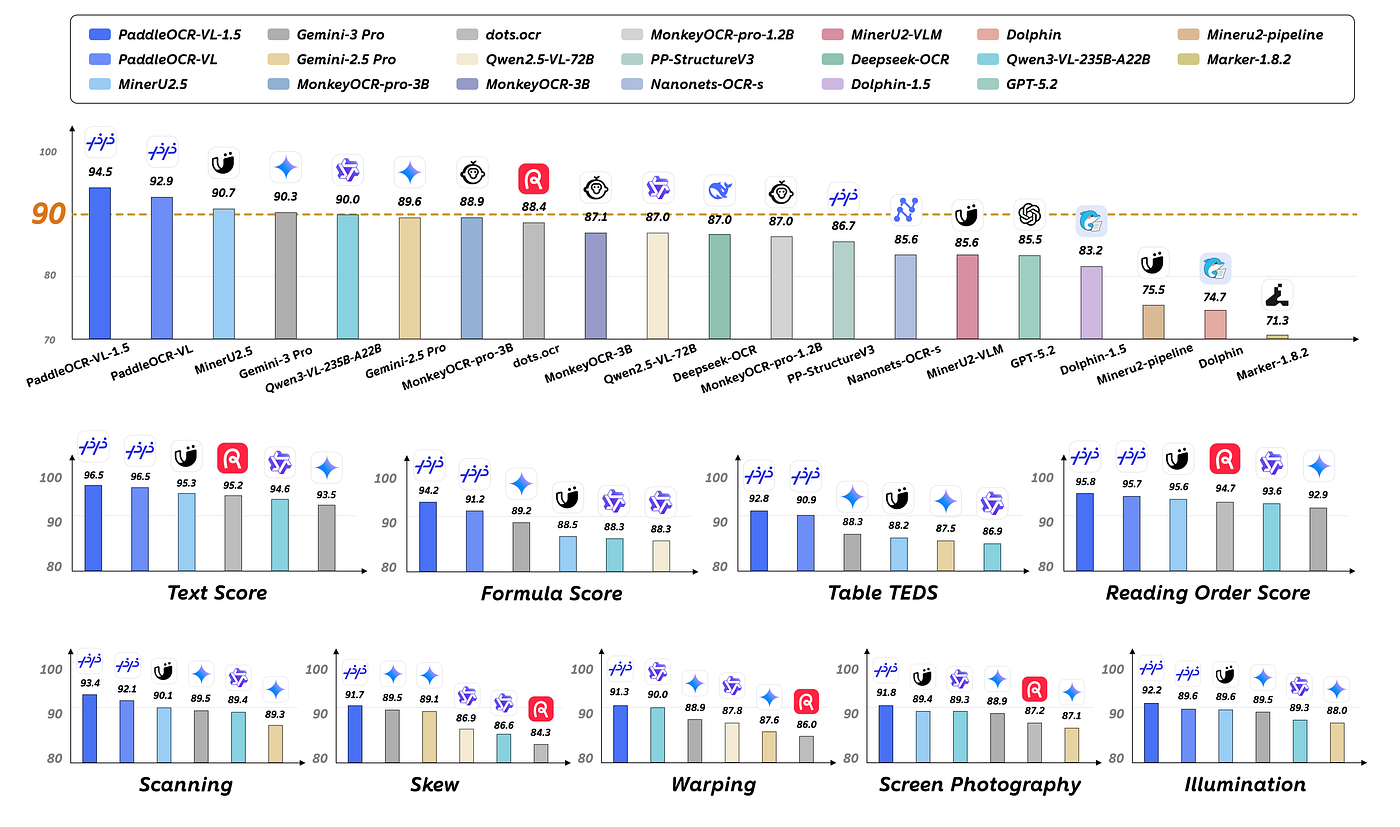
Performance of PaddleOCR-VL-1.5
In the era of massive Multi-modal Large Language Models (MLLMs), bigger isn’t always better — especially when latency and deployment costs are at stake. While giants like GPT-4V and Qwen-VL dominate general benchmarks, specialized, lightweight models are becoming essential for edge deployment and high-throughput industrial applications.
Enter **PaddleOCR-VL-1.5**.
We are releasing a significant upgrade to our vision-language model, specifically engineered for document parsing. Despite its compact size of just 0.9B parameters, it achieves a new state-of-the-art (SOTA) accuracy of 94.5% on OmniDocBench v1.5.
But accuracy on clean PDFs is easy. Real-world documents are messy — crumpled, scanned, skewed, and poorly lit. This post breaks down how PaddleOCR-VL-1.5 handles these physical distortions via our new **Real5-OmniDocBench, introduces new capabilities like Text Spotting and Seal Recognition**, and provides a hands-on guide to running inference via vLLM and Transformers.
1. Why Robustness Matters: The “Real5” Benchmark
Standard OCR benchmarks often rely on clean, born-digital documents. However, enterprise workflows deal with physical paper that has been scanned, photographed, or mishandled.
To systematically evaluate robustness, we constructed the **Real5-OmniDocBench**. This dataset challenges models with five specific physical distortions:
- Scanning Artifacts: Noise and grain typical of office scanners.
- Geometric Skew: Angled documents that confuse standard bounding boxes.
- Physical Warping: Crumpled or curved pages (e.g., open books).
- Screen Capture: Moiré patterns and pixelation from taking photos of screens.
- Lighting Variations: Shadows and uneven illumination.
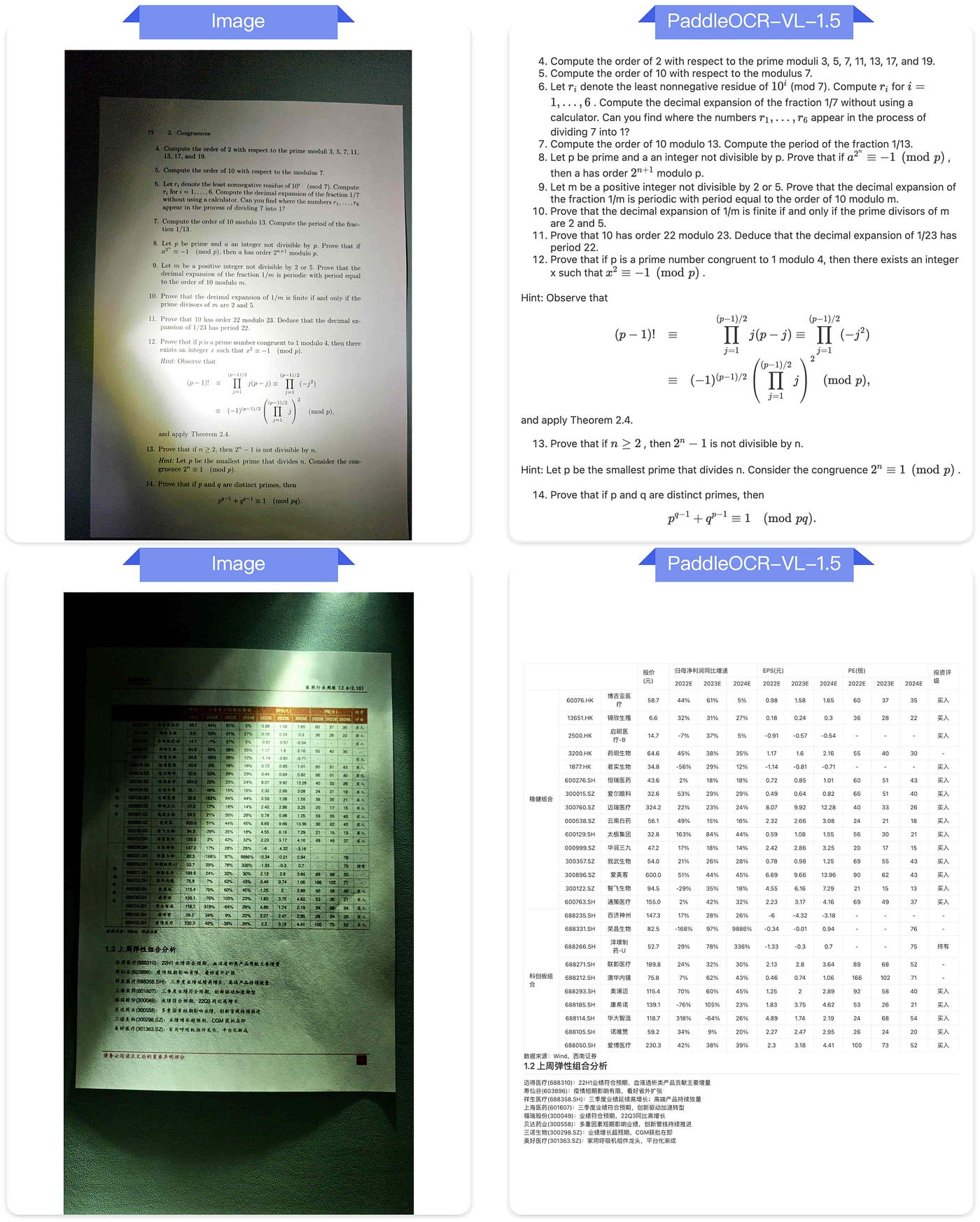
Lighting Variations
PaddleOCR-VL-1.5 demonstrates significant resilience in these scenarios, outperforming larger open-source and commercial models by learning to parse content regardless of geometric deformation.
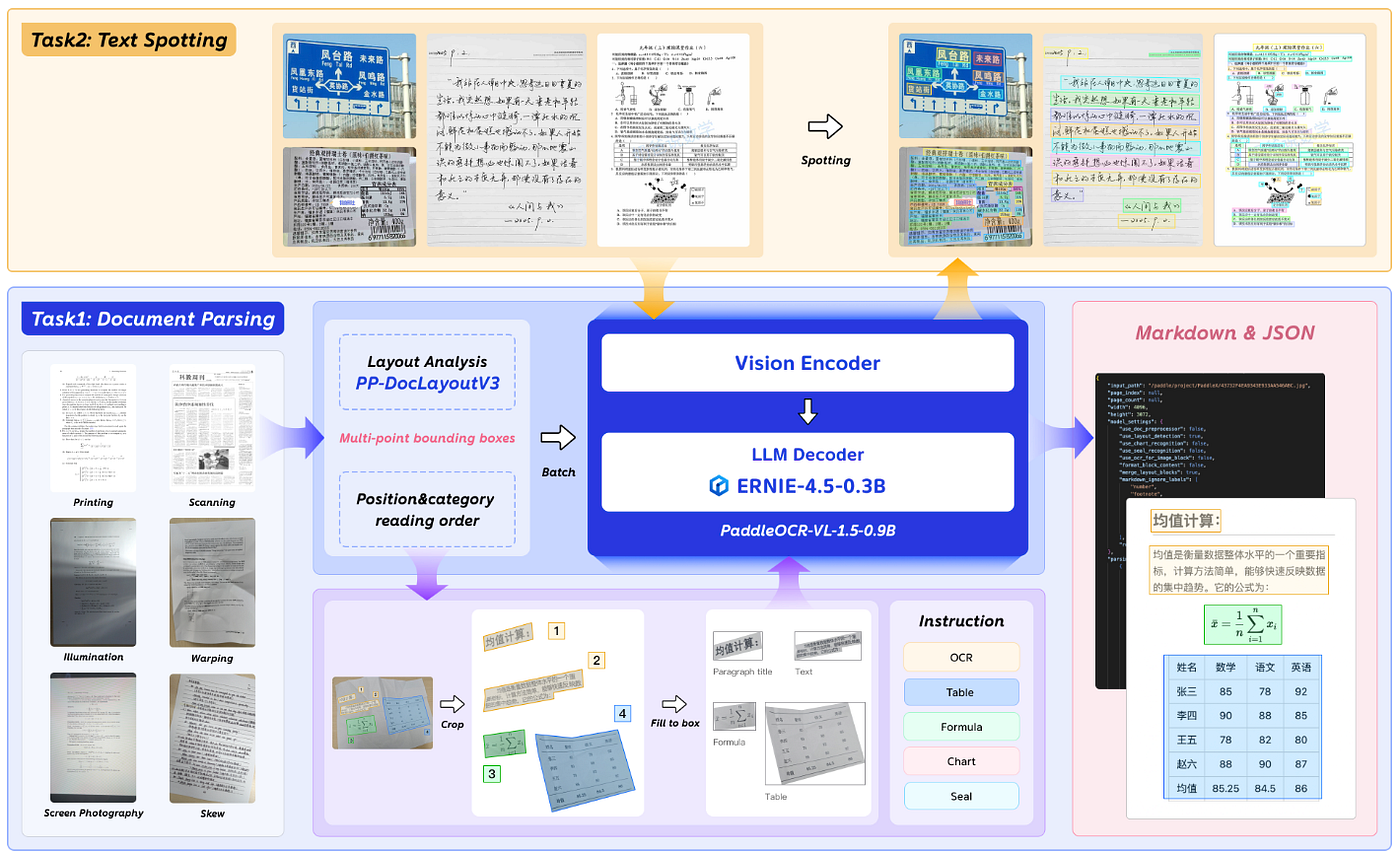
Architecture of PaddleOCR-VL-1.5
2. Core Capabilities & New Features
Beyond robustness, the 1.5 update introduces specific features requested by the developer community for complex document processing (IDP).
⚡ 0.9B Parameters, High Efficiency
The model is designed for speed. It maintains a super-compact architecture (0.9B), making it feasible for local deployment on consumer-grade GPUs while maintaining high inference speeds.
🎯 Text Spotting & Polygon Detection
We introduced a new paradigm for irregular shape localization. Unlike standard bounding boxes, PaddleOCR-VL-1.5 can perform precise polygon detection, essential for curved text in warped documents. The new Text Spotting task combines line-level localization and recognition into a single pass.
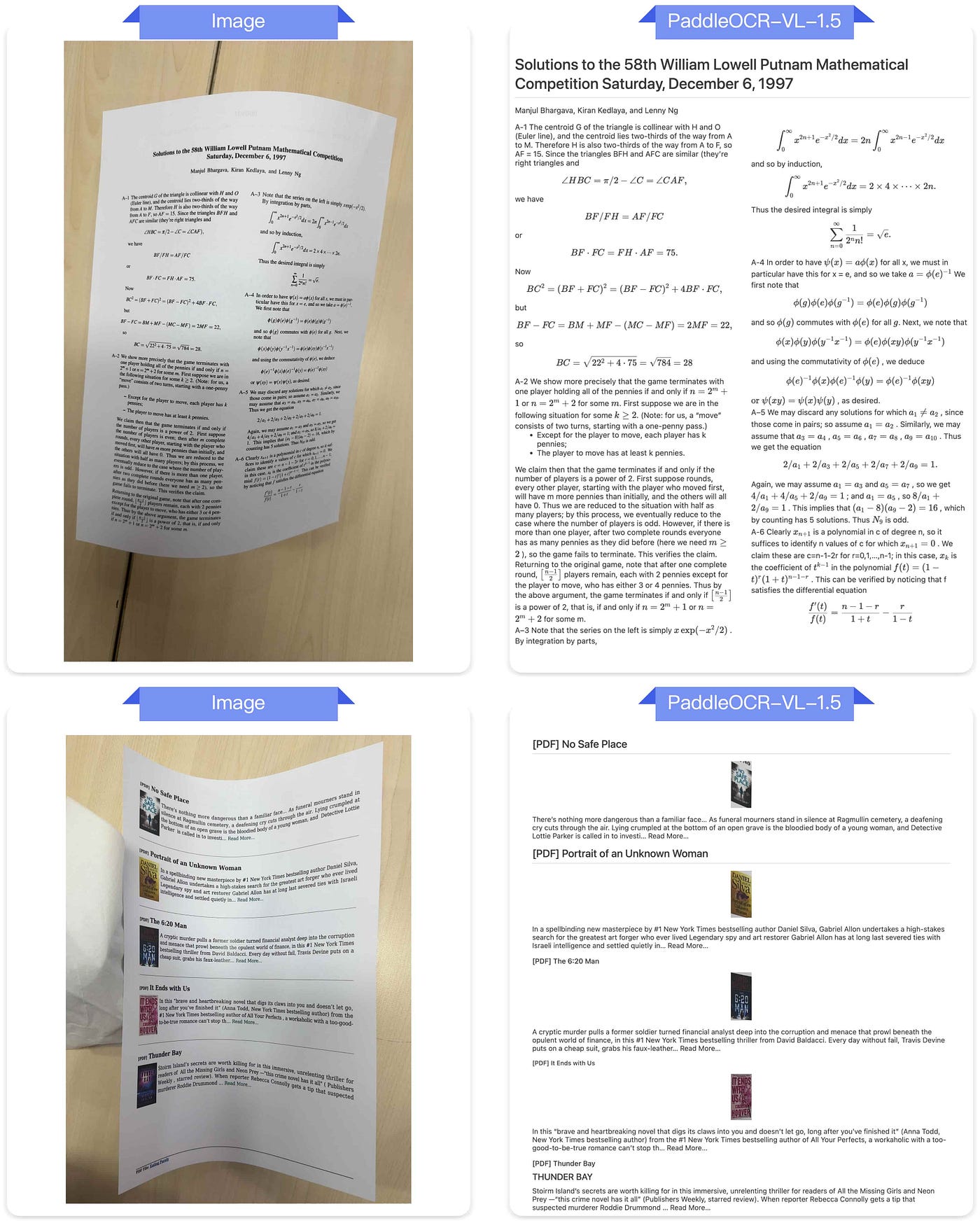
irregular shape localization
💮 Seal Recognition & Multilingual Support
For official documents (contracts, invoices), distinct elements like stamps and seals are critical.
- Seal Recognition: Newly added capability to detect and read text within official stamps.
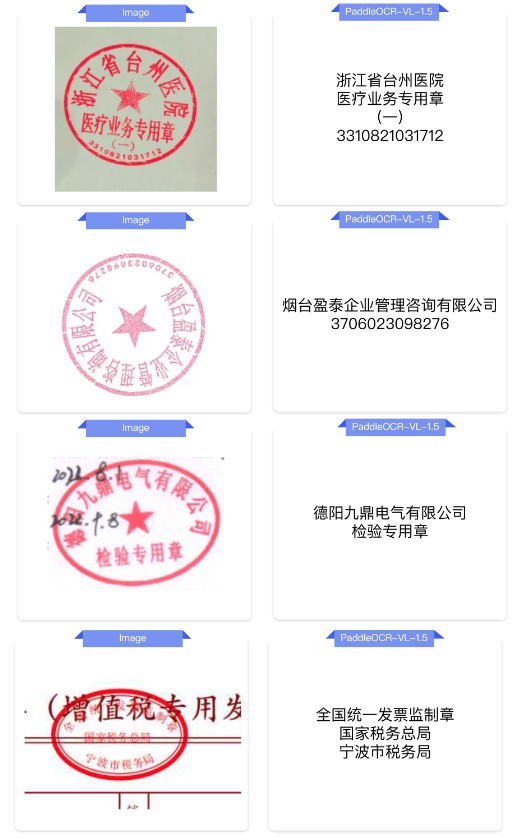
Seal Recognition
- Expanded Languages: Improved support for historical texts (Ancient Chinese), multilingual tables, and added support for Tibetan and Bengali.
- Form Elements: Enhanced recognition of underscores and checkboxes.
📄 Handling Long Documents
RAG (Retrieval-Augmented Generation) pipelines often suffer when tables or paragraphs are split across pages. PaddleOCR-VL-1.5 supports automatic cross-page table merging and cross-page paragraph header recognition, solving the context fragmentation problem in long PDF parsing.
3. Hands-on Guide: How to Use It
PaddleOCR-VL-1.5 supports multiple inference backends. Below is the setup for the official PaddlePaddle backend and the Hugging Face Transformers integration.
Installation
First, ensure you have the correct dependencies. Note that we recommend PaddlePaddle 3.2.1+ for optimal performance.
# Install PaddlePaddle (CUDA 12.6 example)
python -m pip install paddlepaddle-gpu==3.2.1 -i https://www.paddlepaddle.org.cn/packages/stable/cu126/

# Install PaddleOCR with doc-parser support
python -m pip install -U "paddleocr[doc-parser]"
Note: macOS users should use Docker to set up the environment due to dependency constraints.
Method 1: Quick Inference (CLI & Python)
For immediate testing, you can use the Command Line Interface:
paddleocr doc_parser -i https://paddle-model-ecology.bj.bcebos.com/paddlex/imgs/demo_image/paddleocr_vl_demo.pngOr via Python for integration into your pipeline:
from paddleocr import PaddleOCRVL

# Initialize pipeline
pipeline = PaddleOCRVL()

# Predict
image_url = "https://paddle-model-ecology.bj.bcebos.com/paddlex/imgs/demo_image/paddleocr_vl_demo.png"
output = pipeline.predict(image_url)

# Process results
for res in output:
    res.print()
    res.save_to_json(save_path="output")
    res.save_to_markdown(save_path="output")
Method 2: High-Performance Inference with vLLM
For production environments requiring high throughput, you can serve the model using vLLM.
Step 1: Start the Server (Docker)
docker run \
    --rm \
    --gpus all \
    --network host \
    ccr-2vdh3abv-pub.cnc.bj.baidubce.com/paddlepaddle/paddleocr-genai-vllm-server:latest-nvidia-gpu \
    paddleocr genai_server \
    --model_name PaddleOCR-VL-1.5-0.9B \
    --host 0.0.0.0 \
    --port 8080 \
    --backend vllm
Step 2: Client Request
from paddleocr import PaddleOCRVL

# Initialize with vLLM backend
pipeline = PaddleOCRVL(
    vl_rec_backend="vllm-server",
    vl_rec_server_url="http://127.0.0.1:8080/v1"
)

output = pipeline.predict(image_url)
4. Using Hugging Face Transformers
PaddleOCR-VL-1.5–0.9B is also compatible with the transformers library, allowing seamless integration into existing PyTorch workflows.
Tip: While Transformers support is available, the official PaddlePaddle backend currently offers faster inference speeds and native support for page-level document parsing. The Transformers snippet below is ideal for element-level tasks (Spotting, Formula, Table).
# ensure the transformers v5 is installed
python -m pip install "transformers>=5.0.0"
from PIL import Image
import torch
from transformers import AutoProcessor, AutoModelForImageTextToText
# 1. Configuration
model_path = "PaddlePaddle/PaddleOCR-VL-1.5"
task = "ocr" # Options: 'ocr', 'table', 'chart', 'formula', 'spotting', 'seal'
image_path = "test.png"
DEVICE = "cuda" if torch.cuda.is_available() else "cpu"
# 2. Load Model
# Use flash_attention_2 for better memory efficiency if hardware allows
model = AutoModelForImageTextToText.from_pretrained(
model_path,
torch_dtype=torch.bfloat16,
# attn_implementation="flash_attention_2"
).to(DEVICE).eval()
processor = AutoProcessor.from_pretrained(model_path)
# 3. Preprocessing (Crucial for 'Spotting' task)
image = Image.open(image_path).convert("RGB")
if task == "spotting":
# Upscale small images for better spotting accuracy
threshold = 1500
if image.width < threshold and image.height < threshold:
image = image.resize((image.width * 2, image.height * 2), Image.LANCZOS)
max_pixels = 2048 * 28 * 28
else:
max_pixels = 1280 * 28 * 28
# 4. Generate
PROMPTS = {
"ocr": "OCR:",
"spotting": "Spotting:",
"seal": "Seal Recognition:",
# ... add other tasks
}
messages = [
{
"role": "user",
"content": [
{"type": "image", "image": image},
{"type": "text", "text": PROMPTS[task]},
]
}
]
inputs = processor.apply_chat_template(
messages,
add_generation_prompt=True,
tokenize=True,
return_dict=True,
return_tensors="pt",
images_kwargs={"size": {"shortest_edge": processor.image_processor.min_pixels, "longest_edge": max_pixels}},
).to(model.device)
outputs = model.generate(**inputs, max_new_tokens=512)
print(processor.decode(outputs[0][inputs["input_ids"].shape[-1]:-1]))5. Performance Benchmarks
How does it stack up against the competition?
OmniDocBench v1.5 Results PaddleOCR-VL-1.5 achieves 94.5% accuracy, setting a new SOTA. It outperforms its predecessor and competes favorably with much larger models like Qwen2-VL (Instruct) in specialized document tasks.
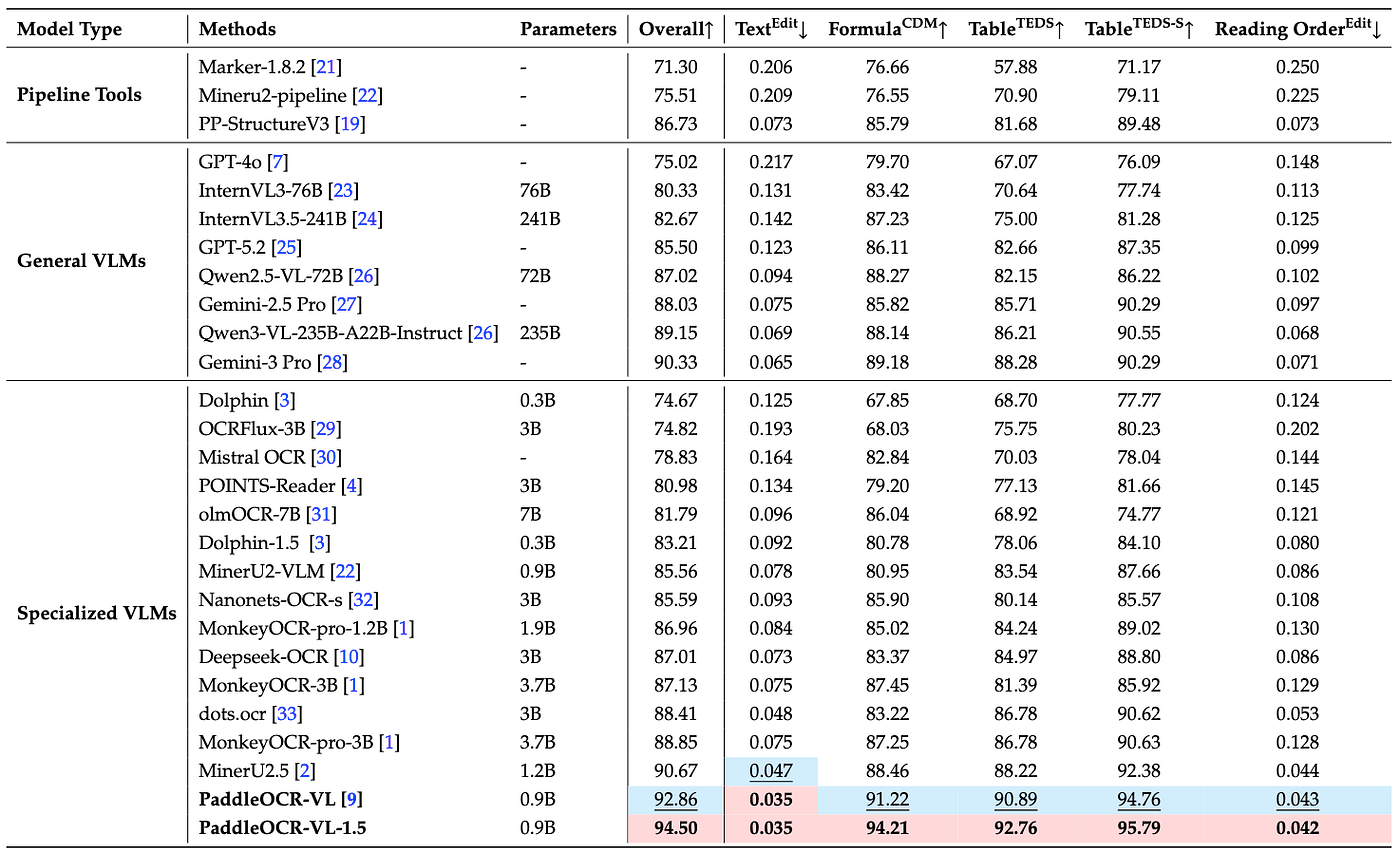
OmniDocBench v1.5 Results
Inference Speed When processing PDF documents on a single NVIDIA A100 (Batch Size=512), the model maintains high throughput for end-to-end parsing (including rendering and markdown generation). This efficiency is key for users needing to process millions of pages without breaking the bank.
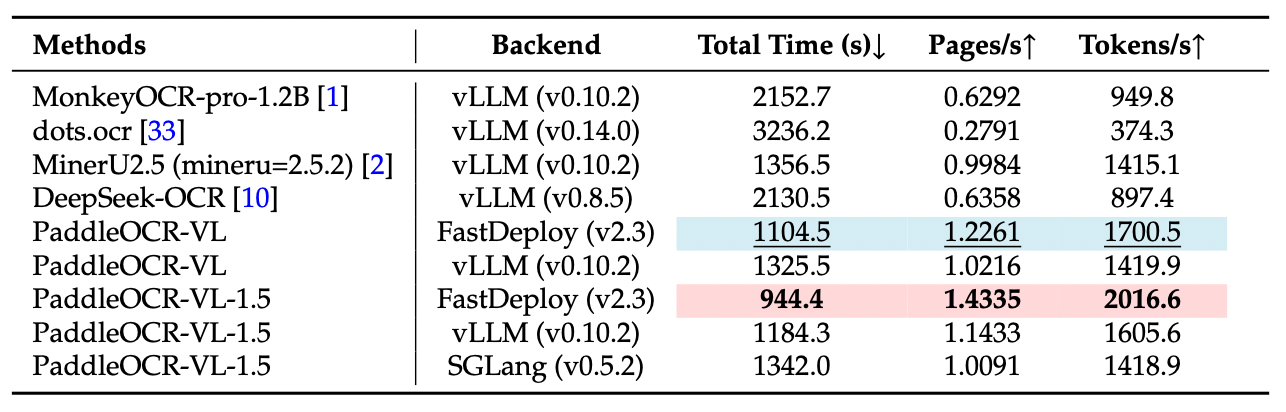
Inference Speed
Conclusion
PaddleOCR-VL-1.5 represents a shift towards “practical AI” — models that are small enough to run anywhere but smart enough to handle the messy reality of physical documents. Whether you are digitizing archives, automating invoice processing, or building RAG pipelines, this 0.9B model offers a compelling balance of speed and accuracy.
Ready to try it? Check out the full documentation on GitHub/PaddleOCR or PaddleOCR-VL-1.5 on HuggingFace.
메타데이터
- post_id
- 9cb278ec5d5a
- slug
- paddleocr-vl-1-5-achieving-sota-document-parsing-with-a-0-9b-vision-language-model-9cb278ec5d5a
- url
- https://medium.com/@alex_paddleocr/paddleocr-vl-1-5-achieving-sota-document-parsing-with-a-0-9b-vision-language-model-9cb278ec5d5a
- canonical_url
- https://medium.com/@alex_paddleocr/paddleocr-vl-1-5-achieving-sota-document-parsing-with-a-0-9b-vision-language-model-9cb278ec5d5a
- author_url
- https://medium.com/@alex_paddleocr
- status
- ok
- fetched_at
- 2026-07-15 05:17:59






