5 Best Free AI Anime Generators (2026): Same Prompt Comparison for Real Anime-Style Results
Most AI image tools claim to generate anime. Many results still look like generic digital art. That makes finding a truly free AI anime…
5 Best Free AI Anime Generators (2026): Same Prompt Comparison for Real Anime-Style Results
Most AI image tools claim to generate anime. Many results still look like generic digital art. That makes finding a truly free AI anime generator harder. Beginners may struggle to choose the right platform. Some tools need advanced prompts or paid plans for better results. Others fail to create consistent anime-style characters.
We tested five popular AI anime generators with the same prompt. We also used the same character concept, composition, and style instructions. This comparison checks anime accuracy, character quality, and ease of use. It also covers free-plan restrictions. This helps readers quickly find the right tool for their needs.
What Is an AI Anime Generator?
An AI anime generator uses machine learning models to create anime-style Japanese images. It can change text descriptions, reference images, and videos into anime visuals. Describe a character, scene, outfit, pose, or background. The tool then creates artwork based on those details.
General AI Image Generators
Not all AI image generators work the same way. General AI image generators support many visual styles. They can create landscapes, realistic portraits, and product photography. They also make fantasy art, concept art, and anime images. These tools offer flexibility, but anime generation is only one feature.
Anime-Focused AI Generators
Anime-focused generators are made for anime and manga aesthetics. They often include anime-trained models and style presets. Many also support character-focused workflows and LoRA integrations. These features improve anime-specific details in the final image. They help with facial structure, line art, and eye design. They also improve hair rendering and costume accuracy. This also helps keep the overall visual style more consistent.

Anime-Focused AI Generators
How We Compare Free AI Anime Generators
For a fair comparison, we tested every tool with the same prompt.
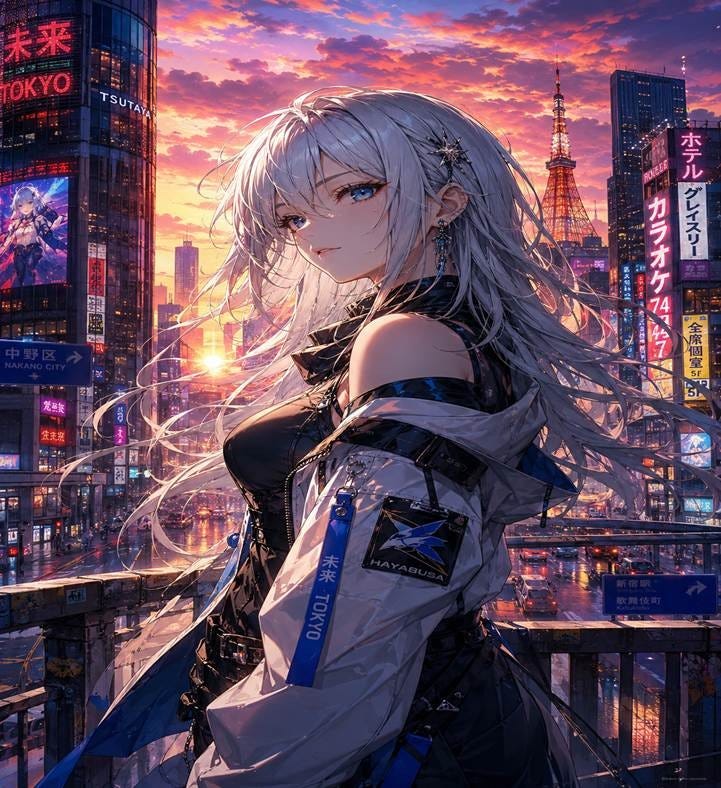
Test Prompt: “A confident anime girl with silver hair and blue eyes standing on a futuristic Tokyo street at sunset, detailed anime illustration, cinematic lighting, highly detailed clothing, vibrant colors, professional anime artwork.”
Using one prompt removes extra variables from the test. It also shows how each platform handles the same request. The comparison focuses on three main criteria.
Anime Style Accuracy
Does the image genuinely look like anime artwork? We evaluated character design, facial proportions, eye rendering, coloring style, line work, and overall adherence to anime aesthetics.
Character Consistency
Many AI tools struggle to maintain coherent facial features, clothing details, and character proportions. We examined the consistency of each generator that rendered the character concept.
Overall Image Quality
Image quality covers detail level, composition, lighting, and clean visuals. It also includes background rendering and control over unwanted artifacts.
This difference matters because anime art has its own visual rules. A general-purpose image model may understand the word “anime.” A dedicated anime AI art generator usually handles the style better. It can match the visual language anime fans expect.
Best Free AI Anime Generators (Same Prompt Comparison)
Here are the 5 best free AI anime generators that are tested with the same prompt to check the actual results:
1. PixAI — Best for Dedicated Anime Creators

PixAI is an AI anime image generator for anime and manga artwork. It also suits character artwork. The platform includes text-to-image creation, image editing, image-to-video tools, and anime-specific settings. Create original characters, update existing artwork, and build anime scenes. You can also animate still illustrations without complex design work.
With Mio AI Assistant, users can create an image by describing it clearly. There is no need for complex prompt writing or technical phrasing. This works well for beginners who do not know anime prompting methods.
Anime Style Performance
PixAI is designed specifically for anime image creation and includes advanced models such as Tubaki 2 and Hoshino v2 for accurate prompt interpretation and detailed artwork.
Key Features
● Strong Prompt Adherence: Generates images that closely match user descriptions.
● Multi-Character Support: Creates cleaner scenes with better character separation and positioning.
● Character Sheet Generator: Produces consistent character designs across different poses, angles, and expressions.
● Prompt Assistant: Expands simple prompts into detailed anime-focused descriptions for improved results.
● Image-to-Video Creation: Converts generated artwork into animated videos with motion effects and camera movements.
Free Plan Limitations
PixAI’s free plan includes 10,000 daily credits, generous for casual anime image generation. However, advanced features such as video generation, Turbo Mode, ControlNet, premium models, and custom LoRA training require a paid plan.

Best For
Creators who want to build complete anime characters and scenes from a single concept. You can create original character designs, consistent multi-pose references, and stylized manga or VTuber visuals.
2. ChatGPT Image Generation — Best for Simple Anime Experiments
ChatGPT’s image generation capabilities have improved considerably. Users can create anime-inspired artwork through natural language prompts. The biggest advantage is accessibility. Users can simply describe an idea conversationally without learning prompt syntax.
Anime Style Performance
ChatGPT can convert text prompts and real images into anime-style visuals with strong control over mood, lighting, and composition.
● Text-to-Image: Works best with detailed prompts describing character design, emotion, clothing, and scene atmosphere
● Style Control: Responds well to anime-inspired directions like cinematic lighting, cel-shading, or studio-style references.
● Image Transformation: Can restyle uploaded photos into anime illustrations with clear stylistic instructions
● Refinement: Allows follow-up edits such as adjusting lighting, color tone, or background detail for improved results.
Free Plan Limitations
On the free tier, anime image generation is limited to a small number of images allowed per day (typically around 2–3).
Best For
Suitable for beginners and casual anime creation. Create quick anime-style portraits from simple text prompts. You can also change photos into anime characters. It also works for cinematic or studio-inspired anime artwork.
3. Canva — Best for Quick Anime-Style Design Content
Canva is an online design tool that includes image creation features. It is not a dedicated AI anime generator. Still, it can create anime-inspired images from text prompts. Users can describe an anime character, outfit, pose, background, and mood. Then they can use the image in posters, thumbnails, and profile pictures. It also works for presentations and social media designs. This makes Canva useful for quick anime-style visuals. It suits content needs more than advanced anime character creation.
Anime Style Performance
Canva creates clean, colorful anime-inspired images from clear prompts. However, it is not anime-focused, so it lacks anime models, LoRA, character sheets, and strong character consistency. Results may look more like general digital art than true anime artwork.

Free Plan Limitations
Canva free users can try AI image generation, but higher usage, premium assets, and some AI features may need a paid plan. It is good for quick anime-style designs, but limited for daily bulk image creation or advanced control.
Best For
Canva works best for beginners, students, creators, and marketers. It suits anime-style images for posters, thumbnails, and profile graphics. It also works for story covers and social media posts. It is less suitable for character consistency or advanced anime workflows.
4. Microsoft Image Creator — Best for Fast Anime-Inspired Images
Microsoft Image Creator, part of Copilot and Designer, is a simple tool. It works well for beginners who want quick image results. It can generate anime-style visuals from natural language prompts. The tool focuses on easy access and a simple process. Users can turn descriptions into images without advanced prompting skills. It also does not need a complex setup.
Anime Style Performance
It can create clean and attractive anime-inspired images. Prompts should include character details, setting, and style direction. The results often look closer to general digital illustration. Character structure may look softer than true anime art. The linework may also feel less specific to anime style.

Free Plan Limitations
Users get a limited number of fast-generation credits per day (commonly around 15). Over time, usage can feel restricted once the fast credits are consumed.
Best For
Quick anime-style concepts, casual experimentation with character ideas, and users who want fast visual results without dealing with complex prompts.
5. Gemini — Best for Google Ecosystem Users
Gemini is powered by models like Gemini Flash and Pro. It can generate anime-style visuals directly through chat-based prompts or tools like Google AI Studio. It understands complex scene descriptions and maintains consistency across multiple generations in the same conversation.
Anime Style Performance
The model works well when the scene has clear details. It can follow instructions about characters, environments, lighting, and camera angles. It creates anime-inspired illustrations with a stable visual structure. One strong advantage is character consistency. The same character design, hair color, and outfit can stay steady across scenes.

Free Plan Limitations
Most users can create a limited number of images each day. After that, they may reach a temporary limit. Free users also miss premium API access and advanced regeneration options. They also get fewer high-end image generation features. Created images include digital watermarks. Strict safety filters may also block some anime prompts.
Best For
Consistent anime character creation across scenes. Suitable for visual tasks which require visual depth and dramatic lighting.
Free AI Anime Generator Comparison Table

While all tools can generate anime-style images, only a few are truly optimized for anime-specific workflows and character consistency. PixAI stands out in this comparison due to its dedicated anime models, LoRA support, and stronger control over original character creation.
Why PixAI Is Different for Anime-Style Generation
PixAI is built specifically for anime, manga, and illustration generation rather than treating anime as just another style option.
Anime-Focused Models and LoRA Support
It uses anime-focused base models with community-driven LoRAs. So the users can generate highly detailed portraits, manga scenes, fantasy characters, and fully customized original characters with strong visual consistency.
A key strength is that models and LoRAs work together. Base models handle overall anime rendering, while LoRAs add specific characters, styles, outfits, or effects without changing the core model. This makes it possible to combine different looks and maintain consistent character identity across multiple generations.
Prompt Helper for Natural Language Input
PixAI also makes the creative process easier for beginners. It helps turn simple descriptions into clearer prompts. Preset models and community tools make the process smoother. This gives users an easier starting point for anime results. They can create anime visuals without dealing with technical complexity.
Beginner-Friendly Workflow
PixAI offers advanced controls, but beginners can still use it easily. Model recommendations, community templates, prompt suggestions, and style presets guide new users. These features make the first steps simpler. They also reduce the time needed to learn the platform.
Free vs Paid: What You Can Actually Do for Free
“Free” AI anime generators usually mean limited but usable access, but not complete unrestricted creation. Most platforms let you try anime image generation, but they control usage through daily limits, slower processing, restricted models, or reduced quality options to manage server load and encourage upgrades.
In practice, free tiers work best for testing and learning prompts. They also suit trying different anime styles. They do not suit large batches of clean finished work. Tools like PixAI, ChatGPT, Gemini, Microsoft Image Creator, and others offer free access. Users can try anime generation without payment. Each tool still limits advanced features. These may include faster rendering, premium models, or deeper customization.
PixAI fits into this same pattern. It offers a free entry point where users can explore anime models and generate real artwork, while more advanced workflows and controls remain part of paid usage.
Which AI Anime Generator Should You Choose?
The right tool depends on what users want to create. Each platform serves a slightly different purpose. For beginners, ChatGPT, Microsoft Image Creator, Gemini, and Canva offer easy starting points. They work with simple prompts and do not need advanced anime prompting skills. For casual testing or quick anime-style visuals, these tools usually work well.
For original character (OC) and character-focused work, PixAI stands out. It supports anime-focused creation, better character consistency, style control, and detailed anime rendering. This matters when users need repeatable designs across multiple images.
For content creators, PixAI is the stronger choice for anime-focused visual content. It works well for high-quality anime artwork, original character designs, character-driven scenes, manga-style visuals, and consistent anime storytelling. Its anime-focused models, prompt support, and character tools make it better for creators who need structured anime results instead of quick general designs.
Conclusion
Each tool creates different levels of anime quality based on its design. ChatGPT, Gemini, Microsoft Image Creator, and Canva work well for quick results. They also suit stylized image ideas and simple anime visuals. PixAI gives stronger results for anime-focused creation. It also offers better character control and consistency.
Overall, the best choice depends on the user’s goal. PixAI suits users who want dedicated anime-style generation. It also works well for original character design.
General AI Image Generators
Not all AI image generators work the same way. General AI image generators support many visual styles. They can create landscapes, realistic portraits, and product photography. They also make fantasy art, concept art, and anime images. These tools offer flexibility, but anime generation is only one feature.
Anime-Focused AI Generators
Anime-focused generators are made for anime and manga aesthetics. They often include anime-trained models and style presets. Many also support character-focused workflows and LoRA integrations. These features improve anime-specific details in the final image. They help with facial structure, line art, and eye design. They also improve hair rendering and costume accuracy. This also helps keep the overall visual style more consistent.
메타데이터
- post_id
- 9cb6f5eee1fc
- slug
- 5-best-free-ai-anime-generators-2026-same-prompt-comparison-for-real-anime-style-results-9cb6f5eee1fc
- url
- https://medium.com/@madnanb0/5-best-free-ai-anime-generators-2026-same-prompt-comparison-for-real-anime-style-results-9cb6f5eee1fc
- canonical_url
- https://medium.com/@madnanb0/5-best-free-ai-anime-generators-2026-same-prompt-comparison-for-real-anime-style-results-9cb6f5eee1fc
- author_url
- https://medium.com/@madnanb0
- status
- ok
- fetched_at
- 2026-06-20 20:29:01



