What Are Soft Links and Hard Links?
In Linux (and other Unix-like systems), soft links and hard links are ways to create references to files. They’re super useful for managing…
What Are Soft Links and Hard Links?
In Linux (and other Unix-like systems), soft links and hard links are ways to create references to files. They’re super useful for managing files, but they work differently under the hood. Let’s break it down.
1. Soft Link (Symbolic Link)
- Definition: A soft link, or symbolic link (symlink), is like a shortcut or pointer to another file or directory. It’s a separate file that stores the path to the original file.
- How It Works: It’s not the file itself — it just tells the system, “Hey, go look over there.” If the original file moves or gets deleted, the symlink breaks (it becomes a “dangling link”).
- Analogy: Think of it like a note on your fridge saying, “Milk is in the pantry.” If someone throws out the milk, the note is useless.
2. Hard Link
- Definition: A hard link is an additional name (or reference) for the same file data on the disk. It’s not a separate file — it directly points to the same underlying data (inode) as the original.
- How It Works: The file’s data exists as long as at least one hard link to it remains. Delete the “original” file? No problem — the data sticks around until all hard links are gone.
- Analogy: Imagine two people calling the same dog by different names (e.g., “Buddy” and “Rex”). It’s still the same dog, and it doesn’t care what you call it.
Key Differences (With a Table)
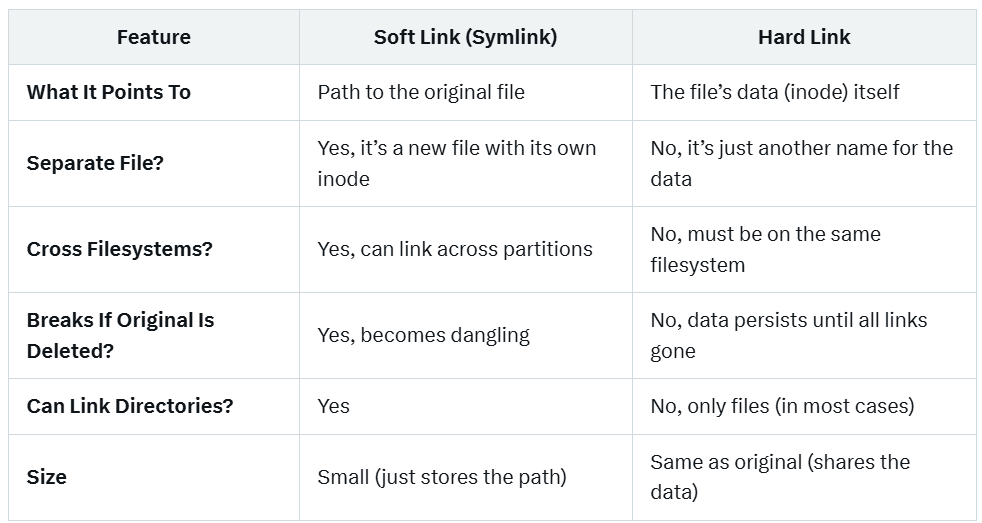
Linux Commands to Create Them
Let’s see this in action with examples a beginner can follow.
Creating a Soft Link
- Command:

touch original.txt              # Create a file

echo "Hello, world!" > original.txt

ln -s original.txt softlink.txt # Create a symlink
ls -l # Check it out- Output:
lrwxrwxrwx 1 user user 12 Mar 15 12:00 softlink.txt -> original.txt
-rw-rw-r-- 1 user user 13 Mar 15 12:00 original.txt- The l in lrwxrwxrwx shows it’s a symlink, and the arrow (->) points to the target.
- Test It:
cat softlink.txt    # Outputs: "Hello, world!"
rm original.txt     # Delete the original
cat softlink.txt    # Error: file not found (dangling link)
Creating a Hard Link
- Command:

touch file1.txt              # Create a file

echo "I’m the data" > file1.txt

ln file1.txt file2.txt       # Create a hard link

ls -li # Check inodes- Output:
123456 -rw-rw-r-- 2 user user 11 Mar 15 12:05 file1.txt
123456 -rw-rw-r-- 2 user user 11 Mar 15 12:05 file2.txt- The 123456 is the inode number — same for both! The 2 shows there are two links to this data.
- Test It:
cat file2.txt       # Outputs: "I’m the data"
rm file1.txt        # Delete the "original"
cat file2.txt       # Still works: "I’m the data"
Real-World Examples
Soft Link Example
- Scenario: You’re an SRE at Google managing a web server. The app expects logs at /var/www/logs/current.log, but logs rotate daily (e.g., log-2025–03–15.log).
- Solution: Use a symlink to point to the latest log:
ln -sf /var/logs/log-2025-03-15.log /var/www/logs/current.log- Why Soft Link?: The target file changes daily, and symlinks can point to new paths without breaking the app. Plus, if the log moves to another disk, the symlink can still work.
Hard Link Example
- Scenario: You’re backing up critical config files (e.g., /etc/nginx/nginx.conf) on the same filesystem, and you want to ensure the data isn’t lost if someone accidentally deletes the original.
- Solution: Create a hard link:
ln /etc/nginx/nginx.conf /backups/nginx.conf.backup- Why Hard Link?: Even if /etc/nginx/nginx.conf is deleted, the data lives on in /backups/nginx.conf.backup because they share the same inode.
When to Use a Hard Link Over a Soft Link?
As a senior SRE, you’d choose a hard link over a soft link in these cases:
- Data Durability
- Why: Hard links keep the data alive as long as one link exists. Soft links break if the target is gone.
- Example: Protecting a critical file (e.g., a database snapshot) from accidental deletion during a chaotic incident response.
2. Performance
- Why: Hard links directly access the inode, skipping the path resolution step symlinks require. It’s a tiny gain, but in high-performance systems (e.g., Google-scale storage), it adds up.
- Example: Linking frequently accessed static assets in a filesystem.
3. Same Filesystem Constraint Is Fine
- Why: Hard links only work within the same filesystem, which is often OK for config files or logs on a single server.
- Example: Mirroring /var/log/app.log to /monitoring/app.log on the same disk for different tools to read.
- Avoiding Dangling Links
- Why: Soft links can point to nothing if the target moves or is deleted — hard links don’t have this issue.
- Example: In a CI/CD pipeline where files are temporary, a hard link ensures scripts don’t fail mid-run.
When Not to Use Hard Links?
- If you need to link across filesystems (e.g., NFS mounts or separate disks) — use a symlink.
- If you’re linking directories (rare, but possible) — symlinks are your only option.
- If the target file will move or change often — symlinks are more flexible.
Pro SRE Tip
At Org, you might encounter both in production systems:
- Soft Links: Common in containerized environments (e.g., Kubernetes) where paths are dynamic, or in GFS (Google File System) setups linking across nodes.
- Hard Links: Useful in Borg-managed clusters for ensuring critical task configs persist across failures without duplication.
Mastering these helps you debug filesystem issues fast (e.g., ls -li to spot hard links by inode) and design resilient systems — key for an SRE role!
메타데이터
- post_id
- 9cf7dbcff4b7
- slug
- what-are-soft-links-and-hard-links-9cf7dbcff4b7
- url
- https://medium.com/@nirbhaysingh281/what-are-soft-links-and-hard-links-9cf7dbcff4b7
- canonical_url
- https://medium.com/@nirbhaysingh281/what-are-soft-links-and-hard-links-9cf7dbcff4b7
- author_url
- https://medium.com/@nirbhaysingh281
- status
- ok
- fetched_at
- 2026-08-27 08:23:07


