End-to-End XML to PDF Processing Using XSLT and Apache FOP
The XML to PDF Processing Flow
End-to-End XML to PDF Processing Using XSLT and Apache FOP
The XML to PDF Processing Flow
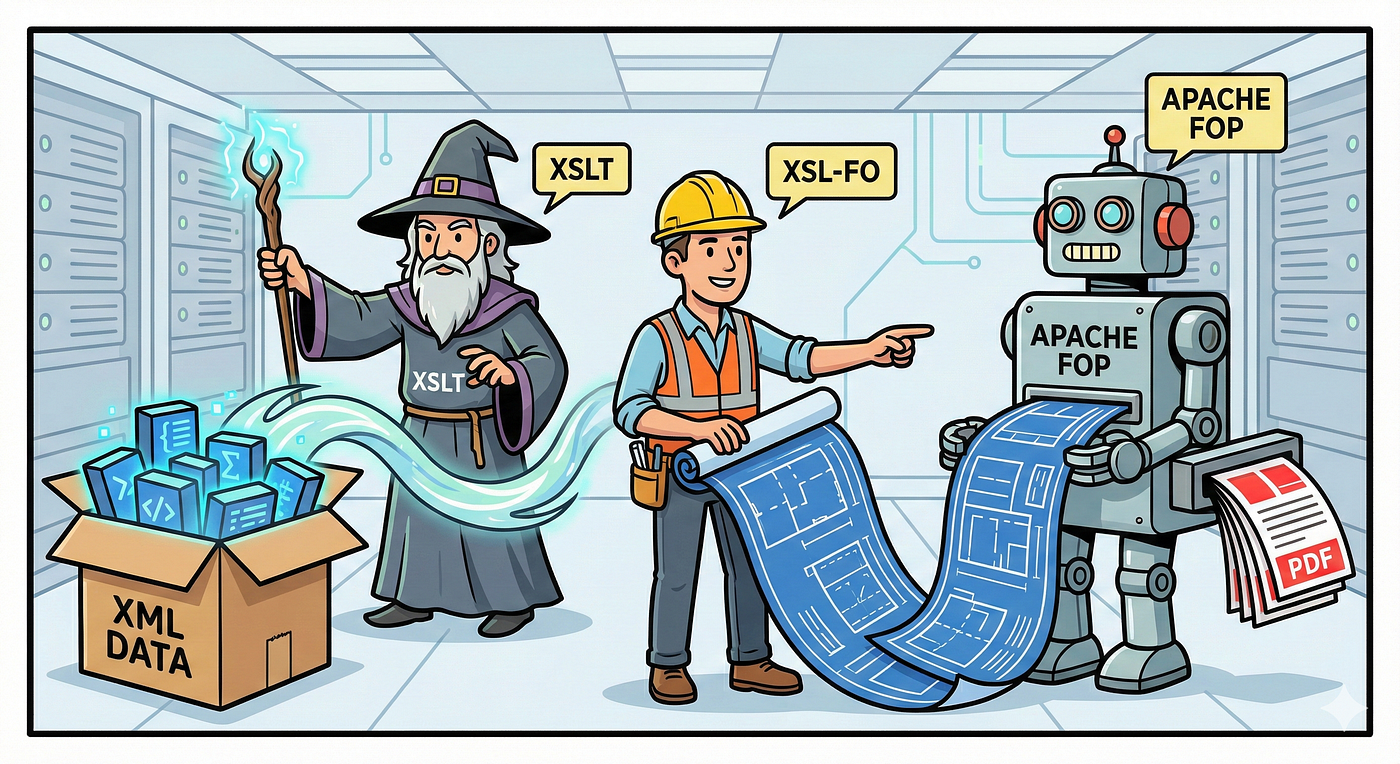
Generating a PDF from XML is not a direct conversion. It is a structured transformation process where data, layout, and rendering are handled in separate stages. At a high level, the flow looks like this:
XML → XSLT → XSL-FO → Apache FOP → PDF
Each stage has a clearly defined role. XML carries the data, XSLT maps that data to a layout, XSL-FO describes how the document should look, and Apache FOP renders the final PDF output.
This separation makes the process easier to maintain, easier to scale, and well-suited for enterprise systems where document formats change independently of the data they represent.
Understanding Each Stage in the Pipeline
The XML to PDF pipeline is built around a simple idea: each stage solves one specific problem. Instead of mixing data, layout, and rendering into a single step, the process is broken into clear, independent layers.
1. XML: Structured Data
XML acts as the source of truth for the document. It contains only structured data and no information about how the document should look.
Because XML is schema-driven and easy to validate, it works well as an input format for documents such as invoices, reports, and statements. Changes to the data structure can be handled without affecting the visual layout of the final PDF.
2. XSLT: Transformation Logic
XSLT sits between raw data and presentation. Its responsibility is to read the XML and transform it into a format that describes how the document should be laid out.
This transformation is rule-based. For example, an XML element representing a customer name can be mapped to a specific position or style in the document. XSLT does not generate a PDF. Instead, it produces another XML document focused entirely on layout instructions.
3. XSL-FO: Document Layout
XSL-FO, or Formatting Objects, is an XML-based language used to define the visual structure of a document.
It describes concepts such as page size, margins, fonts, text blocks, and tables. XSL-FO does not contain business data or transformation logic. Its sole purpose is to describe how content should appear on the page. This separation allows layout changes to be made without modifying the data source or the transformation logic.
4. Apache FOP: Rendering Engine
Apache FOP is responsible for converting XSL-FO into a final output format, most commonly PDF.
It interprets the formatting instructions defined in the XSL-FO document and renders them into a paginated, printable document. Apache FOP does not understand business data or transformation rules. It focuses entirely on rendering.
Building an End-to-End XML to PDF Generation Service
- Make sure Java version is 17 or above and Maven is installed.
- Create new Spring project from **https://start.spring.io**
- Add the following dependency to pom.xml file. This dependency adds Apache FOP, the engine responsible for generating the PDF.
<!-- Apache FOP dependency for rendering XSL-FO content into PDF -->
<dependency>
    <groupId>org.apache.xmlgraphics</groupId>
    <artifactId>fop</artifactId>
    <version>2.9</version>
</dependency>- Create an
**input.xml** file containing the invoice data and relevant fields.
<?xml version="1.0" encoding="UTF-8"?>
<invoices>

    <invoice>
        <invoiceNumber>INV-1001</invoiceNumber>
        <invoiceDate>2025-01-12</invoiceDate>
        <customerName>John Doe</customerName>
        <amount>250.00</amount>
    </invoice>

    <invoice>
        <invoiceNumber>INV-1002</invoiceNumber>
        <invoiceDate>2025-01-13</invoiceDate>
        <customerName>Jane Smith</customerName>
        <amount>420.00</amount>
    </invoice>

</invoices>- Create a file named
**stylesheet.xsl. This file defines how the data from the XML **should be transformed into a printable document layout.
<?xml version="1.0" encoding="UTF-8"?>
<xsl:stylesheet
        version="1.0"
        xmlns:xsl="http://www.w3.org/1999/XSL/Transform"
        xmlns:fo="http://www.w3.org/1999/XSL/Format">

    <!-- Entry point for the transformation -->
    <xsl:template match="/">

        <fo:root>

            <!-- Define page layout -->
            <fo:layout-master-set>
                <fo:simple-page-master
                        master-name="A4"
                        page-width="21cm"
                        page-height="29.7cm"
                        margin="2cm">
                    <fo:region-body/>
                </fo:simple-page-master>
            </fo:layout-master-set>

            <!-- Start page content -->
            <fo:page-sequence master-reference="A4">
                <fo:flow flow-name="xsl-region-body">

                    <!-- Loop through each invoice -->
                    <xsl:for-each select="invoices/invoice">

                        <fo:block font-size="18pt"
                                  font-weight="bold"
                                  space-after="10pt">
                            Invoice
                        </fo:block>

                        <fo:block>
                            Invoice Number:
                            <xsl:value-of select="invoiceNumber"/>
                        </fo:block>

                        <fo:block>
                            Invoice Date:
                            <xsl:value-of select="invoiceDate"/>
                        </fo:block>

                        <fo:block>
                            Customer Name:
                            <xsl:value-of select="customerName"/>
                        </fo:block>

                        <fo:block space-after="15pt">
                            Amount:
                            <xsl:value-of select="amount"/>
                        </fo:block>

                        <!-- Space between invoices -->
                        <fo:block space-after="20pt"/>

                    </xsl:for-each>

                </fo:flow>
            </fo:page-sequence>

        </fo:root>

    </xsl:template>

</xsl:stylesheet>
Service Layer
- With the XML structure and layout rules in place, the next step is to wire everything together using a service layer.
- Create a class named
**PdfServiceto contain the logic for generating a PDF from XML using XSLT and Apache FOP**.
@Service
public class PdfService {
    private static final Logger log = LoggerFactory.getLogger(PdfService.class);
    public void generatePdf(){
        log.info("Starting PDF generation");
        try{
            // Load XML file from classpath
            InputStream xmlInput =
                    getClass().getClassLoader().getResourceAsStream("input.xml");
            // Load XSL file from classpath (layout rules)
            InputStream xslInput =
                    getClass().getClassLoader().getResourceAsStream("stylesheet.xsl");
            if (xmlInput == null || xslInput == null) {
                throw new IllegalStateException("XML or XSL file not found in classpath");
            }
            log.info("XML and XSL files loaded successfully");

            // Initialize Apache FOP factory
            FopFactory fopFactory =
                    FopFactory.newInstance(new File(".").toURI());
            // Tell the printer where to write the PDF
            File outputFile = new File("src/main/resources/output.pdf");

            try(OutputStream out = new FileOutputStream(outputFile)){
                // Create transformer (XSLT Processor)
                TransformerFactory transformerFactory =
                        TransformerFactory.newInstance();

                Transformer transformer =
                        transformerFactory.newTransformer(new StreamSource(xslInput));
                // Create the printer (PDF mode)
                Fop fop = fopFactory.newFop(MimeConstants.MIME_PDF, out);
                // Connect everything and start the transformation
                Source src = new StreamSource(xmlInput);
                Result res = new SAXResult(fop.getDefaultHandler());

                transformer.transform(src, res);
            }
            log.info("PDF generated successfully at {}", outputFile.getAbsolutePath());
        }catch (Exception e) {
            log.error("Error occurred while generating PDF", e);
            throw new RuntimeException("PDF generation failed", e);
        }
    }

}
The **PdfService begins by logging the start of the PDF **generation process. This initial log statement helps confirm that the service has been triggered and provides a clear entry point when tracing execution flow during debugging.
The service loads both **input.xml and `stylesheet.xsl` from the classpath using the application’s class loader. These files represent the data source and the layout rules** respectively. A validation check ensures that the process stops immediately if either resource is missing.
An instance of Apache FOP is initialized using a factory, preparing the rendering engine that converts formatting instructions into a PDF. At this stage, FOP is configured and ready, but no rendering has started yet.
The output location for the generated PDF is defined, and a file output stream is opened using a try-with-resources block. This approach guarantees that system resources are safely released once the PDF generation completes.
A Transformer is created using the XSL stylesheet, enabling the XML data to be processed according to the defined transformation rules. The transformation output is streamed directly into Apache FOP using a SAX result, eliminating the need for intermediate files.
Controller Layer
- Create the controller to trigger PDF generation. Create a controller class named
**PdfController** to expose a REST endpoint that triggers the PDF generation process handled by the service layer.
@RestController
public class PdfController {
    private final PdfService pdfService;

    public PdfController(PdfService pdfService){
        this.pdfService = pdfService;
    }

    @GetMapping("/generate-pdf")
    public String generatePdf(){
        pdfService.generatePdf();
        return "PDF generated successfully";
    }
}
The controller uses **@RestController to expose a RESTful endpoint that can be triggered from a browser or any HTTP client. This keeps the interaction simple and avoids the need for a UI**.
The **PdfService is injected through the constructor, allowing the controller to delegate all PDF**-related logic to the service layer. This keeps the controller lightweight and focused only on request handling.
The **/generate-pdf endpoint invokes the `generatePdf()` method in the service. This single call kicks off the entire XML-to-PDF **pipeline without exposing internal implementation details.
- Application is up and running.

- Once the application is running, accessing the
**/generate-pdfendpoint from the browser successfully triggers the PDF **generation process and returns a confirmation message.

- The final project structure highlights a clear separation of concerns, with the
**PdfControllerhandling HTTP requests, the `PdfService**encapsulating the XML-to-PDF logic, and transformation resources such asinput.xml`,**stylesheet.xsl, and the generated `output.pdf** organized undersrc/main/resources`.

- This approach provides a clean, scalable way to generate PDFs from structured XML data using well-defined transformation and rendering stages. By separating data, layout, and rendering responsibilities, the solution remains flexible and easy to extend as document requirements evolve.
메타데이터
- post_id
- 9d12902da39a
- slug
- end-to-end-xml-to-pdf-processing-using-xslt-and-apache-fop-9d12902da39a
- url
- https://medium.com/@vvandanapdev/end-to-end-xml-to-pdf-processing-using-xslt-and-apache-fop-9d12902da39a
- canonical_url
- https://medium.com/@vvandanapdev/end-to-end-xml-to-pdf-processing-using-xslt-and-apache-fop-9d12902da39a
- author_url
- https://medium.com/@vvandanapdev
- status
- ok
- fetched_at
- 2026-06-22 05:41:33