How to Create Ghibli Style Image in ChatGPT
Ghibli studio is a renowned Japanese animation studio founded by Hayao Miyazaki, Isao Takahata, and Toshio Suzuki. They are famous for…
How to Create Ghibli Style Image in ChatGPT
Ghibli studio is a renowned Japanese animation studio founded by Hayao Miyazaki, Isao Takahata, and Toshio Suzuki. They are famous for their critically acclaimed animated feature films like “Spirited Away,” “My Neighbor Totoro,” “Princess Mononoke,” and many others. It’s our aim to examine how to convert image to ghibli style.
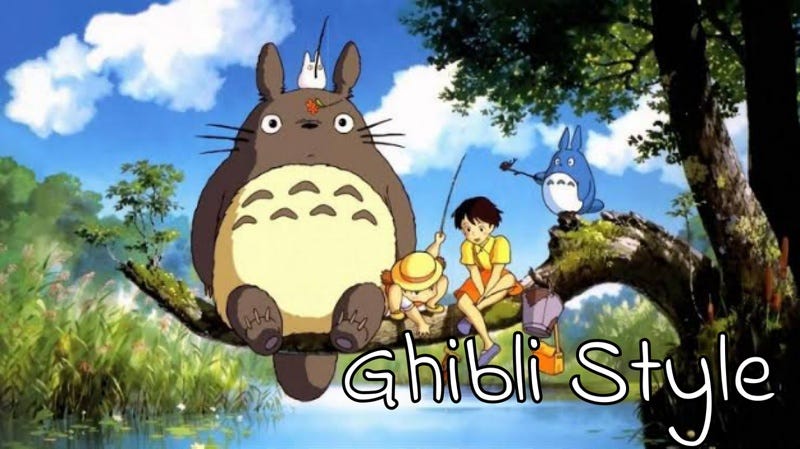
Part 1: How to Create Ghibli Style Image
There are several ways to create Ghibli-style images, ranging from using AI tools to drawing your own. Using AI image generators is the most popular and accessible method. Several AI tools are specifically designed to transform images or generate new ones in the Ghibli style.
[embed]
How to Create a Ghibli Style Image in ChatGPT
-
- Ensure you are using the GPT-4o Model:
- For ChatGPT Plus, Team, or Enterprise users: Make sure you have GPT-4o selected as your model in the ChatGPT interface. It’s usually the default or an option you can select at the top of the chat window.
- For Free users: OpenAI has begun rolling out GPT-4o image generation to free users, though there might be usage limits. Ensure you have access to it.
2. Provide a Clear Prompt:
The key to getting good Ghibli-style images is a descriptive prompt. You can either:
- Describe a scene: Tell ChatGPT exactly what you want to see.
- Upload an image for transformation: If you have a photo you want to convert to Ghibli style, you can upload it and then instruct ChatGPT to “Turn this into a Studio Ghibli style image.”
Example Prompts you can try:
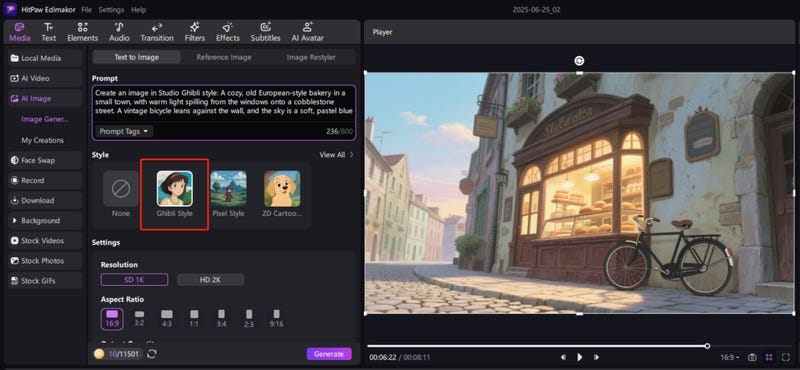
1. “Create an image in Studio Ghibli style: A cozy, old European-style bakery in a small town, with warm light spilling from the windows onto a cobblestone street. A vintage bicycle leans against the wall, and the sky is a soft, pastel blue.”
2. “Ghibli aesthetic illustration of a magical forest. A towering ancient tree with glowing leaves. Small, adorable forest spirits peek from behind moss-covered rocks. Soft, diffused sunlight filters through the canopy.”
3. “Turn this image [upload your image] into a Studio Ghibli character portrait. Give it soft features, expressive eyes, and a background reminiscent of ‘My Neighbor Totoro’ with lush greenery and a clear blue sky.”
4. “Hayao Miyazaki inspired scene: A majestic flying island covered in ancient ruins and waterfalls, soaring through a sky filled with fluffy, dreamlike clouds. A gentle breeze is visible.”
- When writing your prompt, think about the distinct characteristics of Studio Ghibli art, like:
- Style Indicator: Start with “Studio Ghibli style,” “Ghibli aesthetic,” “Hayao Miyazaki inspired,” “hand-drawn anime,” “soft watercolor animation.”
- Subject: Describe the main characters or objects. (e.g., “a young girl with a red umbrella,” “a fluffy cat,” “an ancient forest spirit”).
- Setting/Background: Detail the environment. Ghibli is known for lush, detailed natural landscapes. (e.g., “a whimsical forest with glowing mushrooms,” “a small, cozy town street at sunset,” “a serene rice paddy field under a cloudy sky”).
- Mood/Atmosphere: Convey the feeling. Ghibli often evokes wonder, nostalgia, peace, or gentle magic. (e.g., “peaceful atmosphere,” “dreamy lighting,” “a sense of calm,” “magical and serene”).
- Colors/Lighting: Mention specific color palettes or lighting conditions. (e.g., “soft pastel colors,” “golden hour lighting,” “overcast and gentle light,” “vibrant greens and blues”).
- Details: Add small, specific elements that enhance the Ghibli feel. (e.g., “flying seeds,” “tiny dust sprites,” “ivy-covered walls,” “a gently flowing stream”).
- Avoid terms: Unless you want a specific blend, generally avoid terms like “photorealistic,” “4K,” “cyberpunk,” “dark fantasy,” as they can contradict the Ghibli aesthetic.
Here’s a step-by-step how to create Ghibli style image in ChatGpt:
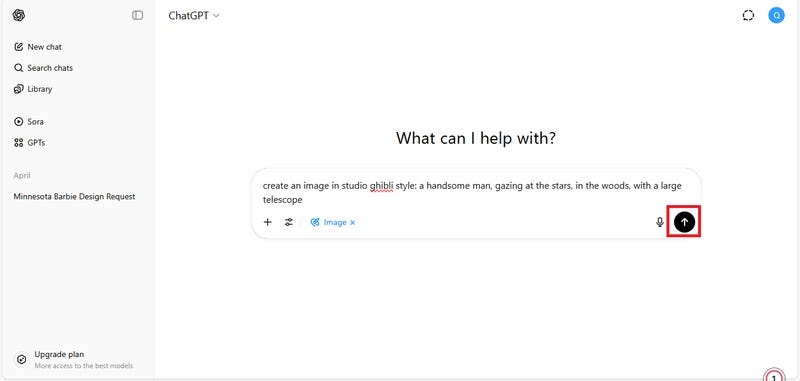
- Open ChatGpt on your computer, log in, and click on “Tools” and select “Create an image” .
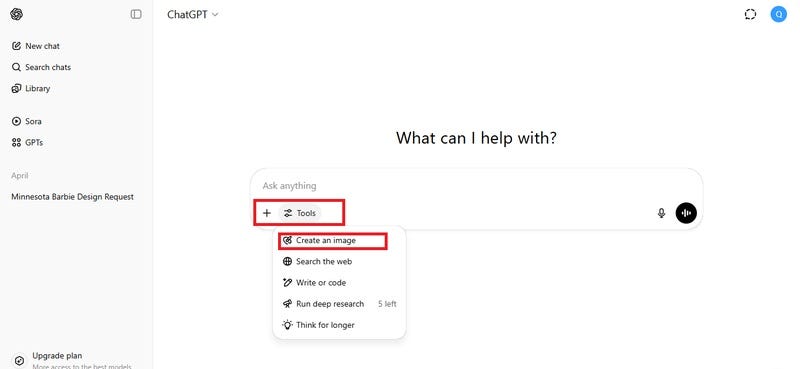
- Describe your image by entering your prompt, and click on the arrow icon to generate.
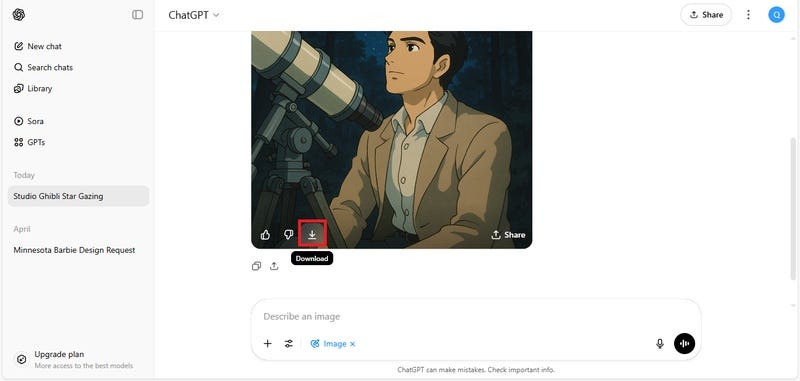
- Click on the download arrow to save your image.
How to Create Ghibli Style Image in Edimakor
- Creating a Ghibli-style image in Edimakor is a fun way to bring the magic of Studio Ghibli to your artwork. Here’s a step-by-step on how to do it.
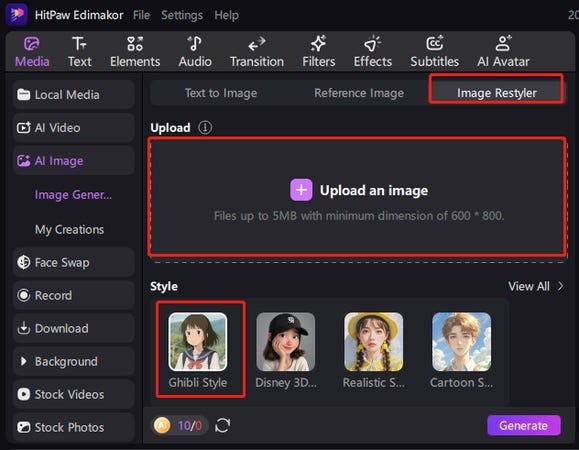
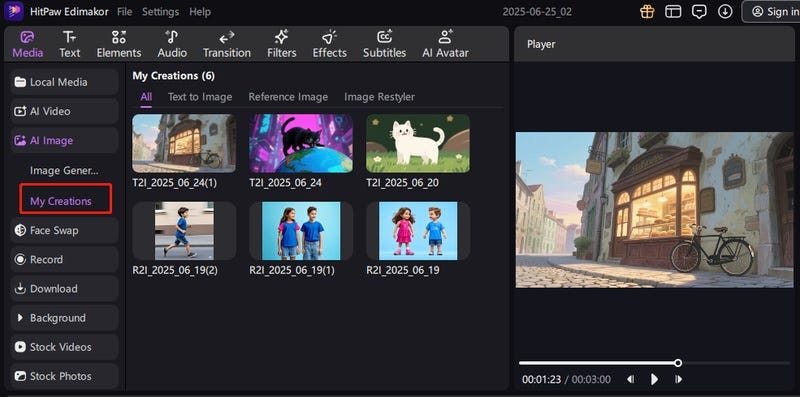
- Launch the Edimakor software on your computer, click on “Toolbox” and select “Text to Image”, “ Reference Image” or “Image Restyler” as you need.

- Now, enter your prompt and select a style from the provided options “Ghibli Style”.

- Or, import your photo to restyle it as a Ghibli image.
- Scroll down to select duration, resolution and aspect ratio.
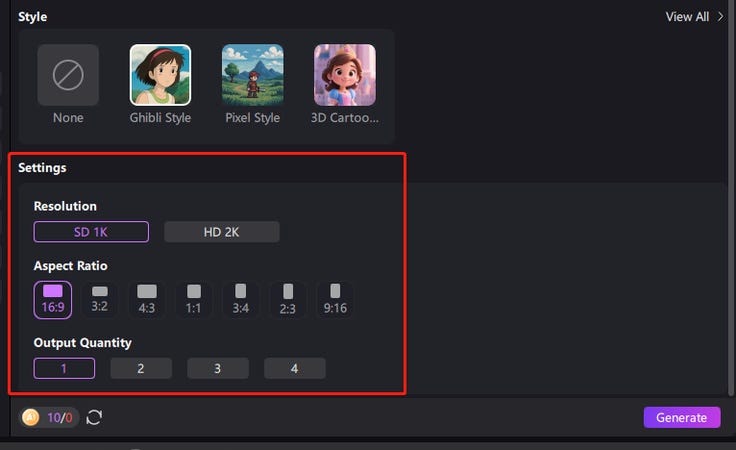
- Upload your intended photo, select an aspect ratio and click on the “Ok” button. Now, click on the “Generate” button to generate. The results will be saved in “My Creations” and default files.
Originally from HitPaw: https://edimakor.hitpaw.com/ai-video-tools/convert-image-to-studio-ghibli-style.html
메타데이터
- post_id
- 9d6040e49d8d
- slug
- how-to-create-ghibli-style-image-in-chatgpt-9d6040e49d8d
- url
- https://medium.com/@edimakorvideoeditor/how-to-create-ghibli-style-image-in-chatgpt-9d6040e49d8d
- canonical_url
- https://medium.com/@edimakorvideoeditor/how-to-create-ghibli-style-image-in-chatgpt-9d6040e49d8d
- author_url
- https://medium.com/@edimakorvideoeditor
- status
- ok
- fetched_at
- 2026-07-10 22:12:50