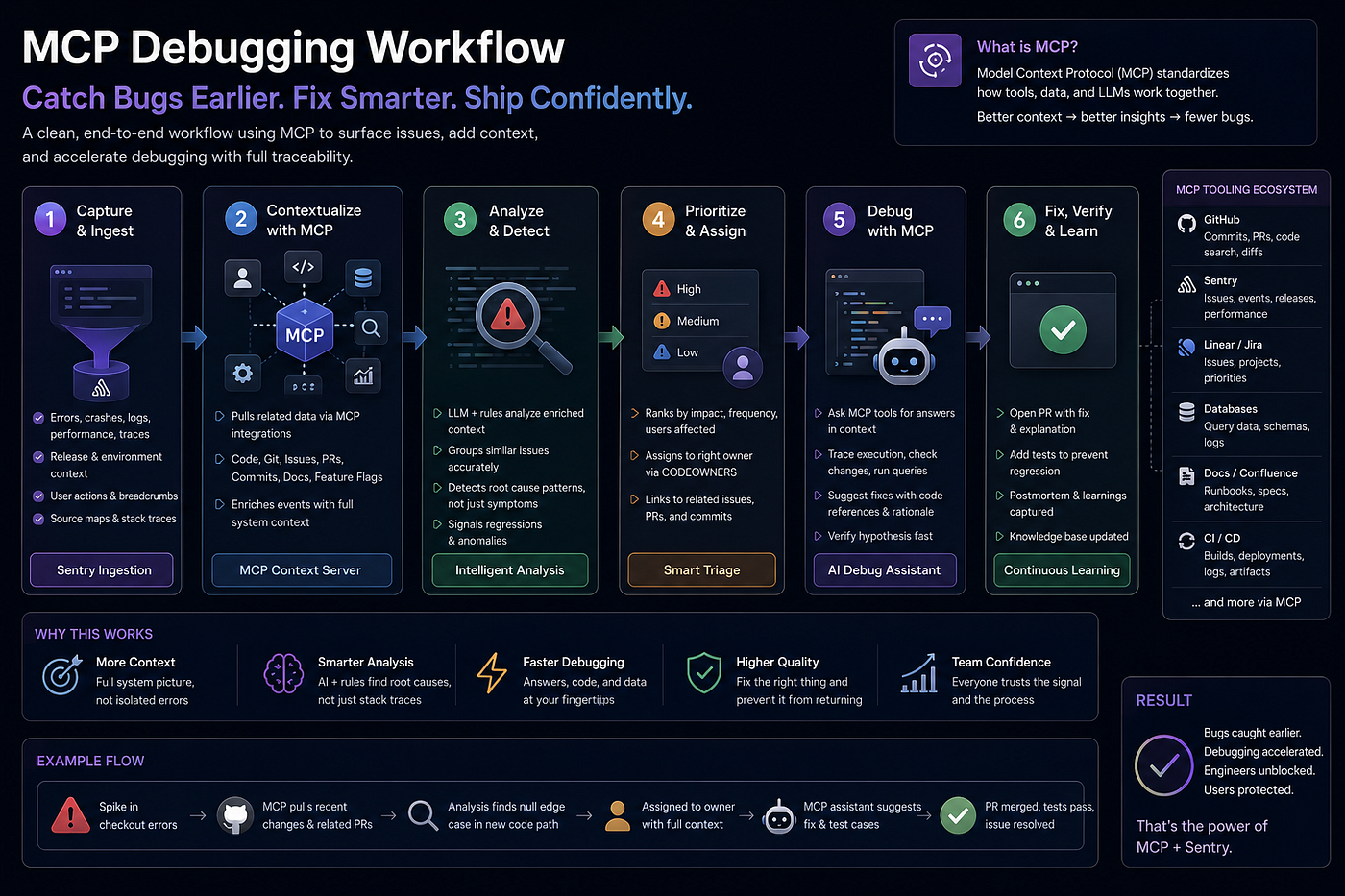
How Sentry Became the Most Honest Member of Our Engineering Team
We added it, removed it, re-added it, fought with it, and finally learned to listen to it. Here’s the full story.
How Sentry Became the Most Honest Member of Our Engineering Team
We added it, removed it, re-added it, fought with it, and finally learned to listen to it. Here’s the full story.
It Started With a Single Commit
Sentry implemented
That’s all the commit message said. No ticket number. No context. Just three words and a deploy flag.
At the time, we thought we were done. We’d integrated Sentry into Zoviz, the tool was running, errors would appear in the dashboard. Job done. Move on.
We were wrong. That commit was not the end of anything — it was the beginning of one of the most humbling, frustrating, and ultimately valuable engineering journeys our team has been through.

Deadlines pressure you to ship. Sentry shows you what shipping actually cost.
Phase 1: The Chaos of “It’s Implemented”
The first thing Sentry taught us was that we had no idea what was actually happening in our production environment.
Within days of the initial setup, the dashboard was on fire. Hundreds of issues. Noise everywhere. Errors from browser extensions, injected scripts, third-party SDKs we didn’t control, and — most embarrassingly — real bugs we’d shipped and never noticed.
Our first reaction was to turn down the volume. We started filtering. We committed core(sentry): filter error shown and core(sentry): remove check state mode for sentry — basically teaching Sentry to be quieter. To show us less.
Looking back, this was the wrong instinct. We were muting the alarm instead of understanding what was burning.
The noise problem got so bad that we actually removed Sentry entirely for a period. That commit exists in our history:
remove(main): remove sentry from project
We told ourselves we’d come back to it properly. And eventually, we did.
Phase 2: Coming Back With a Plan
When we re-integrated Sentry, we did it differently. Instead of just plugging it in and hoping for the best, we approached it like an engineering problem.
First: we documented the noise.
We created a sentry-issues document — a living file that tracked which errors were real, which were third-party noise, and which were known issues we hadn't prioritized yet. The commit history shows this clearly: add documentation for multiple Sentry issues, followed later by reorganize Sentry issue documentation for better tracking, and then clean up Sentry issue documentation and remove obsolete files.
That documentation cycle — create, reorganize, clean up — took months. But it was the foundation of everything that came after.
Second: we built a proper noise filter.
Not just “hide this error class.” A deliberate list of what we called our noise list — errors that were real in the browser sense but meaningless to us as a product team. Things like injected listener-hook crashes from browser extensions, which we eventually handled with a dedicated commit: add handler to ignore injected listener-hook crashes.
This is one of the most underrated Sentry skills: knowing what NOT to look at. Every team has legitimate noise. The question is whether you’ve deliberately decided to ignore it, or whether it’s just burying the things you should be watching.
Phase 3: Sentry as a Feature, Not a Tool
The shift that changed everything was when we stopped thinking of Sentry as a monitoring tool and started treating it as part of our feature development process.
Concretely, this meant:
Integrating Sentry into payment flows.
Payments are where silent failures hurt most. A user’s checkout fails, they don’t understand why, they leave — and you never know it happened. We added integrate Sentry for error tracking in Stripe element setup specifically because our express checkout flow had edge cases we couldn't reproduce locally. Sentry found them in production within 48 hours of the next deploy.
One specific bug: our checkout was using a token field where the updated Stripe flow expected a payment_id. This had been silently failing for a subset of users on specific payment methods. Sentry caught it. The fix was one line. The impact on conversion was real.
Adding Sentry to authentication flows.
Login failures are another category where silent errors kill user trust. We added Sentry reporting to both Google and Facebook login handlers after noticing drop-off we couldn’t explain. The errors showed up immediately — edge cases in the OAuth flow that only appeared for certain account configurations.
improve Google login error handling and Sentry reporting streamline Sentry initialization and enhance Facebook login error handling
These weren’t dramatic failures. They were quiet ones. The kind that lose you 2–3% of signups and you never know why.
Exposing Sentry to plugins.
As Zoviz grew, we built an HTML editor plugin — a separate context that ran partially outside our main Vue application. For a long time, errors in that plugin were invisible to us. We couldn’t see them in Sentry because the plugin didn’t have access to our Sentry instance.
expose Sentry API for html-editor-plugin and add root text detection in loaded assets
This one commit opened a window into a dark room. Errors we didn’t know existed started appearing. Several of them had been there for months.
Phase 4: The Cleanup Sessions
Once we had good data, we started running what we called Sentry cleanup sessions — dedicated time to work through the issue list, triage what was real, fix what we could, and deliberately close what wasn’t worth fixing.
conduct cleanup session to address high-noise Sentry issues
This sounds simple. It’s not. The hard part of cleanup sessions isn’t the fixing — it’s the deciding. For every issue, you have to answer: is this something users are actually experiencing? Is it affecting a critical path? Does the fix cost more than the problem?
We built a simple framework for this:
P0 — Fix immediately: Payment flows, authentication, data loss, anything affecting a critical user action.
P1 — Fix this sprint: Visible UI errors, broken features in secondary flows, anything affecting more than 1% of sessions.
P2 — Track and watch: Edge cases, low-frequency errors, known third-party issues with no available fix.
Noise — Close and document: Browser extension injections, known SDK quirks, errors we’ve consciously decided to ignore.
The discipline of running these sessions regularly — we do them every two weeks now — is what turned Sentry from a noisy dashboard into a reliable signal.
Phase 5: Sentry as a Daily Habit
The final evolution was making Sentry part of our daily routine, not just something we checked after incidents.
Every morning, one person on the team owns the Sentry dashboard. Not to fix everything — just to read it. To notice if something new appeared after yesterday’s deploy. To catch the issue before it becomes an incident.
We call this the Sentry owner rotation. It takes 5–10 minutes. It has caught things that would have taken days to surface through user reports.
The key insight: Sentry is only useful if you’re watching it before things go wrong. Most teams open Sentry when something is already on fire. By then, you’re in firefighting mode — stressed, rushed, not thinking clearly. If you’ve been watching it daily, you see the smoke before the fire.
What the Commit History Actually Tells You
Looking back at our Sentry commit history across Zoviz’s entire lifespan — from Sentry implemented to enhance Sentry error handling and telemetry safeguards — there's a clear arc:
Naive implementation → overwhelming noise → removal → deliberate re-integration → documentation → integration into features → cleanup discipline → daily habit.
Every team goes through some version of this arc. Most get stuck somewhere in the middle — usually at the “it’s too noisy” stage — and either mute it into uselessness or remove it entirely.
The teams that get real value from Sentry are the ones that push through the noise phase, build the discipline to triage regularly, and eventually make it part of how they think about shipping.
The Practical Setup We Use Today
For anyone who wants the concrete version:
Configuration: We run Sentry on our Vue 3 / Nuxt frontend with a carefully maintained beforeSend filter that drops known noise categories before they ever hit the dashboard. The noise list is a living document that we review in every cleanup session.
Tagging: Every deploy is tagged with a release identifier in Sentry. This means when a new error appears, we can immediately see which deploy introduced it — even if we don’t notice it until days later.
Alerts: We have two alert levels. Immediate alerts (Slack DM) for any new error in payment or authentication flows. Daily digest for everything else.
The rotation: One person owns Sentry for the week. Monday morning they do a full triage. Daily they do a quick scan. Friday they hand off with a brief summary.
The cleanup session: Every two weeks, 45 minutes, the whole team. We work through the P0 and P1 list, close resolved issues, and update the noise documentation.
The Honest Truth
Sentry is not magic. It will not automatically make your production environment stable. It will not catch everything. It will, for a while, make things feel worse because you’ll see problems you didn’t know existed.
That discomfort is the point.
The errors were always there. Sentry just gives you the honesty to see them. What you do with that information is still entirely on you.
After years of working with it, here’s how I think about it: Sentry is the most honest member of your engineering team. It doesn’t soften feedback. It doesn’t skip issues because the sprint is busy. It doesn’t assume something is probably fine. It just shows you what’s actually happening in your product, every day, for every user.
Learning to listen to it — really listen, not just glance and close the tab — is one of the highest-leverage skills an engineering team can develop.
Next: I’ll share the specific Sentry configuration we use at Zoviz — including our noise filter setup, release tagging workflow, and the alert rules that have saved us the most time. Stay tuned.
Tags: Sentry Software Engineering Vue Frontend Error Monitoring Engineering Culture
메타데이터
- post_id
- 9dec1733a482
- slug
- how-sentry-became-the-most-honest-member-of-our-engineering-team-9dec1733a482
- url
- https://medium.com/@DavoudAslaniFakour/how-sentry-became-the-most-honest-member-of-our-engineering-team-9dec1733a482
- canonical_url
- https://medium.com/@DavoudAslaniFakour/how-sentry-became-the-most-honest-member-of-our-engineering-team-9dec1733a482
- author_url
- https://medium.com/@DavoudAslaniFakour
- status
- ok
- fetched_at
- 2026-07-14 00:49:32