What Is the A2A Protocol?
As AI agents become more capable, the next challenge is helping them work together across tools, platforms, and organizations. That is…
What Is the A2A Protocol? How Agent2Agent Works Alongside MCP for AI Agent Communication (with Python sample codes)
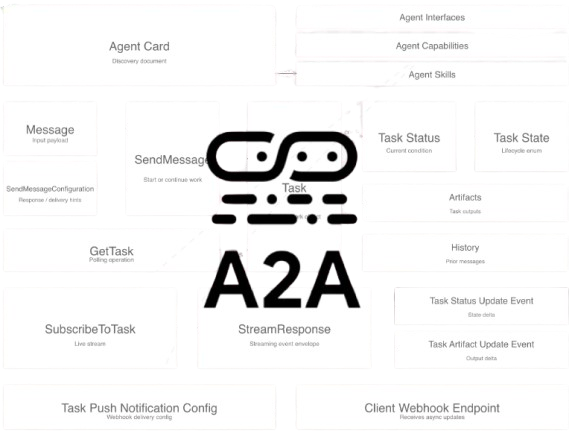
As AI agents become more capable, the next challenge is helping them work together across tools, platforms, and organizations. That is where the Agent2Agent (A2A) protocol comes in. Introduced by Google Cloud and managed by the Linux Foundation, A2A is an open standard designed for secure, structured agent-to-agent communication. While the Model Context Protocol (MCP) focuses on connecting agents to tools, APIs, and data sources, A2A focuses on how agents discover one another, exchange work, track tasks, and share results. In this article, we break down how A2A works, how it differs from MCP, its core concepts such as Agent Card and Task State, and why it is becoming an important building block for interoperable AI systems.
A2A vs MCP
Agent-to-Agent Protocol (A2A) and Model Context Protocol (MCP) are AI agent communication protocols. A2A is a project initiated by Google, and the MCP is developed by Anthropic. While they are completely independent of one another, they go hand in hand. MCP is for agent-to-tool connectivity (connecting LLMs to data, APIs, tools, datastores, etc.), while A2A is for agent-to-agent communication (enabling collaboration between different agents).
[embed]
How does A2A work
A2A makes agent-to-agent communications easy and standardized by defining a standard contract for one agent to discover another agent, send it work, track that work as a task, and receive updates either live or later. The specification’s core goals are discovery, modality negotiation, task management, and secure collaboration without exposing each agent’s internal memory/tools.
Everything starts with the agent card: the client learns where the agent lives (url) and what it supports (MIME types, streaming, skills). The client then starts work with SendMessage (message/send) or a live channel with message/stream (both carry a message). The server materializes that as a task. A task is a single record (task id, context id, status, and later history / artifacts). While your agent runs, task state moves along the lifecycle (submitted → working → terminal states like completed), and each transition updates the same task object the protocol exposes. Finally, the client learns the outcome through whichever path fits: the blocking send response, a stream of events, explicit GetTask polling, or (if configured) push notifications to a callback URL.
Same spine every time: discover → send (or stream) → task evolves → client reads the result (response, stream, poll, or push).
[embed]
The core concepts
1) Agent Card
The Agent Card is the agent’s public profile. It tells other agents who it is, what it does, how to talk to it, and what security/capabilities it supports. In the spec, it includes identity fields plus supported interfaces, capabilities, skills, and security requirements. It also orders supported interfaces so the first one is the preferred one. The agent card is the discovery document for an agent: JSON that describes identity, version, supported input/output MIME types, declared skills, transport hints, and the **url where JSON-RPC traffic should be sent. Clients fetch it over HTTP (for example `GET /.well-known/agent-card.json`**) before calling any task API.
In Python you build the same structure with **AgentCard() (and optional `AgentSkill** entries) when assemblingA2AStarletteApplication`. At runtime the server exposes that object as JSON so portals and CLIs stay in sync with your deployed revision.
from a2a.types import AgentCapabilities, AgentCard, AgentSkill

agent_card = AgentCard(
    name="Example Agent",
    description="Short description for catalogs and UIs.",
    version="1.0.0",
    url="https://your-agent.example.com",
    default_input_modes=["text/plain"],
    default_output_modes=["text/plain"],
    capabilities=AgentCapabilities(streaming=True),
    skills=[
        AgentSkill(
            id="default",
            name="Default skill",
            description="What users can ask this agent to do.",
            tags=["demo"],
            examples=["Summarize this paragraph."],
        )
    ],
)
2) SendMessage
SendMessage is the operation that hands a user turn to the agent and starts or continues work. On the wire it is the JSON-RPC method message/send. The payload includes a Message (role, parts such as text or files, optional taskId / contextId for follow-ups) and optional configuration (for example whether the client is willing to block until completion, accepted output MIME types, or history length hints).
Conceptually, one SendMessage call creates a correlation id on the client side, carries the user message, and yields a Task (or an error) in the JSON-RPC result.
{
  "jsonrpc": "2.0",
  "id": 1,
  "method": "message/send",
  "params": {
    "message": {
      "kind": "message",
      "messageId": "550e8400-e29b-41d4-a716-446655440000",
      "role": "user",
      "parts": [
        {
          "kind": "text",
          "text": "Hello, agent."
        }
      ]
    },
    "configuration": {
      "blocking": true,
      "acceptedOutputModes": ["text/plain"]
    }
  }
}
The companion streaming method message/stream uses the same MessageSendParams shape but returns a stream of events (status updates, artifact updates) instead of a single blocking JSON result.
3) Task
A task is the server-side record of one unit of work (or one thread of conversation) tied to identifiers the client and agent share. The Task object carries id (task id), contextId (broader session or correlation scope), status (current TaskStatus including state), optional history (Message list), and optional artifacts (outputs from the agent).
Your executor does not return a Task directly; the request handler and task store persist and merge updates as your code enqueues events (status changes, artifact updates). message/send returns a snapshot of that Task to the caller (subject to blocking/streaming mode).
{
  "jsonrpc": "2.0",
  "id": 1,
  "result": {
    "kind": "task",
    "id": "7c9e6679-7425-40de-944b-e07fc1f90ae7",
    "contextId": "a1b2c3d4-e5f6-7890-abcd-ef1234567890",
    "status": {
      "state": "completed",
      "timestamp": "2026-01-01T12:00:00.000Z"
    },
    "history": [],
    "artifacts": []
  }
}
4) Task state
Task state is the lifecycle enum on a task’s current TaskStatus: values such as submitted, working, input-required, completed, failed, canceled, rejected, auth-required, and unknown. States tell clients whether to keep polling, show a form for missing input, or treat the task as finished.
In agent code you typically emit TaskStatusUpdateEvent with a TaskStatus that sets state (and optional human-readable message) and marks final: true only when the interaction reaches a terminal outcome for that turn.
from a2a.types import TaskState, TaskStatus, TaskStatusUpdateEvent
# Example: mark work in progress, then later completed (simplified).
working = TaskStatusUpdateEvent(
    task_id="7c9e6679-7425-40de-944b-e07fc1f90ae7",
    context_id="a1b2c3d4-e5f6-7890-abcd-ef1234567890",
    final=False,
    status=TaskStatus(state=TaskState.working, timestamp="2026-01-01T12:00:00.000Z"),
)
completed = TaskStatusUpdateEvent(
    task_id="7c9e6679-7425-40de-944b-e07fc1f90ae7",
    context_id="a1b2c3d4-e5f6-7890-abcd-ef1234567890",
    final=True,
    status=TaskStatus(state=TaskState.completed, timestamp="2026-01-01T12:00:01.000Z"),
)
5) GetTask
GetTask is the read operation for an existing task: on the wire, JSON-RPC tasks/get. Clients pass TaskQueryParams (at minimum the task id, optionally historyLength to trim message history). The handler loads the task from the task store and returns the current Task snapshot (or a not-found error).
Use it when the client missed the final response, reconnects, or needs to poll a long-running job if you are not using streaming.
{
  "jsonrpc": "2.0",
  "id": 2,
  "method": "tasks/get",
  "params": {
    "id": "7c9e6679-7425-40de-944b-e07fc1f90ae7",
    "historyLength": 20
  }
}
6) SubscribeToTask
SubscribeToTask here means subscribing to live task updates (events as the agent progresses) rather than a single blocking JSON body. In the HTTP binding this is usually message/stream: same params shape as message/send, but the HTTP response is a stream (for example Server-Sent Events) of TaskStatusUpdateEvent, TaskArtifactUpdateEvent, and related payloads until a terminal status. If the stream drops, tasks/resubscribe (with the task id) can resume delivery in supported deployments.
Whether streaming is available depends on agent capabilities (for example AgentCapabilities(streaming=True) on the card) and server support.
{
  "jsonrpc": "2.0",
  "id": 3,
  "method": "message/stream",
  "params": {
    "message": {
      "kind": "message",
      "messageId": "660e8400-e29b-41d4-a716-446655440001",
      "role": "user",
      "parts": [{ "kind": "text", "text": "Stream progress for this job." }]
    }
  }
}
{
"jsonrpc": "2.0",
"id": 4,
"method": "tasks/resubscribe",
"params": {
"id": "7c9e6679-7425-40de-944b-e07fc1f90ae7"
}
}7) Push notifications
Push notifications let a client register a callback URL so the agent (or server infrastructure) can POST updates when task state changes, instead of (or in addition to) polling tasks/get or holding a stream. Configuration is scoped per task via JSON-RPC methods such as tasks/pushNotificationConfig/set, tasks/pushNotificationConfig/get, tasks/pushNotificationConfig/list, and tasks/pushNotificationConfig/delete.
A TaskPushNotificationConfig ties a taskId to a PushNotificationConfig (at minimum a url; optional authentication, token, id for multiple callbacks). On the server side, DefaultRequestHandler accepts optional push_config_store and push_sender implementations; without them, push may be unsupported and clients can receive PushNotificationNotSupportedError.
{
{
  "jsonrpc": "2.0",
  "id": 5,
  "method": "tasks/pushNotificationConfig/set",
  "params": {
    "taskId": "7c9e6679-7425-40de-944b-e07fc1f90ae7",
    "pushNotificationConfig": {
      "url": "https://client.example.com/a2a/task-updates",
      "token": "shared-secret-or-jti"
    }
  }
}
from a2a.types import PushNotificationConfig, TaskPushNotificationConfig
# Same information expressed with SDK models (serialized to camelCase on the wire).
TaskPushNotificationConfig(
task_id="7c9e6679-7425-40de-944b-e07fc1f90ae7",
push_notification_config=PushNotificationConfig(
url="https://client.example.com/a2a/task-updates",
token="shared-secret-or-jti",
),
)Why it matters
A2A matters because it lets AI agents work across systems and organizations instead of staying trapped in isolated tools or workflows. By enabling interoperable, secure, and enterprise-ready collaboration, it supports more complex multi-step automation where specialized agents can coordinate effectively. It also complements existing AI infrastructure, such as MCP, rather than replacing it, helping organizations build on what they already have while making their AI investments more scalable, adaptable, and ready for future needs.
Official support
As of now, there are so many big names officially supporting the A2A protocol. Below is a highlight of a number of platforms and providers offering official support for the A2A protocol.
Cloud providers: Google Cloud Platform: Supports A2A and is integrated into the Google Agent Development Kit (ADK) and Gemini on Cloud Run. Microsoft Azure: Azure AI Foundry supports A2A via Semantic Kernel, allowing agents to collaborate across different runtimes. Microsoft Copilot Studio: Uses A2A to orchestrate external agents in response to user triggers. AWS (Amazon Web Services): Supports A2A through Amazon Bedrock AgentCore Runtime and the open-source Strands Agents SDK.
Enterprise platforms: Salesforce: A2A support allows Agentforce agents to work with external ecosystems. SAP: Connects SAP Joule with third-party agents across distributed multi-cloud environments using A2A. ServiceNow: A2A is set as an industry standard for connected support experiences through collaboration with Google.
Frameworks & SDK Integrations LangChain / LangGraph: Provides support for agents to interact across frameworks through shared protocols. Spring AI: Offers server-side integration for Java developers to expose agents as A2A-compliant servers. IBM BeeAI: An open-source framework that uses A2A adapters (A2AServer and A2AAgent) for interoperable communication. MuleSoft: Features an A2A Connector to expose existing agents as compliant clients or servers. Semantic Kernel: Implements A2A support for pro-code developers in the Microsoft ecosystem.
How to implement and deploy
Architecture of a typical A2A HTTP server is shown below,
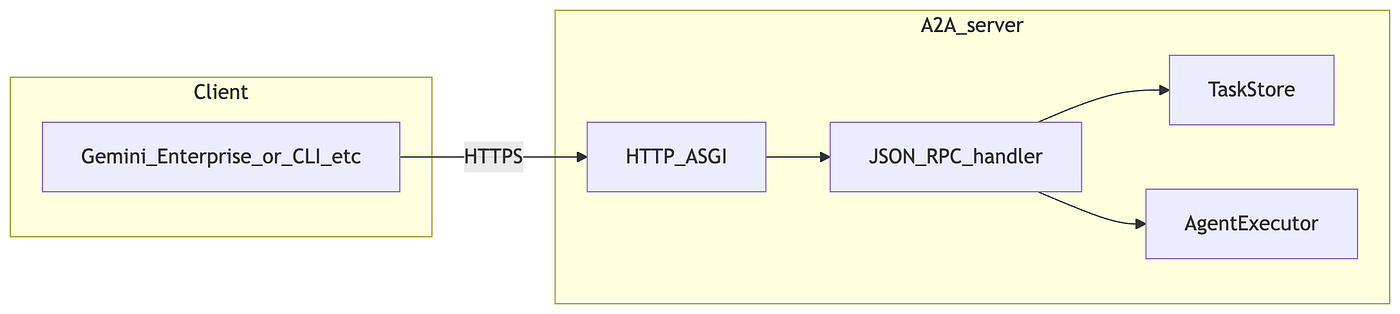
Architecture of a typical A2A HTTP server
1. Defining and starting the agent
You describe the agent for clients with AgentSkill and AgentCard (name, version, url, supported MIME types, capabilities such as streaming).
The AgentCard.url field must match the base URL clients use for JSON-RPC. Deploying means running this process behind HTTPS (e.g. Cloud Run) and pointing portals or CLIs at /.well-known/agent-card.json.
You need a non-abstract AgentExecutor with a real execute method; the following subsections spell out what execute should do. After that, connect this class to the handler so incoming requests run through your executor.
import os
import uvicorn
from a2a.server.apps import A2AStarletteApplication
from a2a.server.request_handlers import DefaultRequestHandler
from a2a.server.tasks import InMemoryTaskStore
from a2a.types import AgentCapabilities, AgentCard, AgentSkill

def main() -> None:
    app_url = os.environ["APP_URL"].rstrip("/")
    skill = AgentSkill(
        id="demo",
        name="Demo skill",
        description="What this skill does, in plain language.",
        tags=["demo"],
        examples=["Example user phrase"],
    )
    agent_card = AgentCard(
        name="Demo A2A Agent",
        description="One-line summary for catalogs.",
        version="1.0.0",
        url=app_url,
        default_input_modes=["text/plain"],
        default_output_modes=["text/plain", "application/pdf"],
        capabilities=AgentCapabilities(streaming=True),
        skills=[skill],
    )
handler = DefaultRequestHandler(
        agent_executor=MyAgentExecutor(),
        task_store=InMemoryTaskStore(),
    )
    app = A2AStarletteApplication(
        agent_card=agent_card,
        http_handler=handler,
    ).build()
    uvicorn.run(
        app,
        host=os.getenv("HOST", "0.0.0.0"),
        port=int(os.getenv("PORT", "8080")),
    )
2. How the agent receives input (and how to extract parts)
The framework calls async execute(self, context, event_queue) on your executor. context.message is the inbound user Message; its parts list holds Part values, each wrapping one of TextPart, FilePart, DataPart, and so on (see the SDK’s a2a.types).
Two complementary approaches:
context.get_user_input(): Convenience when you only need a single string aggregated from text parts.context.message.partsplus helpers froma2a.utils.parts:Useget_text_parts(parts)orget_file_parts(parts)when you need to branch on attachments, MIME types, or filenames, or combine text with files.
For files, FileWithBytes carries base64-encoded content on the wire; FileWithUri carries a URL your code typically fetches (with appropriate auth and timeouts in production).
from a2a.server.agent_execution import AgentExecutor, RequestContext
from a2a.server.events import EventQueue
from a2a.utils.parts import get_file_parts, get_text_parts
class MyAgentExecutor(AgentExecutor):
    async def execute(self, context: RequestContext, event_queue: EventQueue) -> None:
        message = context.message
        if message is None:
            raise ValueError("missing user message")
        prompt = context.get_user_input()
        text_segments = get_text_parts(message.parts)
        file_parts = get_file_parts(message.parts)
        # Dispatch: inspect file MIME types / names, decode bytes, fetch URIs, etc.
        ...
3. How the agent builds and sends output (text and files)
Executors publish results by enqueueing events, not by returning a string. Typical sequence: enqueue the task (or reuse context.current_task), optional non-final TaskStatusUpdateEvent while working, one or more TaskArtifactUpdateEvent instances with an Artifact, then a final TaskStatusUpdateEvent with terminal state (completed, failed, and so on).
Artifacts are built from Part lists:
new_text_artifact(name=..., text=...): Shortcut for a singleTextPart.new_artifact(parts=[...], name=...): Use when the same artifact should include multiple parts, for example user-visible text plus binary output as aFilePartoverFileWithBytes(again base64 on the wire).FileWithUriis also valid when the client should download the payload from your storage.
import base64
from a2a.types import FilePart, FileWithBytes, Part, TaskArtifactUpdateEvent, TextPart
from a2a.utils.artifact import new_artifact, new_text_artifact
from a2a.server.events import EventQueue

async def emit_task_result(
    *,
    task_id: str,
    context_id: str,
    event_queue: EventQueue,
    summary: str,
    attachment: bytes | None,
    attachment_name: str,
    attachment_mime: str,
) -> None:
    if attachment is None:
        artifact = new_text_artifact(name="result", text=summary)
    else:
        artifact = new_artifact(
            [
                Part(root=TextPart(text=summary)),
                Part(
                    root=FilePart(
                        file=FileWithBytes(
                            bytes=base64.b64encode(attachment).decode("ascii"),
                            mime_type=attachment_mime,
                            name=attachment_name,
                        ),
                    ),
                ),
            ],
            name="result",
            description="Text and optional file.",
        )
    await event_queue.enqueue_event(
        TaskArtifactUpdateEvent(
            task_id=task_id,
            context_id=context_id,
            artifact=artifact,
        )
    )
Match default_output_modes on the AgentCard to the MIME types you actually emit.
How to put it together
The three pieces above are layers in one running process, not separate services.
- Definition and startup:
A2AStarletteApplicationexposes the agent card for discovery and routes JSON-RPC toDefaultRequestHandler, which holds yourAgentExecutorandTaskStore. - Input: When a client calls
message/send(ormessage/stream), the handler creates or loads a task, wraps the inboundMessagein aRequestContext, and awaitsexecute. Your code readscontext.message,get_user_input(), or filtered parts. - Output: Still inside
execute, youenqueue_event(task, status, artifacts). The handler drains those events, updates the task in the store, and completes the JSON-RPC response or stream. - Together, that is the A2A server shape: card + RPC plumbing + your executor as the only domain-specific code path.
Conclusion
The A2A protocol represents an important step toward a more connected AI ecosystem, where agents can collaborate reliably without being locked into isolated platforms or custom integrations. By standardizing discovery, messaging, task management, streaming, and push-based updates, A2A gives organizations a practical way to build multi-agent systems that are scalable, secure, and easier to integrate across environments. Paired with MCP, it helps complete the bigger picture of modern AI infrastructure: MCP connects agents to tools, while A2A connects agents to each other. As support continues to grow across cloud providers, enterprise platforms, and open-source frameworks, A2A is shaping up to be a foundational protocol for the next generation of enterprise AI.
메타데이터
- post_id
- 9dfb9e7bb94e
- slug
- what-is-the-a2a-protocol-9dfb9e7bb94e
- url
- https://medium.com/@hrahimi/what-is-the-a2a-protocol-9dfb9e7bb94e
- canonical_url
- https://medium.com/@hrahimi/what-is-the-a2a-protocol-9dfb9e7bb94e
- author_url
- https://medium.com/@hrahimi
- status
- ok
- fetched_at
- 2026-06-09 15:37:30