Migrating from Google Cloud Storage to Cloudflare R2 with rclone
I have been using cloud storage to host my websites for a while now. Cloud storage is really easy to set up. It is not very expensive…
Migrating from Google Cloud Storage to Cloudflare R2 with rclone
I have been using cloud storage to host my websites for a while now. Cloud storage is really easy to set up. It is not very expensive. Sometimes it is even free.
I used to host my files and websites on Google Cloud Storage. Now I need to have a billing account to use it. I did not want to use my debit card for small projects. So I started looking for options. That is when I found Cloudflare R2.
Why Cloudflare R2?
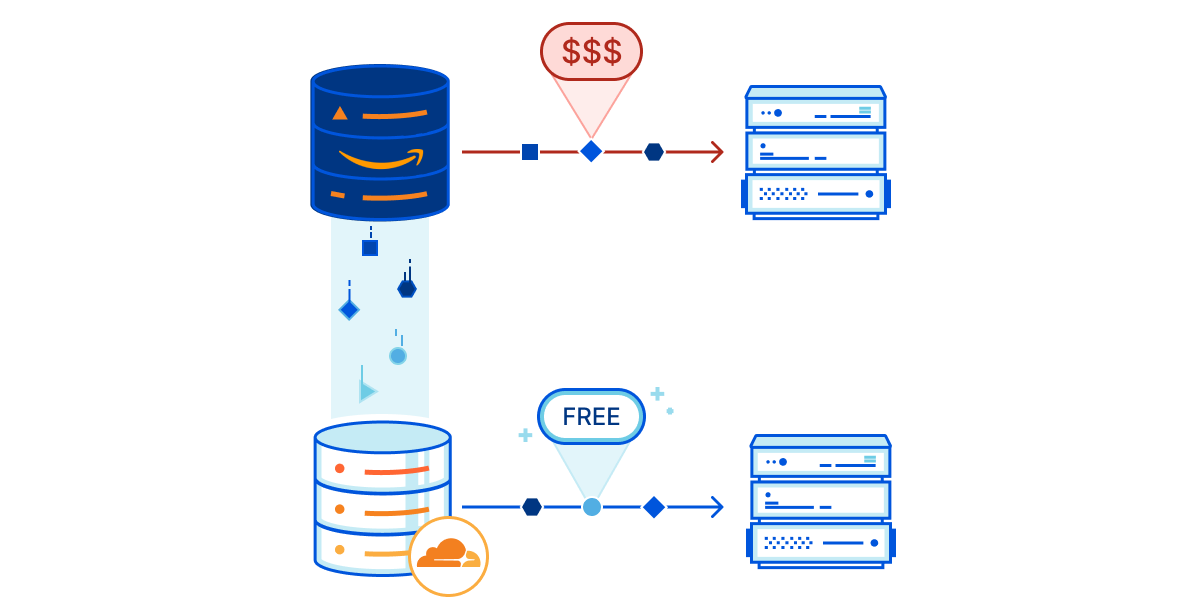
resource: https://blog.cloudflare.com/introducing-r2-object-storage
So what is Cloudflare R2?
Cloudflare R2 is a distributed, S3-compatible object storage service provided by Cloudflare.
It has some advantages:
- S3-compatible object storage This means I can use the tools and workflows that I used with Google Cloud Storage.
- No egress charges Also, Cloudflare R2 does not charge me for data transfer out. This is great for serving content.
- Easy data migration from existing providers Cloudflare offers built-in migration tools to move data from other providers. In this case, however, I chose not to use them.
Even though Cloudflare R2 has some advantages. Google Cloud Storage is still more mature and has more features
Authentication Model: IAM vs Access Keys
Google Cloud Storage has a system for managing access and permissions. It uses something called IAM roles. This allows me to control who can access my data and what they can do with it.
Cloudflare R2 uses access secret key pairs. This is simpler. It is also more limited. I have to manage the keys myself, which can be a problem if I have a lot of users or teams.
Lifecycle Rules
Google Cloud Storage also has something called lifecycle rules. This allows me to automate how my data is handled over time. For example, I can set it up so that old data is deleted or moved to storage. Cloudflare R2 does not have this feature. I have to do it manually.
Fine-Grained Permissions
Another difference between Google Cloud Storage and Cloudflare R2 is how they handle permissions. Google Cloud Storage allows me to set permissions at the bucket level or the object level. Cloudflare R2 does not have this level of control.
Why rclone?
resource: https://rclone.org
To move my data from Google Cloud Storage to Cloudflare R2, I used a tool called rclone.
rclone is a command-line tool designed for syncing and transferring files across different storage providers.
rclone is useful because it abstracts away the differences between providers.
- It supports a lot of cloud storage services.
- It provides a consistent interface.
- It also handles retries and parallel transfers, which makes it really reliable.
Migration Process
For this migration, I moved around 300 MB of data from Google Cloud Storage to Cloudflare R2 using rclone.
The migration process was not very complicated. I just had to configure both sides, verify access, run the transfer, and validate the results. There were some problems.
At first, I ran into errors because my billing account was deactivated. I had to reactivate it before I could proceed. Even after I did, there were still some issues. The system was not very consistent. Some requests failed.
rclone handled this really well. It skipped files that already existed and retried transfers. It also continued from where it left off, which made the process idempotent.
I intentionally avoided using the sync command at this stage. Instead, I used the copy command. This ensured that successfully transferred files remained untouched and failed files could be retried safely.
After the system stabilized and all files were transferred, I validated the result. I used the rclone checkcommand to make sure everything was okay. I also compared the file counts between the source and the destination and manually accessed several files from Cloudflare R2.
Key Takeaways
Here are the key takeaways from my experience.
- Cloud configuration changes are not always immediately consistent. When I reactivated my billing account, it took some time for the system to stabilize.
- It is really important to design your migration to be retry-safe. Using rclone copy of sync allowed me to rerun the migration multiple times safely.
- Partial success is normal and should be expected. The first migration attempt only transferred a subset of files. I was able to continue from the partial state and complete the migration.
- Idempotent tools reduce stress. Rclone avoids reuploading identical files by comparing them, which prevents duplication even when the same command is executed multiple times.
- Validation is not optional. A successful command does not guarantee results. Verifying with rclone check, comparing file counts, and manually accessing files ensured that the migration was actually complete.
- The data transfer itself was not very complicated. Most of the complexity came from handling states and making safe decisions during retries.
References
메타데이터
- post_id
- 9e08e00a524d
- slug
- migrating-from-google-cloud-storage-to-cloudflare-r2-with-rclone-9e08e00a524d
- url
- https://medium.com/@mgstabrani19/migrating-from-google-cloud-storage-to-cloudflare-r2-with-rclone-9e08e00a524d
- canonical_url
- https://medium.com/@mgstabrani19/migrating-from-google-cloud-storage-to-cloudflare-r2-with-rclone-9e08e00a524d
- author_url
- https://medium.com/@mgstabrani19
- status
- ok
- fetched_at
- 2026-07-13 06:23:13


