AI Agent Web Context Pipeline: How SaaS Builders Turn Live Web Data Into Trusted Answers
Most AI SaaS demos fail at the same boring moment: the user asks about something that changed yesterday. The model sounds confident, the…
AI Agent Web Context Pipeline: How SaaS Builders Turn Live Web Data Into Trusted Answers

AI Agent Web Context Pipeline
Most AI SaaS demos fail at the same boring moment: the user asks about something that changed yesterday. The model sounds confident, the answer looks polished, and the product quietly loses trust because the context was stale, noisy, or impossible to verify.
That problem is getting sharper as AI agents move from chat boxes into real workflows. Agents now research competitors, monitor accounts, enrich leads, read product docs, inspect policies, and prepare decisions for humans. They cannot do that well with only a prompt and a model. They need a web context pipeline: a reliable way to find live sources, extract clean content, validate it, cite it, and decide when not to answer.
This guide is for solo SaaS founders, micro SaaS builders, and developers building AI features that depend on current web data. No product pitch, no magic stack. Just the architecture, tradeoffs, checks, and implementation patterns that help live-web AI workflows feel useful instead of risky.
Why Live Web Context Is Becoming a Core AI SaaS Layer
Recent AI SaaS signals point in the same direction. Developer tools are adding persistent memory. Agent platforms are racing to connect to browsers, APIs, files, and workplace apps. Workflow automation projects are becoming more agentic. At the same time, security stories around URL parsing, credential leaks, and agent containment keep reminding builders that “just let the AI browse” is not a production strategy.
The practical shift is simple: users no longer want an AI app that only explains general knowledge. They want an AI app that can work with the current state of the world. That might mean today’s pricing page, a new competitor announcement, a fresh support article, a changing API doc, a government policy update, a customer’s public website, or a recent GitHub issue.
For AI SaaS builders, this creates a valuable but tricky product layer. A good web context pipeline can make your AI feature more useful, more grounded, and more defensible. A weak one can create hallucinations with citations, leak customer context to the wrong place, or burn tokens on messy pages that should never have entered the prompt.
Live web access is not a feature by itself. It is a supply chain for context. Treat it with the same care you give payments, authentication, and data storage.
The Search Intent Gap: Builders Need Architecture, Not Another Tool List
The missing practical value is the middle layer: how to design the pipeline so the agent knows what to search, what to trust, what to ignore, what to cache, what to cite, and when to ask a human for review. That is the gap this article fills.
What an AI Agent Web Context Pipeline Actually Does
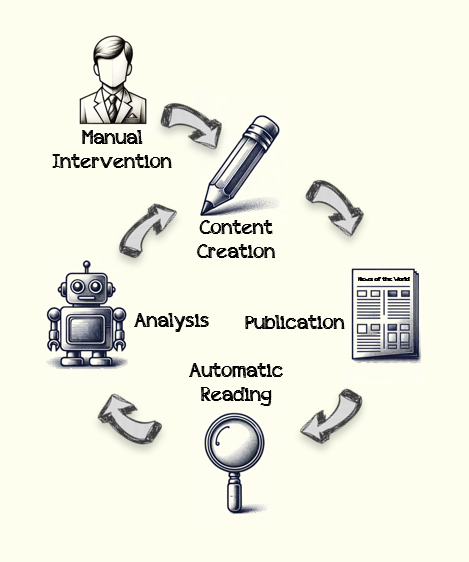
A web context pipeline is the path from a user’s question to a grounded, useful answer based on live or recently fetched sources. It is not only scraping. It includes planning, retrieval, extraction, cleaning, ranking, compression, validation, citation, storage, and monitoring.
A simple version looks like this:
- The user asks a question or triggers a workflow.
- The system decides whether live web context is needed.
- The agent creates search queries or target URLs.
- The pipeline fetches pages, documents, or structured data.
- The extractor converts messy pages into readable text or JSON.
- The system filters low-quality, duplicate, risky, or irrelevant content.
- The ranker selects the smallest useful context set.
- The model answers with citations, uncertainty, and next steps.
- The workflow logs source metadata for debugging and auditability.
The pipeline exists to handle those boring failures before users see them.
Start With the Decision: Does This Workflow Need the Web?
The cheapest, safest web request is the one you do not make. Before giving an AI agent live web access, route the task by context need.
Use live web retrieval when the answer depends on current, external, or customer-specific public information. Examples include competitor monitoring, public account research, regulatory updates, new API docs, pricing-page checks, public company news, open-source issue triage, and market scans.
Avoid live web retrieval when the answer should come from your product database, customer documents, internal knowledge base, or stable documentation. In those cases, web access adds noise and risk. It may also create an answer that sounds better but is less correct.
A simple routing rule
if question.requires_current_public_information:
    use_web_context_pipeline()
elif question.requires_customer_private_data:
    use_private_rag_pipeline()
elif question.requires_product_state:
    query_application_database()
else:
    answer_with_model_or_static_docs()
This is intentionally plain. The real value is not the syntax. It is the discipline. Your AI SaaS should know which context source has authority for each kind of question.
Design the Pipeline Around Source Authority
Not all web sources deserve the same trust. A forum comment, a vendor doc, a GitHub issue, a changelog, a standards page, and a scraped content farm should not be treated equally. If your agent flattens all sources into one context blob, it will eventually produce a confident mess.
Create source authority rules before writing prompts. For example:
- Official documentation beats tutorials for API behavior.
- Changelogs beat old blog posts for recent product changes.
- Primary sources beat summaries for policy, pricing, and security claims.
- Recent discussions can reveal pain points, but should not become facts without support.
- Customer-provided URLs should be treated as relevant, but not automatically trustworthy.
Each fetched item should carry metadata: URL, title, source type, fetch time, publish time when available, author or organization, content hash, extraction method, language, confidence, and known limitations. This metadata helps ranking, citations, freshness checks, and incident review.
Build for Clean Context, Not Maximum Context
More context often makes AI answers worse. A long scraped page can include cookie banners, navigation, ads, related posts, comments, outdated footers, unrelated sidebars, hidden prompts, and duplicate text. If you stuff all of that into the model, you pay more for lower quality.
Clean context means the extracted content is small, relevant, and structured enough for the model to use. Your extractor should remove boilerplate, preserve headings, keep lists, keep code blocks when needed, and mark missing fields honestly. If the page is a pricing page, keep plan names, prices, limits, and important footnotes. If the page is an API doc, keep endpoint names, parameters, examples, and version notes. If it is a news article, keep the headline, source, date, and claims with enough surrounding context.
A beginner mistake is to optimize only for successful fetches. A production pipeline also optimizes for clean failures. If a page cannot be fetched, parsed, or trusted, the system should say so in a structured way. “Not found” is better than pretending the page supported an answer.

Use a Three-Stage Retrieval Pattern
For many AI SaaS workflows, a three-stage retrieval pattern works well.
Stage 1: Discover
The goal is to find candidate sources. This can use a search API, a curated source list, a customer-provided URL, sitemap crawling, RSS feeds, GitHub search, or your own monitored source index. The output should be candidates, not final context.
Stage 2: Extract
The goal is to convert candidate sources into usable text or structured data. Use lightweight fetching for simple pages, browser rendering for JavaScript-heavy pages, document parsing for PDFs, and schema extraction when the workflow needs fields rather than prose.
Stage 3: Validate and Compress
The goal is to keep only the parts needed for the answer. Deduplicate repeated sections. Score relevance against the user task. Check freshness. Prefer primary sources. Keep citation anchors. Then compress the context into a concise packet the model can reason over.
context_packet = {
  "task": user_task,
  "sources": [
    {
      "url": url,
      "source_type": "official_docs",
      "fetched_at": timestamp,
      "freshness": "current_enough",
      "relevant_sections": sections,
      "limitations": []
    }
  ],
  "claims_to_answer": extracted_claims,
  "must_not_infer": unsupported_items
}
This kind of packet helps the model answer with evidence instead of vibes.
Security: Web Context Is an Untrusted Input
Every scraped page is untrusted input. It can contain prompt injection, malicious instructions, misleading data, broken markup, tracking URLs, weird redirects, or URL parsing tricks. Recent developer security discussions keep showing the same lesson: the boundary between “content” and “instruction” must be explicit.
Never let a fetched page issue tool commands directly. Never let it override system rules. Never let it decide where secrets go. Treat page text as evidence to analyze, not instructions to obey.
Practical controls:
- Strip or label hidden text, comments, scripts, and suspicious instruction-like content.
- Separate trusted developer instructions from untrusted web content in the prompt.
- Block credential-bearing requests from web-derived URLs unless explicitly approved.
- Normalize and parse URLs with one trusted library, then enforce allowlists or deny rules.
- Do not follow infinite redirect chains or fetch private network addresses from user-supplied URLs.
- Log source URLs and final destinations separately.
A good mental model is: the web can inform the agent, but it cannot command the agent.
Freshness: Current Does Not Always Mean Better
AI SaaS builders often overcorrect from stale model knowledge to “always fetch the latest.” That creates its own problems. New pages can be wrong, temporary, unverified, or less authoritative than stable docs. Freshness needs rules.
Define freshness by use case. A competitor price monitor may need same-day data. A compliance summary may need official sources and slower verification. A developer answer about an API may need the latest stable documentation, not a random issue from an hour ago. A market trend scan may value recent discussion, but should label it as signal, not fact.
Citations Should Prove Claims, Not Decorate Answers
Many AI products add citations as a trust costume. The answer looks grounded, but the cited page does not actually support the sentence. Users notice this quickly.
Instead, design claim-level citation checks. For important claims, the model should know which source supports the statement. If no source supports it, the answer should phrase it as uncertainty, a hypothesis, or a next step.
Useful citation behavior sounds like this:
- “The current docs show this endpoint accepts these fields…”
- “The pricing page lists usage limits, but it does not mention overage behavior.”
- “I found two recent discussions reporting this issue, but no official confirmation.”
- “The source is blocked, so this workflow should ask for a human check.”
This kind of honesty improves trust and reduces support burden. It also makes your product feel more professional because it knows the difference between evidence and inference.
The difference between noisy browsing and reliable web context is usually validation, not a bigger model.

Cost Control: Live Web Context Can Quietly Eat Margins
Web context pipelines create costs in several places: search API calls, browser rendering, document parsing, storage, embedding, reranking, model tokens, retries, and observability. The expensive part is rarely one dramatic request. It is the quiet multiplication of steps across many users.
Start with a token budget per workflow. Decide how many sources are allowed, how many sections can enter the final context, and when the pipeline should stop. Add caching for stable pages, but do not cache blindly. Cache the raw fetch, the cleaned extraction, the embedding, and the final context packet with separate expiration rules.
For example:
- Pricing pages: short cache, because they can change often.
- API version docs: medium cache, with changelog checks.
- Old blog posts: long cache, unless used for current claims.
- Forums and social discussion: short cache and lower authority.
Use cheaper models for classification, extraction checks, and summarization when quality is sufficient. Save stronger models for final synthesis, tricky reasoning, or high-risk decisions. The goal is not to use the smallest model everywhere. The goal is to spend intelligence where it changes the outcome.
Workflow Example: Competitor Change Monitor
Imagine a micro SaaS founder wants an AI agent that monitors competitor changes and creates a weekly product brief. A weak version would scrape five websites, summarize everything, and send a long email. A better version works like this:
- Maintain a curated list of competitor URLs: pricing, changelog, docs, integrations, and status pages.
- Fetch pages on a schedule with per-source freshness rules.
- Hash cleaned sections so the system detects meaningful changes, not footer noise.
- Classify changes by type: pricing, feature, integration, positioning, security, or docs.
- Ask the model to explain why the change matters for the user’s product category.
- Attach source links and changed snippets.
- Route high-impact changes to human review before notifying the whole team.
This is not just “AI browsing.” It is a workflow with boundaries, source authority, diffing, ranking, and a human decision point. That is what makes it useful.
Implementation Checklist for Builders
Use this checklist before shipping a web-connected AI feature:
- Context routing: The system knows when to use web, private data, app data, or no retrieval.
- Source rules: The pipeline ranks official, recent, and primary sources above weaker signals.
- Extraction quality: Boilerplate is removed, useful structure is preserved, and failures are explicit.
- Security boundaries: Web text cannot become tool instructions or override trusted rules.
- Freshness metadata: Fetch time and publish time are stored separately.
- Citation discipline: Important claims map to supporting sources.
- Cost budgets: Source count, token count, retries, and rendering are capped.
- Observability: Logs show query, sources, extraction status, final context, model route, and user-visible answer.
- Human review: Risky or unsupported outputs can be escalated instead of forced.
Metrics That Tell You Whether the Pipeline Works
Do not judge a web context pipeline only by answer quality in demos. Track operational metrics that reveal failure patterns.
- Fetch success rate: How often sources can be reached.
- Extraction confidence: How often the parser returns clean, relevant content.
- Context usefulness score: Whether selected sources helped answer the user’s actual question.
- Citation support rate: Percentage of key claims backed by cited sources.
- Unsupported answer rate: How often the agent should have said “not enough evidence.”
- Cost per successful answer: Total retrieval and model cost divided by useful completions.
- Time to usable answer: Not just latency, but latency for an answer the user trusts.
These metrics help you decide whether to improve search, extraction, ranking, prompts, caching, or source coverage. Without them, every failure looks like “the model messed up,” which is rarely the full story.
Common Mistakes to Avoid
Mistake 1: Letting the model choose sources without rules
Models can create plausible search plans, but they do not automatically understand your product’s trust hierarchy. Give them source policy, not just a browser.
Mistake 2: Treating scraped text as clean truth
Extraction is lossy. Pages are messy. Parsers miss fields. Always carry extraction confidence and limitations forward.
Mistake 3: Hiding uncertainty
Users do not need fake confidence. They need useful next steps. “I found no official source, but here are two weak signals” is often more valuable than a polished guess.
Mistake 4: Ignoring regional and account-specific page differences
Some pages change by geography, cookies, login state, device, or language. If that matters to the answer, say what was fetched and under what conditions.
Mistake 5: Shipping without replay
You need to replay a past workflow with the same sources and context packet. Otherwise, debugging user complaints becomes guesswork.
The Builder’s Bottom Line
The next wave of AI SaaS will not be won by products that merely connect a model to the internet. It will be won by products that can turn messy live information into clean, limited, cited, and useful context.
That is less glamorous than a viral agent demo, but far more valuable. Users do not care whether your AI “browsed.” They care whether it found the right source, understood the right part, admitted what it could not verify, and helped them make a better decision.
Build the pipeline for that. Your AI agent will feel less like a guessing machine and more like a careful teammate.
FAQ
What is an AI agent web context pipeline?
An AI agent web context pipeline is the system that helps an AI workflow find, fetch, clean, validate, rank, cite, and use live web information. It turns messy public sources into controlled context that a model can use for a grounded answer.
How is web context different from RAG?
RAG usually retrieves from a known knowledge base or document store. Web context often deals with live, external, changing, and untrusted sources. The same retrieval ideas apply, but web context needs stronger freshness, source authority, extraction, and security controls.
Should every AI SaaS agent have web browsing?
No. Web browsing is useful when the task depends on current public information. If the answer should come from private customer data, product state, or stable internal docs, web browsing can add risk and noise.
How do I reduce hallucinations in web-connected AI workflows?
Use source authority rules, clean extraction, claim-level citations, freshness metadata, and explicit uncertainty. Do not let the model treat every scraped page as equally trustworthy. Also test whether cited pages actually support the generated claims.
What are the biggest risks with AI agents using the web?
The biggest risks are prompt injection, bad source quality, stale data, URL and redirect issues, hidden page text, privacy overreach, unsupported citations, and runaway cost from too many fetches or tokens.
What should SaaS builders measure in a web context pipeline?
Track fetch success rate, extraction confidence, citation support rate, unsupported answer rate, cost per successful answer, freshness, source coverage, and time to usable answer. These metrics show where the workflow is actually failing.
메타데이터
- post_id
- 9e2d20f183cf
- slug
- ai-agent-web-context-pipeline-how-saas-builders-turn-live-web-data-into-trusted-answers-9e2d20f183cf
- url
- https://pub.towardsai.net/ai-agent-web-context-pipeline-how-saas-builders-turn-live-web-data-into-trusted-answers-9e2d20f183cf
- canonical_url
- https://pub.towardsai.net/ai-agent-web-context-pipeline-how-saas-builders-turn-live-web-data-into-trusted-answers-9e2d20f183cf
- author_url
- https://medium.com/@saaslyra
- status
- ok
- fetched_at
- 2026-08-24 15:39:55