Terraform Tutorial: The Complete Hands-On Course to Automate AWS Infrastructure as Code (Beginner →…
Hands-on labs, copy-paste code that actually runs, and a capstone project that gets you job-ready.
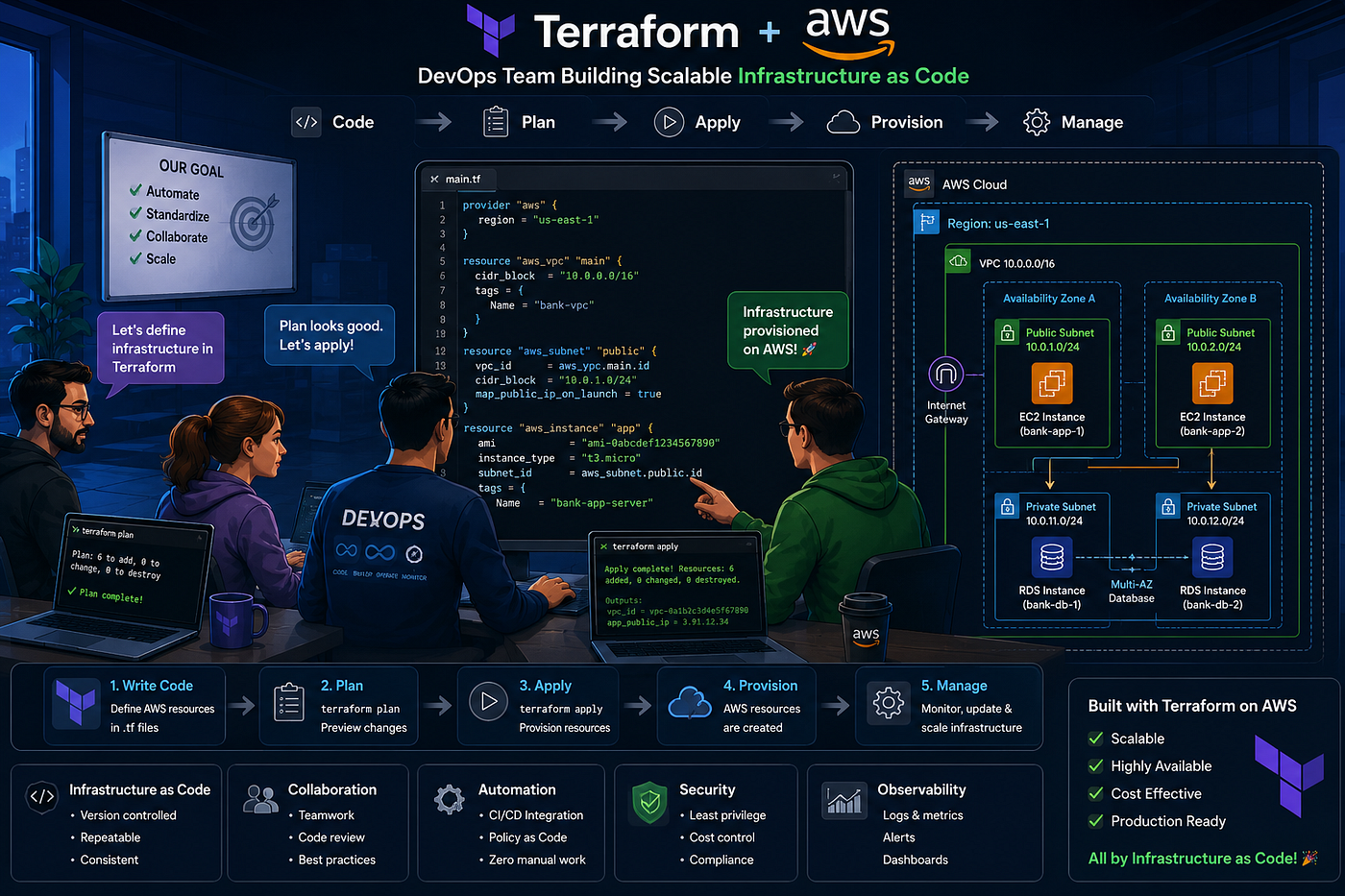
Terraform Tutorial: The Complete Hands-On Course to Automate AWS Infrastructure as Code (Beginner → Pro)
Hands-on labs, copy-paste code that actually runs, and a capstone project that gets you job-ready.
▶️ **YouTube , [📸 Instagram](https://www.instagram.com/devops_voice) , [💼 LinkedIn](https://www.linkedin.com/in/tushar-jadhav29/) , [✍️ Medium](https://medium.com/@tushar.jadhav29)**
Non-Member= Click HERE!
🎯 What You’ll Be Able to Do
By the end of this guide you will be able to:
- Explain what Infrastructure as Code (IaC) is and why Terraform is everywhere.
- Install Terraform, connect it to AWS, and run every core command (
init,plan,apply,destroy,validate,fmt,taint,graph). - Build EC2 instances, VPCs, subnets, S3 buckets, and security groups from scratch.
- Turn messy code into clean, reusable modules, use workspaces, and store remote state on S3.
- Ship a real banking app (DevOps Bank) end-to-end using everything you learned.
- Be ready for the HashiCorp Certified: Terraform Associate (003) exam.
Version note (June 2026): This guide is written for Terraform 1.15.x (the current stable line) and the AWS provider 6.x. The biggest change from older tutorials: you no longer need a DynamoDB table for state locking — S3 now does it natively with
use_lockfile = true. More on that in Module 6.
📖 Table of Contents
- What is Terraform & Why It Matters in 2026
- Getting Started & Lab Setup
- Building Cloud Infrastructure on AWS
- Read, Generate & Modify Configurations
- Terraform Provisioners
- Modules & Workspaces (DRY Principle)
- Remote State Management
- Terraform Cloud & Sentinel
- More Reusable Modules (S3, IAM, Security Group, CloudWatch)
- 🚀 Capstone Project — DevOpsBank
🧠 1 . What is Terraform & Why It Matters in 2026
Terraform is an open-source Infrastructure as Code (IaC) tool from HashiCorp. You describe the cloud resources you want in plain, readable files (written in HCL — HashiCorp Configuration Language), and Terraform figures out how to build them. It works with AWS, Azure, GCP, Kubernetes, GitHub, Cloudflare, and thousands of other providers.
In short: you write what you want, and Terraform works out how to make it.
Why engineers like it
- Declarative — you describe the final result, not the steps to get there.
- Idempotent — run it once or a hundred times, you get the same result.
- Multi-cloud — one tool, many providers.
- State-aware — it knows what already exists versus what should exist.
- Plan before apply — you see exactly what will change before it touches anything real.
The 2026 reality
Terraform is still one of the most widely used DevOps tools, and banks, fintechs, and SaaS companies use it to manage huge amounts of cloud infrastructure. If you work in DevOps, SRE, Cloud, or Platform Engineering, Terraform is a core skill.
🟢 2 . Getting Started & Setting Up Labs
2.1 Infrastructure as Code — the core idea
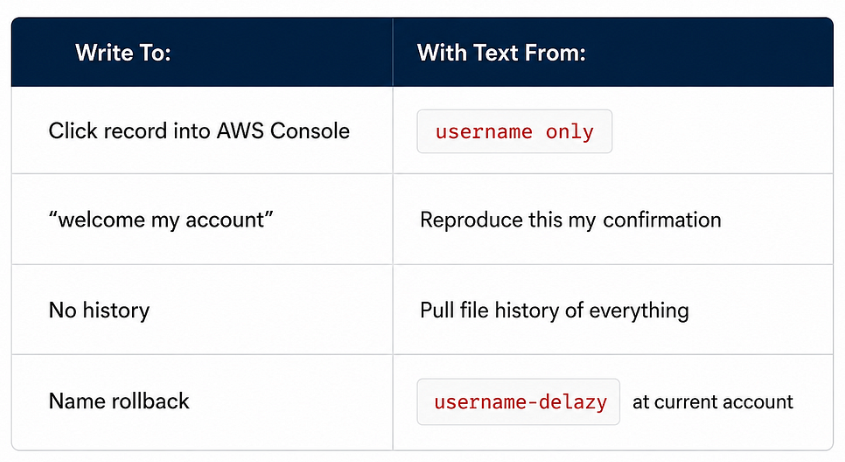
Before IaC, teams clicked through cloud consoles by hand. That’s fine for one server, but not for 500. IaC turns your infrastructure into code you can version, review, and repeat.
2.2 Lab — Install Terraform
Windows
- Download from the official site: https://developer.hashicorp.com/terraform/install
- Extract
terraform.exetoC:\terraform\. - Add
C:\terraform\to your System PATH (Environment Variables → Path → New). - Verify in PowerShell:
terraform -version
# Expected: Terraform v1.15.x on windows_amd64
macOS (Homebrew)
brew tap hashicorp/tap
brew install hashicorp/tap/terraform
terraform -version
Linux (Ubuntu/Debian)
wget -O - https://apt.releases.hashicorp.com/gpg | sudo gpg --dearmor -o /usr/share/keyrings/hashicorp-archive-keyring.gpg
echo "deb [signed-by=/usr/share/keyrings/hashicorp-archive-keyring.gpg] https://apt.releases.hashicorp.com $(lsb_release -cs) main" | sudo tee /etc/apt/sources.list.d/hashicorp.list
sudo apt update && sudo apt install terraform
2.3 Terraform vs Ansible — pick the right tool
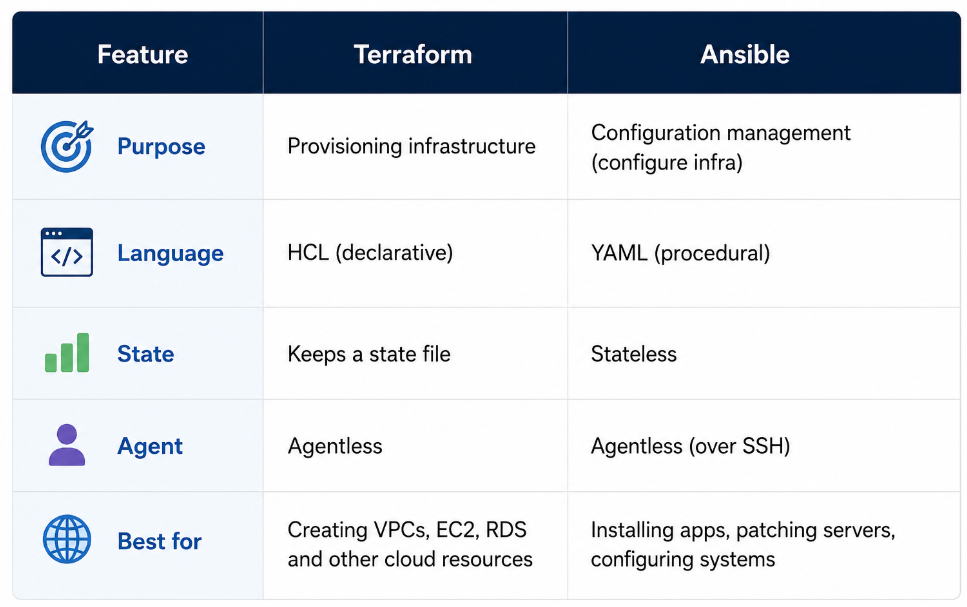
Pro tip: You don’t have to choose. Use Terraform to create the EC2 instance, then Ansible to configure what runs on it.
2.4 Terraform providers
Providers are plugins that talk to APIs. The AWS provider talks to AWS, the Azure provider talks to Azure, and so on.
terraform {
  required_providers {
    aws = {
      source  = "hashicorp/aws"
      version = "~> 6.0"
    }
  }
}

provider "aws" {
  region = "ap-south-1" # Mumbai
}
2.5 Connect Terraform to AWS
Method 1 : AWS CLI profile
aws configure
# Enter Access Key, Secret Key, and region
Terraform automatically reads ~/.aws/credentials.
Method 2: Environment variables
export AWS_ACCESS_KEY_ID="AKIA..."
export AWS_SECRET_ACCESS_KEY="..."
export AWS_REGION="ap-south-1"
❌ Never hard-code keys inside
.tffiles. They'll end up in Git and in your state file.
2.6 The core commands
|------------------|-----------------------------------------|------------------------|
|    Command       |       What it does                      |Everyday analogy        |
|------------------|-----------------------------------------|------------------------|
|terraform init    |Downloads providers, sets up the backend |npm install             |
|terraform plan    |Shows what will change                   |Preview before checkout |
|terraform apply   |Actually creates/changes resources       |Click "Pay"             |
|terraform destroy |Tears it all down                        |Cancel order, refund    |
|------------------|-----------------------------------------|------------------------|
Lab — your first config (main.tf):
provider "aws" {
  region = "ap-south-1"
}

resource "aws_s3_bucket" "demo" {
  bucket = "my-first-terraform-bucket-2026-yourname" # must be globally unique
}
terraform init
terraform plan
terraform apply -auto-approve
terraform destroy -auto-approve🟢 3. Building Cloud Infrastructure with Terraform
About the AMI IDs below: AMI IDs change over time and differ by region, so the exact IDs here may be stale. In real projects, look them up dynamically with a data source (see section 4.8) instead of hard-coding them.
3.1 Lab — create an EC2 instance
resource "aws_instance" "web" {
  ami           = "ami-0f5ee92e2d63afc18" # example: Amazon Linux 2023, Mumbai
  instance_type = "t2.micro"

  tags = {
    Name = "Terraform-Web-Server"
    Env  = "Dev"
  }
}
3.2 Lab — VPC, subnet, EIP, ENI (network basics)
resource "aws_vpc" "main" {
  cidr_block = "10.0.0.0/16"
  tags       = { Name = "tf-vpc" }
}

resource "aws_subnet" "public" {
  vpc_id                  = aws_vpc.main.id
  cidr_block              = "10.0.1.0/24"
  map_public_ip_on_launch = true
  availability_zone       = "ap-south-1a"
}

resource "aws_internet_gateway" "igw" {
  vpc_id = aws_vpc.main.id
}

resource "aws_eip" "nat" {
  domain = "vpc"
}

resource "aws_network_interface" "eni" {
  subnet_id   = aws_subnet.public.id
  private_ips = ["10.0.1.50"]
}
3.3 Lab — S3 + security group
resource "aws_s3_bucket" "data" {
  bucket = "devopsbank-data-2026"
}

resource "aws_security_group" "web_sg" {
  name   = "web-sg"
  vpc_id = aws_vpc.main.id

  ingress {
    from_port   = 80
    to_port     = 80
    protocol    = "tcp"
    cidr_blocks = ["0.0.0.0/0"]
  }

  egress {
    from_port   = 0
    to_port     = 0
    protocol    = "-1"
    cidr_blocks = ["0.0.0.0/0"]
  }
}
3.4 The state file — terraform.tfstate
Terraform tracks reality in terraform.tfstate (a JSON file). It compares three things:
- Desired state — your
.tffiles. - Recorded state — the
.tfstatefile. - Real state — what’s actually in AWS.
If these drift apart, terraform plan shows you the difference.
⚠️ Never edit the state file by hand. Never commit it to a public Git repo. Always back it up to S3 with versioning turned on.
3.5 Provider versioning
terraform {
  required_version = ">= 1.10.0"

  required_providers {
    aws = {
      source  = "hashicorp/aws"
      version = "~> 6.0" # any 6.x, but not 7.x
    }
  }
}
Operator Meaning Example
= Exact version= 6.10.0
!= Not equal != 6.0.0
>= Greater or equal >= 6.0
~> Pessimistic constraint ~> 6.0 allows 6.x, blocks 7.x🟢 4 . Read, Generate & Modify Configurations
This is one of the most important modules in Terraform and IaC. It covers how to read existing configurations, generate new infrastructure definitions, and safely modify resources while maintaining consistency across environments.
Make sure to spend sufficient time practicing the concepts and hands-on labs in this section. Mastering these skills will help you confidently manage real-world infrastructure changes, troubleshoot deployments, and automate cloud environments effectively.
4.1 Attributes & output values
Every resource exposes attributes you can reference.
resource "aws_instance" "web" {
  ami           = "ami-0f5ee92e2d63afc18"
  instance_type = "t2.micro"
}

output "public_ip" {
  value = aws_instance.web.public_ip
}

output "instance_id" {
  value = aws_instance.web.id
}
Run terraform output public_ip after apply to see the value.
4.2 Referencing one resource from another
resource "aws_eip" "ip" {
  instance = aws_instance.web.id # cross-reference
}
4.3 Variables & data types
Note: Each argument goes on its own line. This is the single most common HCL mistake —
typeanddefaultcannot share a line.
variable "region" {
  type    = string
  default = "ap-south-1"
}

variable "instance_count" {
  type    = number
  default = 2
}

variable "enable_monitor" {
  type    = bool
  default = true
}

variable "azs" {
  type    = list(string)
  default = ["ap-south-1a", "ap-south-1b"]
}

variable "tags" {
  type = map(string)
  default = {
    Env   = "dev"
    Owner = "team"
  }
}
Three ways to set a variable:
- CLI:
terraform apply -var="region=us-east-1" - File:
terraform.tfvars(loaded automatically) - Env var:
TF_VAR_region=us-east-1
4.4 Variable validation (catch bad input early)
A small feature that saves a lot of pain — reject bad values before Terraform even plans:
variable "instance_type" {
  type    = string
  default = "t3.micro"

  validation {
    condition     = contains(["t2.micro", "t3.micro", "t3.small"], var.instance_type)
    error_message = "instance_type must be one of t2.micro, t3.micro, or t3.small."
  }
}
4.5 Reading from a list & a map
output "first_az" {
  value = var.azs[0] # list
}

output "owner" {
  value = var.tags["Owner"] # map
}
4.6 Meta-arguments — count & for_each
**count** — for identical copies:
resource "aws_instance" "web" {
  count         = 3
  ami           = "ami-0f5ee92e2d63afc18"
  instance_type = "t2.micro"

  tags = {
    Name = "web-${count.index}"
  }
}**for_each** — for unique resources:
variable "users" {
  default = {
    alice = "developer"
    bob   = "admin"
  }
}

resource "aws_iam_user" "team" {
  for_each = var.users
  name     = each.key

  tags = {
    Role = each.value
  }
}
Rule of thumb: Use
countfor copies,for_eachfor unique resources.for_eachis safer because adding or removing one item doesn't shuffle the others.
4.7 Conditionals & locals
locals {
  env      = "production"
  instance = local.env == "production" ? "t3.large" : "t2.micro"

  common_tags = {
    Environment = local.env
    ManagedBy   = "Terraform"
  }
}

resource "aws_instance" "app" {
  ami           = "ami-0f5ee92e2d63afc18"
  instance_type = local.instance
  tags          = local.common_tags
}
4.8 for expressions & splat
# for expression — transform a list
output "upper_names" {
  value = [for n in var.azs : upper(n)]
}

# splat — pull one attribute from many resources
output "all_ips" {
  value = aws_instance.web[*].public_ip
}
4.9 Data sources & dynamic blocks
Data source — read something that already exists (here, the latest Amazon Linux AMI, so you never hard-code an ID):
data "aws_ami" "amazon_linux" {
  most_recent = true
  owners      = ["amazon"]

  filter {
    name   = "name"
    values = ["al2023-ami-*-x86_64"]
  }
}

resource "aws_instance" "web" {
  ami           = data.aws_ami.amazon_linux.id
  instance_type = "t2.micro"
}
Dynamic block — generate repeated nested blocks from a variable:
variable "ports" {
  default = [80, 443, 22]
}

resource "aws_security_group" "dyn" {
  name = "dyn-sg"

  dynamic "ingress" {
    for_each = var.ports
    content {
      from_port   = ingress.value
      to_port     = ingress.value
      protocol    = "tcp"
      cidr_blocks = ["0.0.0.0/0"]
    }
  }
}
4.10 Lifecycle, depends_on, and moved
A few quality-of-life features worth knowing:
resource "aws_instance" "web" {
  ami           = data.aws_ami.amazon_linux.id
  instance_type = "t2.micro"

  lifecycle {
    create_before_destroy = true # avoid downtime on replacement
    prevent_destroy       = false # set true to guard critical resources
    ignore_changes        = [tags["LastScanned"]]
  }
}

# Force a dependency Terraform can't infer on its own
resource "aws_s3_bucket_policy" "p" {
  bucket     = aws_s3_bucket.data.id
  policy     = "..."
  depends_on = [aws_s3_bucket.data]
}

# Renamed a resource? Tell Terraform instead of destroying + recreating
moved {
  from = aws_instance.old_name
  to   = aws_instance.web
}
4.11 import blocks (Terraform 1.5+)
Bring an existing AWS resource under Terraform’s control without the old two-step CLI dance:
import {
  to = aws_instance.legacy
  id = "i-0abcd1234efgh5678"
}

resource "aws_instance" "legacy" {
  # fill this in to match the real instance
  ami           = "ami-0f5ee92e2d63afc18"
  instance_type = "t2.micro"
}
Then run terraform plan -generate-config-out=generated.tf to have Terraform draft the matching config for you.
4.12 Debugging & quality commands
# Verbose logs
export TF_LOG=DEBUG
terraform apply

# Check syntax
terraform validate

# Auto-format
terraform fmt -recursive

# Force-recreate a resource
terraform apply -replace=aws_instance.web   # modern (>= 0.15.2)
# terraform taint aws_instance.web          # legacy, avoid

# Dependency graph
terraform graph | dot -Tpng > graph.png

# Save a plan, apply it later
terraform plan -out=tfplan
terraform apply tfplan
🟢 5 . Terraform Provisioners
Provisioners run scripts on a local or remote machine after a resource is created. Treat them as a last resort — prefer user_data or Ansible, because provisioners run only at create time and aren't tracked in state.
resource "aws_instance" "web" {
  ami           = "ami-0f5ee92e2d63afc18"
  instance_type = "t2.micro"
  key_name      = "my-keypair"

  connection {
    type        = "ssh"
    user        = "ec2-user"
    private_key = file("~/.ssh/my-keypair.pem")
    host        = self.public_ip
  }

  # 1. file — copy a file to the instance
  provisioner "file" {
    source      = "app.conf"
    destination = "/tmp/app.conf"
  }

  # 2. remote-exec — run commands on the instance
  provisioner "remote-exec" {
    inline = [
      "sudo yum install -y nginx",
      "sudo systemctl start nginx",
    ]
  }

  # 3. local-exec — run a command on YOUR machine
  provisioner "local-exec" {
    command = "echo ${self.public_ip} >> hosts.txt"
  }
}
🟢 6 . Modules & Workspaces (DRY Principle)
6.1 Why modules?
DRY = Don’t Repeat Yourself. If you copy-paste 200 lines for each of 5 environments, you’ve got 1,000 lines of bugs to maintain. A module turns that into a few lines per environment.
6.2 Standard module structure
modules/
└── ec2/
    ├── main.tf
    ├── variables.tf
└── outputs.tf**modules/ec2/main.tf**
resource "aws_instance" "this" {
  ami           = var.ami
  instance_type = var.instance_type
  tags          = var.tags
}**modules/ec2/variables.tf**
variable "ami" {
  type = string
}

variable "instance_type" {
  type    = string
  default = "t2.micro"
}

variable "tags" {
  type    = map(string)
  default = {}
}**modules/ec2/outputs.tf**
output "id" {
  value = aws_instance.this.id
}

output "public_ip" {
  value = aws_instance.this.public_ip
}
Root main.tf — use the module:
module "web_server" {
  source        = "./modules/ec2"
  ami           = "ami-0f5ee92e2d63afc18"
  instance_type = "t3.small"
  tags          = { Name = "web" }
}

output "web_ip" {
  value = module.web_server.public_ip
}
6.3 Modules from the Terraform Registry
You don’t always have to write modules yourself:
module "vpc" {
  source  = "terraform-aws-modules/vpc/aws"
  version = "5.21.0"

  name = "devopsbank-vpc"
  cidr = "10.0.0.0/16"

  azs             = ["ap-south-1a", "ap-south-1b"]
  public_subnets  = ["10.0.1.0/24", "10.0.2.0/24"]
  private_subnets = ["10.0.11.0/24", "10.0.12.0/24"]
}
6.4 Workspaces — manage multiple environments
terraform workspace new dev
terraform workspace new prod
terraform workspace select prod
terraform workspace list
Each workspace has its own state. Use terraform.workspace in code:
resource "aws_instance" "app" {
  ami           = "ami-0f5ee92e2d63afc18"
  instance_type = terraform.workspace == "prod" ? "t3.large" : "t2.micro"

  tags = {
    Env = terraform.workspace
  }
}
Heads-up: Workspaces are great for “same config, slightly different size” environments. For environments that differ a lot, prefer separate folders/state files instead.
🟢 7. Remote State Management
7.1 Git basics for Terraform teams
git init
git add .
git commit -m "initial terraform config"
git remote add origin git@github.com:you/iac.git
git push -u origin main

git checkout -b feature/add-rds
# ...work...
git commit -am "add rds module"
git push origin feature/add-rds

git tag -a v1.0.0 -m "first release"
Always add a .gitignore:
*.tfstate
*.tfstate.backup
.terraform/
*.tfvars
7.2 Remote state on S3 — with native locking (the 2026 way)
This is the part most older tutorials get wrong. You no longer need DynamoDB. Since Terraform 1.10 (experimental) and 1.11+ (generally available), the S3 backend can lock state by itself using use_lockfile = true. The old dynamodb_table argument is now deprecated and will be removed in a future version.
Step 1 — bootstrap an S3 bucket (run once):
resource "aws_s3_bucket" "tfstate" {
  bucket = "devopsbank-tfstate-2026"
}

resource "aws_s3_bucket_versioning" "v" {
  bucket = aws_s3_bucket.tfstate.id

  versioning_configuration {
    status = "Enabled"
  }
}

resource "aws_s3_bucket_server_side_encryption_configuration" "enc" {
  bucket = aws_s3_bucket.tfstate.id

  rule {
    apply_server_side_encryption_by_default {
      sse_algorithm = "AES256"
    }
  }
}
Step 2 — configure the backend in your real project:
terraform {
  backend "s3" {
    bucket       = "devopsbank-tfstate-2026"
    key          = "prod/terraform.tfstate"
    region       = "ap-south-1"
    encrypt      = true
    use_lockfile = true # native S3 locking — no DynamoDB needed
  }
}
terraform init -migrate-stateMigrating from DynamoDB? Keep both
dynamodb_tableanduse_lockfile = truefor one cycle, confirm everything works, then drop thedynamodb_tableline and delete the old lock table. Zero downtime.
7.3 Reading another project’s state
Need an output from a different state file (for example, a shared VPC ID)? Use the terraform_remote_state data source:
data "terraform_remote_state" "network" {
  backend = "s3"
  config = {
    bucket = "devopsbank-tfstate-2026"
    key    = "prod/network/terraform.tfstate"
    region = "ap-south-1"
  }
}

resource "aws_instance" "app" {
  ami           = "ami-0f5ee92e2d63afc18"
  instance_type = "t3.small"
  subnet_id     = data.terraform_remote_state.network.outputs.public_subnet_id
}
7.4 Importing existing resources (CLI)
terraform import aws_instance.legacy i-0abcd1234efgh5678Then write matching HCL (or use the import block from section 4.11, which is the modern approach).
🟢 8 . Terraform Cloud (HCP Terraform) & Sentinel
HCP Terraform (formerly Terraform Cloud) is HashiCorp’s hosted service:
- Stores state remotely (no S3 to manage yourself).
- Runs
planandapplyon cloud workers. - Adds policy-as-code with Sentinel.
Sentinel example — block expensive instance types. Note this is the Sentinel language (not Python):
## python
import "tfplan/v2" as tfplan

allowed_types = ["t2.micro", "t3.micro", "t3.small"]

main = rule {
  all tfplan.resource_changes as _, rc {
    rc.type is "aws_instance" implies
      rc.change.after.instance_type in allowed_types
  }
}
If someone tries to launch a t3.2xlarge, the policy fails the run before anything is created.
🟢 9. More Reusable Modules & Examples
These are the modules you’ll reach for again and again. Each one is small, self-contained, and ready to drop into the modules/ folder.
9.1 S3 bucket module (versioned + encrypted + public access blocked)
**modules/s3/variables.tf**
variable "bucket_name" {
  type = string
}

variable "enable_versioning" {
  type    = bool
  default = true
}

variable "tags" {
  type    = map(string)
  default = {}
}**modules/s3/main.tf**
resource "aws_s3_bucket" "this" {
  bucket = var.bucket_name
  tags   = var.tags
}

resource "aws_s3_bucket_versioning" "this" {
  bucket = aws_s3_bucket.this.id

  versioning_configuration {
    status = var.enable_versioning ? "Enabled" : "Suspended"
  }
}

resource "aws_s3_bucket_server_side_encryption_configuration" "this" {
  bucket = aws_s3_bucket.this.id

  rule {
    apply_server_side_encryption_by_default {
      sse_algorithm = "AES256"
    }
  }
}

resource "aws_s3_bucket_public_access_block" "this" {
  bucket                  = aws_s3_bucket.this.id
  block_public_acls       = true
  block_public_policy     = true
  ignore_public_acls      = true
  restrict_public_buckets = true
}**modules/s3/outputs.tf**
output "bucket_id" {
  value = aws_s3_bucket.this.id
}

output "bucket_arn" {
  value = aws_s3_bucket.this.arn
}
Use it:
module "documents" {
  source      = "./modules/s3"
  bucket_name = "devopsbank-documents-prod"
  tags        = { Project = "bank" }
}
9.2 IAM module (role + policy for EC2)
A common need: give EC2 instances permission to read from S3.
**modules/iam/variables.tf**
variable "role_name" {
  type = string
}

variable "bucket_arn" {
  type = string
}**modules/iam/main.tf**
data "aws_iam_policy_document" "assume" {
  statement {
    actions = ["sts:AssumeRole"]
    principals {
      type        = "Service"
      identifiers = ["ec2.amazonaws.com"]
    }
  }
}

resource "aws_iam_role" "this" {
  name               = var.role_name
  assume_role_policy = data.aws_iam_policy_document.assume.json
}

data "aws_iam_policy_document" "s3_read" {
  statement {
    actions   = ["s3:GetObject", "s3:ListBucket"]
    resources = [var.bucket_arn, "${var.bucket_arn}/*"]
  }
}

resource "aws_iam_role_policy" "s3_read" {
  name   = "${var.role_name}-s3-read"
  role   = aws_iam_role.this.id
  policy = data.aws_iam_policy_document.s3_read.json
}

resource "aws_iam_instance_profile" "this" {
  name = "${var.role_name}-profile"
  role = aws_iam_role.this.name
}**modules/iam/outputs.tf**
output "instance_profile_name" {
  value = aws_iam_instance_profile.this.name
}

output "role_arn" {
  value = aws_iam_role.this.arn
}
9.3 Security group module (flexible, with dynamic ingress)
One reusable module instead of writing security groups by hand every time.
**modules/sg/variables.tf**
variable "name" {
  type = string
}

variable "vpc_id" {
  type = string
}

variable "ingress_ports" {
  type    = list(number)
  default = [80, 443]
}

variable "ingress_cidrs" {
  type    = list(string)
  default = ["0.0.0.0/0"]
}**modules/sg/main.tf**
resource "aws_security_group" "this" {
  name   = var.name
  vpc_id = var.vpc_id

  dynamic "ingress" {
    for_each = var.ingress_ports
    content {
      from_port   = ingress.value
      to_port     = ingress.value
      protocol    = "tcp"
      cidr_blocks = var.ingress_cidrs
    }
  }

  egress {
    from_port   = 0
    to_port     = 0
    protocol    = "-1"
    cidr_blocks = ["0.0.0.0/0"]
  }

  tags = { Name = var.name }
}**modules/sg/outputs.tf**
output "security_group_id" {
  value = aws_security_group.this.id
}
9.4 CloudWatch monitoring module (CPU alarm + email alert)
Get an email when an instance’s CPU stays high.
**modules/monitoring/variables.tf**
variable "instance_id" {
  type = string
}

variable "alert_email" {
  type = string
}

variable "cpu_threshold" {
  type    = number
  default = 80
}**modules/monitoring/main.tf**
resource "aws_sns_topic" "alerts" {
  name = "cpu-alerts"
}

resource "aws_sns_topic_subscription" "email" {
  topic_arn = aws_sns_topic.alerts.arn
  protocol  = "email"
  endpoint  = var.alert_email
}

resource "aws_cloudwatch_metric_alarm" "high_cpu" {
  alarm_name          = "high-cpu-${var.instance_id}"
  comparison_operator = "GreaterThanThreshold"
  evaluation_periods  = 2
  metric_name         = "CPUUtilization"
  namespace           = "AWS/EC2"
  period              = 300
  statistic           = "Average"
  threshold           = var.cpu_threshold
  alarm_description   = "Triggers when CPU is above the threshold"
  alarm_actions       = [aws_sns_topic.alerts.arn]

  dimensions = {
    InstanceId = var.instance_id
  }
}
After applying, check your inbox and confirm the SNS email subscription, or you won’t receive alerts.
🚀 10. LAB — Project: DevOPs Bank
Goal: Deploy a complete, production-style banking app on AWS using only Terraform — VPC, Application Load Balancer, an Auto Scaling Group of web servers, RDS MySQL, S3 for documents, remote state, and modules. Zero clicks in the AWS console.
Architecture
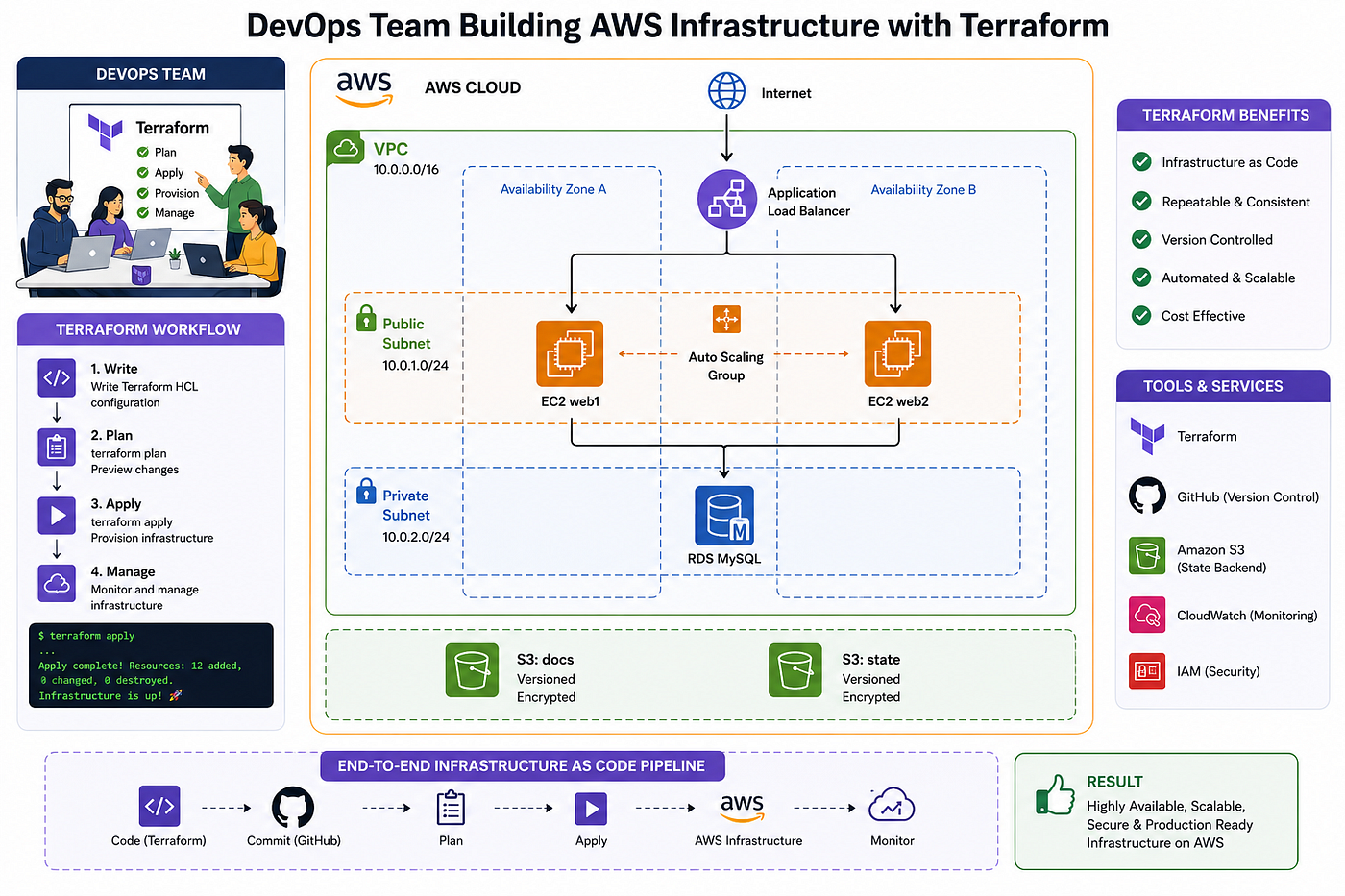
Security note: For simplicity, the web tier below sits in public subnets. In a hardened production setup you’d put the app servers in private subnets behind the load balancer and use a NAT gateway for outbound traffic. The RDS database stays private either way.
Project structure
Bank/
├── backend.tf
├── main.tf
├── variables.tf
├── outputs.tf
├── terraform.tfvars
└── modules/
    ├── network/
    ├── compute/
    └── database/
backend.tf
terraform {
  required_version = ">= 1.11.0"

  required_providers {
    aws = {
      source  = "hashicorp/aws"
      version = "~> 6.0"
    }
  }

  backend "s3" {
    bucket       = "devopsbank-tfstate-2026"
    key          = "prod/terraform.tfstate"
    region       = "ap-south-1"
    encrypt      = true
    use_lockfile = true # native S3 locking
  }
}

provider "aws" {
  region = var.region
}
variables.tf
variable "region" {
  default = "ap-south-1"
}

variable "project" {
  default = "devopsbank"
}

variable "environment" {
  default = "prod"
}

variable "db_username" {
  type      = string
  sensitive = true
}

variable "db_password" {
  type      = string
  sensitive = true
}

variable "instance_type" {
  default = "t3.small"
}
main.tf
module "network" {
  source        = "./modules/network"
  project       = var.project
  environment   = var.environment
  vpc_cidr      = "10.0.0.0/16"
  public_cidrs  = ["10.0.1.0/24", "10.0.2.0/24"]
  private_cidrs = ["10.0.11.0/24", "10.0.12.0/24"]
  azs           = ["ap-south-1a", "ap-south-1b"]
}

module "compute" {
  source            = "./modules/compute"
  project           = var.project
  vpc_id            = module.network.vpc_id
  public_subnet_ids = module.network.public_subnet_ids
  instance_type     = var.instance_type
}

module "database" {
  source             = "./modules/database"
  project            = var.project
  vpc_id             = module.network.vpc_id
  private_subnet_ids = module.network.private_subnet_ids
  db_username        = var.db_username
  db_password        = var.db_password
  app_sg_id          = module.compute.app_sg_id
}

resource "aws_s3_bucket" "documents" {
  bucket = "${var.project}-documents-${var.environment}"
}

resource "aws_s3_bucket_server_side_encryption_configuration" "docs" {
  bucket = aws_s3_bucket.documents.id

  rule {
    apply_server_side_encryption_by_default {
      sse_algorithm = "AES256"
    }
  }
}
modules/network/main.tf
resource "aws_vpc" "this" {
  cidr_block           = var.vpc_cidr
  enable_dns_hostnames = true
  tags                 = { Name = "${var.project}-vpc" }
}

resource "aws_subnet" "public" {
  count                   = length(var.public_cidrs)
  vpc_id                  = aws_vpc.this.id
  cidr_block              = var.public_cidrs[count.index]
  availability_zone       = var.azs[count.index]
  map_public_ip_on_launch = true
  tags                    = { Name = "${var.project}-public-${count.index}" }
}

resource "aws_subnet" "private" {
  count             = length(var.private_cidrs)
  vpc_id            = aws_vpc.this.id
  cidr_block        = var.private_cidrs[count.index]
  availability_zone = var.azs[count.index]
  tags              = { Name = "${var.project}-private-${count.index}" }
}

resource "aws_internet_gateway" "igw" {
  vpc_id = aws_vpc.this.id
}

resource "aws_route_table" "public" {
  vpc_id = aws_vpc.this.id

  route {
    cidr_block = "0.0.0.0/0"
    gateway_id = aws_internet_gateway.igw.id
  }
}

resource "aws_route_table_association" "public" {
  count          = length(aws_subnet.public)
  subnet_id      = aws_subnet.public[count.index].id
  route_table_id = aws_route_table.public.id
}**modules/network/variables.tf**
variable "project" {
  type = string
}

variable "environment" {
  type = string
}

variable "vpc_cidr" {
  type = string
}

variable "public_cidrs" {
  type = list(string)
}

variable "private_cidrs" {
  type = list(string)
}

variable "azs" {
  type = list(string)
}**modules/network/outputs.tf**
output "vpc_id" {
  value = aws_vpc.this.id
}

output "public_subnet_ids" {
  value = aws_subnet.public[*].id
}

output "private_subnet_ids" {
  value = aws_subnet.private[*].id
}
modules/compute/main.tf (ALB + Auto Scaling Group)
This version is complete — it includes the target group and listener that the original left out, so the load balancer actually routes traffic.
resource "aws_security_group" "alb" {
  vpc_id = var.vpc_id

  ingress {
    from_port   = 80
    to_port     = 80
    protocol    = "tcp"
    cidr_blocks = ["0.0.0.0/0"]
  }

  egress {
    from_port   = 0
    to_port     = 0
    protocol    = "-1"
    cidr_blocks = ["0.0.0.0/0"]
  }
}

resource "aws_security_group" "app" {
  vpc_id = var.vpc_id

  ingress {
    from_port       = 80
    to_port         = 80
    protocol        = "tcp"
    security_groups = [aws_security_group.alb.id]
  }

  egress {
    from_port   = 0
    to_port     = 0
    protocol    = "-1"
    cidr_blocks = ["0.0.0.0/0"]
  }
}

resource "aws_lb" "this" {
  name               = "${var.project}-alb"
  internal           = false
  load_balancer_type = "application"
  security_groups    = [aws_security_group.alb.id]
  subnets            = var.public_subnet_ids
}

resource "aws_lb_target_group" "app" {
  name     = "${var.project}-tg"
  port     = 80
  protocol = "HTTP"
  vpc_id   = var.vpc_id

  health_check {
    path                = "/"
    healthy_threshold   = 2
    unhealthy_threshold = 2
  }
}

resource "aws_lb_listener" "http" {
  load_balancer_arn = aws_lb.this.arn
  port              = 80
  protocol          = "HTTP"

  default_action {
    type             = "forward"
    target_group_arn = aws_lb_target_group.app.arn
  }
}

resource "aws_launch_template" "app" {
  name_prefix            = "${var.project}-lt-"
  image_id               = "ami-0f5ee92e2d63afc18"
  instance_type          = var.instance_type
  vpc_security_group_ids = [aws_security_group.app.id]

  user_data = base64encode(<<-EOF
    #!/bin/bash
    yum install -y httpd
    echo "<h1>Welcome to DevOps Bank - Terraform Powered</h1>" > /var/www/html/index.html
    systemctl enable httpd && systemctl start httpd
  EOF
  )
}

resource "aws_autoscaling_group" "app" {
  name                = "${var.project}-asg"
  desired_capacity    = 2
  max_size            = 4
  min_size            = 2
  vpc_zone_identifier = var.public_subnet_ids
  target_group_arns   = [aws_lb_target_group.app.arn]

  launch_template {
    id      = aws_launch_template.app.id
    version = "$Latest"
  }
}**modules/compute/variables.tf**
variable "project" {
  type = string
}

variable "vpc_id" {
  type = string
}

variable "public_subnet_ids" {
  type = list(string)
}

variable "instance_type" {
  type    = string
  default = "t3.small"
}**modules/compute/outputs.tf**
output "app_sg_id" {
  value = aws_security_group.app.id
}

output "alb_dns_name" {
  value = aws_lb.this.dns_name
}
modules/database/main.tf
resource "aws_db_subnet_group" "this" {
  name       = "${var.project}-dbsg"
  subnet_ids = var.private_subnet_ids
}

resource "aws_security_group" "db" {
  vpc_id = var.vpc_id

  ingress {
    from_port       = 3306
    to_port         = 3306
    protocol        = "tcp"
    security_groups = [var.app_sg_id]
  }

  egress {
    from_port   = 0
    to_port     = 0
    protocol    = "-1"
    cidr_blocks = ["0.0.0.0/0"]
  }
}

resource "aws_db_instance" "this" {
  identifier             = "${var.project}-db"
  engine                 = "mysql"
  engine_version         = "8.0"
  instance_class         = "db.t3.micro"
  allocated_storage      = 20
  username               = var.db_username
  password               = var.db_password
  db_subnet_group_name   = aws_db_subnet_group.this.name
  vpc_security_group_ids  = [aws_security_group.db.id]
  skip_final_snapshot    = true
  storage_encrypted      = true
}**modules/database/variables.tf**
variable "project" {
  type = string
}

variable "vpc_id" {
  type = string
}

variable "private_subnet_ids" {
  type = list(string)
}

variable "db_username" {
  type      = string
  sensitive = true
}

variable "db_password" {
  type      = string
  sensitive = true
}

variable "app_sg_id" {
  type = string
}
outputs.tf (root)
output "alb_dns_name" {
  value = module.compute.alb_dns_name
}
Deploy it
terraform init
terraform workspace new prod
terraform plan -out=plan.out
terraform apply plan.out
terraform output alb_dns_name
# → http://devopsbank-alb-xxxxx.ap-south-1.elb.amazonaws.com
🎉 You just deployed a real banking app architecture with one command.
To clean up: terraform destroy -auto-approve
🚀 100+ Handy Knowledge Hub: All-in-One Linux, DevOps & Automation Blogs
👉 **Click here to read all my topic-wise blogs on a single page**
***🐧 Linux Server Configuration — Complete Administrator’s Guide (Beginner → Advanced → Production)***
***🏆 Ultimate DevOps & SRE Learning Hub (2026 Edition) — 100% Free, Real-World Knowledge***
🌟 Final Note
This single page is designed to be:
- 📌 Bookmarked
- 📌 Shared
- 📌 Used daily
Thank you for reading! 😊🚀
If you’re a Linux admin, DevOps engineer, cloud engineer, or SRE — this page is your personal technical library.
👏 If it helped you, clap & share 💬 Drop a comment if you want a topic-wise PDF or roadmap next
🐳Happy Learning & Troubleshooting!
terraform tutorial, terraform aws tutorial, infrastructure as code, terraform for beginners, terraform hands-on labs, terraform modules, terraform cloud, terraform sentinel, iac best practices 2026
메타데이터
- post_id
- 9eebfbbcb2e4
- slug
- terraform-tutorial-the-complete-hands-on-course-to-automate-aws-infrastructure-as-code-beginner-9eebfbbcb2e4
- url
- https://medium.com/beyond-localhost/terraform-tutorial-the-complete-hands-on-course-to-automate-aws-infrastructure-as-code-beginner-9eebfbbcb2e4
- canonical_url
- https://medium.com/beyond-localhost/terraform-tutorial-the-complete-hands-on-course-to-automate-aws-infrastructure-as-code-beginner-9eebfbbcb2e4
- author_url
- https://medium.com/@tushar.jadhav29
- status
- ok
- fetched_at
- 2026-07-09 17:36:58