Building an AI-Powered Ticket Classification System: Why Fine-Tuning Beats Zero-Shot at Scale
Stop burning tokens on repetitive taxonomy prompts. Train once on 3,500 clean examples, classify 70,000 tickets for $500 total, then deploy…
Building an AI-Powered Ticket Classification System: Why Fine-Tuning Beats Zero-Shot at Scale
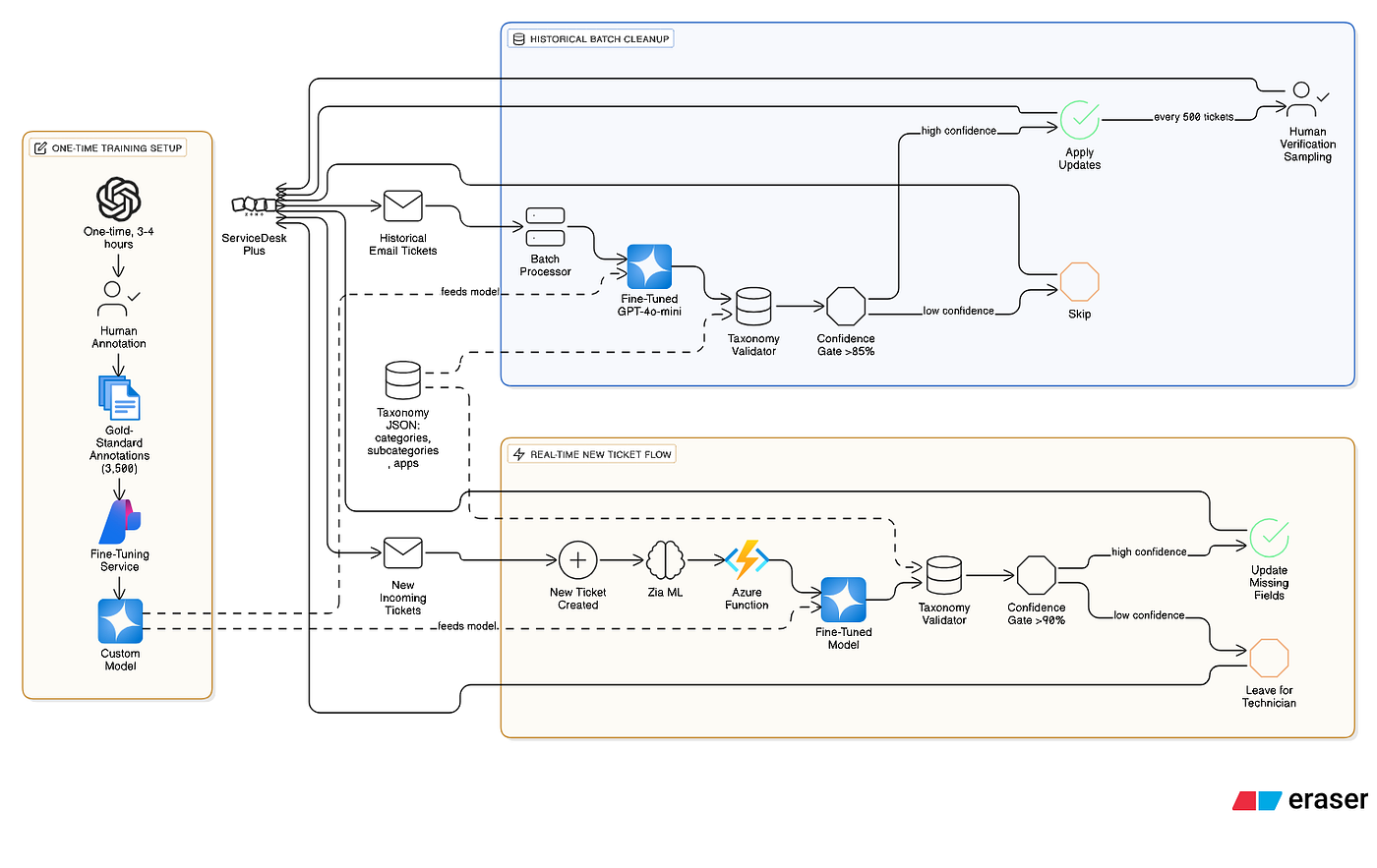
System Architecture — Generated using eraser.ai
Stop burning tokens on repetitive taxonomy prompts. Train once on 3,500 clean examples, classify 70,000 tickets for $500 total, then deploy a safety net that catches what native AI misses.
Enterprise IT service desks face a data integrity crisis: technicians assign random categories to close tickets faster, poisoning years of analytics data. When you have 70,000 tickets with incorrect classifications across four interdependent fields (Category, Subcategory, Application Service, Request Type), the question isn’t whether to automate — it’s whether to pay $3,000 in token costs or $500.
The wrong approach: feed entire taxonomy to GPT-4 on every request. The right approach: teach a specialized model once, then classify for pennies.
The GIGO Trap: Why Native AI Learns Mistakes
ManageEngine ServiceDesk Plus includes Zia, a built-in machine learning engine that requires 500 historical tickets to train. The catch: Zia will learn from any 500 tickets, regardless of accuracy. If historical data is garbage — random category selections, default assignments, closed tickets with no audit trail — Zia confidently reproduces those exact errors at scale.
Historical Data Reality Check:
✓ Main office Service Desk: 6,500 tickets since Dec 2022
✓ All Field Offices: ~70,000 tickets estimated
✗ Email tickets: ~40,000-50,000 (majority miscategorized)
✗ Pattern: Technicians assign common categories to close faster
✗ Zia's view: "This is what correct classification looks like"
Zia uses supervised learning — pattern recognition based on text-to-label relationships technicians created. It has no semantic understanding of IT concepts, no way to detect “wrong” labels, and no built-in quality control. Garbage In, Garbage Out.
You cannot fix bad data by automating it. Phase 0 must come first: clean data annotation before any model touches production.
Token Economics: Why Fine-Tuning Beats Zero-Shot at Scale
My service catalog contains 2,691 tokens of structured taxonomy (measured via token-calculator.net):
- 24 main categories
- 200+ hierarchical subcategories
- 90+ application services (REACH, SAP modules, custom systems)
- 5 request types
Every classification request must include this taxonomy to prevent hallucination and ensure valid field values.
Zero-Shot Approach:
Per ticket classification:
- Taxonomy JSON: 2,691 tokens
- Subject + Description: ~300 tokens
- System prompt: ~150 tokens
Total input: ~3,141 tokens
JSON response (4 fields): ~50 tokens
Total per request: 3,191 tokensCost: 3,191 tokens × $0.03/1K = $0.096 per ticketPhase 2 cleanup (30,000 email tickets):
30,000 × $0.096 = $2,880Ongoing (500 new tickets/month):
500 × $0.096 = $48/monthFine-Tuned Approach:
One-time training:
- 3,500 annotated examples
- Azure OpenAI fine-tuning: $100
- Timeline: 3-4 hours
Per ticket classification (after training):
- Taxonomy JSON: 2,691 tokens (validation)
- Subject + Description: ~300 tokens
- System prompt: ~50 tokens
Total input: ~3,041 tokensJSON response: ~50 tokens
Total per request: 3,091 tokensCost: 3,091 × $0.003/1K = $0.009 per ticket
(Fine-tuned GPT-4o-mini gets 90% inference discount)Phase 2 cleanup (30,000 email tickets):
30,000 × $0.009 = $270Ongoing (500 new tickets/month):
500 × $0.009 = $4.50/monthYear 1 total: $100 training + $270 cleanup + $54 ongoing = $424
vs. Zero-shot: $2,880 + $576 = $3,456Savings: $3,032 first year, $523/year ongoingThe taxonomy must be included regardless of approach. Fine-tuning doesn’t eliminate those tokens — it teaches the model how to interpret them efficiently while unlocking 90% cheaper inference pricing.
Why include taxonomy if we fine-tune?
Fine-tuning teaches pattern recognition (“password reset” tickets → Access Management category). Including the current taxonomy ensures:
- No hallucinated categories (model only selects from valid options)
- Zero retraining when taxonomy updates (just update the JSON file)
- Validation against current field structure (subcategories mapped to correct parent categories)
Think of fine-tuning as teaching the model the rules of classification, while the taxonomy provides the current valid answers to choose from.
Architecture: Four Phases, Zero Downtime
Phase 0: Annotation (2-3 weeks)
   ├─ Sample 3,500 tickets balanced across categories
   ├─ Expert manual review + labeling
   └─ Output: Gold-standard training dataset

Phase 1: Fine-Tune Student Model (1 week)
   ├─ Upload annotations to Azure OpenAI
   ├─ Fine-tuning job: 3-4 hours, $80-120
   └─ Output: Specialized classification model

Phase 2: Historical Cleanup (4-6 weeks, batched)
   ├─ Target: Email-sourced tickets only (~30,000)
   ├─ Batch process: 500 tickets → sample verify → apply
   └─ Human verification gate between batches

Phase 3: Enable Zia + Safety Net (1 week)
   ├─ Layer 1: Zia auto-applies Category field
   ├─ Layer 2: Azure Function fills remaining fields
   └─ Business Rule catches empty fields (no race conditions)

Phase 4: Continuous Feedback (Ongoing)
   ├─ Technician corrections logged
   └─ Monthly annotation set refresh
Skip Phase 0, and you train on garbage. Skip Phase 2, and your reporting stays broken. Skip Phase 3’s safety net, and edge cases fall through. Each phase builds on the previous.
Phase 0: Strategic Annotation (Not Bulk Review)
You cannot manually review 70,000 tickets. You can review 3,500 strategically sampled examples.
Sampling strategy:
import pandas as pd
from collections import defaultdict
import random

def sample_for_annotation(tickets_df, target_per_category=50):
    """
    Extract balanced sample for expert annotation.

    Heuristics for "likely correct" tickets:
    - Assigned by senior technicians (if tracked)
    - Resolution notes contain category keywords
    - Not in top 5 most-common categories (likely defaults)
    - Created during business hours (more deliberate than auto-close)
    """

    # Group by category
    by_category = defaultdict(list)
    for _, ticket in tickets_df.iterrows():
        cat = ticket['category']

        # Quality filters
        is_default = cat in ['General Request', 'Other', 'Unclassified']
        has_resolution = len(str(ticket.get('resolution', ''))) > 50

        if not is_default and has_resolution:
            by_category[cat].append(ticket)

    # Balanced sampling
    annotation_set = []
    for cat, tickets in by_category.items():
        # Sort by creation time (older likely more deliberate)
        sorted_tickets = sorted(tickets, key=lambda x: x['created_time'])

        # Sample evenly across time range
        step = max(1, len(sorted_tickets) // target_per_category)
        sample = sorted_tickets[::step][:target_per_category]

        annotation_set.extend(sample)

    return pd.DataFrame(annotation_set)
# Export for manual review
sample_df = sample_for_annotation(all_tickets, target_per_category=50)
sample_df.to_csv('annotation_batch.csv', index=False)
print(f"Exported {len(sample_df)} tickets for annotation")
Manual annotation template
Quality gates:
- Only include rows marked “High confidence” in training data
- “Medium confidence” → secondary expert review
- “Low confidence” → exclude from training set
Target: 50–100 examples per category = 2,500–5,000 gold-standard records total.
This is the single most important phase. Clean training data determines everything downstream.
Phase 1: Fine-Tune on Annotated Examples
With 3,500 expert-reviewed examples, train a specialized model.
Export taxonomy as structured JSON:
import requests
import json

# SDP API configuration
SDP_BASE = "https://sdpondemand.manageengine.com/api/v3"
SDP_HEADERS = {
    "authtoken": "YOUR_API_KEY",
    "Content-Type": "application/x-www-form-urlencoded"
}
def export_taxonomy():
    """Export current SDP taxonomy for model validation."""

    # Fetch categories with subcategories
    categories_response = requests.get(
        f"{SDP_BASE}/categories",
        headers=SDP_HEADERS
    )

    taxonomy = {
        "categories": [],
        "application_services": [],
        "request_types": []
    }

    for cat in categories_response.json()['categories']:
        # Get subcategories for this category
        subcat_response = requests.get(
            f"{SDP_BASE}/categories/{cat['id']}/subcategories",
            headers=SDP_HEADERS
        )

        taxonomy["categories"].append({
            "name": cat['name'],
            "subcategories": [
                sub['name'] for sub in subcat_response.json()['subcategories']
            ]
        })

    # Fetch application services (custom field options)
    # Note: Adjust field name to match your SDP configuration
    fields_response = requests.get(
        f"{SDP_BASE}/request_additional_fields",
        headers=SDP_HEADERS
    )

    for field in fields_response.json()['additional_fields']:
        if field['name'] == 'Application Service':
            taxonomy['application_services'] = [
                option['value'] for option in field['options']
            ]

    # Fetch request types
    types_response = requests.get(
        f"{SDP_BASE}/request_types",
        headers=SDP_HEADERS
    )

    taxonomy['request_types'] = [
        rt['name'] for rt in types_response.json()['request_types']
    ]

    # Save as compact JSON
    with open('taxonomy.json', 'w') as f:
        json.dump(taxonomy, f, separators=(',', ':'))

    print(f"Taxonomy exported: {len(taxonomy['categories'])} categories")
    return taxonomy
taxonomy = export_taxonomy()
Prepare fine-tuning dataset (JSONL format):
import json
import pandas as pd

def create_finetuning_dataset(annotations_csv, taxonomy_json, output_jsonl):
    """
    Convert annotated tickets to Azure OpenAI fine-tuning format.

    Each example includes:
    - System prompt (role definition)
    - User prompt (ticket + taxonomy)
    - Assistant response (correct classification as JSON)
    """

    annotations = pd.read_csv(annotations_csv)

    with open(taxonomy_json, 'r') as f:
        taxonomy = json.load(f)

    taxonomy_str = json.dumps(taxonomy, separators=(',', ':'))

    with open(output_jsonl, 'w') as out:
        for _, row in annotations.iterrows():
            # Skip low-confidence examples
            if row['Confidence'] != 'High':
                continue

            example = {
                "messages": [
                    {
                        "role": "system",
                        "content": "You are an IT ticket classifier. Always respond with valid JSON matching the provided taxonomy."
                    },
                    {
                        "role": "user",
                        "content": f"""Classify this IT support ticket using the provided taxonomy.
**Ticket:**
Subject: {row['Subject']}
Description: {row['Description']}
**Valid Options:**
{taxonomy_str}
**Instructions:**
- Select ONE Category from categories list
- Select ONE Subcategory that belongs to the chosen Category
- Select ONE Application Service from application_services list
- Select ONE Request Type from request_types list
**Response Format (JSON only, no additional text):**
{{"category": "...", "subcategory": "...", "application_service": "...", "request_type": "..."}}"""
                    },
                    {
                        "role": "assistant",
                        "content": json.dumps({
                            "category": row['Correct Category'],
                            "subcategory": row['Correct Subcategory'],
                            "application_service": row['Correct App Service'],
                            "request_type": row['Correct Request Type']
                        })
                    }
                ]
            }

            out.write(json.dumps(example) + '\n')

    print(f"Created fine-tuning dataset: {output_jsonl}")
create_finetuning_dataset(
    'annotated_tickets_final.csv',
    'taxonomy.json',
    'training_data.jsonl'
)
Submit fine-tuning job:
from openai import AzureOpenAI

client = AzureOpenAI(
    api_key="YOUR_AZURE_KEY",
    api_version="2024-02-01",
    azure_endpoint="https://YOUR-RESOURCE.openai.azure.com"
)
# Upload training file
with open("training_data.jsonl", "rb") as f:
    upload_response = client.files.create(
        file=f,
        purpose="fine-tune"
    )
training_file_id = upload_response.id
print(f"Training file uploaded: {training_file_id}")
# Create fine-tuning job
job = client.fine_tuning.jobs.create(
    training_file=training_file_id,
    model="gpt-4o-mini-2024-07-18",  # Cheaper base model for classification
    hyperparameters={
        "n_epochs": 3,
        "batch_size": 16,
        "learning_rate_multiplier": 0.1
    }
)
print(f"Fine-tuning job started: {job.id}")
print(f"Monitor at: https://platform.openai.com/finetune/{job.id}")
# Monitor progress
import time
while True:
    status = client.fine_tuning.jobs.retrieve(job.id)
    print(f"Status: {status.status}")

    if status.status == "succeeded":
        FINE_TUNED_MODEL = status.fine_tuned_model
        print(f"\n✓ Fine-tuned model ready: {FINE_TUNED_MODEL}")

        # Save model ID for Phase 2
        with open("model_id.txt", "w") as f:
            f.write(FINE_TUNED_MODEL)
        break
    elif status.status == "failed":
        print(f"✗ Fine-tuning failed: {status.error}")
        break

    time.sleep(60)
Timeline: 3–4 hours for 3,500 examples Cost: $80–120 (Azure OpenAI fine-tuning pricing)
Phase 2: Batch Reclassification with Human Verification
Target email-sourced tickets only — these lack categories because they arrive with just subject/description.
Filter logic for email tickets:
import requests
import json
import random
from datetime import datetime
import logging
import time

# Load fine-tuned model ID
with open("model_id.txt", "r") as f:
    FINE_TUNED_MODEL = f.read().strip()
with open("taxonomy.json", "r") as f:
    TAXONOMY = json.load(f)
CONFIDENCE_THRESHOLD = 0.85  # Only update if confident
BATCH_SIZE = 500
VERIFICATION_SAMPLE = 25  # 5% manual review per batch
SDP_BASE = "https://sdpondemand.manageengine.com/api/v3"
SDP_API_KEY = "YOUR_TECHNICIAN_API_KEY"
SDP_HEADERS = {
    "authtoken": SDP_API_KEY,
    "Content-Type": "application/x-www-form-urlencoded"
}
def fetch_email_tickets_batch(offset=0, limit=500):
    """
    Fetch ONLY email-sourced tickets for reclassification.

    Filter:
    - Mode = "E-mail" or "Email to Request"
    - Created after Dec 2022 (SDP deployment)
    - Any status (including closed)
    """

    params = {
        "input_data": json.dumps({
            "list_info": {
                "row_count": limit,
                "start_index": offset,
                "search_criteria": [
                    {
                        "field": "mode",
                        "condition": "is",
                        "values": ["E-Mail", "Email to Request"]
                    },
                    {
                        "field": "created_time",
                        "condition": "greater than",
                        "value": "1669852800000"  # Dec 1, 2022 in epoch ms
                    }
                ]
            }
        })
    }

    response = requests.get(
        f"{SDP_BASE}/requests",
        headers=SDP_HEADERS,
        params=params
    )

    if response.status_code != 200:
        logging.error(f"API error {response.status_code}: {response.text}")
        return []

    return response.json().get("requests", [])
def classify_ticket(subject, description):
    """
    Use fine-tuned model to classify ticket.
    Includes taxonomy for validation against current options.
    """

    taxonomy_json = json.dumps(TAXONOMY, separators=(',', ':'))

    prompt = f"""Classify this IT support ticket using the provided taxonomy.
**Ticket:**
Subject: {subject}
Description: {description}
**Valid Options:**
{taxonomy_json}
**Instructions:**
- Select ONE Category from categories list
- Select ONE Subcategory that belongs to the chosen Category
- Select ONE Application Service from application_services list
- Select ONE Request Type from request_types list
**Response Format (JSON only, no additional text):**
{{"category": "...", "subcategory": "...", "application_service": "...", "request_type": "..."}}"""
    try:
        from openai import AzureOpenAI
        client = AzureOpenAI(
            api_key="YOUR_AZURE_KEY",
            api_version="2024-02-01",
            azure_endpoint="https://YOUR-RESOURCE.openai.azure.com"
        )

        response = client.chat.completions.create(
            model=FINE_TUNED_MODEL,
            messages=[
                {
                    "role": "system",
                    "content": "You are an IT ticket classifier. Always respond with valid JSON matching the provided taxonomy."
                },
                {
                    "role": "user",
                    "content": prompt
                }
            ],
            temperature=0,
            max_tokens=150
        )

        result = json.loads(response.choices[0].message.content)

        # Validate against taxonomy
        if not validate_classification(result):
            logging.warning(f"Invalid classification: {result}")
            return None

        # Heuristic confidence based on response completeness
        result['confidence'] = 0.9 if all(result.values()) else 0.6

        return result

    except Exception as e:
        logging.error(f"Classification failed: {e}")
        return None
def validate_classification(classification):
    """Ensure model selected from valid taxonomy."""

    category = classification.get('category')
    category_obj = next(
        (c for c in TAXONOMY['categories'] if c['name'] == category),
        None
    )

    if not category_obj:
        return False

    subcategory = classification.get('subcategory')
    if subcategory not in category_obj['subcategories']:
        return False

    if classification.get('application_service') not in TAXONOMY['application_services']:
        return False

    if classification.get('request_type') not in TAXONOMY['request_types']:
        return False

    return True
def update_ticket(ticket_id, classifications, original_values):
    """
    Update ticket via SDP API.

    Critical requirements:
    1. Closure rules must allow editing closed tickets
    2. API key must have SDAdmin permissions
    3. Do NOT overwrite resolution notes
    4. Add update_reason to audit trail
    """

    update_payload = {
        "request": {
            "category": {"name": classifications['category']},
            "subcategory": {"name": classifications['subcategory']},
            "udf_fields": {
                "udf_application_service": classifications['application_service']
            },
            "type": {"name": classifications['request_type']}
        }
    }

    response = requests.put(
        f"{SDP_BASE}/requests/{ticket_id}",
        headers=SDP_HEADERS,
        data={"input_data": json.dumps(update_payload)}
    )

    if response.status_code == 200:
        # Add internal note (not visible to requester)
        note_payload = {
            "note": {
                "description": f"""[AUTO-CLASSIFICATION]
Reclassified via fine-tuned AI model.
Confidence: {classifications['confidence']:.1%}
Original values:
- Category: {original_values.get('category', 'None')}
- Subcategory: {original_values.get('subcategory', 'None')}
- Application Service: {original_values.get('application_service', 'None')}
- Request Type: {original_values.get('request_type', 'None')}
New values:
- Category: {classifications['category']}
- Subcategory: {classifications['subcategory']}
- Application Service: {classifications['application_service']}
- Request Type: {classifications['request_type']}
Audit ID: BATCH_PHASE2_{datetime.now().strftime('%Y%m%d')}""",
                "show_to_requester": False,
                "notify_technician": False
            }
        }

        requests.post(
            f"{SDP_BASE}/requests/{ticket_id}/notes",
            headers=SDP_HEADERS,
            data={"input_data": json.dumps(note_payload)}
        )

        return True
    else:
        logging.error(f"Update failed for ticket {ticket_id}: {response.status_code}")
        return False
def export_verification_sample(batch_results, batch_num):
    """Export sample for manual review."""

    import pandas as pd

    sample = random.sample(batch_results, min(VERIFICATION_SAMPLE, len(batch_results)))

    df = pd.DataFrame([
        {
            'Ticket ID': r['ticket_id'],
            'Subject': r['subject'][:50],
            'Original Category': r['original']['category'],
            'New Category': r['classification']['category'],
            'New Subcategory': r['classification']['subcategory'],
            'New App Service': r['classification']['application_service'],
            'New Request Type': r['classification']['request_type'],
            'Confidence': f"{r['classification']['confidence']:.1%}",
            'Correct? (Y/N)': ''
        }
        for r in sample
    ])

    filename = f"verification_batch_{batch_num}.csv"
    df.to_csv(filename, index=False)
    print(f"\n📋 Verification sample exported: {filename}")
    print(f"   Review {len(df)} tickets and mark Correct? column with Y/N")

    return filename
def process_batch_with_verification():
    """
    Main processing loop with human verification gates.

    Workflow:
    1. Fetch 500 email tickets
    2. Classify all with fine-tuned model
    3. Export random 25 for manual review
    4. Wait for human verification
    5. If accuracy ≥95%: Apply updates
    6. If accuracy <95%: Pause and review prompts/thresholds
    """

    batch_num = 0
    total_processed = 0
    total_updated = 0

    while True:
        print(f"\n{'='*60}")
        print(f"BATCH {batch_num + 1}")
        print(f"{'='*60}")

        # Fetch email tickets
        tickets = fetch_email_tickets_batch(
            offset=total_processed,
            limit=BATCH_SIZE
        )

        if not tickets:
            print("No more tickets to process")
            break

        print(f"Fetched {len(tickets)} email tickets")

        # Classify all tickets in batch
        batch_results = []
        for ticket in tickets:
            classification = classify_ticket(
                ticket.get('subject', ''),
                ticket.get('description', '')
            )

            if not classification:
                continue

            batch_results.append({
                'ticket_id': ticket['id'],
                'subject': ticket.get('subject', ''),
                'classification': classification,
                'original': {
                    'category': ticket.get('category', {}).get('name'),
                    'subcategory': ticket.get('subcategory', {}).get('name'),
                    'application_service': ticket.get('udf_fields', {}).get('udf_application_service'),
                    'request_type': ticket.get('type', {}).get('name')
                }
            })

        print(f"Classified {len(batch_results)} tickets")

        # Export verification sample
        verification_file = export_verification_sample(batch_results, batch_num)

        # Wait for human verification
        print("\n⏸️  VERIFICATION REQUIRED")
        print(f"   1. Open {verification_file}")
        print(f"   2. Review classifications and mark Correct? column")
        print(f"   3. Enter accuracy % below (or 'skip' to apply without verification)")

        user_input = input("\nAccuracy % (or 'skip'): ").strip().lower()

        if user_input != 'skip':
            try:
                accuracy = float(user_input.replace('%', '')) / 100

                if accuracy < 0.95:
                    print(f"\n⚠️  Accuracy {accuracy:.1%} below 95% threshold")
                    print("   Options:")
                    print("   - Adjust CONFIDENCE_THRESHOLD in script")
                    print("   - Review taxonomy.json for ambiguous categories")
                    print("   - Add more examples to training data and re-fine-tune")
                    print("\n   Pausing batch processing.")
                    break
                else:
                    print(f"✓ Accuracy {accuracy:.1%} meets threshold, proceeding...")
            except ValueError:
                print("Invalid input, skipping verification")

        # Apply updates for high-confidence classifications
        updated_count = 0
        for result in batch_results:
            if result['classification']['confidence'] >= CONFIDENCE_THRESHOLD:
                if update_ticket(
                    result['ticket_id'],
                    result['classification'],
                    result['original']
                ):
                    updated_count += 1

        total_processed += len(tickets)
        total_updated += updated_count

        print(f"\n✓ Batch {batch_num + 1} complete:")
        print(f"   Processed: {len(tickets)}")
        print(f"   Updated: {updated_count}")
        print(f"   Total progress: {total_processed} tickets, {total_updated} updated")

        batch_num += 1

        # Rate limit buffer
        time.sleep(5)

    print(f"\n{'='*60}")
    print(f"PHASE 2 COMPLETE")
    print(f"{'='*60}")
    print(f"Total tickets processed: {total_processed}")
    print(f"Total tickets updated: {total_updated}")
    print(f"Success rate: {total_updated/total_processed*100:.1%}")
# Run batch processing
if __name__ == "__main__":
    logging.basicConfig(level=logging.INFO)
    process_batch_with_verification()
Critical prerequisites:
Before running Phase 2:
# 1. Enable editing of closed tickets
# Navigate to: Setup > Helpdesk Customizer > Request Closure Rules
# Enable: "Allow technicians to edit closed requests"

# 2. Verify API permissions
# Your API key must have SDAdmin role or explicit "Edit closed requests" permission

# 3. Test on small batch first
BATCH_SIZE = 50  # Start small
CONFIDENCE_THRESHOLD = 0.90  # Conservative threshold
# After first verification passes, scale up to 500
Verification is non-negotiable. Manual review of 5% per batch catches model drift before it corrupts 500 tickets.
Timeline: 500 tickets/day with verification = 60 days for 30,000 email tickets
Phase 3: Zia + Safety Net (No Race Conditions)
Critical limitation: Zia Auto-Apply only supports Category field. It cannot fill:
- Subcategory
- Application Service (custom field)
- Request Type
This isn’t a bug — it’s why you need the safety net.
Layer 1: Enable Zia for Category
Admin > Zia > Artificial Intelligence > Category & Template Prediction

Settings:
✓ Auto-Apply: ON
✓ Confidence Threshold: >85%
✓ Scope: Email tickets only
✓ Field: Category (only option available)
Training Source:
✓ Historical Data: Use Phase 2 cleaned data
✓ Annotation Override: Feed Phase 0 gold-standard examples via Zia Customize Data
Zia will fill Category for ~70–80% of email tickets. The remaining 20–30% have empty Category OR Zia succeeded but left Subcategory/AppService/RequestType empty.
Layer 2: Safety Net via Business Rule + Azure Function
Business Rule configuration:
Rule Name: Auto-Classify Missing Fields

Trigger: Request Creation
Execution: After ticket creation completes
Criteria (match ANY):
├─ Category IS NULL
├─ Subcategory IS NULL
├─ Application Service (UDF) IS NULL
└─ Request Type IS NULL
Additional Filters:
├─ Mode IS "E-Mail" OR "Email to Request"
└─ Status IS NOT "Closed" (only act on new/open tickets)
Action: Custom Function → Webhook
Webhook URL: https://YOUR-FUNCTION.azurewebsites.net/api/ClassifyMissingFields
Method: POST
Payload: {ticket object}
Why there’s no race condition:
Timeline (milliseconds):
T+0ms:   Email arrives → SDP creates ticket
T+100ms: Zia evaluates ticket → Attempts to fill Category
T+150ms: Zia completes:
         - Scenario A: Category filled, Subcategory/App/Type EMPTY
         - Scenario B: All fields EMPTY (Zia had low confidence)
T+200ms: Business Rule fires → Checks which fields are NULL
T+250ms: Webhook triggered ONLY IF any field is still NULL
T+500ms: Azure Function reads current ticket state
T+600ms: Function fills ONLY the fields that are NULL
T+700ms: Update applied
No conflict because:
1. Zia runs first (immediate)
2. Business Rule waits for ticket creation to complete
3. Rule checks current state (which includes Zia's updates)
4. Function only touches NULL fields (never overwrites Zia's work)Azure Function (Python):
import azure.functions as func
import json
import logging
from openai import AzureOpenAI
import requests
import os

# Load configuration
with open("model_id.txt", "r") as f:
    FINE_TUNED_MODEL = f.read().strip()
with open("taxonomy.json", "r") as f:
    TAXONOMY = json.load(f)
client = AzureOpenAI(
    api_key=os.environ["AZURE_OPENAI_KEY"],
    api_version="2024-02-01",
    azure_endpoint=os.environ["AZURE_OPENAI_ENDPOINT"]
)
SDP_BASE = os.environ["SDP_BASE_URL"]
SDP_HEADERS = {
    "authtoken": os.environ["SDP_API_KEY"],
    "Content-Type": "application/x-www-form-urlencoded"
}
HIGH_CONFIDENCE = 0.90  # Stricter threshold for real-time
def main(req: func.HttpRequest) -> func.HttpResponse:
    """
    Safety net: Fill missing classification fields.

    Called by SDP Business Rule when any field is NULL.
    Only updates fields that are currently empty.
    """

    try:
        # Parse webhook payload from SDP
        payload = req.get_json()
        ticket_id = payload['request']['id']
        subject = payload['request'].get('subject', '')
        description = payload['request'].get('description', '')

        # Determine which fields are missing
        current_category = payload['request'].get('category', {}).get('name')
        current_subcat = payload['request'].get('subcategory', {}).get('name')
        current_app = payload['request'].get('udf_fields', {}).get('udf_application_service')
        current_type = payload['request'].get('type', {}).get('name')

        missing_fields = []
        if not current_category:
            missing_fields.append('category')
        if not current_subcat:
            missing_fields.append('subcategory')
        if not current_app:
            missing_fields.append('application_service')
        if not current_type:
            missing_fields.append('request_type')

        logging.info(f"Ticket {ticket_id}: Missing fields: {missing_fields}")

        # Classify using fine-tuned model
        classification = classify_ticket(subject, description)

        if not classification:
            logging.warning(f"Ticket {ticket_id}: Classification failed")
            return func.HttpResponse(
                json.dumps({"status": "failed", "reason": "classification_error"}),
                status_code=500
            )

        confidence = classification.get('confidence', 0)

        if confidence < HIGH_CONFIDENCE:
            # Don't update - escalate to manual review queue
            logging.warning(f"Ticket {ticket_id}: Low confidence {confidence:.1%}, escalating")

            # Add note for technician review
            escalate_note = {
                "note": {
                    "description": f"""[AUTO-CLASSIFICATION] Low Confidence
AI suggested but did not apply (confidence {confidence:.1%}):
- Category: {classification.get('category')}
- Subcategory: {classification.get('subcategory')}
- Application Service: {classification.get('application_service')}
- Request Type: {classification.get('request_type')}
Please review and apply manually if correct.""",
                    "show_to_requester": False
                }
            }

            requests.post(
                f"{SDP_BASE}/requests/{ticket_id}/notes",
                headers=SDP_HEADERS,
                data={"input_data": json.dumps(escalate_note)}
            )

            return func.HttpResponse(
                json.dumps({"status": "escalated", "confidence": confidence}),
                status_code=200
            )

        # Build update payload with ONLY missing fields
        update_request = {}

        if 'category' in missing_fields:
            update_request['category'] = {"name": classification['category']}
        if 'subcategory' in missing_fields:
            update_request['subcategory'] = {"name": classification['subcategory']}
        if 'application_service' in missing_fields:
            update_request['udf_fields'] = {
                "udf_application_service": classification['application_service']
            }
        if 'request_type' in missing_fields:
            update_request['type'] = {"name": classification['request_type']}

        # Apply update
        update_response = requests.put(
            f"{SDP_BASE}/requests/{ticket_id}",
            headers=SDP_HEADERS,
            data={"input_data": json.dumps({"request": update_request})}
        )

        if update_response.status_code == 200:
            logging.info(f"Ticket {ticket_id}: Updated {len(missing_fields)} fields ({confidence:.1%})")

            # Add success note
            note = {
                "note": {
                    "description": f"[AUTO-CLASSIFICATION] Applied via AI safety net (confidence {confidence:.1%})",
                    "show_to_requester": False
                }
            }

            requests.post(
                f"{SDP_BASE}/requests/{ticket_id}/notes",
                headers=SDP_HEADERS,
                data={"input_data": json.dumps(note)}
            )

            return func.HttpResponse(
                json.dumps({"status": "success", "fields_updated": missing_fields}),
                status_code=200
            )
        else:
            logging.error(f"Ticket {ticket_id}: Update failed {update_response.status_code}")
            return func.HttpResponse(
                json.dumps({"status": "failed", "reason": "api_error"}),
                status_code=500
            )

    except Exception as e:
        logging.error(f"Exception: {str(e)}")
        return func.HttpResponse(
            json.dumps({"status": "error", "message": str(e)}),
            status_code=500
        )
def classify_ticket(subject, description):
    """Use fine-tuned model for classification."""

    taxonomy_json = json.dumps(TAXONOMY, separators=(',', ':'))

    prompt = f"""Classify this IT support ticket using the provided taxonomy.
**Ticket:**
Subject: {subject}
Description: {description}
**Valid Options:**
{taxonomy_json}
**Response Format (JSON only):**
{{"category": "...", "subcategory": "...", "application_service": "...", "request_type": "..."}}"""
    try:
        response = client.chat.completions.create(
            model=FINE_TUNED_MODEL,
            messages=[
                {"role": "system", "content": "You are an IT ticket classifier. Respond only with valid JSON."},
                {"role": "user", "content": prompt}
            ],
            temperature=0,
            max_tokens=150
        )

        result = json.loads(response.choices[0].message.content)
        result['confidence'] = 0.9 if all(result.values()) else 0.6

        return result if validate_classification(result) else None

    except Exception as e:
        logging.error(f"Classification error: {e}")
        return None
def validate_classification(classification):
    """Validate against taxonomy."""
    category = classification.get('category')
    category_obj = next(
        (c for c in TAXONOMY['categories'] if c['name'] == category),
        None
    )

    if not category_obj:
        return False

    subcategory = classification.get('subcategory')
    if subcategory not in category_obj['subcategories']:
        return False

    if classification.get('application_service') not in TAXONOMY['application_services']:
        return False

    if classification.get('request_type') not in TAXONOMY['request_types']:
        return False

    return True
Deploy Azure Function:
# Create Function App (Azure CLI)
az functionapp create \
  --resource-group ServiceDeskRG \
  --consumption-plan-location eastus \
  --runtime python \
  --runtime-version 3.11 \
  --functions-version 4 \
  --name sdp-classify-function \
  --storage-account sdpstorage

# Set environment variables
az functionapp config appsettings set \
  --name sdp-classify-function \
  --resource-group ServiceDeskRG \
  --settings \
    AZURE_OPENAI_KEY="your-key" \
    AZURE_OPENAI_ENDPOINT="https://your-resource.openai.azure.com" \
    SDP_BASE_URL="https://sdpondemand.manageengine.com/api/v3" \
    SDP_API_KEY="your-sdp-key"
# Deploy function code
func azure functionapp publish sdp-classify-function
Phase 4: Continuous Feedback Loop
Classification accuracy improves over time with technician corrections.
Log corrections for retraining:
# Add to SDP custom script or Business Rule
def log_technician_correction(ticket_id, field, old_value, new_value, technician):
    """
    When technician manually changes classification, log it.
    Feed back to annotation set monthly.
    """

    correction_log = {
        "ticket_id": ticket_id,
        "field": field,
        "ai_assigned": old_value,
        "technician_corrected": new_value,
        "corrected_by": technician,
        "timestamp": datetime.now().isoformat(),
        "source": "manual_override"
    }

    # Append to corrections database or CSV
    with open("corrections_log.jsonl", "a") as f:
        f.write(json.dumps(correction_log) + '\n')
Monthly review process:
def review_corrections_for_retraining(min_corrections=50):
    """
    Review accumulated corrections monthly.
    If significant drift detected, refresh training data.
    """

    # Load corrections
    corrections = []
    with open("corrections_log.jsonl", "r") as f:
        for line in f:
            corrections.append(json.loads(line))

    # Analyze by category
    from collections import Counter

    category_errors = Counter(c['ai_assigned'] for c in corrections if c['field'] == 'category')

    print(f"Total corrections: {len(corrections)}")
    print(f"\nMost frequently corrected categories:")
    for cat, count in category_errors.most_common(10):
        print(f"  {cat}: {count} corrections")

    # If corrections exceed threshold, retrain
    if len(corrections) >= min_corrections:
        print(f"\n{len(corrections)} corrections accumulated - consider retraining")
        print("Export high-quality corrections to annotation set and re-fine-tune")
Zia feedback integration:
Zia adjusts based on technician upvotes/downvotes every 15 minutes, with full retraining nightly. Feed Phase 2 cleaned data into Zia’s training pool:
Admin > Zia > Customize Data
- Upload Phase 0 gold-standard annotations as CSV
- Zia prioritizes these over noisy historical data
- Retraining incorporates expert examples
Cost Summary (30,000 Email Tickets)
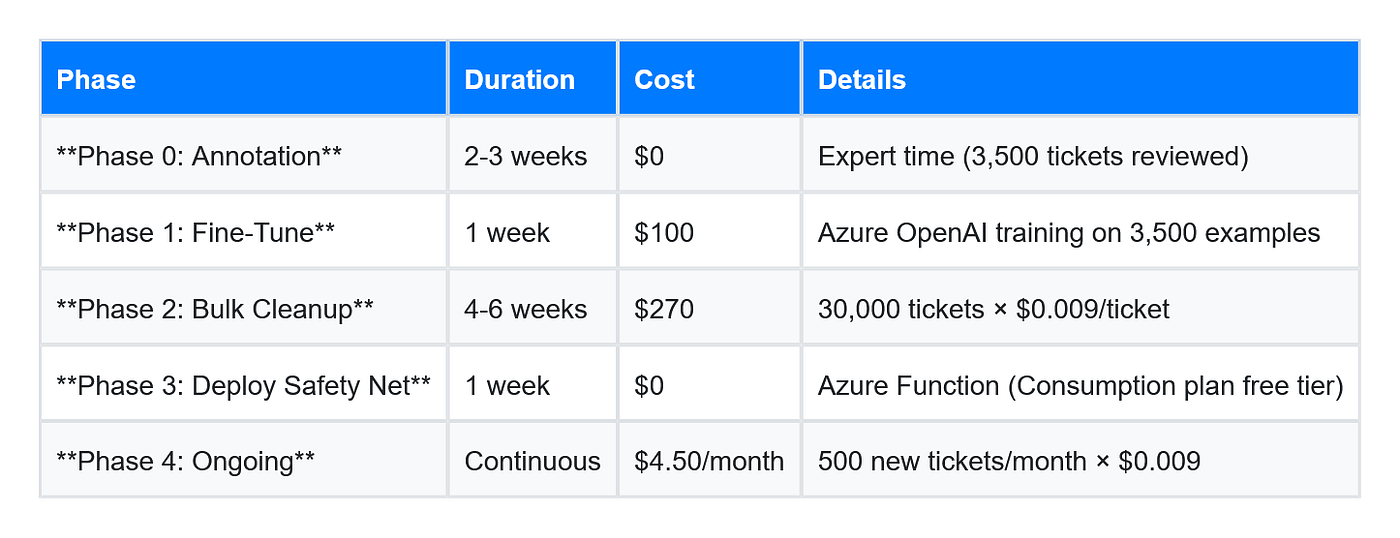
Year 1 Total: $100 training + $270 cleanup + $54 ongoing = $424 vs. Zero-shot approach: $2,880 + $576 = $3,456 Savings: $3,032 first year, $523/year ongoing
Deployment Checklist
Before Phase 2 production run:
- Phase 0 complete: 3,500+ annotated examples, all “High confidence”
- Phase 1 complete: Fine-tuned model deployed, model ID saved
- Taxonomy exported: taxonomy.json includes all current categories/subcats/apps/types
- Closure rules enabled: Setup > Helpdesk Customizer > Allow edit closed requests
- API permissions verified: Technician key has SDAdmin or Edit permissions
- Test batch successful: 50 tickets classified, >95% accuracy in manual review
- Rollback plan: Original values logged in internal notes before updates
- Rate limits understood: SDP Cloud = 1500 req/hour max
- Verification workflow: CSV review process documented, team trained
- Phase 3 webhook configured: Business Rule triggers, Azure Function responds
- Monitoring enabled: Application Insights tracking success/failure rates
Post-deployment monitoring:
# Track classification metrics (Application Insights)
from applicationinsights import TelemetryClient

tc = TelemetryClient('YOUR_INSTRUMENTATION_KEY')
def track_classification(ticket_id, method, confidence, success):
    """Log every classification for analytics."""

    tc.track_event('TicketClassified', {
        'ticket_id': ticket_id,
        'method': method,  # 'zia', 'safety_net', or 'batch'
        'confidence': confidence,
        'success': success
    })

    tc.flush()
# Weekly review dashboard queries:
# - Zia vs Safety Net split percentage
# - Average confidence by category
# - Escalation rate (low confidence tickets)
# - Technician correction frequency
The original approach — zero-shot prompting with full taxonomy — works for tactical testing. At 30,000 tickets with a 2,691-token taxonomy, it becomes a $3,000 token tax you pay every request. Fine-tuning inverts the economics: pay once to teach a specialized model, then classify for 90% less per ticket while maintaining accuracy through taxonomy validation.
Zia handles Category automatically for most tickets. Your fine-tuned safety net catches edge cases and fills the fields Zia can’t touch (Subcategory, Application Service, Request Type). Combined with batch verification gates, you’ve built a self-improving system that cleans historical data and prevents future garbage from entering the pipeline.
메타데이터
- post_id
- 9f24c95386bb
- slug
- fine-tuning-ticket-classification-servicedesk-azure-openai-9f24c95386bb
- url
- https://medium.com/@5a9awneh/fine-tuning-ticket-classification-servicedesk-azure-openai-9f24c95386bb
- canonical_url
- https://medium.com/@5a9awneh/fine-tuning-ticket-classification-servicedesk-azure-openai-9f24c95386bb
- author_url
- https://medium.com/@5a9awneh
- status
- ok
- fetched_at
- 2026-06-16 19:09:56