Scaling Agent Harnesses for Long-Running Sessions
Designing memory, context compaction, and persistence inspired by Claude Code
Scaling Agent Harnesses for Long-Running Sessions
Designing memory, context compaction, and persistence inspired by Claude Code
The leaked Claude Code v2.1.87 source shows how it manages context and memory across long coding sessions. It tackles common problems in long-running agents: context exceeding the model’s window, unpredictable tool outputs, recalling cross-session memory at the right time, and keeping project instructions intact after summarisation. This article breaks down how it works and builds a simplified version in LangGraph using its built-in checkpointers.
How Claude Code Manages Context
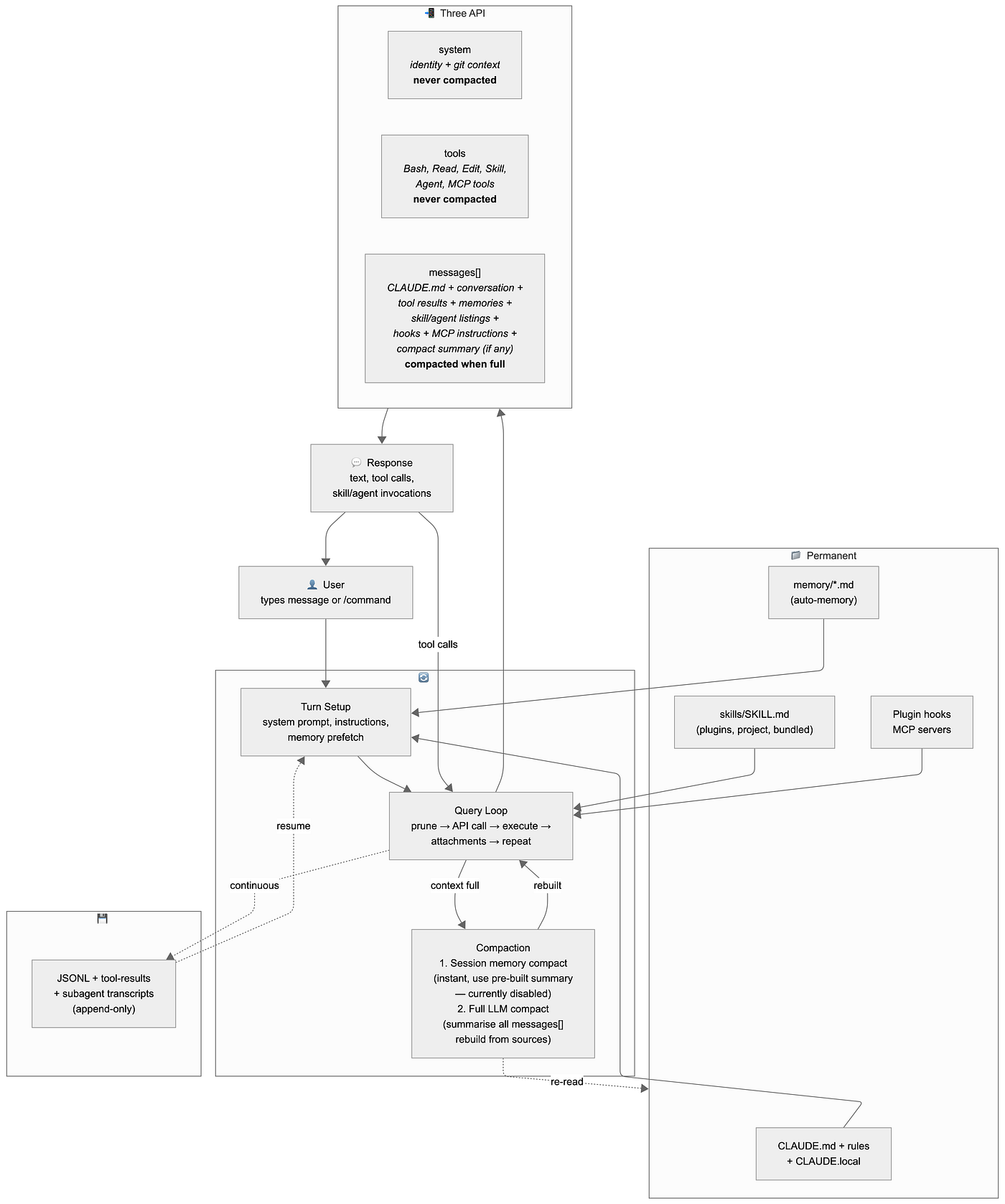
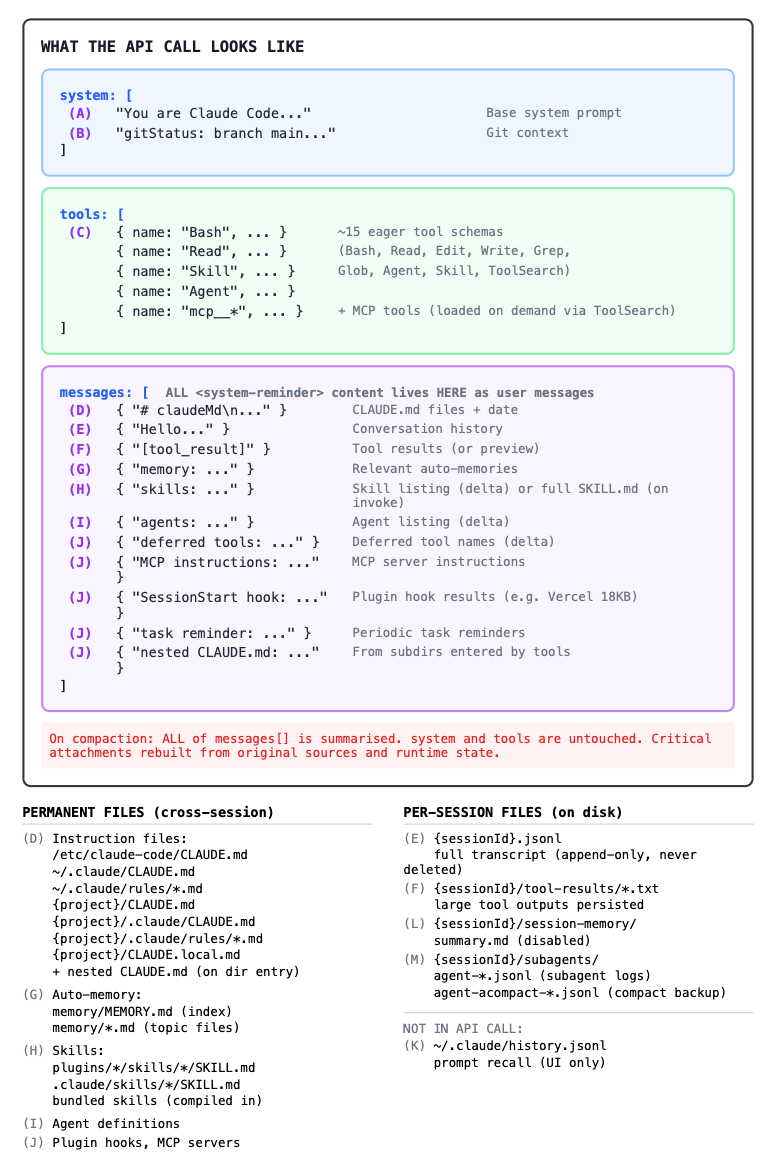
Each API call sends three separate inputs. The system prompt (identity and git context) and tools array (JSON schemas for Bash, Read, Edit, Skill, Agent, and MCP tools) sit outside messages and are never compacted. Everything else lives in the messages array as user messages with <system-reminder> tags: instruction files prepended at position zero, conversation history and tool results in the middle, and attachment messages (memories, skill listings, agent listings, MCP instructions, hook results) injected after each tool execution round. When the context window fills, compaction summarises all of the messages and rebuilds the critical attachments from their original sources. The sections below cover the query loop, subagents, and compaction in detail.
What the API Call Looks Like
The Query Loop

When you type a message, Claude Code enters a loop where each iteration is one API call, continuing until the model responds without tool calls.
Before the loop starts, a background Sonnet call selects up to five relevant memory files based on the user’s question text alone, since sending the full conversation would be too expensive. Those results are not consumed immediately. They arrive after tool execution, which means the first API call in a turn does not include them.
Each iteration prunes the in-memory messages array before sending it to the API. First, it slices to only include messages after the last compaction boundary, leaving the full JSONL on disk untouched. Then it persists any oversized tool results in separate files, replacing them inline with 2 kb previews. If the token count still exceeds about 93% of the context window after all of this, compaction fires.
The model may respond with plain text, which ends the turn, or with tool calls, which execute and loop back for the next API call. Tool calls include general tools (Bash, Read, Edit, Grep), the Skill tool (loads full SKILL.md content into the conversation), the Agent tool (spawns a subagent with isolated context that returns one result), and ToolSearch (loads a deferred tool schema for the next iteration). After each round of tool execution, the system injects delta attachment messages for skill listings, agent listings, MCP instructions, and any settled memory prefetch results, emitting only what changed since the last iteration.
Subagents

When the model calls the Agent tool, Claude Code creates an isolated context within the same process. It copies the parent’s conversation history as starting context, gives the subagent its own tools and system prompt, disables thinking to reduce output token cost, and runs the same query loop code independently. For Explore and Plan agents, CLAUDE.md and git status are omitted from the copied context to save further tokens.
The parent receives only the final result message. All of the subagent’s intermediate work (tool calls, reasoning, and any compaction of its own conversation) stays in a sidechain transcript at subagents/agent-{id}.jsonl, which the parent never reads. This keeps the token cost isolated. A subagent might run dozens of tool calls internally but contribute just one message to the parent's context.
Compaction

The codebase has a microcompact layer that would compress old tool results before full compaction, but it is disabled and not covered here. Compaction itself has two strategies, where it tries the first and falls back to the second if the first is unavailable. The first uses a pre-built session memory file as an instant replacement at compaction time, requiring no API call for the compaction itself (the session memory was built incrementally by a background agent during earlier turns, using separate API calls), but this is currently disabled behind feature gates (see claudefa.st session memory guide for details). The active strategy is a full LLM compact: it forks a new agent that receives the current messages and a structured compact prompt. The forked agent summarises the conversation into about five thousand tokens. Recent messages are kept intact alongside the summary so the model retains the immediate working context, while older messages are replaced by the summary.
After summarising, the system rebuilds the attachment messages that were in messages[] and got summarised away. Agent listings, deferred tool name listings, and MCP instructions are re-announced in full. Session start hooks re-execute. Invoked skill content is re-injected from an in-memory map (capped at ~25,000 tokens). The top five recently accessed files are re-read from disk. Things that live outside messages[] (system prompt, tools[], Claude.md, git context) are unaffected by compaction because they are never stored in messages[] to begin with. Their memoised caches are cleared so they get fresh values on the next turn.
The skill catalogue is deliberately not rebuilt, saving about 4,000 tokens. After compaction, the model cannot discover skills it has not used before unless they are listed in Claude.md. Each compaction is also lossy: the previous summary gets re-summarised along with everything else, so by the third compaction original details have been compressed through three rounds. The full history is preserved in the append-only JSONL on disk, and the compact boundary marker (parentUuid: null) tells the loader where to start on resume.
A Simplified LangGraph Version
Now let’s build a simplified version of the same architecture using LangGraph. LangGraph already provides checkpointers for persistence and RemoveMessage for message deletion. Cross-session memory uses the same approach as Claude Code: markdown files on disk, read every turn. The compaction logic is what we actually need to write.
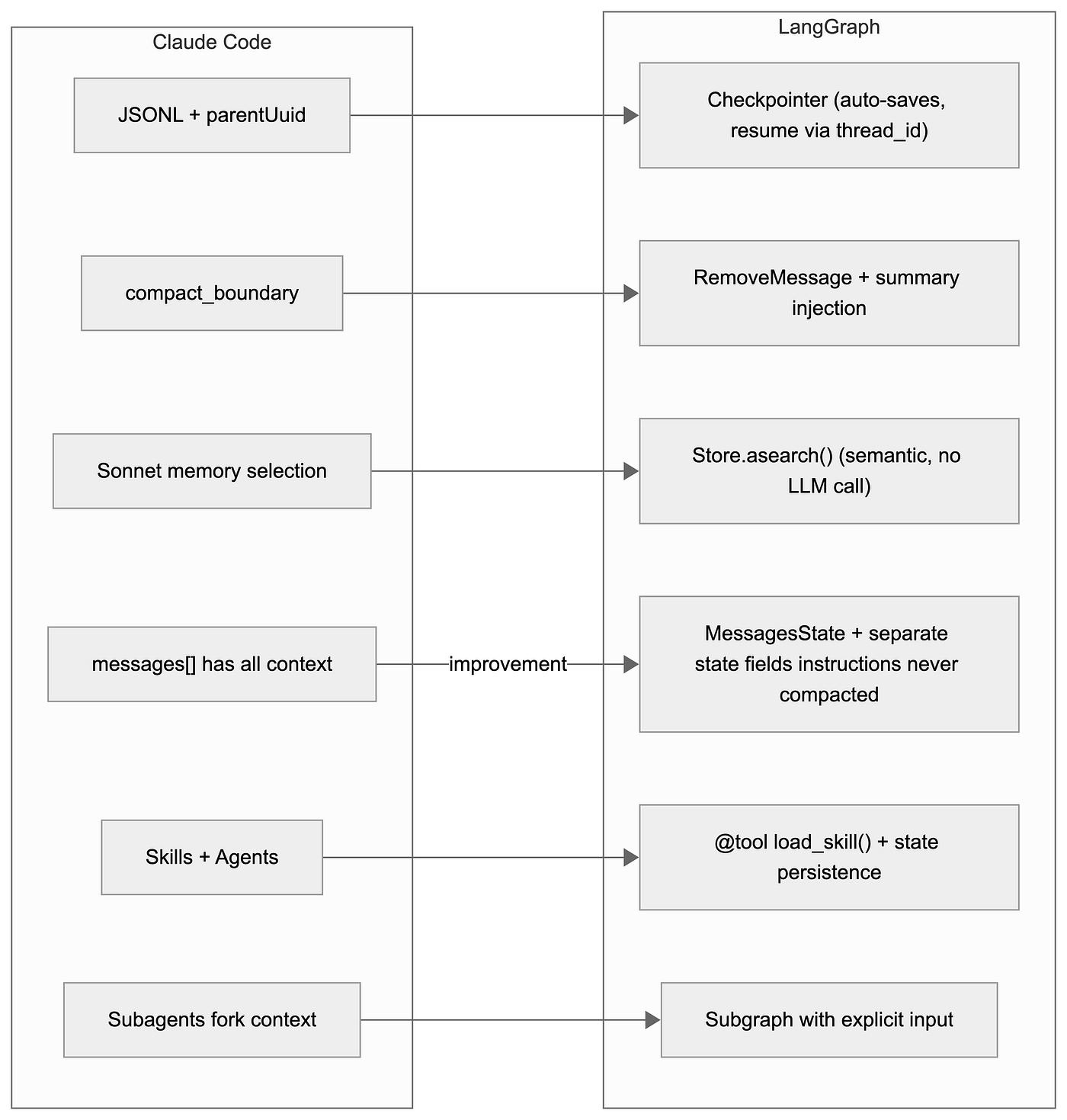
From the above diagram, each arrow shows a Claude Code concept on the left and its LangGraph equivalent on the right. The “improvement” edge highlights that LangGraph can store instructions outside messages[], so they are never affected by compaction.
The graph structure below shows the five nodes and their roles:
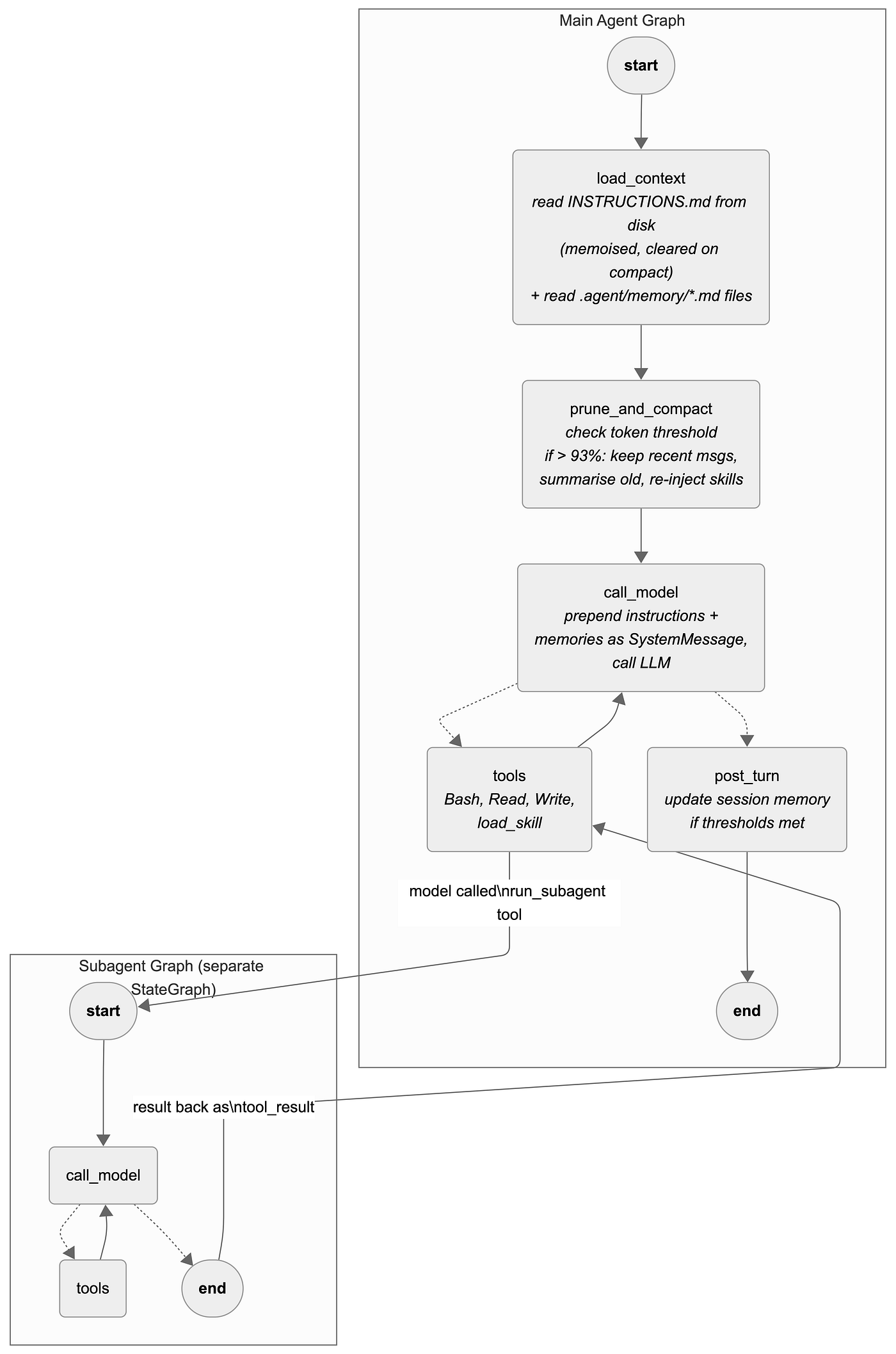
The dotted edges from call_model are conditional: tool calls loop back through tools, text responses go to post_turn. Memory files (.agent/memory/*.md) are read from disk in load_context and injected as part of the SystemMessage in call_model, so they are never in messages[] and survive compaction automatically.
Graph construction
Five nodes wired in sequence, with a conditional branch after call_model that either loops through tools or exits to post_turn. The SQLite checkpointer persists all state across process restarts.
def build_graph():
    builder = StateGraph(AgentState)

    builder.add_node("load_context", load_context)
    builder.add_node("prune_and_compact", prune_and_compact)
    builder.add_node("call_model", call_model)
    builder.add_node("tools", ToolNode(TOOLS))
    builder.add_node("post_turn", post_turn)

    builder.add_edge(START, "load_context")
    builder.add_edge("load_context", "prune_and_compact")
    builder.add_edge("prune_and_compact", "call_model")
    builder.add_conditional_edges(
        "call_model", route_after_model,
        {"tools": "tools", "post_turn": "post_turn"},
    )
    builder.add_edge("tools", "call_model")
    builder.add_edge("post_turn", END)

    checkpointer = SqliteSaver(sqlite3.connect("checkpoints.sqlite"))
    return builder.compile(checkpointer=checkpointer)

# Subagent: separate StateGraph with own call_model + tools loop
subagent_builder = StateGraph(SubagentState)
subagent_builder.add_node("call_model", subagent_call_model)
subagent_builder.add_node("tools", ToolNode([bash, read_file, write_file]))
subagent_builder.add_edge(START, "call_model")
subagent_builder.add_conditional_edges("call_model", subagent_route,
    {"tools": "tools", "__end__": END})
subagent_builder.add_edge("tools", "call_model")
subagent_graph = subagent_builder.compile()
The connection between the two graphs is inside the run_subagent tool:
@tool
def run_subagent(task: str) -> str:
    """Run an isolated subagent for a specific task."""
    result = subagent_graph.invoke({"messages": [HumanMessage(content=task)]})
    return result["messages"][-1].content  # only final result
When the model calls run_subagent, the main tools node executes this function, which invokes the subagent graph. The subagent runs its own call_model and tools loop independently, then the tool returns only the final response as a string. The main graph sees it as a regular tool result. The subagent has no instructions, no memory files, and no checkpointer (lighter context, each invocation independent). The sample agent uses a single subagent type. Claude Code dynamically selects from multiple types (Explore for search, Plan for planning, general-purpose for full tool access, plus plugin agents like vercel:ai-architect), each with different tools, permissions, and system prompts.
Prompts
These are simplified versions used in the LangGraph replication. Claude Code’s actual prompts are more detailed.
Compact prompt (Claude Code uses nine sections, a <analysis> scratchpad, a "CRITICAL: Respond with TEXT ONLY" preamble, and an example format block. This simplified version covers the essential sections):
Your task is to create a detailed summary of the conversation so far,
paying close attention to the user's explicit requests and your previous actions.
This summary should capture technical details, code patterns, and decisions
that would be essential for continuing the work without losing context.

Before writing the summary, analyze the conversation chronologically in <analysis> tags.
Then provide the summary in <summary> tags with these sections:

1. Primary Request and Intent: The user's explicit requests in detail.
2. Key Technical Concepts: Important technologies, frameworks, and patterns discussed.
3. Files and Code Sections: Specific files examined, modified, or created, with paths
   and why each was important.
4. Errors and Fixes: Errors encountered, how they were fixed, and any user corrections
   or feedback (pay special attention to "don't do X" or "actually I meant Y").
5. Problem Solving: Problems solved and any ongoing troubleshooting.
6. Pending Tasks: Tasks explicitly requested but not yet completed.
7. Current Work: What was being worked on immediately before this summary,
   with specific file names and details from the most recent messages.
The code segments the conversation first (using trim_messages to identify recent messages to keep), then sends only the older segment to the model with this prompt. The model receives everything in that segment (user messages, assistant responses, tool results) and summarises all of it. See the Compaction: summarise old, keep recent section below for the full implementation.
Session memory update prompt (Claude Code uses a ten-section template with per-section token caps, {{variableName}} substitution, and strict rules about preserving section headers. This simplified version captures the core idea):
Based on the conversation above, update the session notes.

Update each section below with specific, actionable details from the conversation.
Write info-dense content: file paths, function names, error messages, exact commands.
Skip a section if there are no new insights to add. Do not add filler.
Keep each section under 500 words. If approaching the limit, cycle out less important
details while preserving the most critical information.
Always update Current State to reflect the most recent work.

Sections:
# Session Title
# Current State
# Task Specification
# Files and Functions
# Errors and Corrections
# Key Results
# Next Steps
Claude Code’s full version has sections for Workflow, Codebase Documentation, Learnings, Key Results, and Worklog, with a 2,000-token cap per section and 12,000 tokens total. The background agent uses FileEdit to update sections in-place rather than rewriting the entire file.
State: instructions outside messages
Instructions and memories are read from disk and injected as a SystemMessage at each API call, same as Claude Code’s prependUserContext(). They are never stored in messages[], so compaction does not affect them. Invoked skill content and session memory persist in state fields across compaction:
class AgentState(MessagesState):
    summary: str                    # compaction summary
    instructions: str               # CLAUDE.md equivalent (never compacted)
    invoked_skills: dict[str, str]  # skill name → content (survives compaction)
    session_memory: str | None      # background summary for instant compaction

# Cross-session memory: .agent/memory/*.md files read from disk every turn.
# Survives compaction (re-read from disk, never in messages[]).
# Agent creates memories via write_file tool. For production at scale,
# use a lightweight LLM call to select relevant files (Claude Code's approach).
Compaction: summarise old, keep recent
Following Claude Code’s design: keep recent messages intact (the model was just working with them), summarise only the older ones.
def compact(state: AgentState) -> dict:
    messages = state["messages"]

    # Keep recent messages (Claude Code uses calculateMessagesToKeepIndex)
    kept = trim_messages(
        messages, strategy="last",
        token_counter=count_tokens_approximately,
        max_tokens=COMPACT_THRESHOLD // 5,
        start_on="human", end_on=("human", "tool"),
    )
    kept_ids = {id(m) for m in kept}

    # Summarise only the OLDER messages
    to_summarise = [m for m in messages if id(m) not in kept_ids]
    if not to_summarise:
        return {}

    response = model.invoke(
        to_summarise + [HumanMessage(content=COMPACT_PROMPT)]
    )

    # Delete old, keep recent, inject summary + re-inject skills
    delete = [RemoveMessage(id=m.id) for m in to_summarise]
    summary = HumanMessage(content=f"[Summary]\n{response.content}")
    skill_msgs = [
        HumanMessage(content=f"[Skill: {n}]\n{c[:5000]}")
        for n, c in state.get("invoked_skills", {}).items()
    ]
    return {"messages": [*delete, summary, *skill_msgs], "summary": response.content}
The result is [summary] + [kept recent messages] + [re-injected skills], not a single summary replacing everything. RemoveMessage creates a new checkpoint with the old messages removed. Previous checkpoints are preserved in the database for recovery, same as Claude Code's JSONL preserving pre-compact entries.
Memory: file-based, read every turn
The working example follows Claude Code’s actual pattern: memory files live on disk at .agent/memory/*.md, are read at every turn in call_model, and are never stored in messages[]. This means they survive compaction automatically because they are re-read from disk, not from the conversation.
# In call_model — read memory files from disk every turn
MEMORY_DIR = Path(".agent/memory")
if MEMORY_DIR.exists():
    for mem_file in MEMORY_DIR.glob("*.md"):
        content = mem_file.read_text()[:4096]
        system_parts.append(f"Memory ({mem_file.stem}):\n{content}")

# Agent creates memories by writing files:
# write_file(".agent/memory/user_prefs.md", "User prefers concise responses.")
Claude Code uses a separate Sonnet API call to select which memory files are relevant per turn (up to 5 out of potentially many). It sends the user’s question plus a manifest of memory file names and descriptions to a fast model, which picks the most relevant files. The example code loads all memory files, which is simpler but does not scale. For production with many memories, replicate Claude Code’s approach: send a lightweight LLM call with the user’s question and memory index, let the model pick which files to load.
Skills: @tool with progressive disclosure
@tool
def load_skill(skill_name: str) -> str:
    """Load a specialised skill prompt by name."""
    return SKILL_REGISTRY.get(skill_name, f"Unknown skill: {skill_name}")
List critical skills in your instruction files so they survive compaction. The skill catalogue is a convenience, not a requirement.
What gets stored after a session
After a user asks several questions, triggers a compaction, and resumes the session later, the agent’s data looks like this:
.agent-data/
  checkpoints.sqlite       ~5 MB   (all state snapshots, grows with session)
  tool-results/
    bash-84ffc64a.txt      15 KB   (large bash output persisted with preview)

.agent/
  memory/
    project_goal.md        206 B   (cross-session, survives compaction)
    user_prefs.md          125 B   (read from disk every turn)
Claude Code stores more for the same amount of work because it uses an append-only JSONL transcript (never deleted) and keeps separate files for each subagent and compact backup:
~/.claude/projects/{cwd}/
  {sessionId}.jsonl        22 MB   (full transcript, never deleted)
  {sessionId}/
    tool-results/          12 files
    subagents/             96 files (subagent transcripts + compact backups)
    session-memory/        (disabled)
  history.jsonl            13k lines (prompt recall, UI only)
  memory/                  4 files (auto-memory)
The LangGraph checkpointer stores state snapshots rather than an event log, so it is more compact. Old checkpoints are preserved and can be inspected with graph.get_state_history(config) for debugging or recovery.
Conclusion
The LangGraph agent here covers the core of what Claude Code does: loading instructions from disk, compacting old messages while keeping recent ones, persisting large tool results, and reading cross-session memory files at every turn. Claude Code’s production system adds more on top of that, including LLM-based memory selection (a fast Sonnet call to pick which files matter this turn), delta attachment messages for skills and agents, subagent isolation, plugin hooks, and prompt cache management.
With the Claude Code source now out there, it’s a good chance to study how it works and start building your own agent 🙂.
메타데이터
- post_id
- 9f2e9eb1a6f0
- slug
- scaling-agent-harnesses-for-long-running-sessions-9f2e9eb1a6f0
- url
- https://blog.gopenai.com/scaling-agent-harnesses-for-long-running-sessions-9f2e9eb1a6f0
- canonical_url
- https://blog.gopenai.com/scaling-agent-harnesses-for-long-running-sessions-9f2e9eb1a6f0
- author_url
- https://medium.com/@yia333
- status
- ok
- fetched_at
- 2026-06-12 07:40:50