Building Pipelines for Serverless Spark
Leveraging Apache Airflow for defining Data Pipelines for Spark
Building Pipelines for Serverless Spark
Leveraging Apache Airflow for defining Data Pipelines for Spark Apps
Table Of Contents
+Overview
- Introduction To Apache Airflow
- Serverless Spark Submission — How does Airflow fit?
- Serverless Pipeline Sample DAG
- Couple of Beginner Tips
- A Realistic Workflow — Sales Data Analysis
- Side Note
- Source Code
- References
Overview
Workflows are an indispensable element of building pipelines for any large Big Data or Machine Learning applications.

Sample Workflow: Weekly Sales Data Analysis by Region, followed by overall trend analysis
Data Scientists and Engineers need a mechanism to be able to:
- Define the sequencing / upstream-downstream dependencies of tasks “Trends in Sales Data should be calculated after all of the regional sales data have been analyzed… OR “If America Sales Data takes more time, wait or keep polling until it is done before running the next job...”
- Schedule or Trigger tasks “I want to run this weekly sales data report at 1:00 A.M every Sunday” OR “I want to run the analysis as soon as data lands on my S3 bucket sent by my partner org”
- Monitor tasks “I want to see when the task t1 was triggered and how long it took to finish...” “I want an email alert if task t2 fails”
- Automatically retry failed tasks “If task t1 failed because of some environmental issue — retry up to 5 times…”
- Compare historical information for task run “America Sales Data used to run faster about three months ago, the downstream application has slowed down now. Is there a way to see the run information from two months back…?”
Introduction To Apache Airflow
If you are like me, who likes to think things visually, understanding and explaining things in terms of images rather than words or numbers, you will love Apache Airflow. All it took me was a couple of stretch weekends to read up some tutorials and documentation to get things up and running.

See the beautiful historical runs by date, time and breakdown of tasks for each run
Apache Airflow is a platform created by the community to programmatically author, schedule and monitor workflows for data engineering pipelines. It started at Airbnb in October 2014 as a solution to manage the company’s increasingly complex workflows. Airflow provides many plug-and-play operators that are ready to execute your tasks. Src: https://airflow.apache.org/
If you are new to Airflow, make sure you read the Airflow concepts on
-Operators (specifically Python Operators)
- Sensors (specifically Python Sensors)
- Fan In / Fan Out Sequencing of tasks
- Defining and accessing Variables
- XCOM : How to pass data between tasks
- DAG : Structure of DAG
- op_kwargs: Passing in arguments to Python function
I have given some links in the Reference section below which helped me understand these concepts.
Serverless Spark Submission — How does Airflow fit?
If you have not tried already, sign into cloud.ibm.com and create an instance of Analytics Engine Serverless Spark — that lets you run you spark workloads on a behind-the-scenes managed spark cluster. You do not need to bother to setup the Spark environment and you pay only for the resources consumed as as long as your workload runs. Read a brief overview here.
While you can submit Analytics Engine Spark applications using either CLI or REST API, we shall leverage the REST API method to invoke from the airflow DAG.
When you submit a Spark Application against your instance, it returns you an application “id” and “state”. Initially it would be in “accepted” state. You can then periodically check the state of that application id. You would see that it moves from “running” and finally it reaches the terminal state of “finished” or “failed”. So we need a mechanism to keep polling the state of application using REST API.
=================================== PythonSensor construct is a fit for poll, wait, track requirement ===================================
Another point to note that is that for any Spark Application submission REST API based operation you generate the IAM Bearer Token first. Here’s the API reference for getting the token. Similarly to submit the spark applications, it is again a REST API call
***======================================== PythonOperator construct is a fit for IAM tokens and submitting spark app
*P.S — I tried experimenting with SimpleHTTPOperator, but settled in for Python Operator later as I found the Python to be more easy and flexible to use. SimpleHTTPOperator did not have a way of specifying dynamic endpoint which I needed for tracking state.
Serverless Pipeline Sample DAG
(This is assuming you already have a Serverless Spark instance created, and you have the api key and instance id handy)
1. First Come the Imports The imports of python modules and airflow constructs needed.

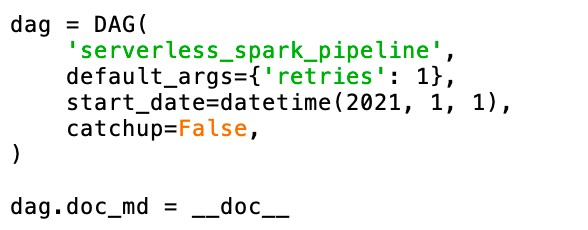
2. DAG Definition and Configuration
3. PythonOperator and the corresponding function for generating IAM Token

4. PythonOperator and the corresponding python function for submitting spark application

5. PythonSensor and the corresponding python function for tracking spark application Note that you can configure the poke interval — by default it is one minute.

P.S — This code does not consider the case of ‘failed’ but you get the idea…
6. And finally the sequencing

Order of execution from left to right
Let’s see how the DAG turns out on the Airflow UI:

You can see the progress of application with the different color legends

Also see the duration and other details per task
Couple of Beginner Tips
Tip1: You place your DAG files (essentially python files) under the “dags” folder of your Airflow installation). It takes about less than a minute to reflect on the Airflow UI. Whenever you make changes for the files it takes about the same time to reflect

Tip2: Unpause the DAG for testing. Otherwise it will not automatically proceed to the next task Here I have unpaused my two DAGs : “sales_data_analysis” and “serverless_spark_pipeline”

Tip3: For Python Operators, define the python function ahead of the Operator in the DAG
A Realistic Workflow — Sales Data Analysis
A real workflow will have parallel tasks and some kind of a fan-out/fan-in of tasks, branching out, joining in. Airflow supports all these and more complex requirements.
Tasks Sequencing
- Let us consider the Sales Data Analysis application which requires 3 parallel regional analysis (say, America, Asia, Europe) to happen and then overall trends analysis on final data.
- This is how I would sequence the tasks in my DAG — it should be fairly intuitive to understand.
- The outcome of this DAG is the first picture shown at the top of this article

DAG Sequencing for parallel tasks and join
Python Operator/Sensor
- Here is the code for all of the PythonOperators/Tasks.
- Essentially they are all calling the same _submit_spark_appliction python callable and _track_application python callable.
- But what will change is the parameters passed to the callable — in this case I am only passing the region using the op_kwargs. In a more real DAG, you would maybe pass the application name and other input arguments

Tracking Application ID for Parallel Submissions
- A slight modification has been done for the key that is used to push and pull the application id so that the right application_ids get tracked to completion

Branching
- You can define branching code with the airflow branch operator, wherein, based on the outcome of a task you can have the DAG execute different tasks as needed. Read more here https://www.astronomer.io/guides/airflow-branch-operator/
Side Note
Apache Airflow is one of most comprehensive and widely used workflow management systems. If you are curious about how Kubeflow compares with Airflow — this is a nice article to read through https://valohai.com/blog/kubeflow-vs-airflow/
Source Code
1. Serverless-Spark-Submission DAG 2. Sales-Data-Analysis.py DAG
References
- Tuan Vu’s Introduction to Apache Airflow is an excellent starting point
- https://naiveskill.com/install-airflow/ — helped me setup Airflow locally on my Mac
- XCOM: https://www.astronomer.io/guides/airflow-passing-data-between-tasks/
- Sequencing : https://livebook.manning.com/book/data-pipelines-with-apache-airflow/chapter-15/1
- Python Operator https://airflow.apache.org/docs/apache-airflow/stable/howto/operator/python.html
메타데이터
- post_id
- 9fba808ac4e0
- slug
- building-pipelines-for-serverless-spark-9fba808ac4e0
- url
- https://selectfrom.dev/building-pipelines-for-serverless-spark-9fba808ac4e0
- canonical_url
- https://selectfrom.dev/building-pipelines-for-serverless-spark-9fba808ac4e0
- author_url
- https://medium.com/@mrudulamadiraju
- status
- ok
- fetched_at
- 2026-08-17 14:16:34