Implementing GitHub OAuth with Lucia in a SvelteKit Project
In this blog post, I’ll walk you through how I integrated GitHub OAuth authentication into my SvelteKit project using Lucia for session…
Implementing GitHub OAuth with Lucia in a SvelteKit Project
Photo by stefan moertl on Unsplash
In this blog post, I’ll walk you through how I integrated GitHub OAuth authentication into my SvelteKit project using Lucia for session management. I’ll jump straight into the code and explain the theory behind key decisions as we go.
Step 1: Redirecting the User to GitHub
When the user clicks the “Login with GitHub” button, they are redirected to GitHub’s authorization page. This is handled by a SvelteKit endpoint.
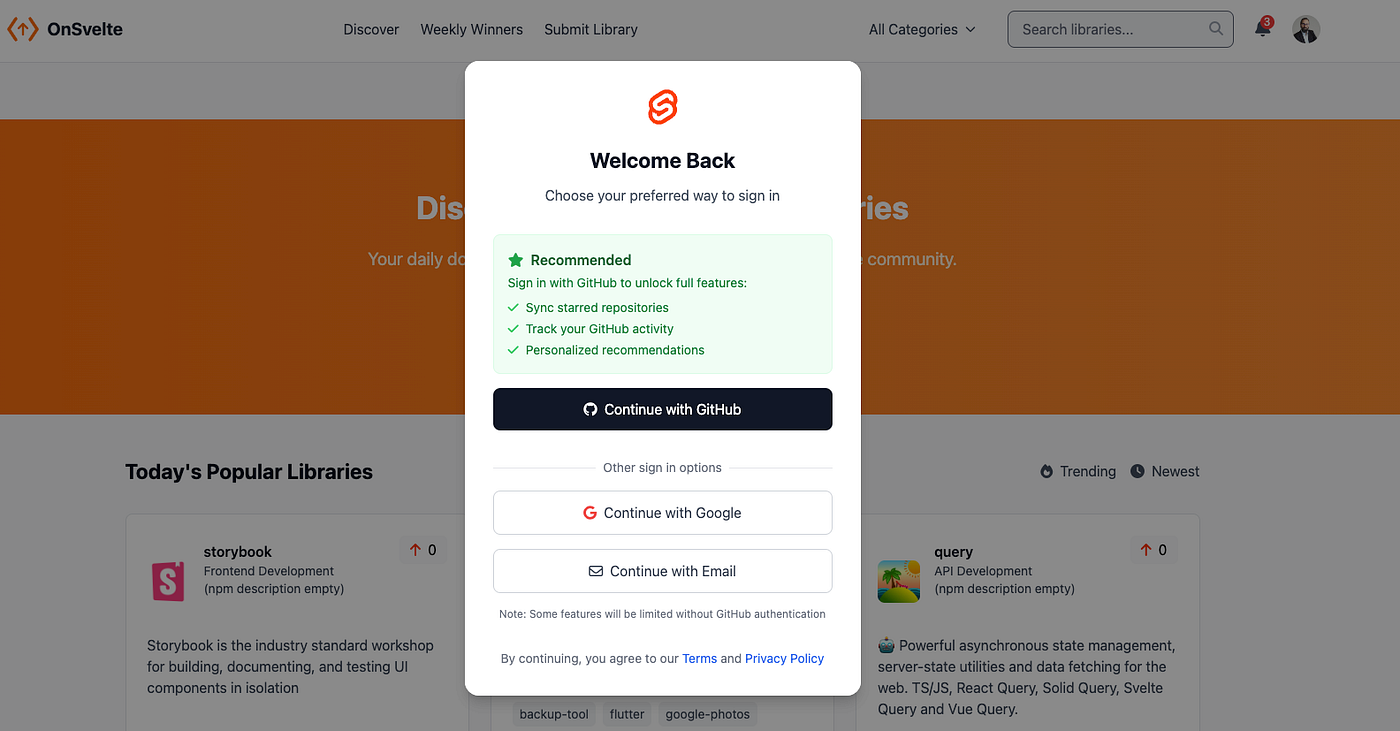
Code: /src/routes/login/github/+server.ts
import { generateState } from "arctic";
import { github } from "$lib/server/oauth";
import type { RequestEvent } from "@sveltejs/kit";

export async function GET(event: RequestEvent): Promise<Response> {
    // Generate a unique state for the OAuth transaction
    const state = generateState();

    // Create the GitHub authorization URL
    const url = github.createAuthorizationURL(state, []);

    // Store the state in a secure, HTTP-only cookie
    event.cookies.set("github_oauth_state", state, {
        path: "/",
        httpOnly: true,
        maxAge: 60 * 10, // 10 minutes
        sameSite: "lax"
    });

    // Redirect the user to GitHub's authorization page
    return new Response(null, {
        status: 302,
        headers: {
            Location: url.toString()
        }
    });
}
Why the State Parameter?
The state parameter is a unique, random string that prevents Cross-Site Request Forgery (CSRF) attacks. By storing it in a secure cookie and verifying it later, we ensure that the OAuth flow was called back for the same user and not by a malicious actor.
Step 2: Handling the GitHub Callback
After the user authorizes the application, GitHub redirects them to our callback URL (you set that up on your GitHub app settings page). Here, we validate the state, exchange the authorization code for an access token, and retrieve the user’s GitHub profile.
Code: /src/routes/login/github/callback/+server.ts
import { Session, User } from "$lib/server/db/model";
import { github, setSessionTokenCookie } from "$lib/server/oauth";
import type { RequestEvent } from "@sveltejs/kit";
import type { OAuth2Tokens } from "arctic";
import type { IUser } from "$lib/server/db/schema/entities";
import { SvelteLibraryFetcher } from "$lib/server/scrape/GitHubScraper";
import logger from "$lib/common/Logger";

export async function GET(event: RequestEvent): Promise<Response> {
    // Extract the code and state from the callback URL
    const code = event.url.searchParams.get("code");
    const state = event.url.searchParams.get("state");
    const storedState = event.cookies.get("github_oauth_state") ?? null;

    // Validate the state and code
    if (code === null || state === null || storedState === null || state !== storedState) {
        return new Response(null, { status: 400 });
    }

    // Exchange the authorization code for an access token
    let tokens: OAuth2Tokens;
    try {
        tokens = await github.validateAuthorizationCode(code);
    } catch (e) {
        return new Response(null, { status: 400 });
    }

    // Fetch the user's GitHub profile
    const githubUserResponse = await fetch("https://api.github.com/user", {
        headers: {
            Authorization: `Bearer ${tokens.accessToken()}`
        }
    });
    const userDetails = await githubUserResponse.json();
    const githubId = userDetails.id;

    // Check if the user already exists in the database
    const existingUser = await User.findOne({ githubId }).exec();
    if (existingUser) {
        return await sessionOk(existingUser, event, false);
    }

    // Create a new user if they don't exist
    const newUser = await User.create(SvelteLibraryFetcher.toLocalUser(userDetails));
    return await sessionOk(newUser, event, true);
}

// Helper function to create a session and redirect the user
async function sessionOk(user: IUser, event: RequestEvent, isNewUser: boolean): Promise<Response> {
    const sessionToken = Session.generateSessionToken();
    const session = await Session.createSession(user._id.toString(), sessionToken);
    setSessionTokenCookie(event, sessionToken, session.expires_at);
    return new Response(null, {
        status: 302,
        headers: {
            Location: "/"
        }
    });
}
After saving the user, we are unconditionally redirecting to the landing page, this can be improved later by keeping in a cookie the page the user intended to visit before logging in (the one that triggered the login), and redirecting him back to it on success. We can also show the user a tutorial on his first connection through the isNewUser forking variable.
Why Validate the State?
Validating the state parameter ensures that the callback request is legitimate. If the state doesn’t match the one we stored, we reject the request to prevent CSRF attacks. That attack consists of a hacker calling the callback URL as if it was called by GitHub to mislead the app and cause it to grant him access.
Step 3: Managing Sessions with Lucia
Lucia handles session management by validating session tokens and managing cookies. The session token is stored in an HTTP-only cookie, making it inaccessible to client-side JavaScript.
The hook below is a middleware: it intercepts any request coming to the Sveltekit server. We use that opportunity to read the session cookie, and find the user corresponding to it (validateSessionToken()), which we set into the request context, making it readable by all the next request handlers.
Code: /src/hooks.server.ts
import {
    validateSessionToken,
    setSessionTokenCookie,
    deleteSessionTokenCookie
} from "$lib/server/oauth";
import type { Handle } from "@sveltejs/kit";

export const handle: Handle = async ({ event, resolve }) => {
    const token = event.cookies.get("session") ?? null;

    if (token === null) {
        event.locals.user = null;
        event.locals.session = null;
        return resolve(event);
    }

    // Validate the session token
    const { session, user } = await validateSessionToken(token);

    if (session !== null) {
        setSessionTokenCookie(event, token, session.expires_at);
    } else {
        deleteSessionTokenCookie(event);
    }

    event.locals.session = session;
    event.locals.user = user;
    return resolve(event);
};
Why Use HTTP-Only Cookies?
HTTP-only cookies cannot be accessed by client-side JavaScript, which prevents cross-site scripting (XSS) attacks from stealing session tokens.
Step 4: Passing the information to the front-end
At the root of the project templates, I added a +layout.server.ts file that will be called on any page display. As it is run on the server side, it gets the user we just set in the code above and makes it available to the svelte frontend pages by returning it (adding it to the data that is preloaded before running the template pages).
To read more about how layouts work in SvelteKit, check this page.
To read more about data preloading in Svelte, check the official documentation, which is very well explained.
Code: /src/routes/+layout.server.ts
import type { LayoutServerLoad } from './$types';

export const load: LayoutServerLoad = async ({ locals }) => {
    return {
        user: locals.user, // Pass the user object to the client
    };
};
Step 5: Making The User App-widely Available
The connected user is central information any component can need, whether to check the rights, display an avatar, or make changes to his information. On Svelte, you can achieve this by combining two features: stores (to get notified of changes) and context (to make a variable available to any component that requests it).
Code: /src/lib/stores/userStore.ts
import {type Writable, writable} from 'svelte/store';
import type {UserDTO} from "$lib/dto/UserDTO";

export const userStore: Writable<UserDTO | null> = writable(null);
All the work has been done for you, making the store declaration a one line call.
Code: /src/routes/+layout.svelte
<script lang="ts">
 import { writable } from 'svelte/store';
 import { i18n } from '$lib/i18n';
 import { ParaglideJS } from '@inlang/paraglide-sveltekit';
 import '../app.css';
 import '@fortawesome/fontawesome-free/css/all.min.css'

 import { onMount, setContext } from 'svelte';
 import {userStore} from "$lib/stores/userStore";
 import type {UserDTO} from "$lib/dto/UserDTO";

 const screenSize = '(min-width: 640px)';
 const isDesktop = writable(false);
 // Provide the user store to the context
 setContext('user', userStore);
 setContext('isDesktop', isDesktop);


 interface PageData {
  user: UserDTO;
 }
 let { data, children } = $props<{ data: PageData; children: any }>()
 userStore.set(data.user);

 // Initialize the store with the user data from the server
 userStore.set(data.user);
 // detect if the size of the screen matches a mobile or desktop layout
 function updateMedia() {
  isDesktop.set( window.matchMedia(screenSize).matches );
 }

 onMount(() => {
  // Set initial value
  updateMedia();

  // Add event listener for window resize
  const mediaQuery = window.matchMedia(screenSize);
  mediaQuery.addEventListener('change', updateMedia);

  // Clean up listener
  return () => mediaQuery.removeEventListener('change', updateMedia);
 });

</script>

<ParaglideJS {i18n}>
 {@render children()}
</ParaglideJS>
I intentionally added another example of an app-wide store you might want to take decisions upon: here it is a detection of screen size changes to trigger a mobile view. You can also use this example to see that we can create stores both in separate js/ts files or directly in svelte components.
Step 6: Displaying the User in the UI
Code: /src/lib/comp/desktop/Header.svelte
<script lang="ts">
    import { writable } from 'svelte/store';
    import LoginPopup from "$lib/comp/desktop/login/LoginPopup.svelte";
    import type { UserDTO } from "$lib/dto/UserDTO";

    export let user: UserDTO;

    const showLoginPopup = writable(false);

    function openLoginPopup(event: MouseEvent) {
        event.stopPropagation();
        showLoginPopup.set(true);
    }
</script>

<header id="header" class="sticky top-0 bg-white border-b border-gray-200 z-50">
    <div class="container mx-auto px-6 py-4 flex justify-between items-center">
        <!-- Logo and navigation -->
        <div class="flex items-center space-x-6">
            <img src={user?.icon} alt="Profile" class="w-8 h-8 rounded-full" on:click={openLoginPopup}>
        </div>
    </div>
    <LoginPopup bind:showPopup={$showLoginPopup} />
</header>
Why Pass the User Object?
Passing the user object to the client allows us to personalize the UI, such as displaying the user’s avatar and enabling user-specific actions.
Conclusion
Integrating GitHub OAuth with Lucia and Arctic, took me three hours, and now I have a widely available user I can access anywhere from the app.
If you’re building a project from scratch or an MVP, I highly recommend using SvelteKit. It’s lightweight, flexible, and easy to learn.
You can see the project live on https://svelter.me
Annex:
You are probably wondering what is in the functions I didn’t show the code of. I grouped them in an interface here, but you can do whatever strategy you pick here. As a temporary quick win solution, I am saving the sessions in MongoDb, but you could want to use JWT to avoid having to read and write into db on each request:
export interface ISessionFeatures {
    generateSessionToken: () => string;
    createSession: (userId: string, sessionToken: string) => Promise<SessionDocument>;
    getSession: (sessionToken: string) => Promise<SessionDocument | null>;
    deleteSession: (sessionToken: string) => Promise<boolean>;
    updateSessionExpiration: (sessionToken: string, newExpiration: Date) => Promise<boolean>;
}
So if you want, like me, to jump-start. Here’s a KISS implementation :-)
import  { Document, Schema, Model } from 'mongoose';
import { randomBytes } from 'crypto';
import {connectToDatabase} from "$lib/server/db";

export interface ISession {
    id: string; // Session token (64-character hex string)
    user_id: string; // User ID associated with the session
    expires_at: Date; // Expiration date of the session
}

// Define the Session interface
export type SessionDocument = Document & ISession;

// Define the Session schema
export const sessionSchema: Schema = new Schema({
    id: {
        type: String,
        required: true,
        unique: true, // Ensures the field is unique
        index: true,  // Adds an index to the field
    },
    user_id: {
        type: String,
        required: true,
        index: true,  // Optionally, add an index to `user_id` if you query by it frequently
    },
    expires_at: {
        type: Date,
        required: true,
    },
});

// Define the static methods in an object
const sessionStatics = {
    /**
     * Generates a secure random session token.
     * @returns A unique session token.
     */
    generateSessionToken: function (): string {
        return randomBytes(32).toString('hex'); // 64-character hex string
    },

    /**
     * Creates a new session.
     * @param userId - The ID of the user associated with the session.
     * @param sessionToken - The session token to be used as the session ID.
     * @returns The created session document.
     */
    createSession: async function (
        this: Model<SessionDocument>, // Explicitly define `this` as the Mongoose model
        userId: string,
        sessionToken: string
    ): Promise<SessionDocument> {
        await connectToDatabase();
        return await this.create({
            id: sessionToken, // Use the session token as the session ID
            user_id: userId,
            expires_at: new Date(Date.now() + 1000 * 60 * 60 * 24 * 7 * 4), // 4 week from now
        });
    },

    /**
     * Retrieves a session by its token.
     * @param sessionToken - The session token to search for.
     * @returns The session document if found, otherwise null.
     */
    getSession: async function (
        this: Model<SessionDocument>, // Explicitly define `this` as the Mongoose model
        sessionToken: string
    ): Promise<SessionDocument | null> {
        await connectToDatabase();
        return await this.findOne({ id: sessionToken }).exec();
    },

    /**
     * Deletes a session by its token.
     * @param sessionToken - The session token to delete.
     * @returns A boolean indicating whether the session was deleted.
     */
    deleteSession: async function (
        this: Model<SessionDocument>, // Explicitly define `this` as the Mongoose model
        sessionToken: string
    ): Promise<boolean> {
        await connectToDatabase();
        const result = await this.deleteOne({ id: sessionToken }).exec();
        return result.deletedCount > 0; // Returns true if a session was deleted
    },

    /**
     * Updates the expiration date of a session.
     * @param sessionToken - The session token to update.
     * @param newExpiration - The new expiration date.
     * @returns A boolean indicating whether the session was updated.
     */
    updateSessionExpiration: async function (
        this: Model<SessionDocument>, // Explicitly define `this` as the Mongoose model
        sessionToken: string,
        newExpiration: Date
    ): Promise<boolean> {
        await connectToDatabase();
        const result = await this.updateOne({ id: sessionToken }, { expires_at: newExpiration }).exec();
        return result.modifiedCount > 0; // Returns true if the session was updated
    },

};

// Add the static methods to the schema one by one
for (const [methodName, methodImplementation] of Object.entries(sessionStatics)) {
    sessionSchema.statics[methodName] = methodImplementation;
}
I hope you enjoyed this article. Feel free to ask any questions, I’ll be happy to help.
메타데이터
- post_id
- 9fbdf1f0800c
- slug
- implementing-github-oauth-with-lucia-in-a-sveltekit-project-9fbdf1f0800c
- url
- https://medium.com/@zhamdi/implementing-github-oauth-with-lucia-in-a-sveltekit-project-9fbdf1f0800c
- canonical_url
- https://medium.com/@zhamdi/implementing-github-oauth-with-lucia-in-a-sveltekit-project-9fbdf1f0800c
- author_url
- https://medium.com/@zhamdi
- status
- ok
- fetched_at
- 2026-07-21 07:04:46