Developer Authentication Options: A Complete Guide (2025)
Authentication is the backbone of security in any application, especially when developers build APIs, services, or tools that interact with…
Developer Authentication Options: A Complete Guide (2025)
Authentication is the backbone of security in any application, especially when developers build APIs, services, or tools that interact with sensitive data or infrastructure. Whether you’re building a public-facing API, a backend service, or a secure internal tool, how you authenticate users or other services is critical.
In this article, we’ll explore the different authentication methods developers can use, along with their use cases, benefits, and potential downsides. No jargon — just plain English.
Why Developer Authentication Matters
Before jumping into the methods, let’s clarify why authentication is such a big deal in development:
- 🛡️ Prevent unauthorized access to services and data
- 🔍 Identify and track users, clients, or machines
- 🔐 Enforce roles and permissions
- 🌐 Protect APIs from abuse or malicious use
- 🤝 Integrate securely with third-party systems
Now, let’s look at the best options developers have today.
API Key Authentication
What is it?
An API key is a unique string that identifies and authenticates a client calling your API. Think of it like a password you include in every request.
GET /api/data
Authorization: Api-Key abc123xyz456
Pros:
- Easy to generate and use
- Works well for simple use cases (e.g., internal tools)
Cons:
- No user identity; just identifies the app
- Can be leaked if stored in public repos
- No built-in expiration or rotation mechanism
Use Cases:
- Internal APIs
- Non-sensitive data or public endpoints with rate limiting
JWT (JSON Web Tokens)
What is it?
JWT is a compact, self-contained token that includes encoded data (claims) like user ID, expiration time, and roles. It’s signed by the server so it can be verified but not tampered with.
Authorization: Bearer eyJhbGciOiJIUzI1NiIsInR5cCI6...Pros:
- Stateless — no need for server-side session storage
- Includes user info (like roles) in the token
- Easy to use in SPAs and mobile apps
Cons:
- If stolen, it’s dangerous (no built-in revoke unless managed)
- Should be stored securely (never in
localStoragein sensitive apps)
Use Cases:
- Web and mobile apps
- Microservices needing identity propagation
- APIs that require scalable authentication
OAuth 2.0
What is it?
OAuth 2.0 is an authorization framework that allows one app to act on behalf of a user without sharing their password. It’s widely used to log in with third-party providers like Google or GitHub.
Common Flows:
- Authorization Code — Most secure, used in web apps
- Client Credentials — For machine-to-machine auth
- Device Code — Used in devices like smart TVs
- PKCE — Secure for mobile and single-page apps
Pros:
- Granular access control (scopes)
- Works across platforms and services
- Widely adopted and supported
Cons:
- Can be complex to implement
- Requires token management (refresh, revoke, etc.)
Use Cases:
- “Login with Google/GitHub” type apps
- APIs that access third-party services
- Backend services needing delegated access
OpenID Connect (OIDC)
What is it?
OIDC is built on top of OAuth 2.0 and adds identity features. It not only authorizes but also authenticates users and provides their profile data securely.
Pros:
- Combines login + user info
- Compatible with social login providers
- Token-based and stateless
Cons:
- Slightly more complex than OAuth alone
Use Cases:
- Single Sign-On (SSO)
- Web/mobile user login
- Identity federation across systems
Session Cookies (with CSRF Protection)
What is it?
This is the traditional method used in server-rendered websites. The server keeps a session in memory or a database, and sets a cookie on the client’s browser.
Pros:
- Time-tested
- Built-in support in most backend frameworks
- Secure with CSRF protection
Cons:
- Doesn’t scale well across servers without session sharing
- Not great for APIs or stateless architectures
Use Cases:
- Server-side rendered websites (e.g., Django, Rails)
- Admin dashboards
- Apps where CSRF/XSS is managed well
Refresh Tokens
What is it?
In token-based systems like OAuth or JWT, refresh tokens allow users to get a new access token without re-authenticating. They’re usually long-lived and stored securely.
Pros:
- Allows short-lived access tokens (more secure)
- Keeps users logged in without prompting them
Cons:
- If not implemented properly, they can be abused
- Requires careful token management
Use Cases:
- Mobile and SPA apps
- Systems with long user sessions
- OAuth 2.0 flows with access token expiry
Mutual TLS (mTLS)
What is it?
In mTLS, both the client and server present certificates to verify each other’s identity. It’s a very secure method, especially in internal or enterprise networks.
Pros:
- Extremely secure
- Perfect for service-to-service communication
Cons:
- Complex to set up and manage
- Requires certificate management and rotation
Use Cases:
- Microservices in Kubernetes
- Financial or health APIs
- Zero-trust networks
SSH Key Authentication
What is it?
SSH keys are a secure way to authenticate developers or services to servers, Git platforms, or CI/CD tools. You generate a public/private key pair, and only the private key holder can access systems where the public key is trusted.
Pros:
- Very secure (especially with passphrase)
- Widely supported
Cons:
- Keys must be managed and rotated securely
- Not ideal for web applications or user-facing systems
Use Cases:
- Git and server access
- Secure CI/CD pipelines
- DevOps and infrastructure work
SAML (Security Assertion Markup Language)
What is it?
SAML is an XML-based protocol for exchanging authentication and authorization data. It’s used mostly in enterprise SSO systems, like logging into multiple internal tools with one account.
Pros:
- Mature and secure
- Enterprise-grade
- Integrates well with corporate directories
Cons:
- Verbose and more complex than modern protocols
- Not API-friendly
Use Cases:
- Enterprise SSO
- Internal employee tools
- HR/Finance/Legal dashboards in corporations
Bonus: Adaptive and Context-Aware Authentication
Some systems go beyond fixed methods and adapt authentication based on behavior:
- Recognize device fingerprints
- Check for IP reputation
- Block logins from unfamiliar countries or times
- Add friction only when risk is high (e.g., re-authentication)
These are usually built into modern identity platforms like Okta, Auth0, or AWS Cognito.
Choosing the Right Authentication Method
Not sure which authentication method to use? Here’s a quick guide based on different use cases:
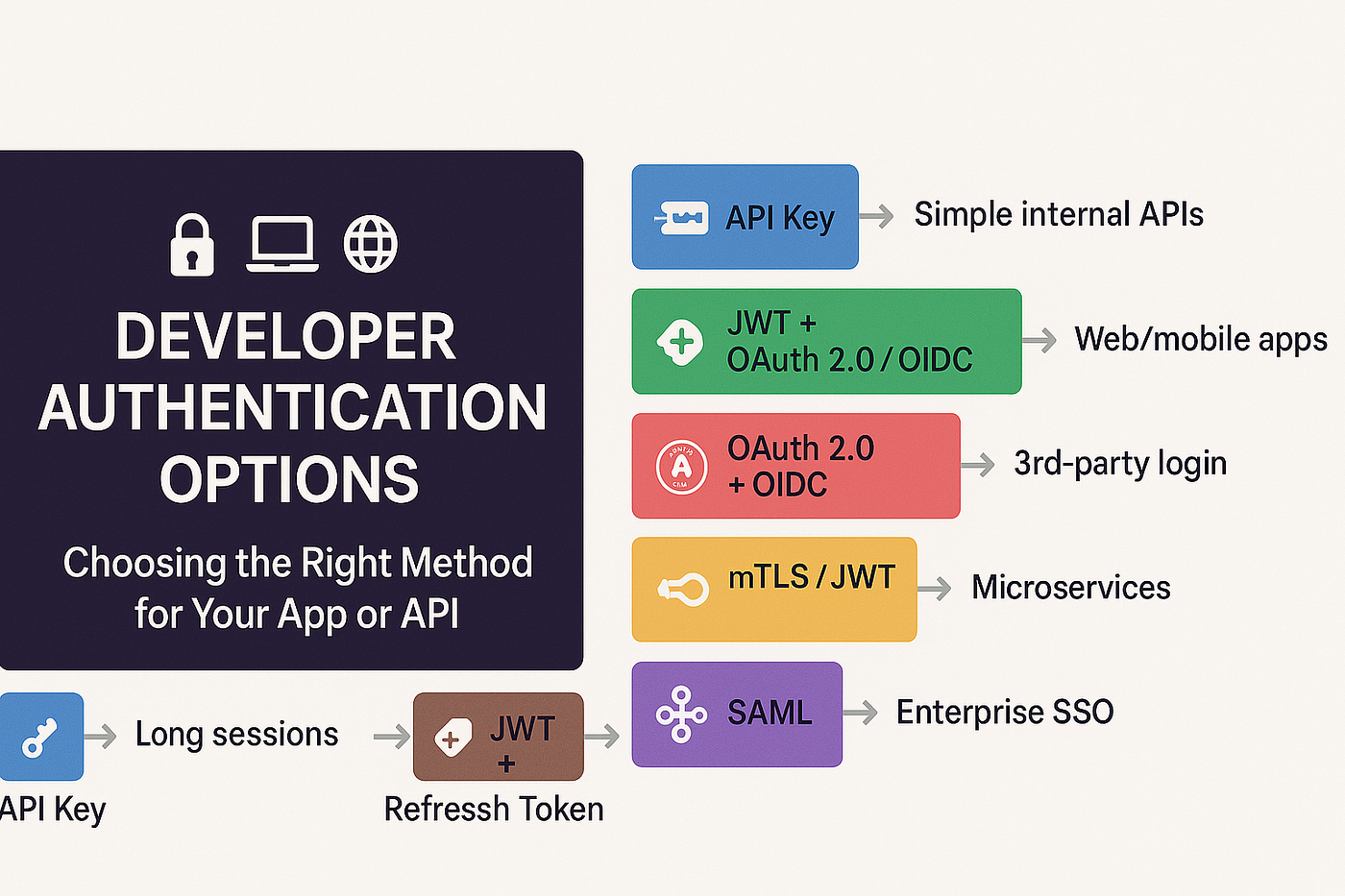
- For a simple internal API: Use API Key authentication. It’s easy to implement and manage for basic, low-risk access.
- For web or mobile user login: Go with JWT combined with OAuth 2.0 or OpenID Connect (OIDC). This setup is secure, scalable, and works well across platforms.
- For third-party logins (like Google, GitHub, Apple, etc.): Use OAuth 2.0 with OpenID Connect to delegate authentication and access user profile data safely.
- For secure communication between microservices: Use mutual TLS (mTLS) or JWT for authenticated and encrypted service-to-service calls.
- For DevOps tasks or CI/CD pipelines: Authenticate using SSH keys for secure access to servers, Git repositories, and automation tools.
- For enterprise dashboards or internal tools (Single Sign-On): Implement SAML-based authentication, which integrates well with identity providers like Okta, Azure AD, and Google Workspace.
- For apps that require long user sessions (without frequent logins): Use JWT with refresh tokens to securely manage session longevity and token renewal.
Final Thoughts
Authentication is not one-size-fits-all. The best method depends on what you’re building, who it’s for, and how much security you need. For developers, understanding these tools isn’t just useful — it’s essential.
Start simple, but build with scalability and security in mind. If you’re ever unsure, combine approaches like JWT + OAuth + Refresh Tokens, or lean on identity platforms like Auth0, Okta, Firebase, or AWS Cognito to do the heavy lifting.
메타데이터
- post_id
- 9fef16f8fbe1
- slug
- developer-authentication-options-a-complete-guide-2025-9fef16f8fbe1
- url
- https://medium.com/@mahabub-r/developer-authentication-options-a-complete-guide-2025-9fef16f8fbe1
- canonical_url
- https://medium.com/@mahabub-r/developer-authentication-options-a-complete-guide-2025-9fef16f8fbe1
- author_url
- https://medium.com/@mahabub-r
- status
- ok
- fetched_at
- 2026-07-10 19:15:58