Python Text File Reading and Writing in various modes, Part 2
In the previous article, you have seen how to read text files with r file open mode(default mode if it is omitted), and write data using…
Python Text File Reading and Writing in various modes, Part 2
In the previous article, you have seen how to read text files with r file open mode(default mode if it is omitted), and write data using the r+ mode. You have seen that opening files in both those modes do not erase previous content, and that the file must exist, otherwise an error will occur. I presume that the file is accessible(readable/writable) for the user that is running Python program, so I did not elaborate further on this point.
Now, every time we re-run the program, I told you that you should manually set the contents of a text file to London, because something else has been added. Now, what if we want to empty ir, truncate the file? There is a mode that does just this- truncate the file when it is opened. This file open mode is w, as in write.
with open('list.txt', 'w') as file:
    pass
Now this is very important — when you open a file in w mode, if it exists, it will be truncated. If it doesn’t exist, opposed to what we saw in r/r+ mode, it will be created- and it will be empty. You can check that the file is empty after running the program, and you can pass different filename(one that doesn’t exist) to see it will be created.
Writing to a file opened this way can be done with write method-it will write a string to a file. After I write to a file, I will use tell file handler’s method to print the current cursor location. After that, I will rewind the cursor position to 0, start of a file. I mentioned tell and seek, but didn’t exactly use it.
with open('list2.txt', 'w') as file:
    file.write("London")
    print(file.tell())
    file.seek(0)
    print(file.tell())
6
0
seek(0) positions pointer at the start of the file. If we execute seek(1),it will be placed at the byte position 1- not the character at position 1. That is because characters can be represented with multiple bytes. So just remember — seek work with bytes, not characters.
What would happen if we try to write Paris, with cursor at position 0? Will it overwrite first letters of London? Or truncate the file again? Let us try:
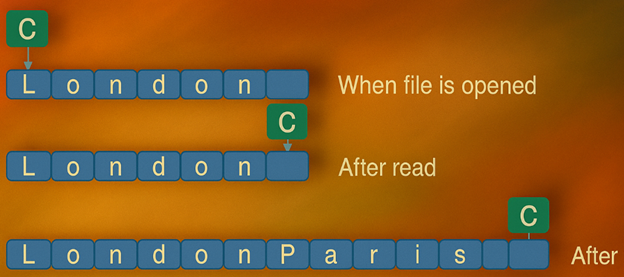
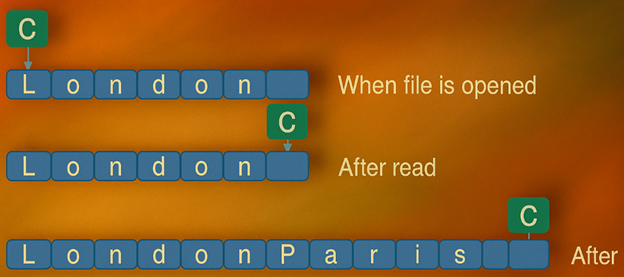
file.write("Paris")If we manually check the list2.txt file, we will see that the content is Parisn- just as we had with r+.
How about reading from this file? After rewinding the cursor to 0, we can read it with read metod:
    print(file.read())
io.UnsupportedOperation: not readable
We get an exception, because w is a write-only mode, we can’t read it. Why should we use it at all? We can use it to generate a new file, or existing file with contents we need to be erased. With this mode, we can’t append or read, while with r+ we can read and append to an existing file, if we use seek method accordingly.
There is an addition to w mode, and it is w+ mode. The only difference between w and w+ is that with w+ we can read the content of file, not just write to it. Opening with w+ still creates new file or truncate existing file, so any read should be done after writing to a file, using seek rewind to appropriate position.
with open('list3.txt', 'w+') as file:
    file.write("London")
    file.seek(0)
    print(file.read())
London
Now we can see that w+ is the same as w, plus the ability to read file contents.
Also, comparing w+ and r+, we can see that their main difference is that in r+ mode, file must exist, and in w+ mode it is truncated if it exists, otherwise ne file is created.
There are more modes to explore, some rather exotic, which I will discuss in the next article(s).
If you are learning Python, and want to follow the PCEP Python exam syllabus, check my newest Udemy Course, it is a video tutorial packed with hands-on example, quizzes, coding exercises and two full mock exams:
https://www.udemy.com/course/pass-python-pcep-30-0x-video-lessons-and-mock-tests-2025/
If you want to learn more about AWS Lightsail service, check my course on Udemy on AWS Lightsail.
https://www.udemy.com/course/aws-lighsail-a-different-perspective
Also, if you want to prepare for the basic AWS Certified Cloud Practitioner exam, check another one of my courses, also on Udemy:
https://www.udemy.com/course/aws-certified-cloud-practitioner-crash-course
메타데이터
- post_id
- a019b6b7e393
- slug
- python-text-file-reading-and-writing-in-various-modes-part-2-a019b6b7e393
- url
- https://medium.com/@krejjas/python-text-file-reading-and-writing-in-various-modes-part-2-a019b6b7e393
- canonical_url
- https://medium.com/@krejjas/python-text-file-reading-and-writing-in-various-modes-part-2-a019b6b7e393
- author_url
- https://medium.com/@krejjas
- status
- ok
- fetched_at
- 2026-06-23 17:05:31