Building a Classic Hangman Game in C#
Ever found yourself wanting to dive into a coding project that’s both fun and a great learning experience? That’s exactly where I found…
Building a Classic Hangman Game in C
Ever found yourself wanting to dive into a coding project that’s both fun and a great learning experience? That’s exactly where I found myself, and the result was a journey into building a classic game of Hangman using C# and the .NET console. It’s more than just guessing letters; it’s about understanding game loops, managing state, and even wrestling with the command line — all invaluable skills for any aspiring developer.
Join me as I share the story of this project, from the initial Console.WriteLine("Welcome to HangManGame"); to a fully playable game with a few neat tricks up its sleeve.
The Core of the Game: What Makes it Tick?
At its heart, our Hangman game is a traditional word-guessing challenge. A secret word is chosen at random, and the player, armed with a limited number of guesses, tries to unveil it letter by letter.
Here’s a rundown of the key features we managed to build:
- Random Word Fun: Each new game presents a fresh challenge with a word plucked randomly from a predefined list. No two games are alike (well, not for a while, anyway!).
- Interactive Console Experience: It’s all about that classic console feel. Players input their guesses, and the game responds, updating the display in real-time.
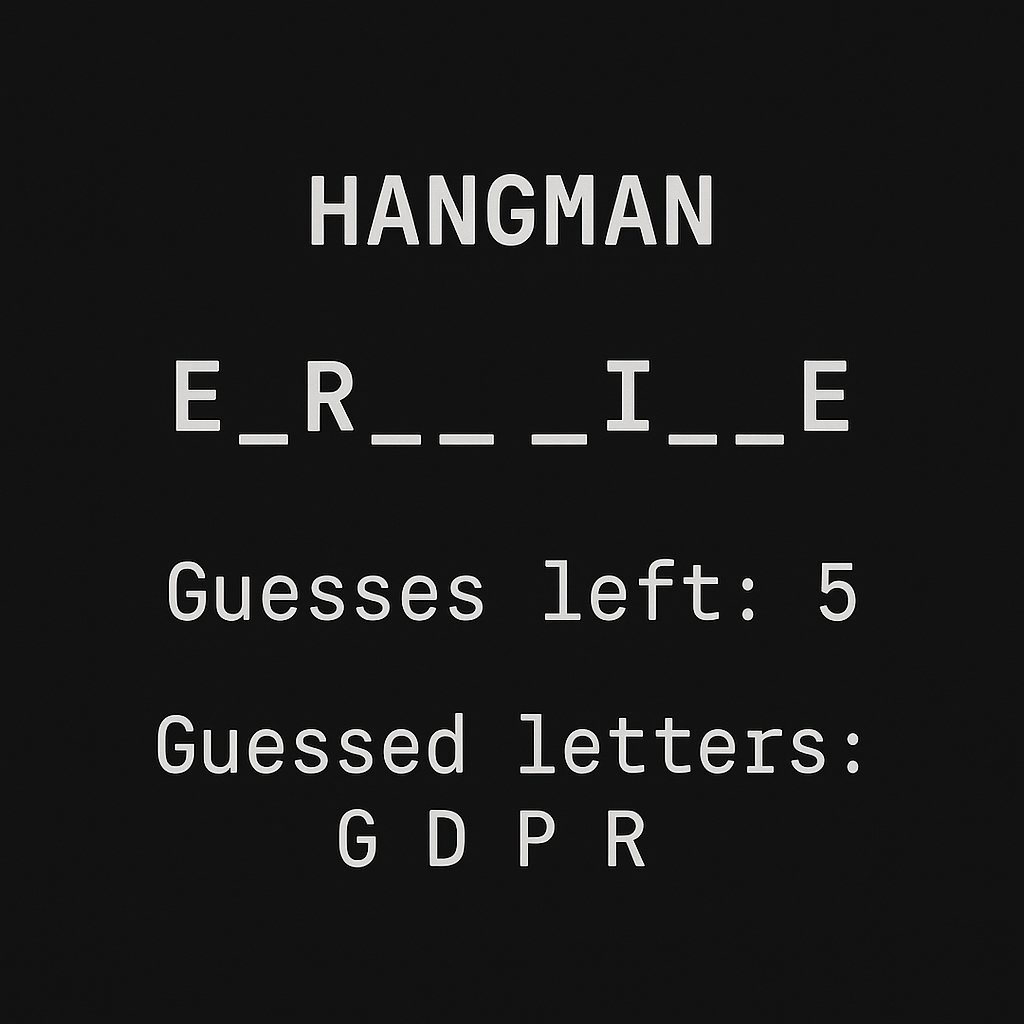
- Crystal Clear Game State: We made sure the player always knows where they stand. The display clearly shows:
- The secret word with underscores for unguessed letters (e.g.,
H _ N _ E _). - The number of precious guesses remaining.
- A handy list of letters already attempted.
- Smart Input Handling: The game is patient. It validates input to ensure players enter actual letters and handles empty inputs gracefully. It also knows if you’ve guessed a letter before!
Fair Play Rules:
- Making an incorrect guess costs you a try.
- Interestingly, we even implemented a (configurable) penalty for re-guessing a letter you’ve already tried — keeps you on your toes!
- And don’t worry about case sensitivity; ‘a’ is the same as ‘A’.
- The Thrill of the Win (or the Agony of Defeat): Clear win/loss conditions determine the outcome, and the secret word is always revealed at the end, just in case you were stumped.
- “Again! Again!”: The fun doesn’t stop. A main menu allows players to jump right back in for another round or exit when they’ve had their fill.
The Journey: More Than Just Code
Building Hangman wasn’t just about writing C#; it was a mini-adventure in software development. Here are some of the milestones and challenges:
- The Skeleton: First, we laid down the basic game loop — prompting for input, checking letters, and determining if the game was over.
- State Management is Key: A surprisingly tricky part was ensuring all game variables (like
guessesLeft, thesecretWord, and the array ofguessedLetters) reset correctly for each new game. This took a bit of back-and-forth to get just right! - User Experience Matters (Even in a Console): We iterated on the display flow. Initially, information might have appeared after a guess. We refined it so the player sees the full game state (word, guesses left, guessed letters) before making each crucial decision. This makes a huge difference in playability.
- Tackling the Edge Cases: What if the user types nothing? What if they type a number? What if they guess the same wrong letter twice? We worked through these to make the game more robust.
- Version Control Odyssey: Ah, Git! Setting up version control is a must. We learned to
git init, craft meaningful commit messages (git commit -m "Feat: Implement core Hangman logic"), and even troubleshoot those classic "git is not recognized" and "Permission denied (publickey)" SSH errors. Switching to HTTPS for remotes was a practical solution there. And yes,.gitignorebecame our best friend for keeping those pesky.vsfiles out of the repository.
What I Learned (and You Can Too!)
This Hangman project, while seemingly simple, packed a punch in terms of learning:
- C# Fundamentals: Loops, conditionals, arrays, strings, methods, and basic class structure (even if implicitly through the
Program.cs). - Console I/O: Reading user input and writing output effectively.
- Algorithmic Thinking: Designing the logic for checking letters, updating the display, and managing game state.
- Debugging: Stepping through code, figuring out why
guessesLeftwasn't decrementing correctly (spoiler: variable scope!). - Git & GitHub: The basics of version control, from initializing a repo to pushing changes and understanding SSH vs. HTTPS.
What’s Next for Hangman?
The beauty of a project like this is that it can always grow. Some ideas bubbling for future enhancements include:
- Difficulty Levels: Varying word length or the number of guesses.
- Word Categories: Letting players choose themes like “Animals” or “Programming Terms.”
- External Word Lists: Loading words from a text file to easily expand the dictionary.
- The Actual Hangman: Adding a visual (ASCII art) representation of the hangman figure as guesses run out.
- A Hint System: For when you’re really stuck!
Your Turn!
Building a simple game is a fantastic way to solidify your programming skills and have some fun in the process. If you’re learning C# or any other language, I highly recommend taking on a project like Hangman. You’ll be surprised at how much you learn and the satisfaction you get from seeing it all come together.
You can find the https://github.com/Abhi-AIX/hangman_game_c_sharp
Happy coding!
메타데이터
- post_id
- a02ff0c85f86
- slug
- building-a-classic-hangman-game-in-c-a02ff0c85f86
- url
- https://medium.com/@aibhi.dev/building-a-classic-hangman-game-in-c-a02ff0c85f86
- canonical_url
- https://medium.com/@aibhi.dev/building-a-classic-hangman-game-in-c-a02ff0c85f86
- author_url
- https://medium.com/@aibhi.dev
- status
- ok
- fetched_at
- 2026-07-20 18:44:07