🚀 Building a Real-Time CDC Pipeline on Google Cloud: MySQL to BigQuery
🚀 Overview
🚀 Building a Real-Time CDC Pipeline on Google Cloud: MySQL to BigQuery
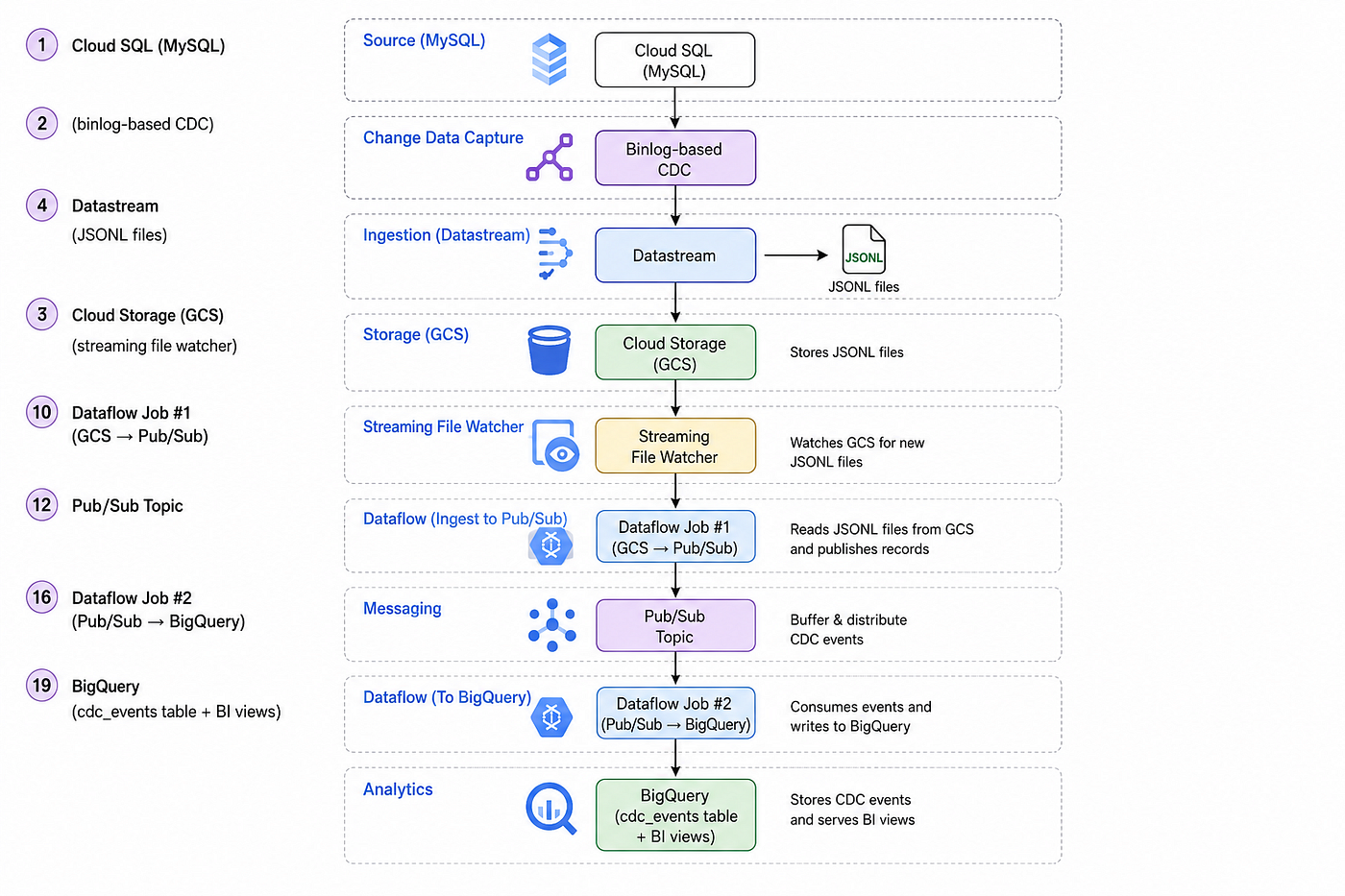
Real-time CDC pipeline: Cloud SQL to BigQuery via Datastream & Dataflow.
🚀 Overview
Modern data platforms are shifting from batch-based processing to real-time, event-driven systems. Organizations no longer want to wait hours or days to derive insights — they want data as it changes. This is where Change Data Capture (CDC) becomes essential.
CDC allows capturing every INSERT, UPDATE, and DELETE event from a transactional database and streaming those changes into downstream systems like data warehouses. In this article, we build a CDC pipeline on Google Cloud Platform (GCP) that streams changes from Cloud SQL (MySQL) into BigQuery in near real time.
The solution uses the following Google Cloud services:
· Cloud SQL (MySQL 8.4 — Enterprise Plus) as the transactional source system
· Datastream to extract database changes using MySQL binary logs
· Cloud Storage (GCS) as a durable intermediate landing zone for CDC files
· Apache Beam running on Dataflow (Streaming) for parsing, transformation, and routing
· Pub/Sub as a scalable and decoupled messaging layer
· BigQuery as the final analytical data warehouse
This pipeline supports continuous CDC ingestion, is suitable for learning and reference environments.
✅ Step 1: Configure Cloud SQL (MySQL)
To use Cloud SQL (MySQL) as a CDC source, it must be configured to reliably expose binary logs while ensuring stability and durability.
Instance Configuration
- Enterprise Plus edition provides better performance and compatibility with Datastream.
- MySQL 8.4 supports modern replication and binlog features required for CDC.
- Single-zone deployment works for demos; use high availability for production.
- Password-based authentication keeps setup simple for integrations.
Configuration details:

Instance name: development
Project: free-trial-first-project
Region / Zone: us-central1 (Single-zone deployment)
Edition: Enterprise Plus for enhanced performance and compatibility
Database version: MySQL 8.4 with modern replication features
Authentication: Password-based for simple integration
Data Protection
- Enable automated backups to safeguard data.
- Use Point-in-Time Recovery (PITR) to restore consistency if pipelines fail or need rebuilding.
To ensure durability and recovery, the database is configured with essential protection mechanisms:

Standard backup tier for cost-effective data protection
Automated daily backups to maintain regular restore points
Point-in-time recovery (PITR) enabled for precise data restoration
Database Flags
- Increase timeout values to prevent long-running CDC connections from dropping.
- Proper tuning ensures stable, uninterrupted streaming.
To support stable and long-running CDC connections, the following database flags are configured:

net_read_timeout  = 3600
net_write_timeout = 3600
wait_timeout      = 86400
Networking
- Public IP (0.0.0.0/0) is acceptable for labs only.
- For production, use private IP and VPC peering to improve security.
Public IP is enabled for direct access
Authorized networks set to 0.0.0.0/0 (intended for lab/demo use only)
Binary Logging
- CDC depends entirely on MySQL binary logs.
- Ensure
log_binis enabled—otherwise, Datastream will not work.
SHOW VARIABLES LIKE 'log_bin';
Expected result: ON
✅ Step 2: Create Schema & CDC User
Application Database
The SampleDB_Students schema is intentionally kept simple to support learning and validation:
- Demonstrates row-level CDC behavior
- Helps validate INSERT, UPDATE, and DELETE propagation
- Provides a clear, easy-to-understand dataset for testing pipelines
CREATE DATABASE SampleDB_Students;
USE SampleDB_Students;

CREATE TABLE Students (
    StudentID INT AUTO_INCREMENT PRIMARY KEY,
    FirstName VARCHAR(50),
    LastName VARCHAR(50),
    Age INT,
    Grade VARCHAR(10)
);
Datastream User
A dedicated Datastream user is created to ensure secure and controlled access:
- Isolates CDC operations from application users
- Follows the principle of least privilege
- Enables replication access without allowing schema modifications
CREATE USER 'datastream_user'@'%' IDENTIFIED BY 'password';Required Permissions:
SELECTon application tablesREPLICATION SLAVEandREPLICATION CLIENTfor binary log access
GRANT SELECT ON SampleDB_Students.* TO 'datastream_user'@'%';
GRANT REPLICATION SLAVE, REPLICATION CLIENT ON *.* TO 'datastream_user'@'%';

FLUSH PRIVILEGES;
✅ Step 3: Create Cloud Storage Bucket
Purpose and Design Rationale
Cloud Storage serves as a buffer and durability layer between Datastream and Dataflow, improving pipeline reliability and flexibility.
Key benefits:
- Enables replay of CDC files if downstream processing fails
- Simplifies debugging and validation by storing raw CDC output
- Provides cost-effective, highly durable storage
Additionally, using the same bucket for Dataflow staging and temp locations helps streamline resource management and reduces operational complexity.
Bucket name: temp_test_bucket_11022026
Region: us-central1
Purpose: Used for Datastream CDC file landing and Dataflow staging
✅ Step 4: Configure Datastream
Source Connection Profile
The source connection profile defines how Datastream connects to the MySQL database:
- Configures network connectivity, authentication, and endpoint details
- Uses IP allowlisting to ensure only Datastream-managed IPs can access the database
- Provides a secure and controlled entry point for CDC extraction
This connection profile defines how Datastream securely connects to the source MySQL instance.

Name: source-connection-profile
Region: us-central1
Host: 34.121.159.93
Port: 3306
Username: datastream_user
Connectivity: Configured using IP allowlisting
Destination Connection Profile
The destination profile defines where the captured data is delivered:
- Specifies the Cloud Storage location for CDC files
- Manages file access and ownership permissions
- Enables seamless integration with downstream Dataflow jobs for processing
This connection profile defines where Datastream delivers the captured CDC data.

Name: destination-connection-profile
Region: us-central1
Bucket: temp_test_bucket_11022026
✅ Step 5: Create CDC Stream
Stream Settings
The CDC stream controls what data is captured and how it is processed:
- Binary Log Position ensures consistent, exactly-once ordering within MySQL transaction boundaries
- Region alignment minimizes latency and reduces network egress costs
The stream defines how change data is captured and delivered from the source to the destination.

Name: cloud-sql-my-sql-cdc-stream
Region: us-central1
Source: MySQL
Destination: Cloud Storage
CDC method: Binary Log Position
Object Selection
Only required databases and tables are included to:
- Minimize unnecessary data movement
- Reduce storage and processing costs
The stream is configured to capture only the required dataset for focused and efficient CDC processing:

Database: SampleDB_Students
Table: Students
File Format
- JSON offers flexibility to handle schema evolution
- JSONL (JSON Lines) supports efficient streaming and line-by-line processing
• JSON
• All additional features disabled
Validation Result
All critical validation checks have been successfully completed, ensuring the CDC pipeline is correctly configured end-to-end:

• MySQL version
• Binary logging
• Permissions
• Binlog configuration
• Cloud Storage access
✅ Step 6: Setup Pub/Sub
Purpose
Pub/Sub acts as a decoupling layer between data ingestion and downstream analytics, making the overall pipeline more flexible and resilient.
Key benefits:
- Enables horizontal scalability to handle varying data volumes
- Provides built-in buffering and retry mechanisms for reliability
- Supports multiple independent consumers without impacting upstream systems
This design allows new consumers — such as alerting systems or ML pipelines — to be added seamlessly without modifying existing ingestion logic.
Pub/Sub is configured to enable real-time event streaming and decoupled data processing.

Topic: data_engineering_topic
Subscription: data_engineering_subscription
✅ Step 7: Dataflow Job #1 (GCS → Pub/Sub)
Purpose
This streaming pipeline transforms file-based CDC output into real-time, event-driven messages, enabling downstream systems to process changes continuously.
Responsibilities
- Continuously detect new CDC files
- Parse each JSONL record
- Normalize metadata and payload
- Publish clean, structured events to Pub/Sub
Key Design Decisions
**MatchContinuously()** enables near real-time discovery of new files- Stateless processing improves simplicity, scalability, and fault tolerance
- Publishing JSON messages preserves flexibility for schema evolution
import apache_beam as beam
from apache_beam.options.pipeline_options import PipelineOptions
from apache_beam.io import fileio
import json

class ParseCDCFile(beam.DoFn):
    def process(self, element):
        record = json.loads(element)
        source_meta = record.get("source_metadata", {})
        payload = record.get("payload", {})

        message = {
            "uuid": record.get("uuid"),
            "read_timestamp": record.get("read_timestamp"),
            "source_timestamp": record.get("source_timestamp"),
            "database": source_meta.get("database"),
            "table": source_meta.get("table"),
            "change_type": source_meta.get("change_type"),
            "primary_keys": source_meta.get("primary_keys"),
            "is_deleted": source_meta.get("is_deleted"),
            "payload": payload
        }

        yield json.dumps(message).encode("utf-8")

def run():
    options = PipelineOptions(
        runner='DataflowRunner',
        project='project-5dd8f491-cc9c-4f1e-951',
        region='us-central1',
        temp_location='gs://temp_test_bucket_11022026/temp',
        staging_location='gs://temp_test_bucket_11022026/staging',
        job_name='cdc-to-pubsub-job10',
        streaming=True
    )

    with beam.Pipeline(options=options) as p:
        (
            p
            | fileio.MatchContinuously(
                'gs://temp_test_bucket_11022026/SampleDB_Students_Students/**/*.jsonl',
                interval=60.0
            )
            | fileio.ReadMatches()
            | beam.FlatMap(lambda f: f.read_utf8().splitlines())
            | beam.ParDo(ParseCDCFile())
            | beam.io.WriteToPubSub(
                topic='projects/project-5dd8f491-cc9c-4f1e-951/topics/data_engineering_topic'
            )
        )

if __name__ == '__main__':
    run()
✅ Step 8: Dataflow Job #2 (Pub/Sub → BigQuery)
Purpose
This pipeline transforms streaming CDC events into BigQuery tables, enabling analytics and reporting on continuously changing data.
Key Characteristics
- Streaming ingestion ensures low-latency data availability
- Append-only writes preserve the full history of changes
- JSON payload storage provides flexibility for evolving schemas
What This Enables
- Audit trails for tracking every data change
- Time-travel analysis to view data at any point in time
- Support for merge-based modeling in downstream transformations
import apache_beam as beam
from apache_beam.options.pipeline_options import PipelineOptions
import json

class ParsePubSubMessage(beam.DoFn):
    def process(self, element):
        record = json.loads(element.decode('utf-8'))
        yield {
            'uuid': record.get('uuid'),
            'read_timestamp': record.get('read_timestamp'),
            'source_timestamp': record.get('source_timestamp'),
            'database': record.get('database'),
            'table': record.get('table'),
            'change_type': record.get('change_type'),
            'primary_keys': json.dumps(record.get('primary_keys')),
            'is_deleted': record.get('is_deleted'),
            'payload': json.dumps(record.get('payload'))
        }

def run():
    options = PipelineOptions(
        runner='DataflowRunner',
        project='project-5dd8f491-cc9c-4f1e-951',
        region='us-central1',
        temp_location='gs://temp_test_bucket_11022026/temp',
        staging_location='gs://temp_test_bucket_11022026/staging',
        job_name='pubsub-subscription-to-bigquery-job10',
        streaming=True
    )

    table_spec = 'project-5dd8f491-cc9c-4f1e-951:cdc_dataset.cdc_events'

    table_schema = {
        'fields': [
            {'name': 'uuid', 'type': 'STRING'},
            {'name': 'read_timestamp', 'type': 'TIMESTAMP'},
            {'name': 'source_timestamp', 'type': 'TIMESTAMP'},
            {'name': 'database', 'type': 'STRING'},
            {'name': 'table', 'type': 'STRING'},
            {'name': 'change_type', 'type': 'STRING'},
            {'name': 'primary_keys', 'type': 'STRING'},
            {'name': 'is_deleted', 'type': 'BOOL'},
            {'name': 'payload', 'type': 'STRING'}
        ]
    }

    with beam.Pipeline(options=options) as p:
        (
            p
            | beam.io.ReadFromPubSub(
                subscription='projects/project-5dd8f491-cc9c-4f1e-951/subscriptions/data_engineering_subscription'
            )
            | beam.ParDo(ParsePubSubMessage())
            | beam.io.WriteToBigQuery(
                table_spec,
                schema=table_schema,
                write_disposition=beam.io.BigQueryDisposition.WRITE_APPEND,
                create_disposition=beam.io.BigQueryDisposition.CREATE_IF_NEEDED
            )
        )

if __name__ == '__main__':
    run()
✅ Step 9: Validate the Pipeline
Purpose
Sample inserts are used to validate the entire CDC pipeline, ensuring each component works as expected.
What gets verified:
- Binlog capture in MySQL
- CDC extraction by Datastream
- File delivery to Cloud Storage
- Event publication to Pub/Sub
- Successful ingestion into BigQuery
By verifying each stage, you can quickly identify issues and ensure the pipeline is functioning correctly.
INSERT INTO SampleDB_Students.Students (FirstName, LastName, Age, Grade)
VALUES
('Alice', 'Johnson', 20, 'A'),
('Bob', 'Smith', 22, 'B'),
('Charlie', 'Brown', 19, 'A'),
('Diana', 'Prince', 21, 'C');
✅ Step 10: Operational notes
BigQuery Streaming Buffer
When data is streamed into BigQuery, it is temporarily stored in a streaming buffer before being fully committed.
Limitations:
UPDATEandDELETEoperations are not allowed on buffered rows- MERGE operations must wait until data is committed to storage
Dataflow Job Operations
Streaming Dataflow jobs are always running, but you can manage them using:
- Drain: Graceful shutdown after processing in-flight data
- Cancel: Immediate termination of the job
- Restart from snapshot: Restore pipeline state for recovery and continuity
✅ Step 11: Next Enhancements
To make the CDC pipeline production-ready, consider the following improvements:
- Use materialized views in BigQuery to improve BI query performance
- Implement schema evolution handling to manage changing data structures
- Add dead-letter queues to isolate and debug failed records
- Build merge-based CDC tables for upsert-style analytics models
- Enable monitoring and alerting with Cloud Monitoring for proactive issue detection
메타데이터
- post_id
- a06ca2ff2e20
- slug
- building-a-real-time-cdc-pipeline-on-google-cloud-mysql-to-bigquery-a06ca2ff2e20
- url
- https://medium.com/@viveka_64875/building-a-real-time-cdc-pipeline-on-google-cloud-mysql-to-bigquery-a06ca2ff2e20
- canonical_url
- https://medium.com/@viveka_64875/building-a-real-time-cdc-pipeline-on-google-cloud-mysql-to-bigquery-a06ca2ff2e20
- author_url
- https://medium.com/@viveka_64875
- status
- ok
- fetched_at
- 2026-06-09 14:34:10