How an AEM Request Actually Works: From Browser Click to Rendered HTML
Confused about how AEM turns a URL into a page? Follow one request through CDN, Dispatcher, Sling, and HTL — the full AEM request lifecycle
How an AEM Request Actually Works: From Browser Click to Rendered HTML
A developer on my team built an email notification service for a form submission flow — API key, endpoint, the works. He configured it locally, submitted a test form, watched the email land in his inbox. Everything worked. He pushed the same code through the Cloud Manager pipeline to Stage, submitted the same form, and… nothing. No email, no exception in the browser, no obvious failure anywhere in the request/response cycle.
The root cause? The OSGi configuration carrying the API key and endpoint only existed locally — set through the Felix console as a quick manual tweak — and never made it into the project as a proper .cfg.json file. Locally it was configured; in the Cloud, it simply didn't exist. He was staring at the email service code when the real problem was upstream, in how a request actually reaches a working, fully-configured OSGi service in the first place.
This is the single most underrated thing to learn early in your AEM career. Once you can trace a request end-to-end — CDN → Dispatcher → Publish → Sling → HTL → HTML — half of your “mystery bugs” stop being mysteries.
What you’ll walk away with
- A mental model of the full AEM request lifecycle, layer by layer
- Why AEM is “resource-oriented” instead of “controller-oriented” like Spring MVC
- How Sling decides which script or servlet renders your content
- Where caching decisions get made, and why they matter for performance
- A real debugging scenario that only makes sense once you know this flow
- Practical checkpoints to use next time something “just doesn’t render”
Why This Matters More Than It Looks
Every AEM developer eventually hits a wall where a page behaves differently than expected — wrong component, stale content, unexpected 404, or a servlet that “should” fire but doesn’t. Almost all of these trace back to a gap in understanding the request pipeline.
This isn’t a theoretical diagram to memorize for an exam. It’s the map you’ll use in the Felix console, in Dispatcher logs, and in CDN dashboards every time production behaves oddly. Architects use this exact mental model when deciding where caching rules go, where security boundaries live, and why a “simple” content change sometimes needs a full pipeline deploy instead of just a content push.
The Core Idea: AEM Doesn’t Have Controllers, It Has Resources
If you’ve worked with Spring MVC or Express, your instinct is to think “URL maps to a controller method.” Forget that instinct here.
AEM is built on Apache Sling, and Sling is resource-oriented. A URL doesn’t point to a piece of code — it points to a node in the JCR repository. Sling then looks at that node’s sling:resourceType and uses it to find the code that should render it.
Think of it like a hotel concierge system: the URL is a room number, not a person’s name. The concierge (Sling) looks up which room it is, checks what “type” of room it is (suite, standard, penthouse), and only then decides which staff member (script or servlet) handles it.
Real-World Scenario: Works Locally, Silent in the Cloud
The situation: A retail client needed a “notify me when back in stock” form. On submit, a servlet picks up the request, calls an internal EmailService OSGi component, which in turn hits a third-party email API using a configured API key and endpoint URL.
The problem: Locally, it worked perfectly — form submits, email arrives. After deploying through the Cloud Manager pipeline to Stage, the same form submitted cleanly (200 OK, no errors in the browser), but no email ever arrived. Nothing in the request/response cycle looked broken.
What we found: The developer had configured the API key and endpoint locally through the Felix Console — a fast, convenient way to test a service during local development. But that configuration was never captured as a .cfg.json file inside the ui.config module and committed to Git. Locally, the EmailService component happily activated with a valid configuration. In the Cloud, with /apps immutable and nothing in the repository initializing that config, the component's @Reference to its configuration never resolved — it stayed in the OSGi lifecycle's Unsatisfied state and never became Active. The servlet itself still ran and returned 200 OK; it just couldn't call a service that had never started.
The lesson: A request completing successfully at the HTTP level tells you nothing about whether every service behind it actually activated. Manual Felix Console changes are great for prototyping, but they live only on that instance — they don’t travel through Git, and Git is the only thing the Cloud Manager pipeline deploys. If it’s not a .cfg.json file in your project, it doesn't exist in the Cloud.
The Full Journey: Browser to HTML
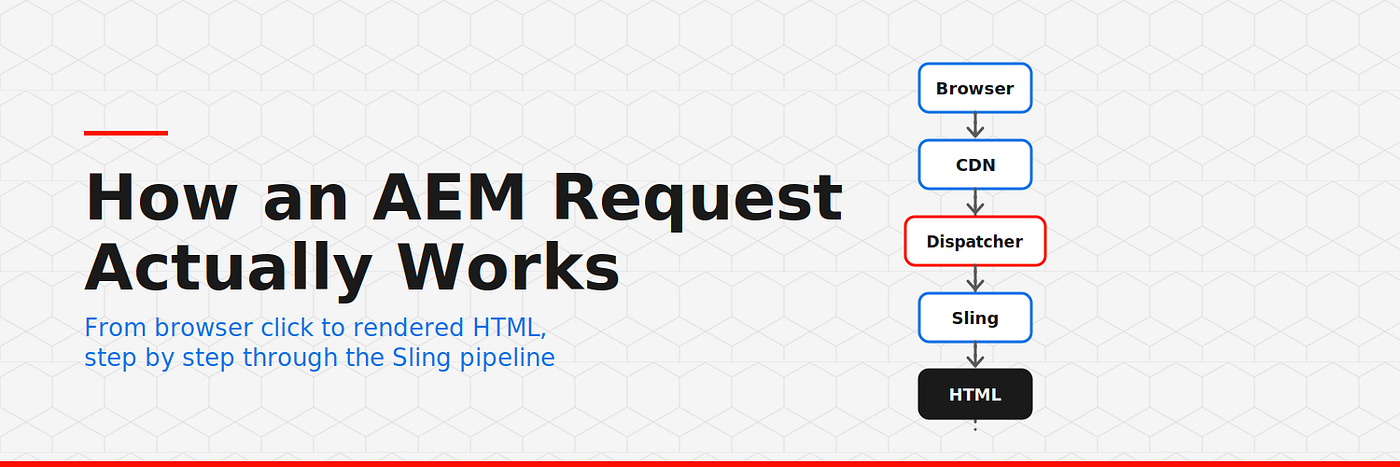
Here’s the flow, in order, every single time a page loads:
┌─────────┐    ┌─────────┐    ┌────────────┐    ┌───────────────┐
│ Browser │───▶│   CDN   │───▶│ Dispatcher │───▶│  AEM Publish  │
└─────────┘    └─────────┘    └────────────┘    └───────┬───────┘
                  (cache?)       (cache?)               │
                                                        ▼
                                          ┌───────────────────────────┐
                                          │ Sling Resource Resolver   │
                                          │ /content/site/en/home     │
                                          └────────────┬──────────────┘
                                                       ▼
                                          ┌───────────────────────────┐
                                          │ Reads sling:resourceType  │
                                          │ e.g. site/components/page │
                                          └────────────┬──────────────┘
                                                       ▼
                                          ┌───────────────────────────┐
                                          │ ServletResolver looks in  │
                                          │ /apps (and /libs overlay) │
                                          └────────────┬──────────────┘
                                                       ▼
                                     ┌─────────────────┴─────────────────┐
                                     ▼                                   ▼
                          ┌─────────────────┐                 ┌────────────────────┐
                          │ Sling Model +   │                 │ Registered Servlet │
                          │ HTL script      │                 │ (if resourceType/  │
                          │ (page.html)     │                 │  selector matches) │
                          └────────┬────────┘                 └──────────┬─────────┘
                                   ▼                                     ▼
                              HTL renders HTML  ◀──────────────  returns response
                                    │
                                    ▼
                          Response bubbles back through
                       Dispatcher (cached to disk) → CDN (edge cache) → Browser
Step-by-Step: What Happens at Each Layer
1. CDN — the first line of defense
What happens: The Adobe-managed CDN (Fastly, in most AEMaaCS setups) checks its edge cache first.
Example: A visitor in Singapore requests /content/wknd/us/en/home.html. If it's cached at a nearby edge node, the response comes back in milliseconds — AEM Publish never even sees the request.
Best practice: Set explicit Cache-Control headers on your responses so the CDN knows exactly how long to hold content.
Common mistake: Forgetting that dynamic, personalized, or authenticated content should not be cached at the CDN layer. Caching a logged-in user’s page for everyone is a fast way to leak data.
2. Dispatcher — the disk cache and firewall
What happens: If the CDN misses, the request hits the Dispatcher. It checks its own filesystem cache and validates freshness using the .stat file mechanism — if the cached file's timestamp is older than the relevant .stat file, it's treated as stale and re-fetched from Publish.
Best practice: Use a “deny all, then allow explicitly” filter strategy so nothing sensitive (like /system/console or .json selectors) is exposed by accident.
Common mistake: Caching URLs with query parameters by default. AEM intentionally skips caching ?param=value URLs unless whitelisted in ignoreUrlParams, precisely to stop cache-busting abuse from flooding Publish with unique render requests.
3. Sling Resource Resolution — the real “routing”
What happens: Sling maps the URL path to a JCR node, strips off selectors and extensions, and reads that node’s sling:resourceType.
Example: For /content/wknd/us/en/home.print.html, Sling resolves the node /content/wknd/us/en/home, notes the selector print and extension html, then reads sling:resourceType (e.g., wknd/components/page).
Best practice: Keep resource types clean and predictable — mirror your component folder structure under /apps so resolution is easy to reason about.
Common mistake: Assuming a missing script fails loudly. It often doesn’t — Sling just renders nothing, which is exactly what bit us in the hero banner story above.
4. Script or Servlet Resolution
What happens: The ServletResolver looks in /apps (with /libs as a fallback overlay) for something matching the resource type, selector, and extension — either an HTL script or a registered Servlet.
// Prefer resource-type binding over path binding for security and cacheability
@Component(service = Servlet.class)
@SlingServletResourceTypes(
    resourceTypes = "wknd/components/relatedarticles",
    methods = "GET",
    extensions = "json"
)
public class RelatedArticlesServlet extends SlingSafeMethodsServlet {
@Override
protected void doGet(SlingHttpServletRequest request,
SlingHttpServletResponse response) throws IOException {
// Resource-type binding means this servlet inherits
// the ACLs of the content node it's attached to —
// no separate /bin path to secure.
Resource resource = request.getResource();
RelatedArticlesModel model = resource.adaptTo(RelatedArticlesModel.class); response.setContentType("application/json");
response.getWriter().write(model.toJson());
}
}Best practice: Bind servlets to resource types, not paths (/bin/...). A path-bound servlet needs its own explicit ACLs; a resource-type-bound servlet automatically respects the permissions of the content node it's attached to.
Common mistake: Registering a servlet on both a path and a resource type “just in case” — this creates ambiguous resolution and unpredictable caching behavior at the Dispatcher.
5. HTL Rendering
What happens: If a script is resolved, HTL initializes the Sling Model via data-sly-use, the model's @PostConstruct runs any business logic, and HTL substitutes the final values into markup — with automatic context-aware escaping.
Best practice: Let HTL’s default escaping do its job. Only override context (@ context='html' or similar) when you have a specific, understood reason.
Common mistake: Using @ context='unsafe' to "just get it working." This disables XSS protection entirely and gets flagged in Cloud Manager's security scans — it's one of the fastest ways to fail a code quality gate.
Key Takeaways
- AEM resolves resources, not routes — the URL points to a JCR node, not a controller.
- The resource’s
sling:resourceTypeis the pivot point that determines which script or servlet renders it. - Caching decisions happen at two layers before your code even runs: CDN (edge) and Dispatcher (disk) — understand both before blaming “AEM being slow.”
- A missing script or unresolved resource type usually fails silently, not loudly — check resolution first when something just doesn’t appear.
- Resource-type-bound servlets are the secure, cacheable, AEM-idiomatic choice over path-bound servlets.
Next time a component “just doesn’t render,” don’t start in the Java class. Start at the top of this diagram and walk down. Nine times out of ten, that’s where the real answer is.
If this cleared up something that’s been fuzzy, follow along — this is part of an ongoing AEM developer series going deeper into Sling, OSGi, and AEMaaCS internals. Drop a comment with the weirdest “silent failure” you’ve debugged in AEM — I’ll bet it traces back to this exact flow. And if you know a junior dev who needs this mental model, send it their way.
메타데이터
- post_id
- a08724da4cd8
- slug
- how-an-aem-request-actually-works-from-browser-click-to-rendered-html-a08724da4cd8
- url
- https://medium.com/@neerajchaudhary856/how-an-aem-request-actually-works-from-browser-click-to-rendered-html-a08724da4cd8
- canonical_url
- https://medium.com/@neerajchaudhary856/how-an-aem-request-actually-works-from-browser-click-to-rendered-html-a08724da4cd8
- author_url
- https://medium.com/@neerajchaudhary856
- status
- ok
- fetched_at
- 2026-08-03 23:46:16






