Publishing SNS notifications to a Firehose Delivery Stream
Discover how to utilize Amazon SNS and Amazon Data Firehose to route notifications or messages to storage endpoints for archival…
TUTORIAL
Publishing SNS notifications to a Firehose Delivery Stream
Discover how to utilize Amazon SNS and Amazon Data Firehose to route notifications or messages to storage endpoints for archival, compliance or other purposes. In this guide, Terraform will be used to provision and deploy resources on AWS.
Table of Contents
· Prerequisites · Introduction · A2A Messaging · Terraform Configuration · AWS Provider Configuration · Storage Endpoint · IAM Permissions · Firehose Delivery Stream · SNS Subscription ∘ Variables ∘ Outputs · Deployment · Testing · Cleanup · Learn more
Prerequisites
Introduction
Before diving into the fun part, let’s break down the AWS services we’ll use in this guide.
- Amazon Simple Storage Service (S3) is an object storage service for storing and retrieving any amount of data from anywhere.
- Amazon Simple Notification Service (SNS) is a managed Pub/Sub AWS service that provides message delivery from publishers to subscribers. Publishers (producers) send messages to a topic and subscribers (consumers, clients) subscribe to the topic and receive messages using an endpoint type such as Firehose. SNS sends notifications two ways, A2A and A2P.
- Amazon Data Firehose is a fully managed AWS service for delivering real-time streaming data to destinations such as Amazon S3. You configure the publishers to send messages to Firehose and it will automatically deliver the messages to the destination you specified.
- Amazon CloudWatch monitors your AWS resources and the applications you run on AWS in real time.
Note: Amazon Data Firehose was previously known as Amazon Kinesis Data Firehose.
A2A Messaging
One of the primary uses of Amazon SNS is application-to-application (A2A) messaging with subscribers. You can distribute messages to Firehose delivery streams, Lambda functions, SQS queues, HTTP(S) endpoints, etc.
To forward notifications to storage endpoints, you can subscribe Amazon Data Firehose delivery streams to an Amazon SNS topic. When you publish messages to an Amazon SNS topic, they are sent to the Firehose delivery stream and then delivered to the destination you configured in Firehose.
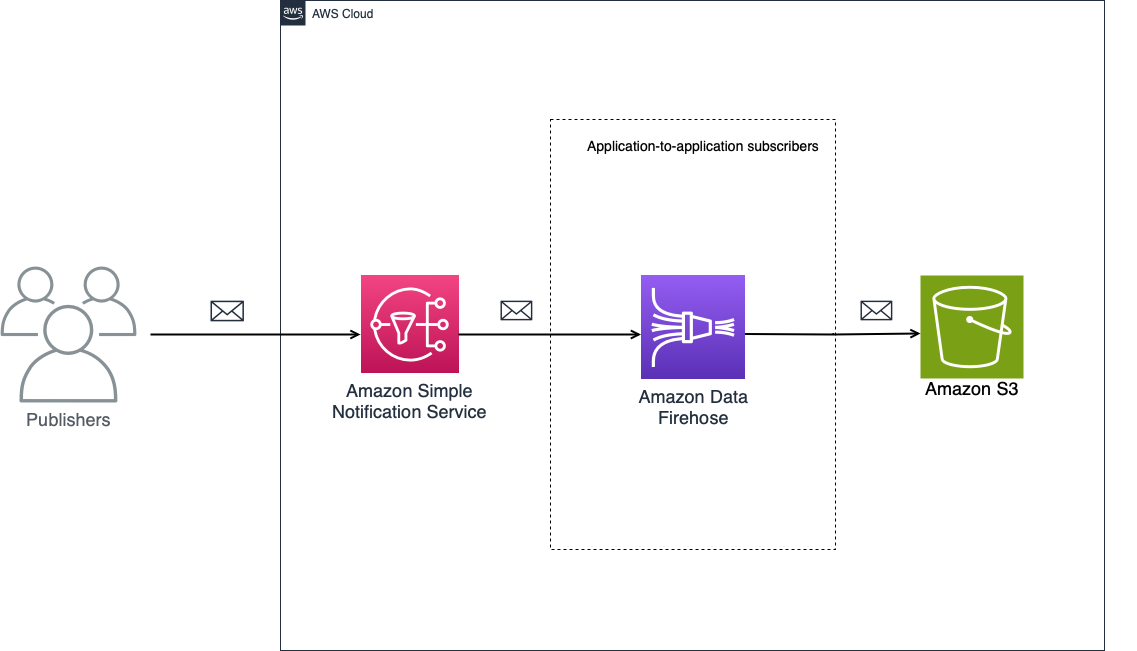
SNS — Firehose — S3
Through these streams, SNS notifications can be routed to Amazon S3, Amazon Redshift, Amazon OpenSearch Service or third-party providers (Datadog, MongoDB,…). In this example, the destination will be an S3 bucket.
Note: We’re using various AWS services and there are associated costs beyond the Free Tier usage.
Terraform Configuration
The file structure will be as follows:
- providers.tf — AWS provider configuration
- main.tf — the main set of configuration (S3 bucket, Firehose delivery stream, SNS topic, etc.)
- iam.tf — IAM roles and policies
- variables.tf — input variable definitions
- output.tf — output definitions used for testing
- terraform.tfvars — sensitive variable values, if version control systems like Git are being used, this file should be ignored.
AWS Provider Configuration
Let’s begin by setting up the AWS provider. Create aprovider.tf file. The terraform block specifies the required provider and its version. The provider block initializes the AWS provider with the specified region and access keys belonging to your IAM user. These values are provided through variables, allowing for flexibility and security in the configuration.
terraform {
  required_providers {
    aws = {
      source  = "hashicorp/aws"
      version = "5.44.0"
    }
  }
}

provider "aws" {
  region     = var.region
  access_key = var.access_key
  secret_key = var.secret_key
}
Now we’ve established the necessary connection to the AWS environment for further infrastructure provisioning using Terraform.
Storage Endpoint
Create main.tf. The first resource to be created is an Amazon S3 bucket with minimal configuration. Since bucket names must be globally unique, we will append a random ID to the provided bucket name.
resource "random_id" "s3_bucket_id" {
  byte_length = 8
}

# S3 Destination Bucket
resource "aws_s3_bucket" "s3_destination_bucket" {
  bucket = "${var.s3_destination_bucket_name}-${random_id.s3_bucket_id.hex}"
  force_destroy = true
  tags = {
    Environment = "dev"
    Role        = "analytics"
  }
}

resource "aws_s3_bucket_ownership_controls" "s3_destination_bucket_ownership" {
  bucket = aws_s3_bucket.s3_destination_bucket.id
  rule {
    object_ownership = "BucketOwnerPreferred"
  }
}

resource "aws_s3_bucket_acl" "s3_destination_bucket_acl" {
  depends_on = [aws_s3_bucket_ownership_controls.s3_destination_bucket_ownership]
  bucket     = aws_s3_bucket.s3_destination_bucket.id
  acl        = "private"
}

resource "aws_s3_bucket_versioning" "s3_destination_bucket_versioning" {
  bucket = aws_s3_bucket.s3_destination_bucket.id
  versioning_configuration {
    status = "Enabled"
  }
}
In this example, ownership controls and access control list (ACL) for the bucket are also configured, ensuring that only authorized entities can access the bucket. We also enable versioning for the bucket.
Note: It’s a good practice to tag all (taggable) resources for better organization or cost-tracking purposes.
IAM Permissions
Create iam.tf file to store IAM roles, access policies and other IAM resources.
To subscribe a Firehose delivery stream to an SNS topic, we need an IAM role that trusts the Amazon SNS service principal and has permission to write to the delivery stream. An access policy defines a set of recommended permissions.
# SNS to Firehose
resource "aws_iam_policy" "sns_to_firehose_access_policy" {
  name        = "SNSToFirehoseAccessPolicy"
  description = "Allow SNS to put records in the Firehose Delivery Stream"
  policy      = <<EOF
{
  "Version": "2012-10-17",
  "Statement": [
    {
      "Action": [
        "firehose:DescribeDeliveryStream",
        "firehose:ListDeliveryStreams",
        "firehose:ListTagsForDeliveryStream",
        "firehose:PutRecord",
        "firehose:PutRecordBatch"
      ],
      "Resource": [
        "${aws_kinesis_firehose_delivery_stream.extended_s3_stream.arn}"
      ],
      "Effect": "Allow"
    }
  ]
}
EOF
}

resource "aws_iam_role" "sns_subscription_role" {
  name               = "SNSSubscriptionRole"
  assume_role_policy = <<EOF
{
  "Version": "2012-10-17",
  "Statement": [
    {
      "Effect": "Allow",
      "Principal": {
        "Service": "sns.amazonaws.com"
      },
      "Action": "sts:AssumeRole"
    }
  ]
}
EOF
}

resource "aws_iam_role_policy_attachment" "sns_subscription_role_policy_attachment" {
  role       = aws_iam_role.sns_subscription_role.name
  policy_arn = aws_iam_policy.sns_to_firehose_access_policy.arn
}
We also need to configure the IAM policy and role for granting permissions to Amazon Data Firehose to interact with an S3 bucket.
# Firehose to S3
resource "aws_iam_policy" "firehose_to_s3_policy" {
  name        = "FirehoseToS3Policy"
  description = "Allow Firehose to put records in the S3 bucket"
  policy      = <<EOF
{
  "Version": "2012-10-17",
  "Statement": [
    {
      "Effect": "Allow",
      "Action": [
        "s3:AbortMultipartUpload",
        "s3:GetBucketLocation",
        "s3:GetObject",
        "s3:ListBucket",
        "s3:ListBucketMultipartUploads",
        "s3:PutObject"
      ],
      "Resource": [
        "${aws_s3_bucket.s3_destination_bucket.arn}",
        "${aws_s3_bucket.s3_destination_bucket.arn}/*"
      ]
    }
  ]
}
EOF
}

resource "aws_iam_role" "firehose_role" {
  name               = "FirehoseDeliveryStreamRole"
  assume_role_policy = <<EOF
{
  "Version": "2012-10-17",
  "Statement": [
    {
      "Effect": "Allow",
      "Principal": {
        "Service": "firehose.amazonaws.com"
      },
      "Action": "sts:AssumeRole"
    }
  ]
}
EOF
}

resource "aws_iam_role_policy_attachment" "delivery_stream_access_attachment" {
  policy_arn = aws_iam_policy.firehose_to_s3_policy.arn
  role       = aws_iam_role.firehose_role.name
}
Firehose Delivery Stream
Update main.tf to create a Firehose delivery stream for the message archiving, specifically targeting Amazon S3 as its destination. Enable Amazon CloudWatch error logging to ensure that you can access error details when failures occur.
# CloudWatch Log Group
resource "aws_cloudwatch_log_group" "firehose_s3_log_group" {
  name = "firehose/s3"
  retention_in_days = 5
  log_group_class = "STANDARD"
  tags = {
    Environment = "dev"
    Application = "analytics"
  }
}

# Firehose
resource "aws_kinesis_firehose_delivery_stream" "extended_s3_stream" {
  name        = "user-activity-stream"
  destination = "extended_s3"

  extended_s3_configuration {
    bucket_arn         = aws_s3_bucket.s3_destination_bucket.arn
    role_arn           = aws_iam_role.firehose_role.arn
    buffering_size     = 1
    buffering_interval = 60
    custom_time_zone   = "Europe/Belgrade"

    cloudwatch_logging_options {
      enabled = true
      log_group_name = aws_cloudwatch_log_group.firehose_s3_log_group.name
      log_stream_name = "S3Delivery"
    }
  }

 tags = {
    Environment = "dev"
    Role        = "analytics"
  }
}
SNS Subscription
Finally, update main.tf to create a topic for publishing notifications and configure a subscription to the SNS topic. Subscription specifies the protocol as firehose and the endpoint specifies the ARN of the Firehose delivery stream.
# SNS
resource "aws_sns_topic" "user_activity" {
  name = "user-activity-topic"
  tags = {
    Environment = "dev"
    Role        = "analytics"
  }
}

resource "aws_sns_topic_subscription" "user_activity_sns_subscription" {
  protocol              = "firehose"
  topic_arn             = aws_sns_topic.user_activity.arn
  endpoint              = aws_kinesis_firehose_delivery_stream.extended_s3_stream.arn
  subscription_role_arn = aws_iam_role.sns_subscription_role.arn
  depends_on = [
    aws_sns_topic.user_activity,
    aws_kinesis_firehose_delivery_stream.extended_s3_stream
  ]
}
We have now established a communication channel where notifications published to the SNS topic are automatically forwarded to the specified Firehose delivery stream for further processing or storage.
Variables
Input variable definitions are stored in variables.tf file.
variable "region" {
  type        = string
  description = "The region in which the resources will be created."
}

variable "access_key" {
  type        = string
  description = "The access key for the AWS account."
}

variable "secret_key" {
  type        = string
  description = "The secret access key for the AWS account."
}

variable "s3_destination_bucket_name" {
  type        = string
  description = "The name of the S3 bucket to which the messages will be directed."
}
All these variables are required. Store their values in terraform.tfvars.
region     = "<value>"
access_key = "<value>"
secret_key = "<value>"
s3_destination_bucket_name = "<value>"
Outputs
We’ll capture the outputs from the deployment process. For testing, we’ll need the resource names and/or ARNs.
- SNS topic ARN
- S3 bucket name
output "sns_topic_arn" {
  value = aws_sns_topic.user_activity.arn
}

output "s3_destination_bucket_name" {
  value = aws_s3_bucket.s3_destination_bucket.bucket
}
Deployment
From the command line, initialize Terraform to download and install the providers.
terraform initApply the configuration.
terraform apply -auto-approveYou can verify that resources have been creating via AWS CLI or in the AWS console.

An empty S3 bucket

SNS topic and subscription

Data Firehose delivery stream

New CloudWatch Log Group
Testing
Publish a message to the SNS topic via the AWS CLI command and check that the message was sent to the destination S3 bucket.
Replace <OUTPUT_SNS_TOPIC_ARN> and <OUTPUT_S3_BUCKET-NAME> with your output values.
aws sns publish --topic-arn <OUTPUT_SNS_TOPIC_ARN> --message "Publishing a first message to the SNS topic @cloudvesna"aws s3 ls s3://<OUTPUT_S3_BUCKET-NAME> --recursive --human-readable --summarize
CLI
You should see a similar output in your terminal.

Message delivered to S3
You can inspect Firehose Stream Metrics to gain more insight. For testing purposes, we only published one message so not much to see here (we sent one message with a size of 433 B).

Firehose Stream metrics
Cleanup
Delete all resources by running terraform destroy command.
Learn more
Thank you for taking the time to read my article! If you found it valuable, I invite you to follow my Medium account for similar content in the future. I regularly share tutorials and tips on DevOps and Cloud, and I would be thrilled to connect with you.
메타데이터
- post_id
- a0afdd45d47c
- slug
- publishing-sns-notifications-to-a-firehose-delivery-stream-a0afdd45d47c
- url
- https://towardsaws.com/publishing-sns-notifications-to-a-firehose-delivery-stream-a0afdd45d47c
- canonical_url
- https://towardsaws.com/publishing-sns-notifications-to-a-firehose-delivery-stream-a0afdd45d47c
- author_url
- https://medium.com/@cloudvesna
- status
- ok
- fetched_at
- 2026-08-07 08:47:49