SLF4J: The Logging Facade Every Java Developer Should Know
If you’ve ever opened a Java project and found log4j.properties, logback.xml, and java.util.logging configurations fighting for dominance…
SLF4J: The Logging Facade Every Java Developer Should Know
If you’ve ever opened a Java project and found log4j.properties, logback.xml, and java.util.logging configurations fighting for dominance, you’ve experienced "Logging Hell". In the Java ecosystem, logging is fragmented. Libraries use different frameworks, and when you combine them, you often end up with missing logs, duplicate logs, or classpath errors. Enter SLF4J the industry standard for maintaining sanity in Java logging.
SLF4J stands for Simple Logging Facade for Java. It is not a logging implementation itself, but rather a facade (abstraction) that allows developers to plug in different logging frameworks (like Logback, Log4j, or java.util.logging) at deployment time.
This means you can write logging code once and switch the underlying logging engine without changing your application logic — a huge advantage for long-term maintainability.
Why is this separation vital?
- For Library Authors: If you write a library (e.g., a PDF generator), you shouldn’t force your users to use Log4j. By using SLF4J, you let the application developer choose the logging framework.
- For Application Developers: You can switch logging backends (e.g., moving from Log4j to Logback) by changing a Maven dependency, without rewriting a single line of Java code.
Why Use SLF4J?
- Flexibility: Swap logging frameworks (Logback, Log4j2, JUL) without touching your code.
- Consistency: Provides a unified API across projects.
- Performance: Uses efficient
{}placeholders for parameterized logging, avoiding string concatenation overhead. - Migration-Friendly: Makes it easier to move from legacy frameworks like Log4j 1.x to modern ones like Logback.
Setting Up SLF4J
To use SLF4J, you need:
- slf4j-api dependency (mandatory).
- A binding (e.g., slf4j-simple, logback-classic, or log4j-slf4j2-impl).
Example Maven setup for Logback:
<dependency>
  <groupId>org.slf4j</groupId>
  <artifactId>slf4j-api</artifactId>
  <version>2.0.17</version>
</dependency>
<dependency>
  <groupId>ch.qos.logback</groupId>
  <artifactId>logback-classic</artifactId>
  <version>1.5.21</version>
</dependency>
Here’s a simple Hello World example using Slf4J:
import org.slf4j.Logger;
import org.slf4j.LoggerFactory;

public class HelloWorld {
    private static final Logger logger = LoggerFactory.getLogger(HelloWorld.class);

    public static void main(String[] args) {
        logger.info("Hello World");
        logger.debug("Debugging details here...");
        logger.error("An error occurred!");
    }
}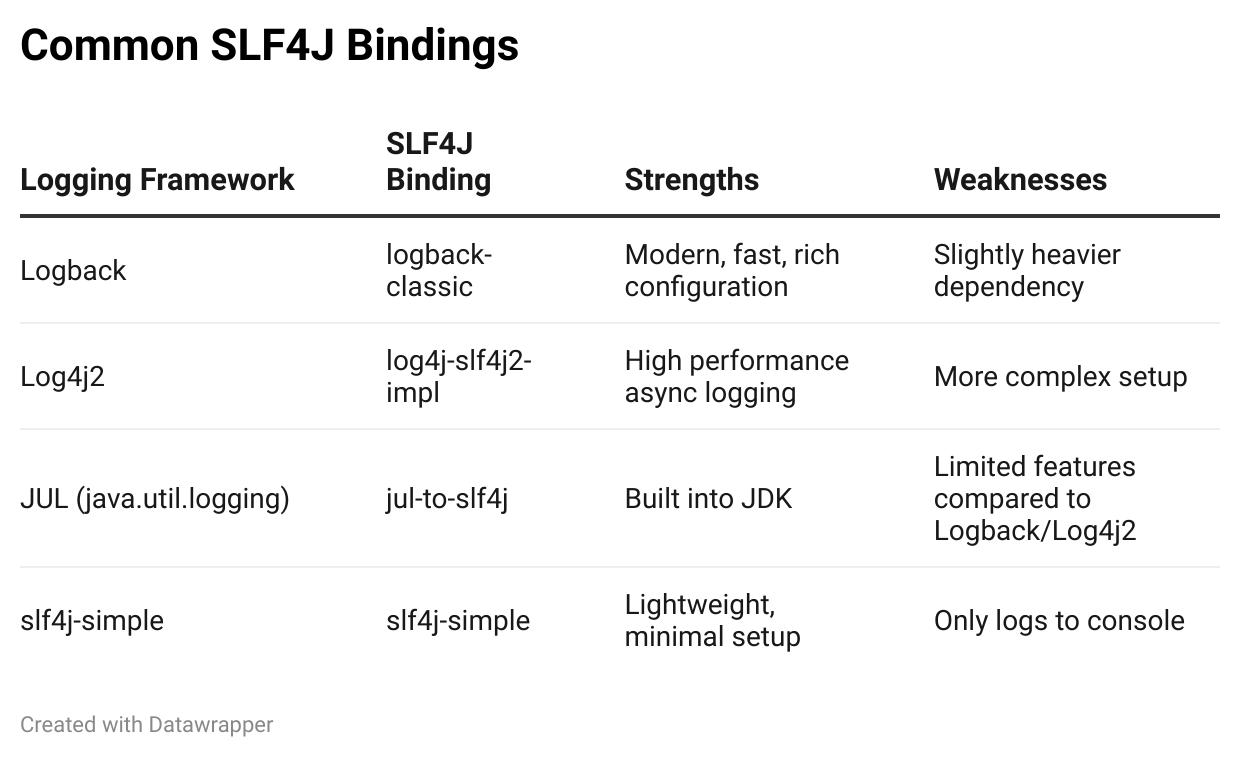
Legacy Bridging (The “Fixer” Dependencies): If you depend on a library that uses an old logger (like Commons Logging), you can trick it into using SLF4J by adding a “bridge” jar.
jcl-over-slf4j: Redirects Commons Logging to SLF4J.jul-to-slf4j: Redirects Java Util Logging to SLF4J.log4j-over-slf4j: Redirects Log4j 1.x to SLF4J.
Advantages of using SLF4J
A. Parameterized Logging
Before SLF4J, developers often wrote code like this to avoid performance hits:
// The "Old Way" - String Concatenation
if (logger.isDebugEnabled()) {
    logger.debug("Processing user: " + user.getId() + " with action: " + action);
}
The Problem:
- Without the
ifcheck, the strings are concatenated (andtoString()is called) even if DEBUG level is disabled. This wastes CPU and memory. - With the
ifcheck, the code becomes verbose and cluttered.
The SLF4J Way: SLF4J introduced Parameterized Logging using curly braces {} as placeholders.
// The SLF4J Way
logger.debug("Processing user: {} with action: {}", user.getId(), action);
If SLF4J sees the log level is INFO (for example) and DEBUG is disabled. It immediately returns. It never concatenates the strings and never calls toString() on the objects. It effectively defers the cost of message construction until it's certain the message will actually be logged.
B. The Fluent API (Version 2.0+)
For years, SLF4J was stuck with methods like debug(String, Object...). While effective, it became messy when you needed to pass Exceptions, Markers, or multiple arguments.
SLF4J 2.0 introduced a Fluent API that makes logging more readable and flexible.
For basic Fluent API usage, instead of logger.info(...), you start with logger.atInfo()
// Traditional
logger.info("Temperature set to {}. Old temperature was {}.", newTemp, oldTemp);

// Fluent API (SLF4J 2.0)
logger.atInfo()
      .log("Temperature set to {}. Old temperature was {}.", newTemp, oldTemp);
Similarly, for handling exceptions:
try {
    processData();
} catch (Exception e) {
    // Fluent API makes it clear 'e' is the cause, not a message parameter
    logger.atError()
          .setMessage("Failed to process data for user {}")
          .addArgument(userId)
          .setCause(e)
          .log();
}
The Fluent API makes attaching exceptions unambiguous. In older versions, it was sometimes unclear if the exception was a parameter or a cause.
C. Lazy Evaluation with Suppliers
This is a massive performance feature. If you have a method that is expensive to calculate, you can pass a Supplier (lambda). It will only run if that log level is enabled.
// heavyCalculation() is ONLY called if DEBUG is enabled
logger.atDebug()
      .setMessage("Computation result: {}")
      .addArgument(() -> heavyCalculation())
      .log();
D. MDC (Mapped Diagnostic Context)
If you are building a web server or microservice, MDC is your best friend. It allows you to “stamp” every log line in a specific thread with metadata (like a Request ID or User ID) without passing that ID to every single method.
// In your request filter or controller
MDC.put("requestId", "req-12345");

// In some deep service method 10 layers down
logger.info("Processing payment");
// Output: [INFO] [requestId=req-12345] Processing payment

// Cleanup
MDC.clear();
Summary
SLF4J remains the gold standard for Java logging because it solves the coupling problem.
- Always use interfaces: Write code against
org.slf4j.Logger. - Use placeholders:
logger.info("Val: {}", val)saves memory. - Upgrade to 2.0: Use the
logger.atInfo()Fluent API for cleaner, more efficient code. - Context is King: Use MDC to track requests across threads.
By decoupling your application from the logging implementation, you ensure your code is future-proof, cleaner, and faster.
메타데이터
- post_id
- a0d52f3ac7cd
- slug
- slf4j-the-logging-facade-every-java-developer-should-know-a0d52f3ac7cd
- url
- https://medium.com/@kaustubh.saha/slf4j-the-logging-facade-every-java-developer-should-know-a0d52f3ac7cd
- canonical_url
- https://medium.com/@kaustubh.saha/slf4j-the-logging-facade-every-java-developer-should-know-a0d52f3ac7cd
- author_url
- https://medium.com/@kaustubh.saha
- status
- ok
- fetched_at
- 2026-07-14 05:34:20