Deep Dive into SAP Fiori Architecture: From UI5 Screen to Database
Ever wondered what happens when you click a button in your sleek SAP Fiori app? How does that simple action travel all the way to your…
Deep Dive into SAP Fiori Architecture: From UI5 Screen to Database
Ever wondered what happens when you click a button in your sleek SAP Fiori app? How does that simple action travel all the way to your company’s database and back with the information you need? Let’s pull back the curtain and walk through the entire journey, layer by layer.
Photo by Lorenzo Herrera on Unsplash
What is SAP Fiori, Really?
Before we dive deep, let’s get our basics straight. SAP Fiori is SAP’s modern user experience (UX) that makes enterprise applications feel as intuitive as your favorite mobile apps. Unlike the old SAP GUI screens that required training manuals and patience, Fiori apps are role-based, responsive, and actually pleasant to use.
But here’s the thing — Fiori isn’t just a pretty face. It’s a complete architecture that connects beautifully designed interfaces with powerful backend systems. Let’s see how.
The Architecture: A 30,000-Foot View
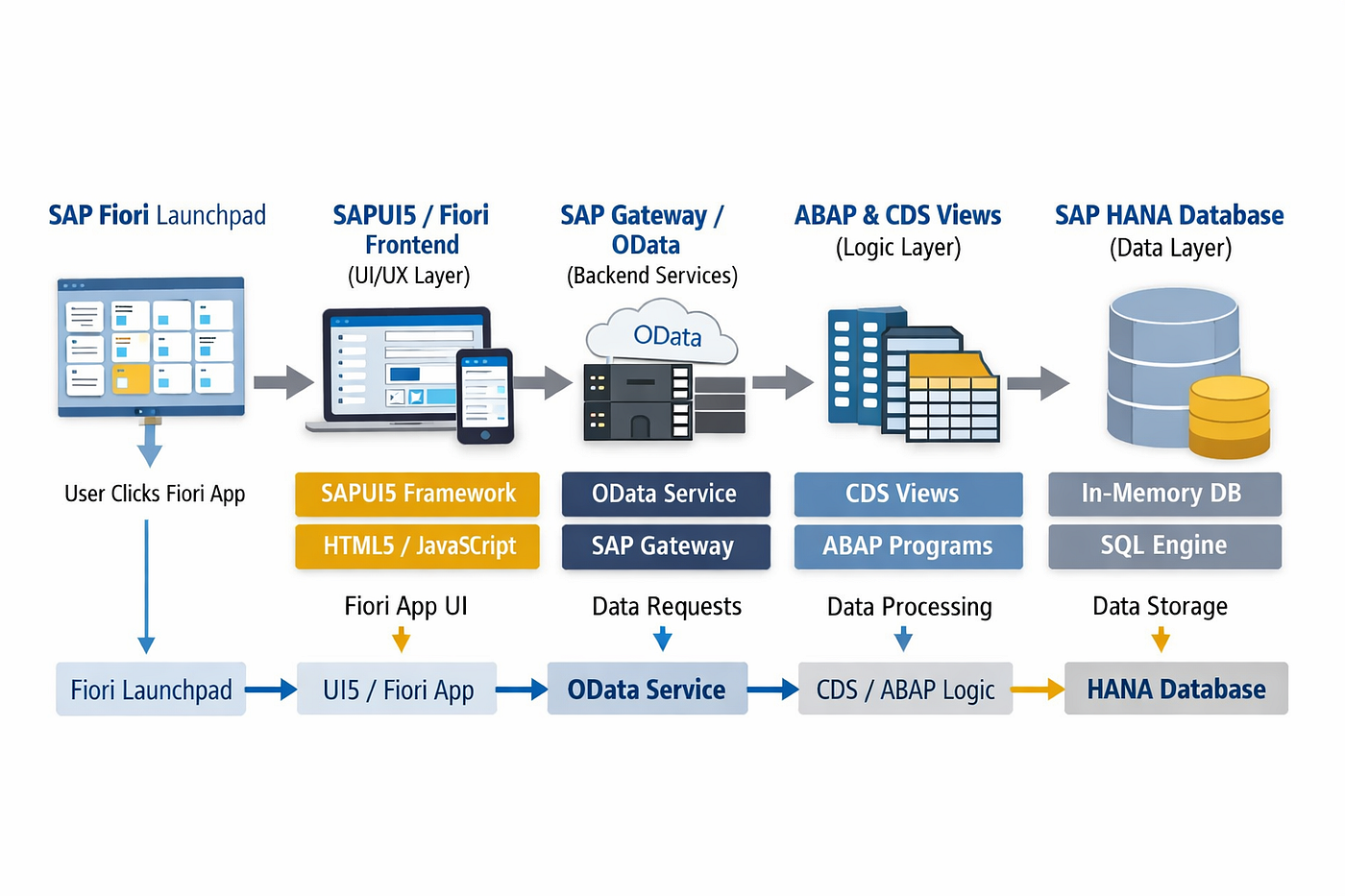
SAP Fiori architecture overview
Think of SAP Fiori architecture as a well-organized restaurant. You have:
- The dining area (UI Layer) — where customers interact
- The waiters (Gateway/OData Services) — who take orders and deliver food
- The kitchen (Backend Layer) — where the actual cooking happens
- The pantry (Database) — where all ingredients are stored
Now let’s zoom into each layer and see what’s really cooking.
Layer 1: The Frontend — SAPUI5
This is what you see and touch. The frontend is built with SAPUI5 (also called OpenUI5 in the open-source version), which is SAP’s JavaScript framework based on HTML5.
What makes SAPUI5 special?
When you’re working with a Fiori app, you’re interacting with components written in JavaScript, styled with CSS, and structured with XML views. SAPUI5 provides:
- Pre-built controls like tables, buttons, forms, and charts
- Responsive design that adapts to phone, tablet, or desktop
- Built-in accessibility features
- Data binding that automatically updates the UI when data changes
Here’s a simple reality check: When you see a list of sales orders on your screen, that’s an SAPUI5 table control bound to a data model. The framework handles the rendering, sorting, filtering, and all those smooth interactions without you writing mountains of code.
The MVC Pattern
SAPUI5 follows the Model-View-Controller pattern:
- Model: Holds your data (think customer names, order numbers)
- View: The visual representation (what you see)
- Controller: The logic that connects them (what happens when you click)
This separation keeps code clean and maintainable. Trust me, your future self will thank you for this.
Layer 2: The Communication Highway — OData Services
Here’s where things get interesting. Your UI needs to talk to the backend, but they speak different languages. Enter OData (Open Data Protocol).
What is OData?
OData is a REST-based protocol that defines how to request and manipulate data. Think of it as a standardized menu language between your frontend and backend.
When you click “Load More Orders,” your SAPUI5 app sends an HTTP request like:
GET /sap/opu/odata/sap/ZSALESORDER_SRV/SalesOrderSet?$top=20&$skip=0This URL is asking the backend: “Hey, give me the first 20 sales orders from the SalesOrderSet.”
SAP Gateway: The Translator
SAP Gateway is the component that exposes backend data as OData services. It sits between your Fiori app and the SAP backend (like ECC or S/4HANA), translating OData requests into ABAP calls and vice versa.
The Gateway handles:
- Authentication and authorization
- Data format conversion (JSON/XML to ABAP structures)
- Caching for performance
- Error handling and logging
Layer 3: The Backend Brain — SAP NetWeaver/S/4HANA
This is where your business logic lives. When the OData request reaches here, it’s processed by ABAP code that you (or SAP) has written.
The Service Implementation
In the backend, you have classes that implement the OData service operations:
- GET_ENTITYSET — Retrieves a collection (like all sales orders)
- GET_ENTITY — Retrieves a single record (one specific order)
- CREATE_ENTITY — Creates new records
- UPDATE_ENTITY — Updates existing data
- DELETE_ENTITY — Removes records
Each of these methods contains ABAP code that:
- Validates your request
- Checks your authorizations (Can you access this data?)
- Applies business logic (Is this operation allowed?)
- Queries the database
- Formats the response
Business Logic Layer
This isn’t just about fetching data. Real business magic happens here:
- Calculating prices with discounts
- Checking inventory availability
- Validating customer credit limits
- Triggering workflows
- Updating related documents
All those rules that make your business run? They’re implemented in this layer.
Layer 4: The Database — Where Everything Lives
At the bottom of our stack sits the database — typically SAP HANA for S/4HANA systems or a traditional database like Oracle or DB2 for older systems.
SAP HANA’s Special Sauce
If you’re on HANA, you’re sitting on a powerful in-memory database. This means:
- Data is stored in RAM, not on disk, making queries lightning-fast
- Complex calculations happen in the database itself
- Real-time analytics are actually real-time
- Tables can be optimized for either reading (column store) or writing (row store)
When your ABAP code executes a SELECT statement, HANA processes it and returns results in milliseconds, even for millions of records.
The Complete Journey: A Real Example
Let’s trace what happens when you create a new sales order in a Fiori app:
Step 1: User Action You fill out a form and click “Create.” The SAPUI5 controller captures this event.
Step 2: OData POST Request The app sends a POST request to the OData service with the order data in JSON format.
Step 3: Gateway Processing SAP Gateway receives the request, authenticates you, and converts the JSON payload to ABAP structures.
Step 4: Backend Processing The CREATE_ENTITY method in your service implementation:
- Validates the data (Are all required fields filled?)
- Checks authorizations (Can you create orders for this customer?)
- Applies business logic (Credit limit check, pricing)
- Calls standard SAP functions or BAPIs
Step 5: Database Transaction The ABAP code writes to database tables — header table (VBAK), item table (VBAP), partner table (VBPA), etc.
Step 6: Response Journey Back Database confirms the commit, ABAP sends success response, Gateway converts it to JSON, and your UI displays “Order 123456 created successfully!”
All of this happens in under a second.
Performance Considerations
Building Fiori apps that perform well requires thinking about the entire stack:
- Frontend: Minimize data binding complexity, lazy-load data, use client-side filtering when possible
- OData: Use $select to request only needed fields, implement server-side pagination, enable caching
- Backend: Optimize database queries, use buffering wisely, avoid nested loops in ABAP
- Database: Create proper indexes, use HANA-optimized code (CDS views), partition large tables
Security Across Layers
Each layer has its security responsibilities:
- UI Layer: Input validation, preventing XSS attacks
- Gateway Layer: Authentication (OAuth, SAML), authorization checks
- Backend Layer: SAP authorization objects, transaction codes
- Database Layer: Database user permissions, encryption at rest
Security is never “someone else’s problem” — it’s baked into every layer.
The Future: SAP Fiori Elements and RAP
SAP is pushing toward even faster development with:
Fiori Elements: Template-based apps that generate UI automatically from metadata. You define what data to show, and SAP generates the entire app.
RAP (RESTful ABAP Programming): A new way to build OData services directly on CDS (Core Data Services) views, eliminating much of the manual coding.
These technologies push more intelligence into the metadata layer, making development faster and more standardized.
Wrapping Up
SAP Fiori architecture is a sophisticated but logical system. From the moment you interact with a UI5 control to the microsecond when data is written to HANA, every layer has a specific job to do.
Understanding this architecture makes you a better Fiori developer because you know:
- Where to optimize for performance
- How to debug issues effectively
- Which layer to modify for specific requirements
- How to design scalable applications
The next time you click a button in a Fiori app, you’ll appreciate the intricate dance happening across these layers. And if you’re building Fiori apps, you now have the mental model to build them right.
Happy Fiori-ing!
메타데이터
- post_id
- a23e99adaa95
- slug
- deep-dive-into-sap-fiori-architecture-from-ui5-screen-to-database-a23e99adaa95
- url
- https://medium.com/@aamirer195/deep-dive-into-sap-fiori-architecture-from-ui5-screen-to-database-a23e99adaa95
- canonical_url
- https://medium.com/@aamirer195/deep-dive-into-sap-fiori-architecture-from-ui5-screen-to-database-a23e99adaa95
- author_url
- https://medium.com/@aamirer195
- status
- ok
- fetched_at
- 2026-06-23 17:05:31