Stop Blocking Your App Load: Architecting APP_INITIALIZER with Signals
The “white screen of death” while waiting for configuration is a relic of the past. Stop using blocking APP_INITIALIZER pipelines and start…
Stop Blocking Your App Load: Architecting APP_INITIALIZER with Signals
The “white screen of death” while waiting for configuration is a relic of the past. Stop using blocking APP_INITIALIZER pipelines and start architecting a responsive, non-blocking configuration bootstrap.
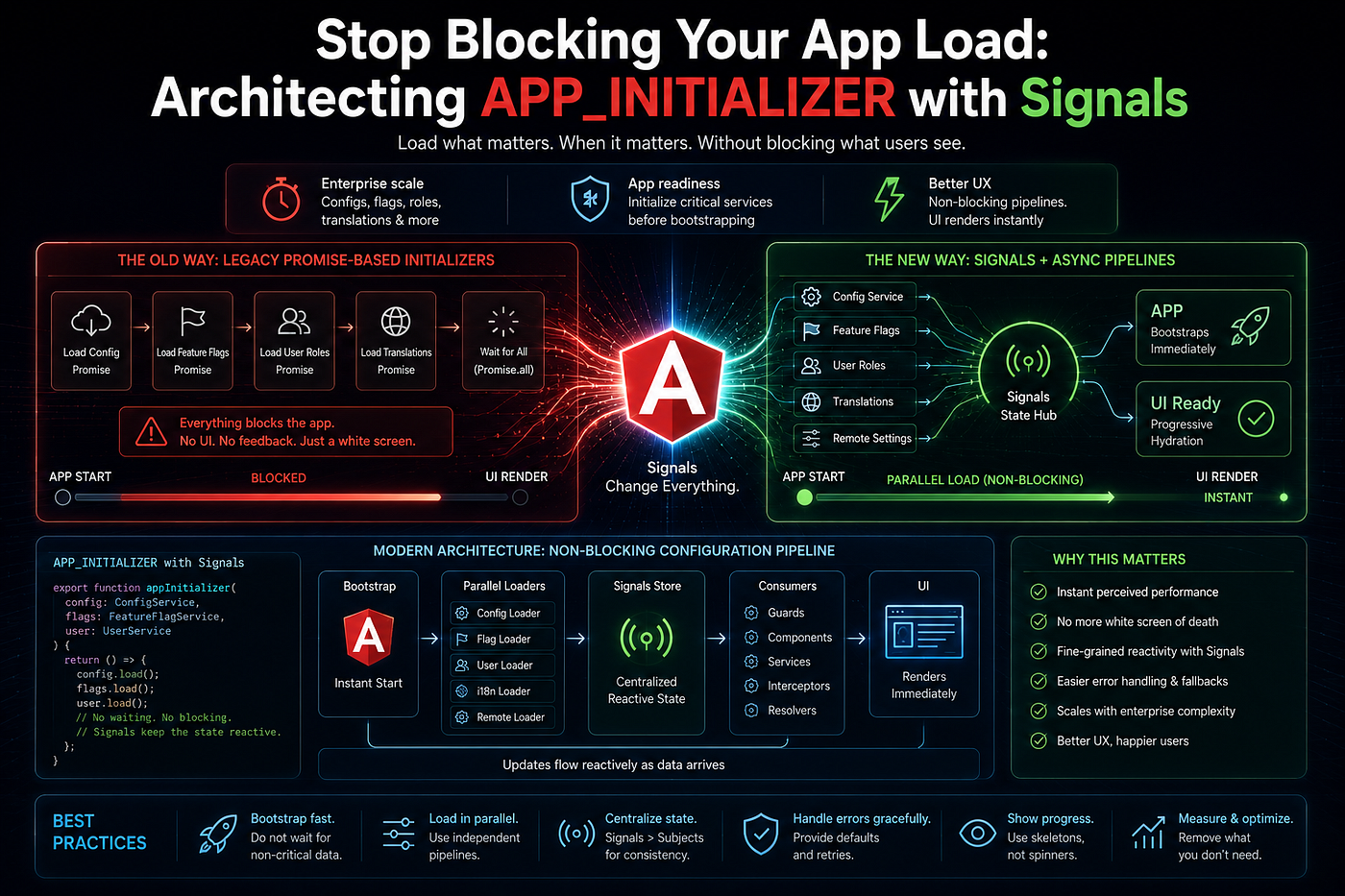
In an enterprise Angular app, the first three seconds of the user experience is when all the magic happens. You need to retrieve feature flags, fetch user’s RBAC permission, initialize tenant’s theme and telemetry client — and that is before any components rendering.
We did that for years with APP_INITIALIZER token where we injected a service, returned a Promise and our Angular application would freeze on white screen until that promise resolves.
In 2026, that is completely wrong approach which ruins your First Contentful Paint score and creates a state of “dead” app penalized by search engines.
Here is how to build modern, non-blocking bootstrap with the help of Signals and Resource-based configuration pipelines.
The Legacy Problem: The Blocking Gatekeeper
The legacy approach forces Angular to wait for a complete synchronous chain before it even attempts to bootstrap the AppComponent.
// The Blocking Legacy Pipeline
export function initializeConfig(configService: ConfigService) {
  // Angular halts all execution until this Promise resolves
  return () => configService.loadConfiguration().toPromise();
}

// In app.config.ts
providers: [
  {
    provide: APP_INITIALIZER,
    useFactory: initializeConfig,
    deps: [ConfigService],
    multi: true
  }
]
If your configuration API takes 600ms to respond, your user stares at a white screen for 600ms. In the age of Core Web Vitals and INP metrics, this is unacceptable.
The Modern Solution: Reactive Configuration
Configuration is not an obstruction; configuration should be a reactive dependency. You don’t have to obstruct the bootstrap process; you just need to design the user interface to expect the data.
In an Angular 22 architecture, resource() API is used to describe the configuration stream.
1. The Reactive Configuration Service
Instead of a Promise, return a Resource that holds the state. This service does not block the main thread. It simply declares that configuration will eventually exist.
// The Non-Blocking Reactive Architecture
@Injectable({ providedIn: 'root' })
export class ConfigService {
  private http = inject(HttpClient);

  // Define a resource that doesn't block the bootstrap
  configResource = rxResource({
    loader: () => this.http.get<AppConfig>('/api/config')
  });

  // Expose as a signal for easy template consumption
  get config() { return this.configResource.value; }
  get isLoading() { return this.configResource.isLoading; }
}
2. Guarding vs. Handling
In case your application cannot run without config (like, authentication tokens), you can go for one of these architectures:
Option 1: Shell Architecture Approach (Suggested) Render the “Shell” component right away. Use the @if flow control mechanism to display the skeleton UI till the configResource emits an event that says that config is loaded. It will give the instant visual response to the user.
<!-- Non-blocking, instant render -->
@if (configService.isLoading()) {
  <app-skeleton-loader />
} @else {
  <router-outlet />
}
Option 2: Route Resolver Approach If you need data before routing, you can go for Route Resolver approach. As opposed to the APP_INITIALIZER, the resolver will block only the route and not the whole bootstrapping process of the app.
export const configResolver: ResolveFn<AppConfig> = () => {
  return inject(ConfigService).configResource.value!;
};

// In app.routes.ts
{ path: 'dashboard', component: DashboardComponent, resolve: { config: configResolver } }
Why This Wins for Enterprise
Firstly, moving away from blocking initializers gives you several advantages in architecture terms:
- Better SEO & Metrics: Your First Contentful Paint time reduces dramatically, since the browser gets the shell HTML and the base CSS right away.
- Improved Perceived Performance: Skeleton loading and indicators reassure the user that the app works and reacts even when the backend is fetching the flags.
- Error Resilience: In case the configuration API throws an error, your app won’t crash during the bootstrap stage. You’ll be able to show the user an error screen and give him an opportunity to try again or interact with other components of the dashboard.
Stop Blocking, Start Orchestrating
If you have your application under ransom with APP_INITIALIZER waiting for the backend to answer you, you are definitely not helping your users.
Build your frontend application as a reactive system. Use rxResource to get your configuration, make use of @if skeleton loaders for the first time rendering, and keep the APP_INITIALIZER only for mission-critical things which are impossible to work without (such as global error handler registration).
Now, it is up to you: do you use “Global App Shell” trick to cover up your application from slow loads, or Route Resolvers approach to guarantee that your data will be present at any cost?
메타데이터
- post_id
- a295cb017275
- slug
- stop-blocking-your-app-load-architecting-app-initializer-with-signals-a295cb017275
- url
- https://javascript.plainenglish.io/stop-blocking-your-app-load-architecting-app-initializer-with-signals-a295cb017275
- canonical_url
- https://javascript.plainenglish.io/stop-blocking-your-app-load-architecting-app-initializer-with-signals-a295cb017275
- author_url
- https://medium.com/@ganeshlawand2002
- status
- ok
- fetched_at
- 2026-07-17 06:05:59