What Is Cursor AI? (And Why Developers Are Ditching VS Code for It)
Something unusual is happening in developer tooling.
What Is Cursor AI? (And Why Developers Are Ditching VS Code for It)
Something unusual is happening in developer tooling.
Engineers who have used VS Code for years — some of them for a decade — are quietly switching editors. Not to Vim. Not to JetBrains. To something called Cursor.
If you haven’t heard of it yet, you will. And if you’ve heard of it but haven’t tried it, this post will explain exactly what it is, why developers are making the switch, and whether it’s actually worth the hype.
What Is Cursor?
Cursor is a code editor built on top of VS Code. It looks almost identical to VS Code — same layout, same extensions, same keyboard shortcuts, same themes. If you opened it for the first time, you might think someone just installed a GitHub Copilot plugin and called it a day.
But the difference isn’t the interface. It’s the depth of AI integration baked into the core of the editor.
Where Copilot gives you autocomplete suggestions, Cursor understands your entire codebase and lets you have a conversation with it. Not just “complete this line” — but “why is this function slow?”, “refactor this entire module to use async/await”, “find all the places in this project where we’re not handling errors correctly.”
It’s the difference between autocomplete and a coding partner.
The Features That Are Actually Making People Switch
1. Codebase-Aware Chat
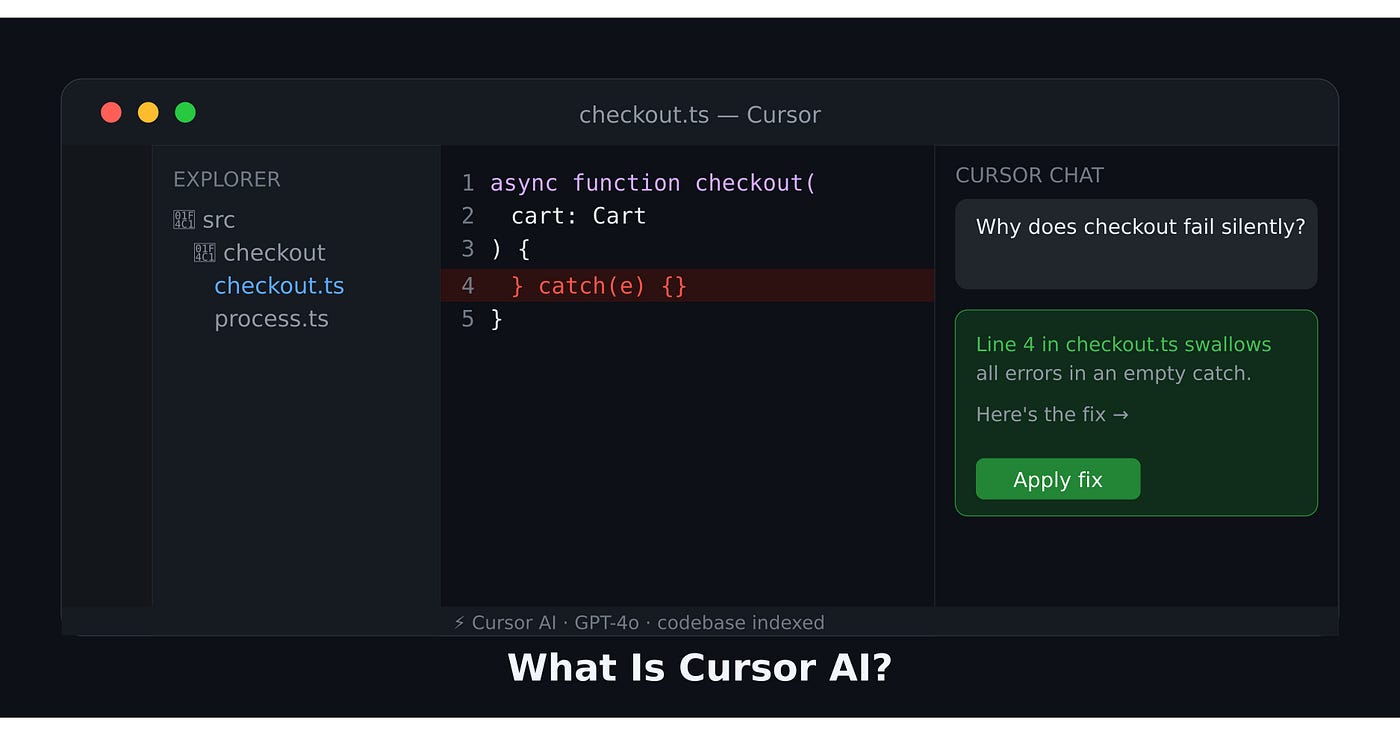
This is the headline feature. In Cursor, you can open a chat and ask questions about your entire project — not just the file you have open.
You: Why does the checkout flow sometimes fail silently?Cursor: Looking at your codebase... In `src/checkout/process.ts`
line 47, the Stripe webhook handler swallows exceptions in the
catch block without logging or re-throwing. If the payment
processor returns an unexpected status, the error disappears.
Here's the fix: [shows you the exact code change]This is not a hallucination-prone chatbot giving generic advice. It’s reading your actual files. It knows your variable names, your function signatures, your folder structure. The answers are specific to your code.
2. Cmd+K — Inline Editing
Press Cmd+K (or Ctrl+K on Windows) anywhere in your code, describe what you want, and Cursor rewrites the selected block — showing you a diff before applying it.
# You select this function and press Cmd+K:
def get_users():
    users = db.query("SELECT * FROM users")
    return users
# You type: "add pagination, error handling, and logging"# Cursor rewrites it and shows you the diff:
def get_users(page: int = 1, page_size: int = 20):
try:
offset = (page - 1) * page_size
users = db.query(
"SELECT * FROM users LIMIT ? OFFSET ?",
(page_size, offset)
)
logger.info(f"Fetched {len(users)} users (page {page})")
return users
except DatabaseError as e:
logger.error(f"Failed to fetch users: {e}")
raiseYou review the diff, accept or reject. No copy-pasting from ChatGPT. No switching tabs. The edit happens right there, in context.
3. Multi-File Edits with Composer
This one is genuinely hard to explain until you see it. Cursor’s “Composer” feature lets you describe a change and have it modify multiple files at once.
Say you want to add a new field to your user model. In a normal workflow, that means:
- Update the database schema
- Update the model class
- Update the serializer
- Update the API endpoint
- Update the TypeScript types on the frontend
- Update the tests
That’s 5–6 files, a lot of mental context-switching, and easy to miss one.
With Composer, you describe the change once. Cursor identifies all the files that need updating, proposes the changes across all of them simultaneously, and you review each one before accepting. It’s the closest thing to having a senior engineer who actually reads all your code and makes coherent changes across the whole system.
4. It Knows Your Errors
Cursor integrates with your terminal. When your code throws an error, you can click “Fix in Cursor” and it reads the stack trace, locates the source, and proposes a fix — without you copying and pasting anything.
Okay But Is It Just VS Code With ChatGPT?
Kind of — but that undersells it significantly.
The key difference is context. When you paste code into ChatGPT, you’re limited to what fits in one message. ChatGPT doesn’t know what other files exist, what your project’s conventions are, or how the code you’re asking about connects to the rest of the system.
Cursor indexes your entire codebase and keeps that context in every conversation. It’s closer to asking a colleague who has read all your code — versus asking a smart stranger who’s only seen the snippet you showed them.
The other difference is workflow friction. Every time you switch to a browser to ask ChatGPT something, you lose context, you copy-paste, you come back. Cursor eliminates all of that. The AI is where your code is.
Who Is It For?
Solo developers get the most dramatic benefit. If you’re building a project alone, Cursor essentially gives you a second pair of eyes that knows the whole codebase at all times. Code review, refactoring suggestions, catching bugs — all available without scheduling a meeting.
Mid-level engineers find it genuinely accelerates them into senior-level output. You can tackle unfamiliar codebases, legacy code, and complex refactors with more confidence when you have a tool that can explain what code does and help you change it safely.
Senior engineers use it differently — less for “help me write this” and more for “do the boring part while I think about the architecture.” Generating boilerplate, writing test cases, updating documentation — Cursor handles the mechanical work so you can stay in the high-level decisions.
The Downsides (Yes, There Are Some)
It costs money. The free tier is limited. The Pro plan is $20/month. That’s not nothing, though for most professionals it pays for itself quickly.
It can be wrong. Cursor is confident. Sometimes too confident. It will propose a change that looks correct, passes the eye test, and subtly breaks something else. You still need to review everything it does. The moment you stop reviewing is the moment you start shipping AI-generated bugs.
Privacy concerns. Your code gets sent to AI model providers (Anthropic, OpenAI) for processing. For open-source projects or personal work this is usually fine. For proprietary enterprise code, check your company’s policy before connecting it to your codebase.
It can make junior engineers skip fundamentals. If you’re still learning, leaning on Cursor too hard means you don’t build the mental models that make you a strong engineer long-term. Use it as a tutor, not a crutch.
Should You Switch?
If you’re already paying for GitHub Copilot ($10/month), Cursor Pro ($20/month) is worth seriously comparing. Copilot has gotten better, but codebase-level awareness and Composer-style multi-file edits are still Cursor’s differentiators.
If you’ve never tried AI-assisted coding at all, Cursor’s free tier is the best place to start. Install it — it imports all your VS Code settings, extensions, and themes automatically. The switching cost is genuinely close to zero.
The engineers who thrive in the next few years won’t be the ones who refused to use AI tools out of principle. They’ll be the ones who learned which tools to trust, how to verify AI output, and how to stay in the driver’s seat.
Cursor is the most practical starting point for that skill.
Try it and come back to tell me you didn’t get distracted by it for the next three hours. I’ll wait. Follow for one practical engineering post every day.
메타데이터
- post_id
- a2b6438e49f0
- slug
- what-is-cursor-ai-and-why-developers-are-ditching-vs-code-for-it-a2b6438e49f0
- url
- https://medium.com/codex/what-is-cursor-ai-and-why-developers-are-ditching-vs-code-for-it-a2b6438e49f0
- canonical_url
- https://medium.com/codex/what-is-cursor-ai-and-why-developers-are-ditching-vs-code-for-it-a2b6438e49f0
- author_url
- https://medium.com/@luckyudbhav
- status
- ok
- fetched_at
- 2026-07-17 10:42:52