Amazon VPC: Building the Network Behind Every AWS Application
“Before an application can process a single request, it needs a network. Amazon VPC is the service that provides that network, giving you…
Amazon VPC: Building the Network Behind Every AWS Application
“Before an application can process a single request, it needs a network. Amazon VPC is the service that provides that network, giving you complete control over how your cloud infrastructure communicates, routes traffic, and stays secure.”
Introduction
In the previous edition of this series, we explored Amazon EC2 and learned how AWS provides virtual machines that allow us to deploy applications without managing physical hardware. However, creating an EC2 instance is only one step in building a cloud application. A server without a network is essentially an isolated computer — it cannot receive user requests, communicate with databases, access storage services, or even download software updates.
This is where Amazon Virtual Private Cloud (Amazon VPC) becomes one of the most important services in AWS.
Whether you’re deploying a simple portfolio website, hosting a three-tier enterprise application, running a Kubernetes cluster, or building a highly available microservices platform, everything begins inside a VPC. It provides the networking foundation upon which almost every AWS architecture is built.
Unlike traditional data centers, where organizations purchase routers, switches, firewalls, and networking equipment, AWS virtualizes these networking components and allows you to design an entire network through software. You decide the IP address range, divide it into subnets, configure routing, control Internet access, and implement multiple layers of security — all without touching a single physical device.
Understanding Amazon VPC is therefore much more than learning another AWS service. It is about understanding how networking works in the cloud and how AWS enables secure, scalable, and highly available application architectures.
In this article, we will gradually build an AWS network from the ground up. Instead of learning individual services in isolation, we’ll understand how each networking component contributes to the complete picture and how traffic flows through the architecture.
Understanding IP Addresses
An IP (Internet Protocol) address is a unique logical identifier assigned to a device within a network. Its primary purpose is to identify devices and enable communication between them.
The most commonly used addressing scheme in cloud environments today is IPv4, which consists of four decimal numbers separated by periods.
For example:
10.0.1.25172.31.15.100192.168.1.50Each IPv4 address contains 32 bits, allowing approximately 4.3 billion unique addresses. Although IPv6 was introduced to overcome the limitations of IPv4, IPv4 remains the primary networking standard you’ll encounter while working with Amazon VPC.
An IP address performs two important functions.
First, it uniquely identifies a device within a network.
Second, it provides location information that allows routers to determine where packets should be forwarded.
Every request you send across the Internet — whether opening LinkedIn, streaming a video, or connecting to an AWS-hosted application — ultimately depends on IP addresses and routing decisions.
Public IP Addresses vs Private IP Addresses
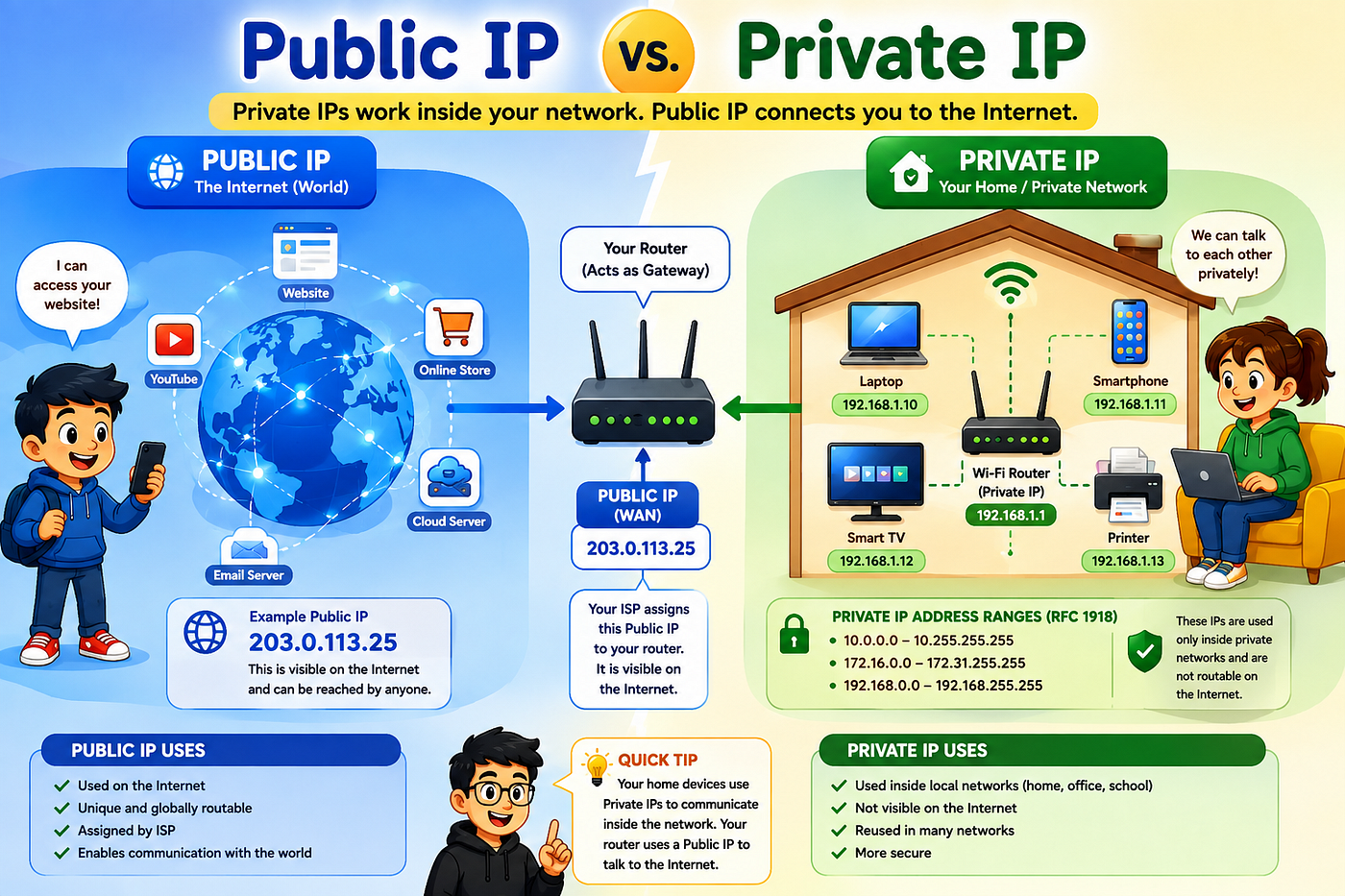
Not every IP address on the Internet is publicly accessible.
In fact, most devices communicate using private IP addresses that exist only within their own local networks.
Suppose your laptop is connected to your home Wi-Fi.
Your laptop might have the following address:
192.168.1.20Your smartphone may have:
192.168.1.35Your smart TV could have:
192.168.1.42All three devices can communicate with one another because they belong to the same private network. However, these addresses cannot be reached directly from the Internet because they are reserved for internal communication.
Private IPv4 addresses are defined by RFC 1918, which reserves three address ranges specifically for private networking:
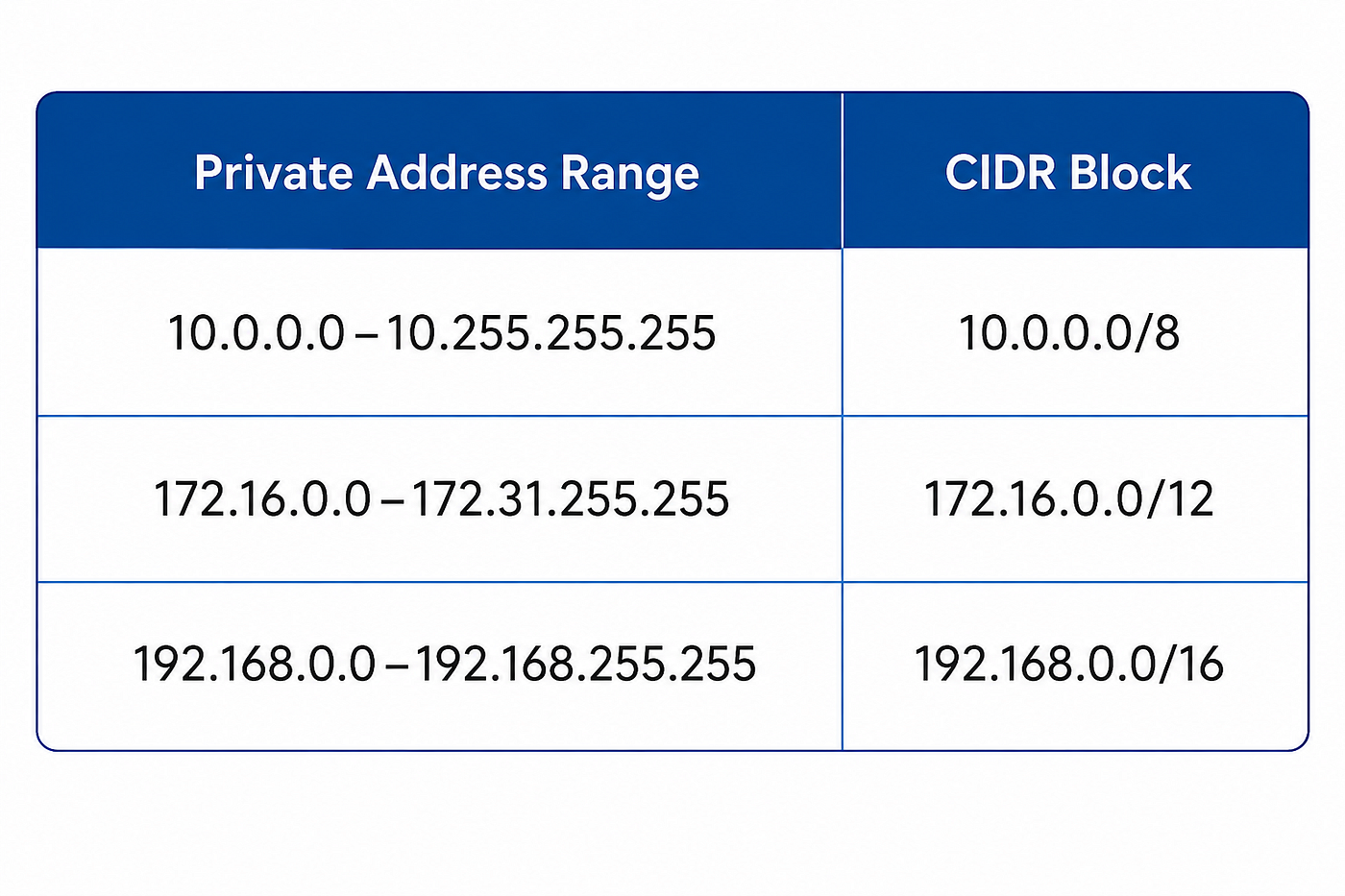
These address ranges are not routable over the public Internet and can therefore be reused by millions of organizations without conflicts.
In contrast, public IP addresses are globally unique and can be reached from anywhere on the Internet, provided that routing and security policies allow the connection.
AWS uses both private and public IP addresses extensively. Most backend resources communicate using private IP addresses, while only selected resources — such as public-facing load balancers or web servers — receive public IP addresses.
This separation is one of the key principles behind secure cloud architecture.
Why Cloud Networks Need Isolation
Imagine if AWS connected every virtual machine from every customer to one enormous shared network.
A configuration mistake by one organization could expose another organization’s servers. Internal databases belonging to different customers might become visible to one another, creating severe security and privacy issues.
Clearly, such a design would be unacceptable.
Instead, AWS creates logically isolated virtual networks for each customer.
Although millions of customers share AWS’s physical infrastructure, each customer operates within an independent virtual network that behaves as though it were a dedicated private data center.
Within that isolated network, customers can:
- Choose their own IP address range.
- Divide the network into multiple segments.
- Configure custom routing policies.
- Control Internet connectivity.
- Implement multiple layers of network security.
- Deploy resources without affecting any other AWS customer.
This concept of logical isolation is precisely what Amazon Virtual Private Cloud provides.
Introducing Amazon Virtual Private Cloud (Amazon VPC)
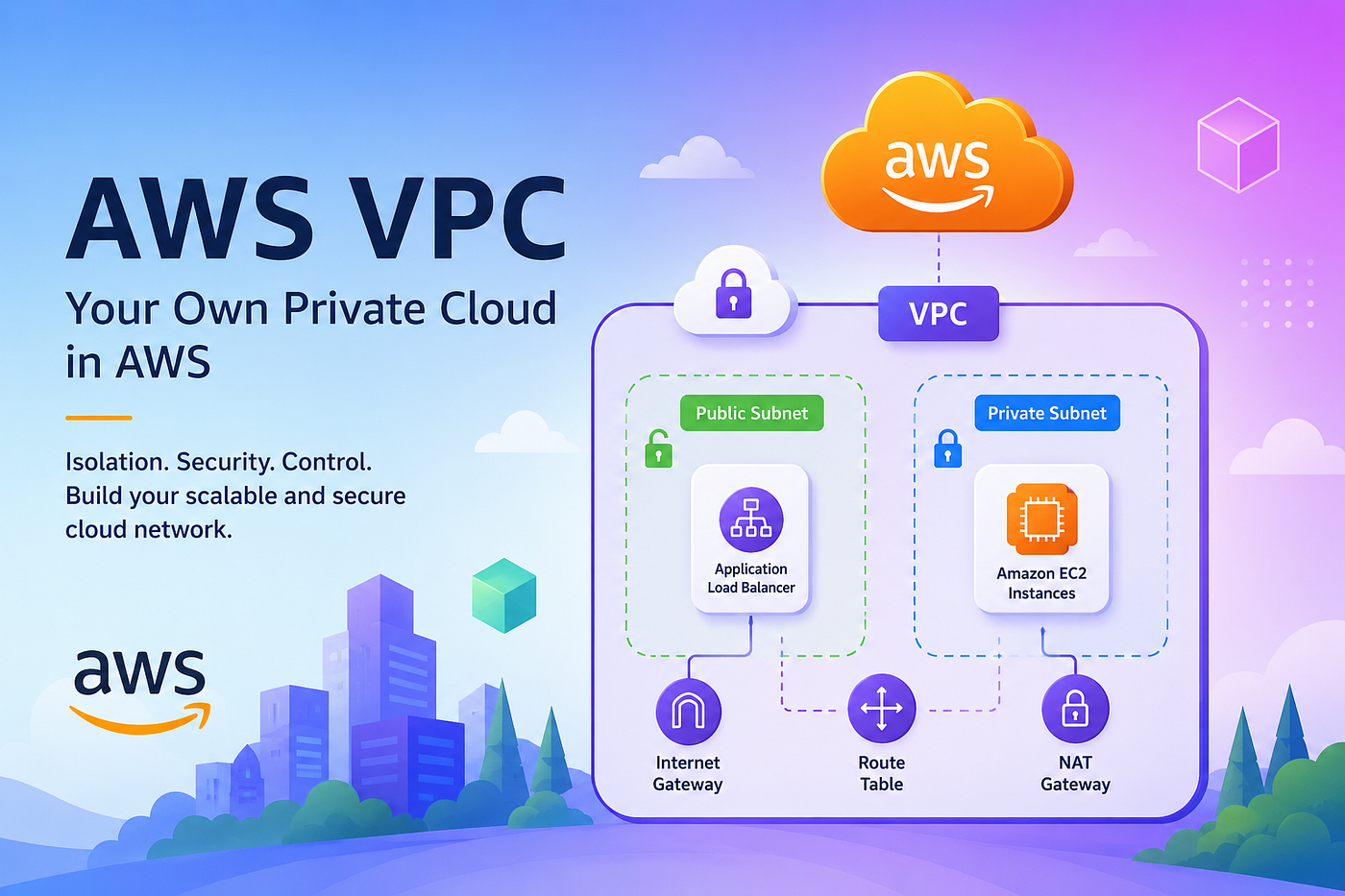
Amazon Virtual Private Cloud (Amazon VPC) is a logically isolated virtual network that you create within an AWS Region. It provides complete control over your cloud networking environment by allowing you to define your own IP address space, create multiple subnets, configure route tables, attach network gateways, and implement layered security controls.
Unlike services such as Amazon EC2 or Amazon S3, a VPC does not provide compute or storage resources. Instead, it acts as the networking boundary within which those resources operate. Every EC2 instance, Amazon RDS database, Elastic Kubernetes Service (EKS) node, and many other AWS services are launched inside a VPC.
One architectural characteristic that often confuses beginners is that a VPC spans an entire AWS Region. It is not limited to a single Availability Zone. This regional scope allows resources deployed across multiple Availability Zones to remain part of the same virtual network while benefiting from high availability and fault tolerance.
The individual building blocks inside a VPC are subnets, and each subnet belongs to only one Availability Zone. This design enables architects to distribute workloads across multiple AZs while maintaining a consistent networking environment.
In essence, a VPC represents your own software-defined data center network inside AWS. Before deploying applications, databases, or load balancers, you first establish the networking boundary that determines how those resources communicate internally and externally.
AWS Regions and Availability Zones
To fully understand Amazon VPC, it’s important to understand where it exists within AWS’s global infrastructure.
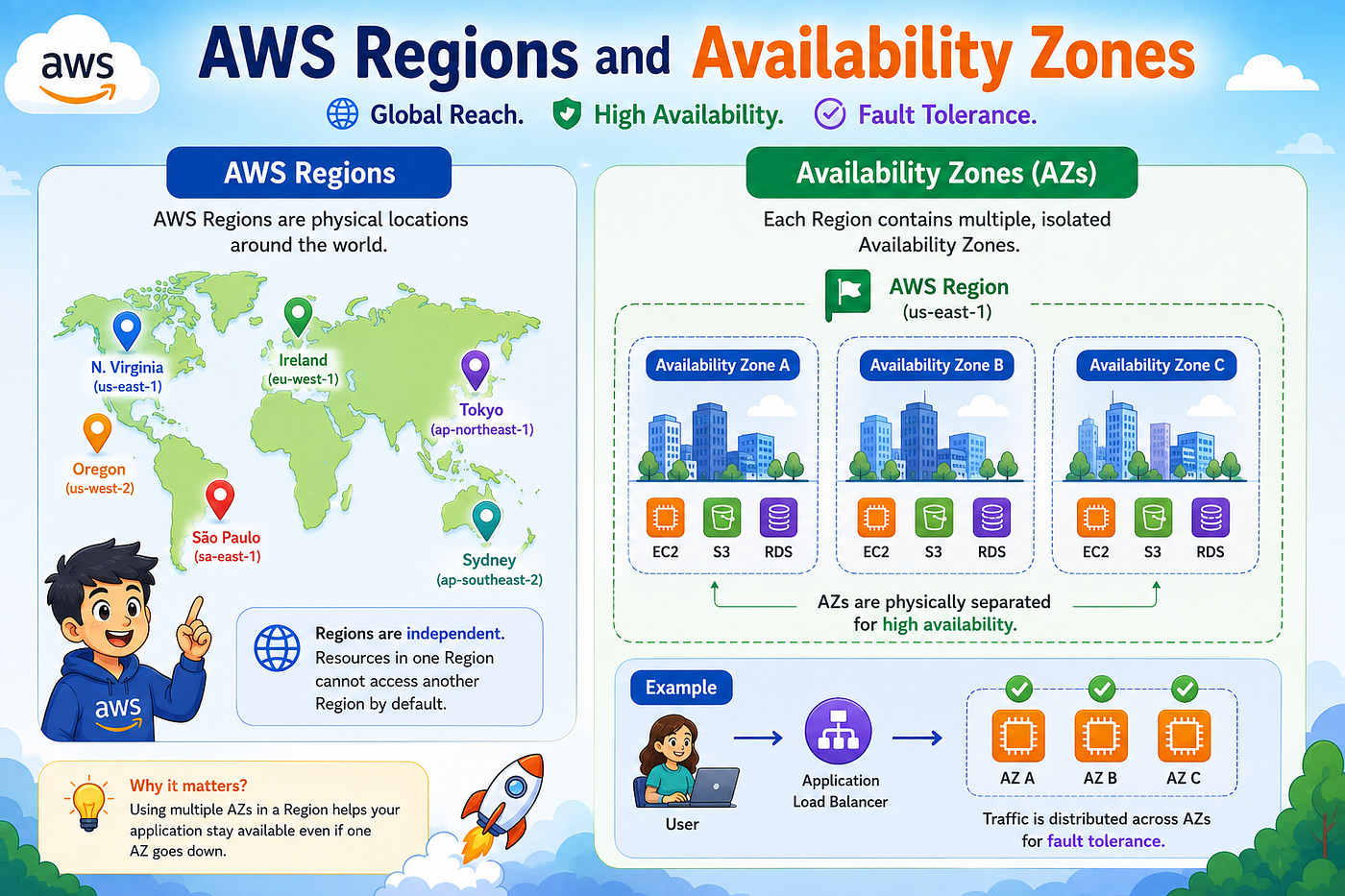
AWS operates data centers around the world, but these data centers are not managed individually. Instead, they are grouped into Regions, and each Region consists of multiple physically separate Availability Zones (AZs).
An AWS Region is a geographical area that contains multiple Availability Zones. Examples include US East (N. Virginia), Europe (Frankfurt), and Asia Pacific (Singapore). Each Region is isolated from every other Region, allowing organizations to choose where their applications and data should reside based on latency, compliance, or disaster recovery requirements.
Within a Region, AWS provides multiple Availability Zones. Each Availability Zone consists of one or more data centers with independent power, cooling, and networking infrastructure. Because AZs are physically separated, a failure in one Availability Zone does not automatically impact the others.
This architecture enables organizations to build highly available applications by distributing resources across multiple Availability Zones.
Amazon VPC takes advantage of this design by existing at the Regional level, while allowing individual subnets to be created within specific Availability Zones. As a result, resources located in different AZs can still communicate through the same VPC, enabling resilient and fault-tolerant application architectures.
Planning a Network: Why IP Address Ranges Matter
Creating a VPC is not simply a matter of clicking a button in the AWS Console. One of the first and most important decisions you make is choosing the IP address range for your network.
Every device inside the VPC requires an IP address. If the address range is too small, you may run out of available addresses as your infrastructure grows. If it overlaps with another network that you later need to connect to — such as an on-premises data center or another VPC — it can create routing conflicts that are difficult to resolve.
For this reason, network planning is a critical part of cloud architecture. AWS requires you to specify a CIDR (Classless Inter-Domain Routing) block when creating a VPC. This CIDR block defines the pool of private IP addresses that can be allocated to resources within the VPC.
Understanding CIDR notation and how IP address ranges are divided into smaller network segments is the next essential step in mastering Amazon VPC.
Designing VPC: CIDR Blocks, Subnets, and Route Tables
At this point, we understand that a VPC is simply a private network inside an AWS Region. However, creating an empty network isn’t enough. Just as an architect prepares a blueprint before constructing a building, a cloud engineer must first design how IP addresses will be allocated within the VPC.
This planning begins with CIDR blocks.
What is CIDR?
When creating a VPC, AWS asks you to specify an IPv4 CIDR block.
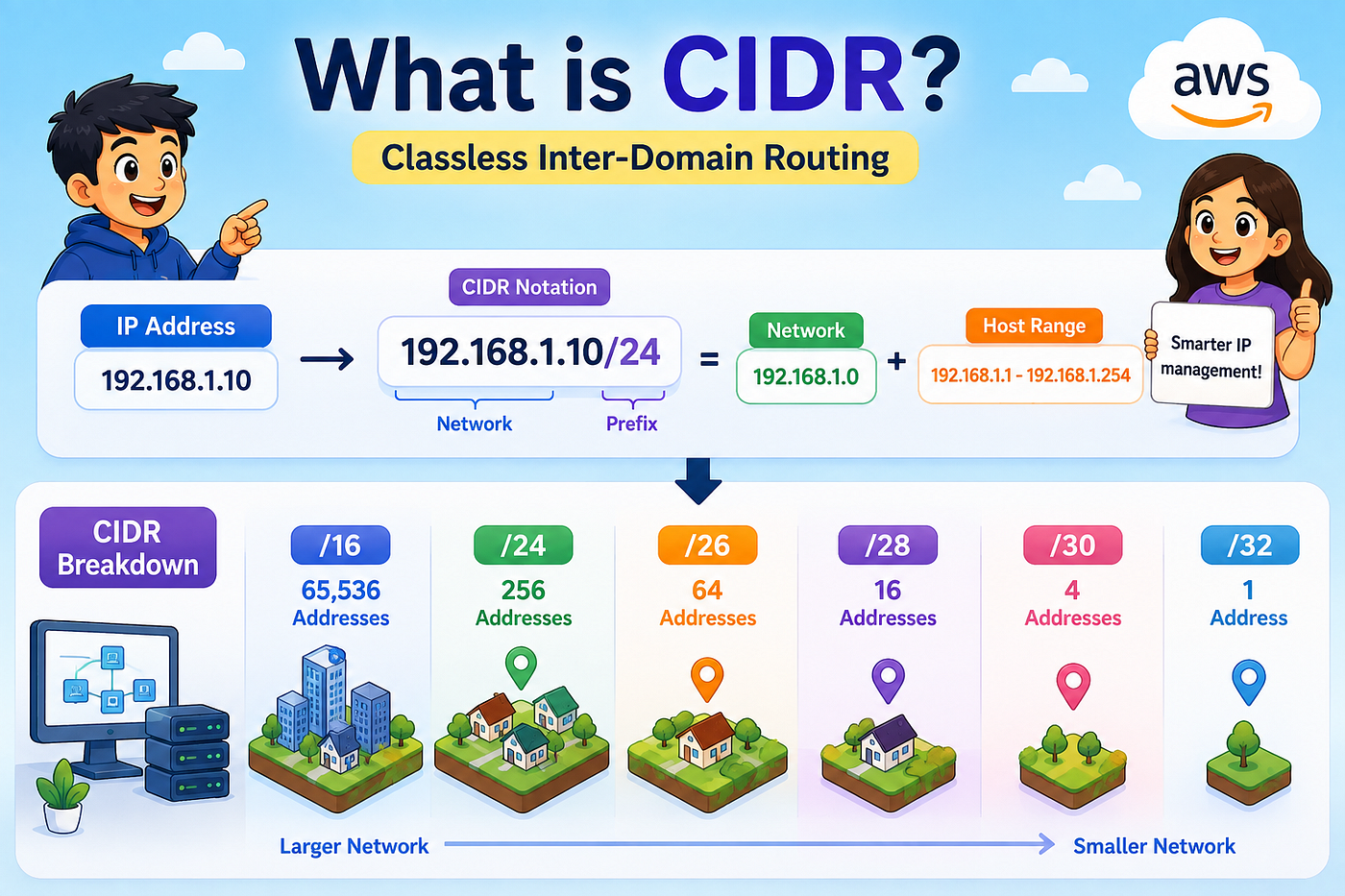
For example:
10.0.0.0/16If you’ve never worked with networking before, this notation can look confusing. Fortunately, the idea behind it is much simpler than it appears.
A CIDR (Classless Inter-Domain Routing) block defines the range of IP addresses available inside your network. Instead of assigning IP addresses one by one, you reserve an entire range that AWS can allocate to your resources as needed.
Think of it as reserving land before building a city. You don’t purchase individual houses first — you acquire the entire area, then divide it into smaller sections for different purposes.
Similarly, a CIDR block defines the total address space available for your VPC.
Understanding the “/16”
Let’s look again at:
10.0.0.0/16The 10.0.0.0 represents the starting address of the network.
The /16 is called the prefix length. It tells AWS how many bits identify the network portion of the address and how many bits remain available for creating host addresses.
Fortunately, you don’t need to perform binary calculations every time. As cloud engineers, we mostly need to understand the practical impact.
A /16 network provides significantly more IP addresses than a /24 network, making it a common choice for production VPCs that may grow over time.
Note: AWS reserves five IP addresses in every subnet for internal networking, so not every address is available for your resources.
Why Does a VPC Need an IP Range?
Every resource deployed inside a VPC needs an IP address.
Consider a simple application consisting of:
- A Load Balancer
- Two Web Servers
- One Application Server
- One Database Server
- One Bastion Host
Each of these resources requires its own private IP address to communicate with the others.
As the application grows, you may add dozens — or even hundreds — of additional servers. Rather than assigning addresses manually, AWS allocates them automatically from the CIDR block you defined when creating the VPC.
Choosing an appropriate CIDR range from the beginning is important because changing it later can become complicated, especially in production environments.
A Single Network Isn’t Enough
Suppose we create a VPC with this CIDR block:
10.0.0.0/16Technically, we could place every EC2 instance, database, and application server into one large network.
Would that work?
Yes.
Would it be a good design?
Absolutely not.
Imagine mixing web servers, databases, monitoring systems, internal APIs, and administrative servers together without any logical separation. Managing security, routing, and scalability would quickly become difficult.
Instead, we divide the VPC into subnets.
What is a Subnet?
A subnet is simply a smaller network created from the VPC’s CIDR block.
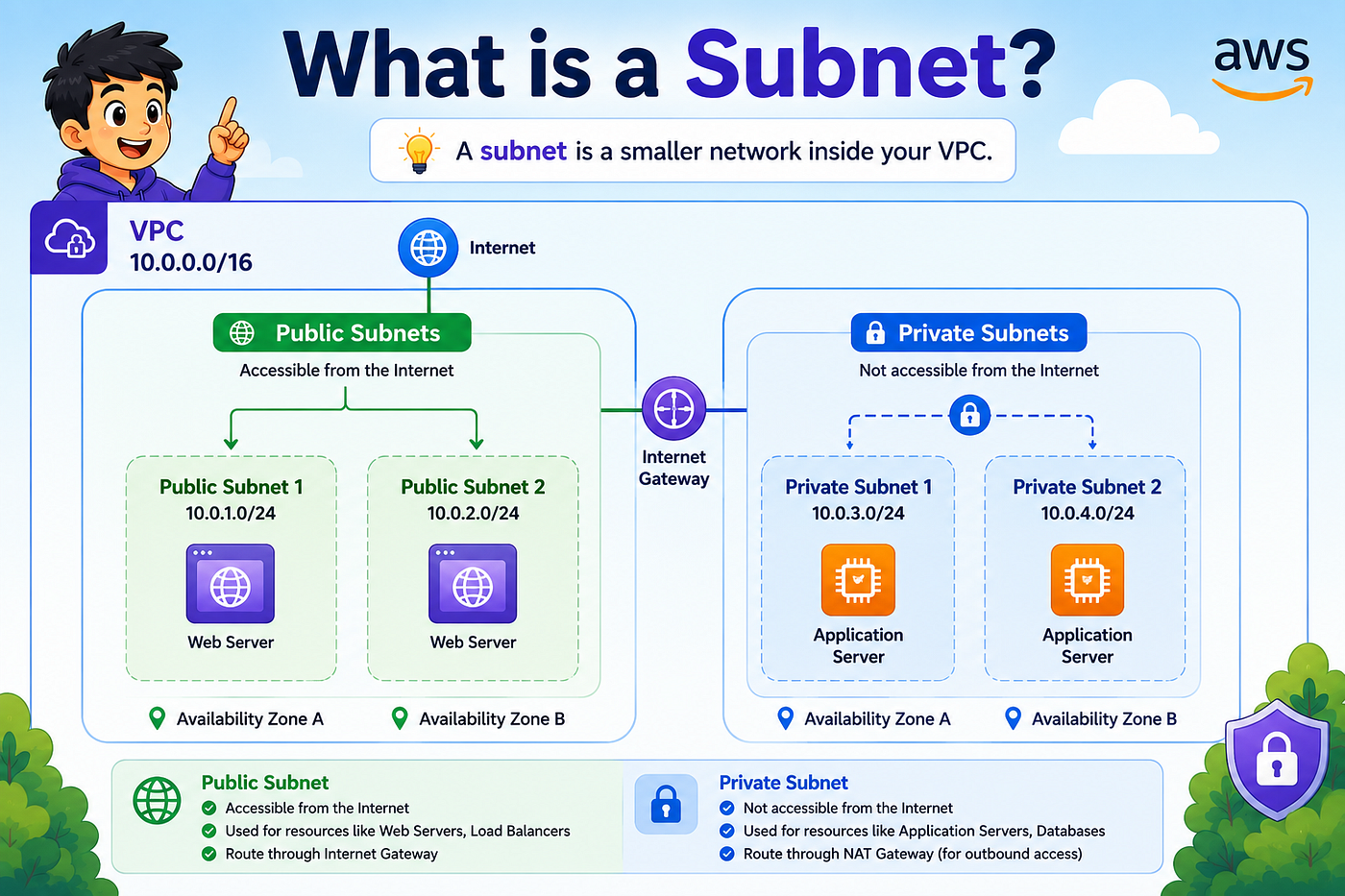
Instead of treating the entire VPC as one large network, we split it into multiple smaller sections, each serving a specific purpose.
For example:
VPC
10.0.0.0/16
│
├── Public Subnet A
│      10.0.1.0/24
│
├── Public Subnet B
│      10.0.2.0/24
│
├── Private Subnet A
│      10.0.11.0/24
│
└── Private Subnet B
       10.0.12.0/24
Each subnet receives a portion of the VPC’s address space.
Together, they still belong to the same VPC but can be managed independently.
Why Do We Need Multiple Subnets?
Different resources have different networking requirements.
For example:
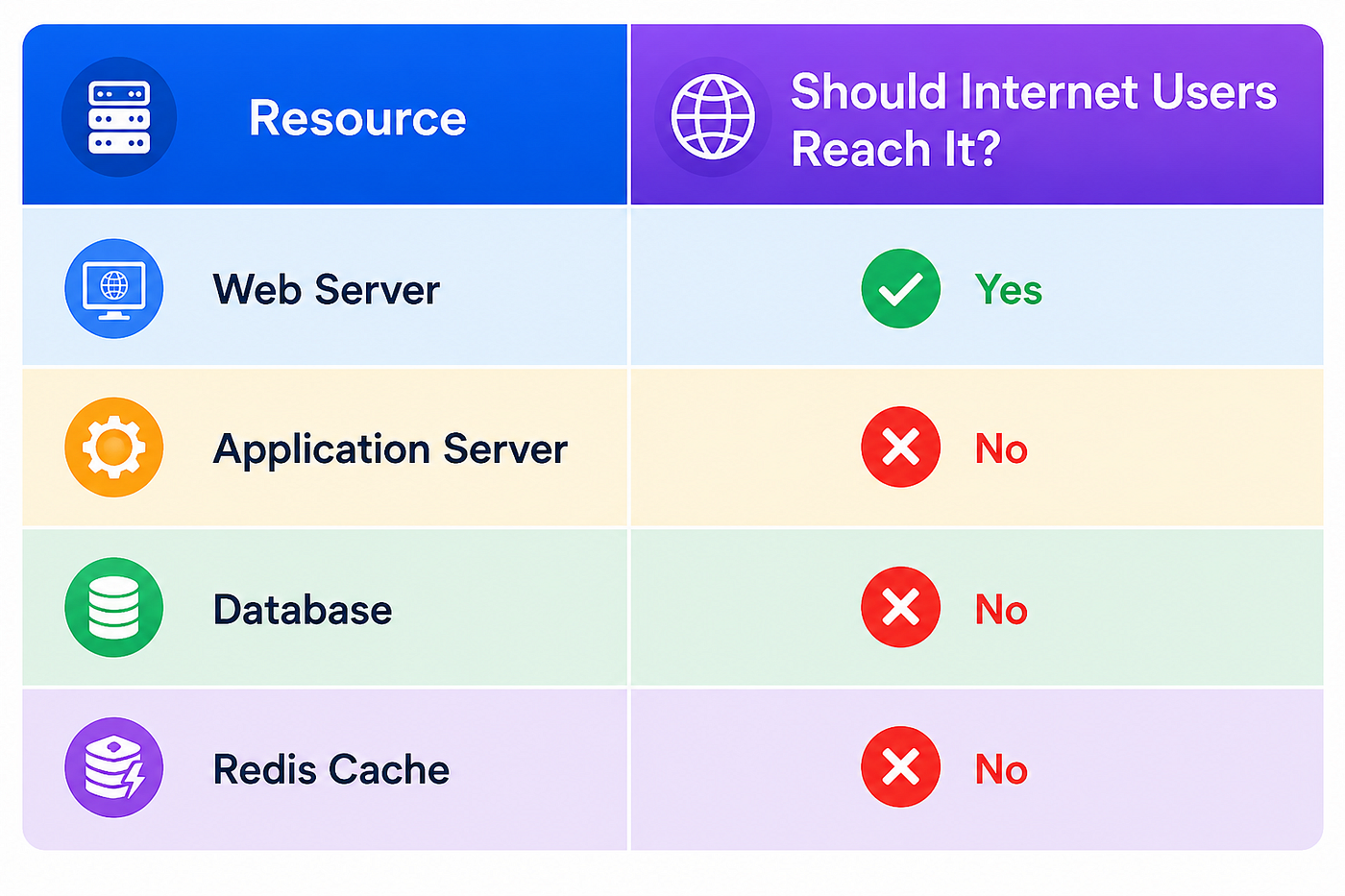
If every resource lived in the same subnet, securing them would become much more difficult.
Instead, cloud architectures separate Internet-facing resources from internal services.
This approach improves:
- Security
- Scalability
- Availability
- Network organization
Public Subnets
A public subnet is a subnet whose route table contains a route to an Internet Gateway (IGW).
Because of this route, resources inside the subnet can communicate directly with the Internet (provided they also have a public IP address and appropriate security rules).
Typical resources deployed in public subnets include:
- Application Load Balancers
- Bastion Hosts
- NAT Gateways
- Public-facing Web Servers (in some architectures)
The important thing to understand is that a subnet does not become public simply because its name says “Public Subnet.”
It becomes public only when its routing configuration allows Internet access.
Private Subnets
A private subnet has no direct route to the Internet Gateway.
Resources inside these subnets receive private IP addresses and are not directly reachable from the Internet.
Private subnets typically contain:
- Application Servers
- Databases
- Kubernetes Worker Nodes
- Internal APIs
- Caching Systems
This isolation significantly reduces the attack surface because external users cannot establish direct connections to these resources.
A Common Misconception
Many beginners think that placing an EC2 instance inside a public subnet automatically makes it accessible from the Internet.
This is not true.
For an EC2 instance to be publicly reachable, all of the following conditions must be met:
- It must be in a public subnet.
- It must have a public or Elastic IP address.
- The route table must contain a route to an Internet Gateway.
- Its Security Group must allow the incoming traffic.
- The Network ACL must also permit the traffic.
Missing even one of these conditions prevents Internet connectivity.
This layered security model is one of AWS’s biggest strengths.
Availability Zones and Subnets
Earlier, we learned that a VPC spans an entire AWS Region.
Subnets work differently.
A subnet belongs to exactly one Availability Zone and cannot span multiple AZs.
For example:
Region
│
├── Availability Zone A
│      ├── Public Subnet A
│      └── Private Subnet A
│
└── Availability Zone B
       ├── Public Subnet B
       └── Private Subnet B
This design allows you to distribute resources across multiple Availability Zones while maintaining high availability.
If one Availability Zone experiences an outage, workloads in the other AZ can continue serving users.
This is why production architectures almost always create at least two public subnets and two private subnets across different Availability Zones.
Introducing Route Tables
Now we’ve created multiple subnets.
But another question immediately appears.
How does AWS know where network traffic should go?
The answer is Route Tables.
A Route Table contains a set of routing rules that determine where packets should be forwarded based on their destination.
Every subnet in a VPC must be associated with a route table.
It allows every subnet inside the VPC to communicate with other subnets in the same VPC.
For example:
Web Server
10.0.1.15
   ↓
Application Server
10.0.11.20
   ↓
Database
10.0.12.30
Since all these resources belong to the same VPC, AWS automatically routes traffic between them using the local route.
No Internet Gateway or NAT Gateway is required for internal communication.
Connecting Our VPC to the Outside World
At this point, we have designed a well-structured VPC with multiple subnets, distributed them across Availability Zones, and configured route tables for internal communication.
However, our application is still completely isolated.
Imagine you’ve deployed a web application on an EC2 instance inside your VPC. You know the private IP address of the instance, the application is running perfectly, and all internal communication works as expected.
But when you open your browser and enter your application’s URL…
Nothing happens.
Why?
Because although the application exists inside AWS, there is currently no path between the Internet and your VPC.
To establish that connection, AWS provides the Internet Gateway.
Internet Gateway (IGW)
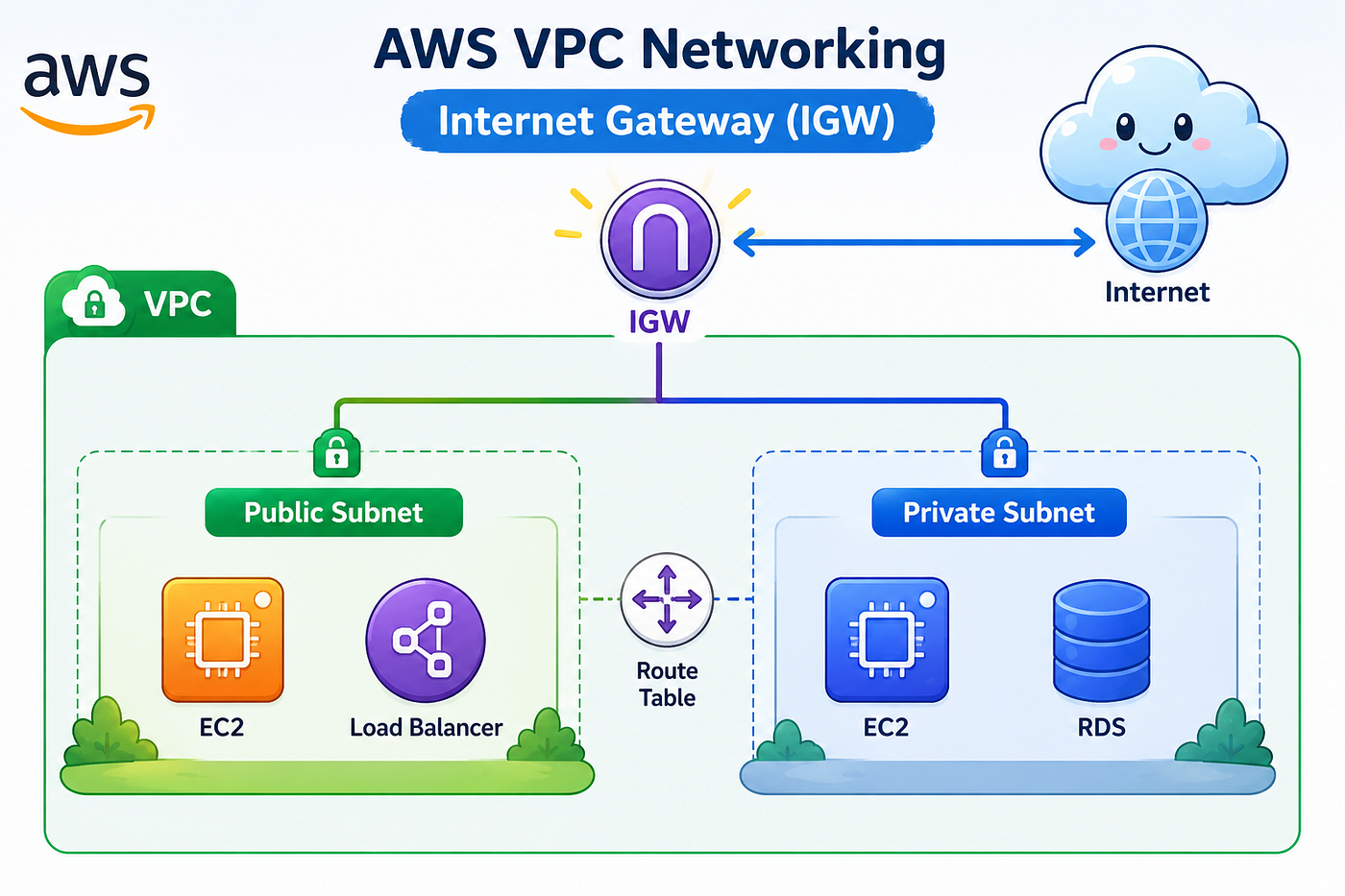
An Internet Gateway (IGW) is a highly available, horizontally scaled AWS-managed gateway that enables communication between your VPC and the public Internet.
Think of it as the front entrance to your private network. Without it, traffic from the Internet has no way of entering your VPC, and resources inside your VPC have no way of sending traffic back to Internet users.
Attaching an Internet Gateway to a VPC does not automatically make all resources publicly accessible. It simply provides the capability for Internet communication. Whether traffic is actually allowed depends on several other networking components that work together.
An Internet Gateway is attached at the VPC level, meaning the entire VPC can use it. However, only subnets with appropriate routing can actually send traffic through it.
Route Tables Revisited
Earlier, we introduced route tables and saw the default Local Route, which enables communication between resources inside the same VPC.
To allow Internet access, we add another routing rule.
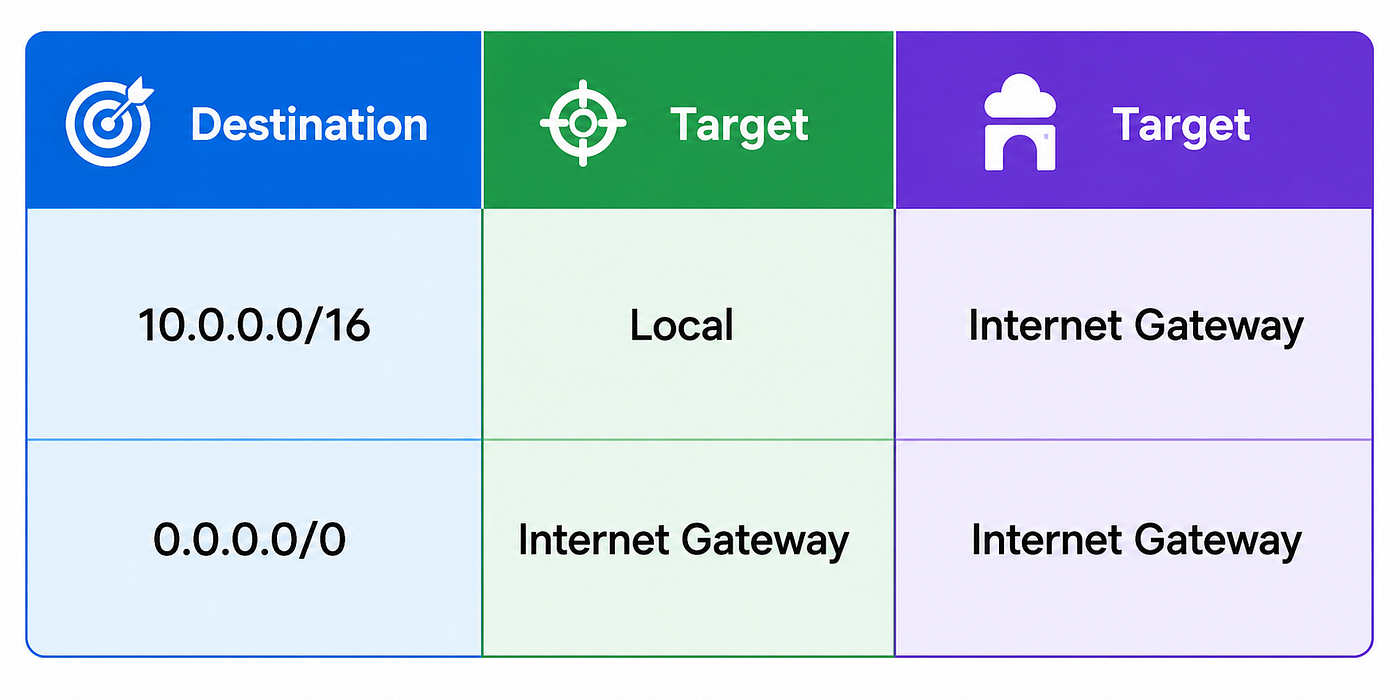
The destination 0.0.0.0/0 represents all IPv4 addresses that are outside the VPC.
Whenever a packet’s destination doesn’t belong to the local VPC, AWS forwards it to the Internet Gateway.
This simple route transforms a subnet into a public subnet.
Notice something important here.
The subnet itself didn’t change.
The EC2 instance didn’t change.
Only the routing configuration changed.
This demonstrates why AWS networking is driven by routing rather than resource names.
Inbound and Outbound Traffic
When discussing networking, you’ll frequently hear the terms Inbound and Outbound traffic.
These terms describe the direction in which packets travel relative to a resource.
Inbound Traffic
Inbound traffic refers to requests entering a resource.
For example:
User
 ↓
Internet
 ↓
Application Load Balancer
 ↓
EC2 Instance
Here, the EC2 instance receives an HTTP request.
That request is considered Inbound Traffic.
Outbound Traffic
Outbound traffic refers to packets leaving a resource.
For example:
EC2 Instance
 ↓
Internet Gateway
 ↓
Internet
 ↓
Software Repository
If the server downloads software updates or calls an external API, those packets represent outbound traffic.
Understanding this distinction becomes extremely important when configuring Security Groups and Network ACLs.
Why We Rarely Expose EC2 Instances Directly
Although AWS allows you to assign a public IP address directly to an EC2 instance, this is generally not considered a production best practice.
Instead, production environments place an Application Load Balancer (ALB) in front of the application.
Users connect to the Load Balancer rather than directly to the EC2 instances.
This provides several advantages:
- Traffic distribution across multiple servers
- High availability
- SSL/TLS termination
- Health monitoring
- Automatic failover
- Simplified scaling
Instead of exposing servers, we expose the Load Balancer.
Application Load Balancer (ALB)
An Application Load Balancer receives incoming client requests and distributes them across multiple healthy application servers.
Suppose your website receives one million users.
If every request were sent to a single EC2 instance, that server would eventually become overloaded.
Instead, the Load Balancer distributes requests among multiple instances.
             Users
               │
        Application Load Balancer
      ┌────────┼────────┐
   EC2-1    EC2-2    EC2-3
This improves both scalability and availability.
If one server becomes unhealthy, the Load Balancer automatically stops forwarding traffic to it.
Target Groups
A Load Balancer doesn’t send requests directly to EC2 instances.
Instead, it forwards traffic to a Target Group.
A Target Group is simply a logical collection of backend resources that receive traffic from the Load Balancer.
Targets may include:
- EC2 Instances
- ECS Tasks
- Lambda Functions
- IP Addresses
Each Target Group continuously performs Health Checks.
If an EC2 instance fails its health check, it is temporarily removed from the Target Group until it becomes healthy again.
This happens automatically without requiring administrator intervention.
Security Groups
Even after configuring Internet connectivity, AWS still does not allow unrestricted access to your resources.
Every EC2 instance is protected by a Security Group, which acts as a virtual firewall.
Unlike traditional firewalls, Security Groups are stateful.
This means if an inbound connection is allowed, the corresponding response traffic is automatically permitted.
For example:
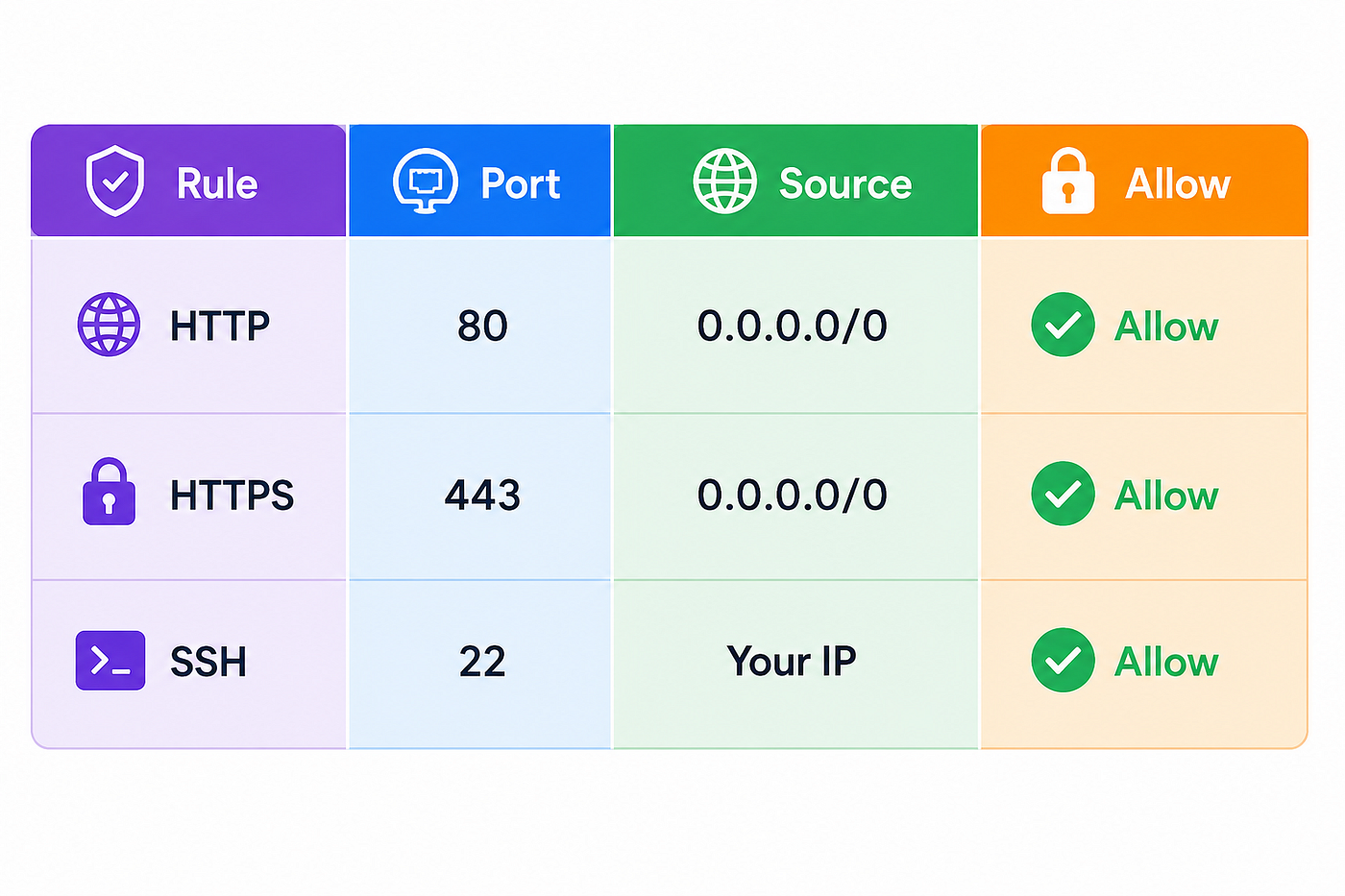
Everything not explicitly allowed is automatically denied.
This “default deny” model significantly improves security.
Network ACLs (NACL)
While Security Groups protect individual resources, Network ACLs operate at the subnet level.
A Network ACL acts as another layer of protection before traffic even reaches the EC2 instance.
Unlike Security Groups, Network ACLs are stateless.
This means inbound and outbound traffic must both be explicitly permitted.
Because Network ACLs evaluate rules in numerical order, rule priority becomes important.
Security Groups vs Network ACLs
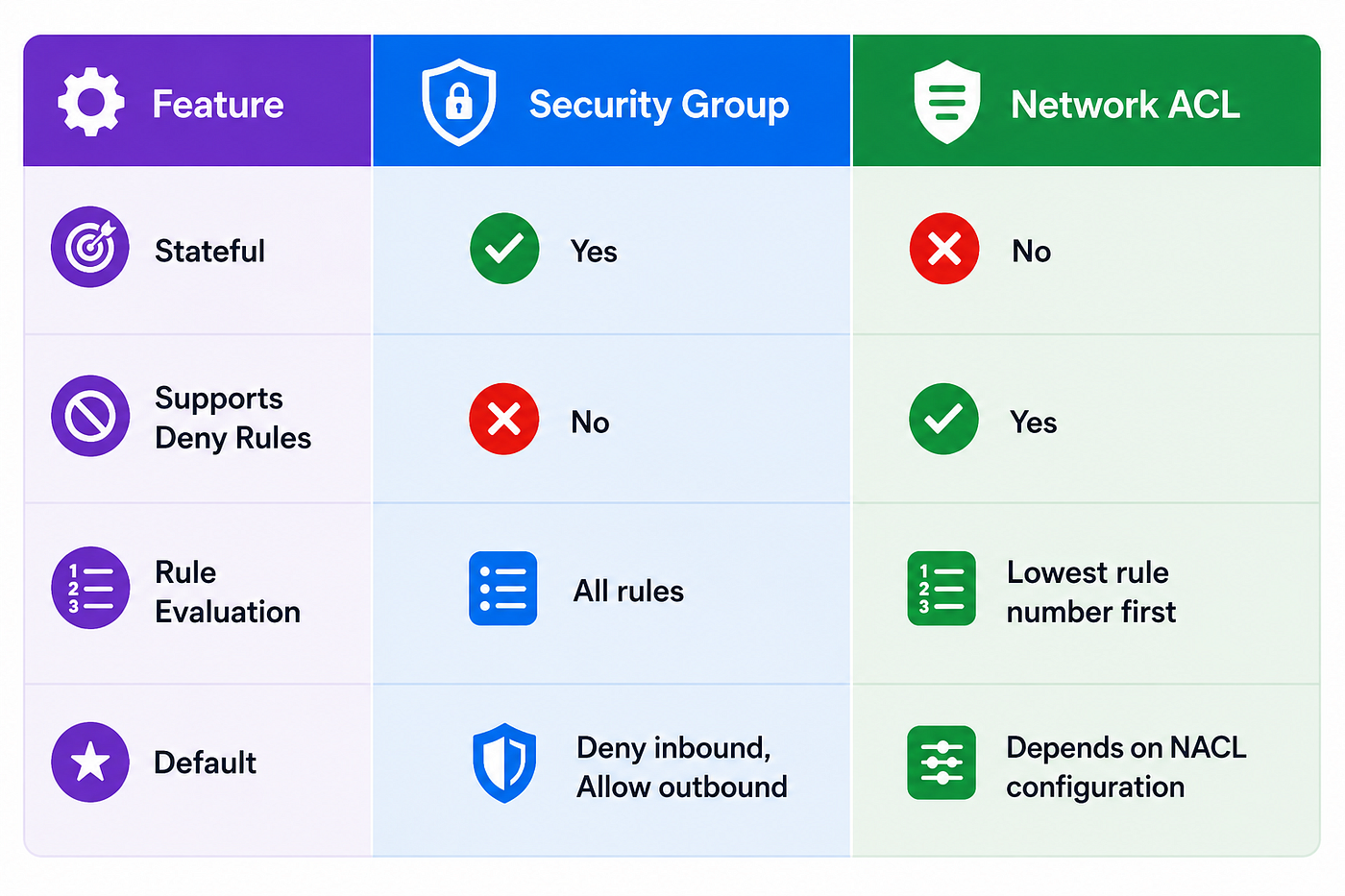
Most AWS architectures rely primarily on Security Groups, while Network ACLs provide an additional layer of network-level protection.
Private Subnets Still Need Internet Access
Earlier, we learned that databases and application servers are usually placed inside private subnets.
But here’s an interesting question.
How does a private EC2 instance download operating system updates?
How does it install packages from external repositories?
How does it pull Docker images?
Clearly, these servers still require outbound Internet access.
However, we don’t want them to be reachable from the Internet.
AWS solves this problem using a NAT Gateway.
NAT Gateway
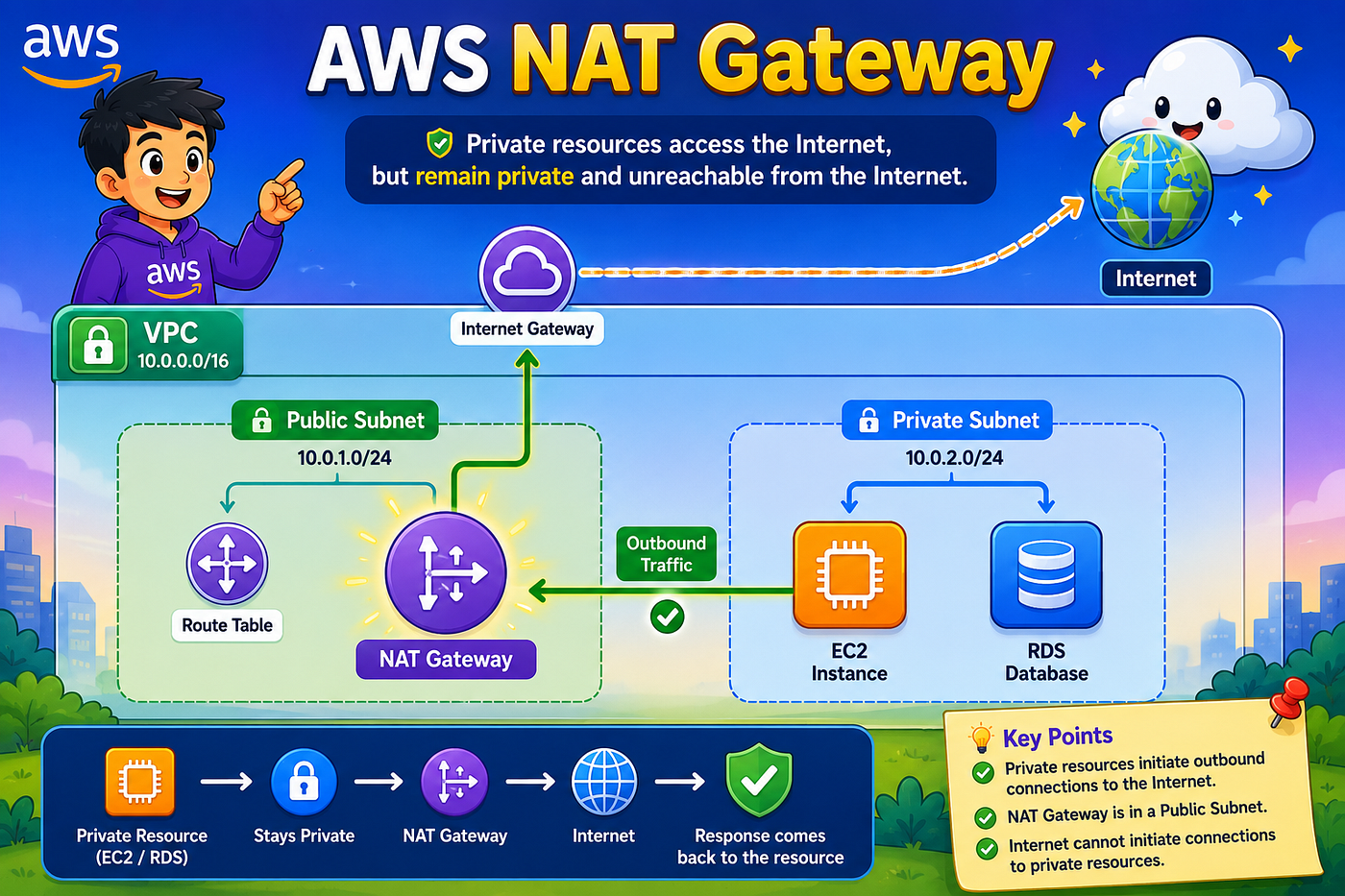
A Network Address Translation (NAT) Gateway enables resources inside private subnets to initiate outbound Internet connections while preventing unsolicited inbound connections from the Internet.
Instead of exposing the private server directly, outbound requests are translated through the NAT Gateway.
The communication flow looks like this:
Private EC2
   ↓
Private Route Table
   ↓
NAT Gateway
   ↓
Internet Gateway
   ↓
Internet
Notice the important difference.
Traffic can leave the private subnet.
But external users cannot initiate new connections back to the EC2 instance.
This makes the NAT Gateway one of the most important security components in production VPC architectures.
A NAT Gateway is typically deployed inside a public subnet and associated with an Elastic IP, allowing it to communicate with the Internet on behalf of private resources.
Putting Everything Together
Let’s follow a complete request from a user’s browser to an application running inside AWS.
User Browser
   ↓
Internet
   ↓
Internet Gateway
   ↓
Public Route Table
   ↓
Application Load Balancer
   ↓
Target Group
   ↓
EC2 Instance
   ↓
Application
   ↓
Database (Private Subnet)
   ↓
Response Returned
Meanwhile, if the application server needs to download updates:
Private EC2
   ↓
Private Route Table
   ↓
NAT Gateway
   ↓
Internet Gateway
   ↓
Internet
This is the networking flow that powers thousands of production AWS applications every second.
Every component we’ve discussed contributes to moving traffic securely and efficiently through the architecture.
Best Practices
When designing Amazon VPC architectures, several best practices are followed consistently across production environments:
- Deploy resources across at least two Availability Zones for high availability.
- Place databases, caches, and backend services inside private subnets.
- Expose only Load Balancers to the Internet whenever possible.
- Apply the principle of least privilege when creating Security Group rules.
- Avoid opening SSH (
22) or RDP (3389) to0.0.0.0/0. - Use separate route tables for public and private subnets.
- Deploy a NAT Gateway in each Availability Zone to eliminate single points of failure.
- Continuously monitor network activity using services such as VPC Flow Logs and Amazon CloudWatch.
Following these practices helps create architectures that are secure, scalable, and resilient.
Conclusion
Amazon VPC is far more than just another AWS service — it is the networking foundation upon which almost every cloud architecture is built.
Throughout this article, we’ve designed a virtual network from scratch, beginning with IP address planning and subnetting, then progressing through routing, Internet connectivity, traffic flow, security controls, and outbound communication for private resources.
Once these concepts become clear, you’ll notice that almost every AWS architecture diagram follows the same fundamental pattern. The services may change, but the networking principles remain consistent.
Mastering Amazon VPC is therefore not just about learning AWS — it’s about understanding the networking concepts that power modern cloud infrastructure.
메타데이터
- post_id
- a2f51189ec3a
- slug
- amazon-vpc-building-the-network-behind-every-aws-application-a2f51189ec3a
- url
- https://medium.com/@thisarak943/amazon-vpc-building-the-network-behind-every-aws-application-a2f51189ec3a
- canonical_url
- https://medium.com/@thisarak943/amazon-vpc-building-the-network-behind-every-aws-application-a2f51189ec3a
- author_url
- https://medium.com/@thisarak943
- status
- ok
- fetched_at
- 2026-08-09 07:18:25


