Cross-App Communication in Micro Frontends
How Independent Frontend Applications Talk to Each Other
Cross-App Communication in Micro Frontends
How Independent Frontend Applications Talk to Each Other
Modern web applications are growing rapidly in scale. Large organizations often have multiple teams working on different parts of the same UI. Managing a massive monolithic frontend becomes difficult — deployments slow down, codebases become tightly coupled, and team autonomy suffers.
This is where Micro Frontend Architecture comes in.
However, once you split your frontend into multiple independent applications, a new challenge appears:
How do these independent applications communicate with each other?
This article explores Cross-App Communication in Micro Frontends, including patterns, implementation approaches, and practical code examples.
What Are Micro Frontends?
Micro Frontends apply the microservices philosophy to frontend development.
Instead of one large frontend application, the UI is split into multiple smaller frontend apps, each owned by a team and deployed independently.
Example structure:
E-commerce Application├── Product Catalog App
├── Shopping Cart App
├── User Profile App
├── Checkout App
└── Notification AppEach micro frontend can be built with different frameworks:
AppFrameworkCatalogReactCartVueProfileAngularCheckoutNext.js
These applications are then composed together in a container application (shell app).
The Core Problem: Cross-App Communication
Because micro frontends are independent applications, they cannot directly share internal state like components in a monolithic app.
However, they often need to exchange information.
Example Scenario
User clicks Add to Cart in the Catalog App.
Catalog App → Cart AppCart App must update its state and UI.
Without a communication strategy, these apps remain isolated.
Micro Frontend Communication Flow
Below illustrates a typical interaction flow.
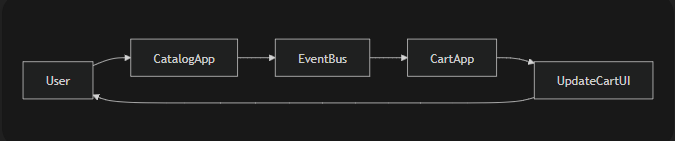
Explanation
- User interacts with Catalog App
- Catalog App publishes an event
- Event travels through a shared communication layer
- Cart App receives the event
- Cart UI updates
Common Communication Patterns
Several patterns are commonly used.

We will explore each.
1. Communication Using Custom Browser Events
This is the simplest and most framework-agnostic approach.
Micro frontends communicate using native browser events.
Architecture

Publishing an Event
Catalog App emits an event when a product is added to cart.
function addToCart(product) {
  const event = new CustomEvent("cart:add", {
    detail: product
  });

window.dispatchEvent(event);
}
Listening to the Event
Cart App listens globally.
window.addEventListener("cart:add", (event) => {
  const product = event.detail;
  cartStore.add(product);
});
Why This Works
Browser events provide:
- Global event propagation
- Framework independence
- Simple implementation
Pros
✔ No dependencies ✔ Works across frameworks ✔ Very simple
Cons
✖ Hard to manage in large systems ✖ Event names may conflict ✖ Debugging becomes difficult
2. Communication Using an Event Bus (Pub/Sub)
A more scalable solution is using an Event Bus.
This follows the Publish-Subscribe pattern.
Architecture

Apps do not communicate directly.
Instead:
Producer → Event Bus → ConsumersImplementing a Simple Event Bus
Create a shared module.
eventBus.js
class EventBus {
  constructor() {
    this.events = {};
  }

subscribe(event, callback) {
    if (!this.events[event]) {
      this.events[event] = [];
    }
    this.events[event].push(callback);
  }
  publish(event, data) {
    if (!this.events[event]) return;
    this.events[event].forEach(callback => {
      callback(data);
    });
  }
}
export const eventBus = new EventBus();
Publishing an Event
Catalog App
import { eventBus } from "./eventBus";

function addToCart(product) {
  eventBus.publish("cart:add", product);
}
Subscribing to Events
Cart App
import { eventBus } from "./eventBus";

eventBus.subscribe("cart:add", (product) => {
  cartStore.add(product);
});
Why This Pattern Is Popular
Event buses create loose coupling.
Apps only know:
- the event name
- the data format
They don’t know about each other.
3. Communication Using Shared State
Another approach is using a shared state store.
Popular tools include:
- Redux
- Zustand
- RxJS
- Global Context
All micro frontends connect to the same store.
Architecture

Example Using Redux
Shared Store
import { createStore } from "redux";

const initialState = {
  cart: []
};
function reducer(state = initialState, action) {
  switch (action.type) {
    case "ADD_TO_CART":
      return {
        ...state,
        cart: [...state.cart, action.payload]
      };
    default:
      return state;
  }
}
export const store = createStore(reducer);
Dispatch Action
Catalog App
store.dispatch({
  type: "ADD_TO_CART",
  payload: product
});
Consume State
Cart App
const cart = store.getState().cart;Pros
✔ Centralized state ✔ Predictable state updates ✔ Great for complex UI
Cons
✖ Creates tight coupling ✖ Harder independent deployments
4. Communication Through URL State
Sometimes the URL itself becomes the communication layer.
Example:
/checkout?cartId=12345Micro frontends read query parameters.
Flow

Example
Updating URL
window.history.pushState({}, "", "/checkout?cartId=123");Reading URL
const params = new URLSearchParams(window.location.search);
const cartId = params.get("cartId");
Advantages
✔ Works naturally with routing ✔ Easy to debug
Limitations
✖ Limited data capacity ✖ Not suitable for real-time updates
Choosing the Right Strategy
Selecting a communication strategy depends on scale.

Best Practices
1. Prefer Event-Driven Communication
Events reduce tight coupling between apps.
2. Avoid Direct Imports Between Apps
Bad:
CatalogApp importing CartApp codeGood:
CatalogApp emits event → CartApp listens3. Use Typed Events
Define event contracts.
Example:
cart:add
cart:remove
cart:update
4. Introduce an App Shell
The Shell Application manages shared resources.

Real-World Example: Amazon-Style Cart Flow
User clicks Add to Cart.
Catalog App
      ↓
Event Bus
      ↓
Cart App
      ↓
Notification App
Effects triggered:
- Cart UI updates
- Notification appears
- Analytics event fires
All from one event.
Final Thoughts
Micro Frontends bring team autonomy, scalability, and independent deployments.
However, communication between these apps is critical.
The most effective approaches usually combine:
- Event-Driven Architecture
- Shared state for critical data
- Backend synchronization
When implemented correctly, cross-app communication enables micro frontends to behave like a single cohesive application while remaining independently deployable.
메타데이터
- post_id
- a329e1ed7ae5
- slug
- cross-app-communication-in-micro-frontends-a329e1ed7ae5
- url
- https://medium.com/@vasanthancomrads/cross-app-communication-in-micro-frontends-a329e1ed7ae5
- canonical_url
- https://medium.com/@vasanthancomrads/cross-app-communication-in-micro-frontends-a329e1ed7ae5
- author_url
- https://medium.com/@vasanthancomrads
- status
- ok
- fetched_at
- 2026-06-20 20:29:01