Azure API Management : OAuth 2.0 with Microsoft Entra ID
End-to-end guide: protecting an API with validate-azure-ad-token and enabling the developer portal OAuth 2.0 test console.
Azure API Management : OAuth 2.0 with Microsoft Entra ID
End-to-end guide: protecting an API with validate-azure-ad-token and enabling the developer portal OAuth 2.0 test console.
This guide documents how to protect an API in Azure API Management (APIM) using Microsoft Entra ID (OAuth 2.0), validate tokens at the gateway with the validate-azure-ad-token policy, test the setup with a script (no portal required), and finally enable the developer portal’s built-in OAuth 2.0 flow so consumers can acquire tokens interactively instead of pasting bearer tokens manually.
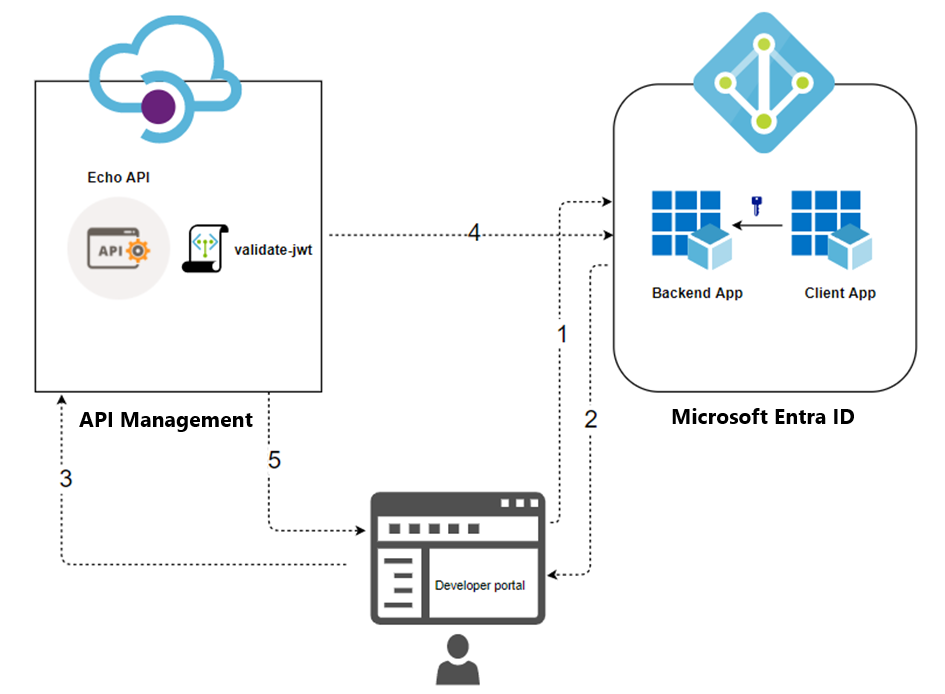
Architecture at a glance
┌─────────────────────┐        1. request token         ┌──────────────────────┐
│  Consumer            │ ──────────────────────────────▶ │  Microsoft Entra ID  │
│  (script / SPN /     │ ◀────────────────────────────── │  (OAuth 2.0 server)  │
│   developer portal)  │        2. access token          └──────────────────────┘
└─────────┬───────────┘
          │ 3. API call with Authorization: Bearer <token>
          ▼
┌────────────────────┐        4. validate-azure-ad-token policy:
│  API Management      │           signature · expiry · issuer/tenant ·
│  gateway             │           audience · client application id
└─────────┬───────────┘
          │ 5. forwarded only if token is valid
          ▼
┌─────────────────────┐
│  Backend API         │
└─────────────────────┘
Two identities are registered in Entra ID:

Environment reference
The concrete values for this deployment (identifiers redacted):

Part 1 : App registrations in Microsoft Entra ID
1.1 Register the backend app (represents the API)
- Azure portal → App registrations → New registration
- Name it (e.g.
backend-app), choose the supported account type, leave Redirect URI empty → Register - Record the Application (client) ID : this is the token audience
- Expose an API → set the Application ID URI (default
api://<client-id>is fine) - Add a scope: scope name
API.Access; who can consent: Admins and users; fill in display name and description → Add scope
1.2 Set the backend app to issue v2 tokens (critical)
By default, tokens requested against a custom API resource are issued as v1 tokens (ver: 1.0, aud: api://<guid>, issuer sts.windows.net). The validate-azure-ad-token policy configuration in this guide expects v2 tokens (ver: 2.0, aud: <bare guid>, issuer login.microsoftonline.com/<tenant>/v2.0).
In backend-app → Manifest, set the token version to 2.
New (Microsoft Graph) manifest format : inside the api block:
"api": {
    "requestedAccessTokenVersion": 2
}
Legacy (AAD Graph) manifest format : top level:
"accessTokenAcceptedVersion": 2Save. Allow a minute or two for propagation.
Symptom if skipped: tokens decode with
ver: 1.0andaud: api://<guid>, and APIM returns401 Unauthorizeddue to audience mismatch.
1.3 Register the client app (represents the consumer)
- App registrations → New registration → name it (e.g.
client-app) → Register - Record the Application (client) ID
- Certificates & secrets → New client secret → record the secret value immediately (it is shown only once)
1.4 Grant the client app permission to the API
- client-app → API permissions → Add a permission → My APIs → select the backend-app
- Delegated permissions → check
API.Access→ Add permissions - Click Grant admin consent for <tenant>
For app-only (client credentials) authorization with a claim requirement, additionally define an App role on the backend-app (member type: Applications), assign it to the client-app under Application permissions, and grant admin consent. App-only tokens carry
roles, neverscp. See Part 5.
Part 2 : APIM policy
2.1 Named values
Create these under APIM → Named values so the policy stays free of hard-coded IDs:

2.2 Policy XML
Apply at the API scope (APIs → <your API> → All operations → Inbound processing → policy editor):
<policies>
    <inbound>
        <base />
        <validate-azure-ad-token tenant-id="{{tenant-id}}"
                                 header-name="Authorization"
                                 failed-validation-httpcode="401"
                                 failed-validation-error-message="Unauthorized. Access token is missing or invalid.">
            <client-application-ids>
                <!-- Only tokens acquired by this client app are accepted -->
                <application-id>{{client-app-client-id}}</application-id>
            </client-application-ids>
            <audiences>
                <audience>{{backend-app-client-id}}</audience>
            </audiences>
        </validate-azure-ad-token>
    </inbound>
    <backend><base /></backend>
    <outbound><base /></outbound>
    <on-error><base /></on-error>
</policies>
What this enforces on every request:
- Valid signature (keys resolved automatically from the tenant)
- Token not expired
- Issuer belongs to the configured tenant
audequals the backend-app client ID- The token was acquired by the pinned client app (
azp/appid)
Do not add a required
scpclaim if consumers use the client credentials flow : app-only tokens have noscpclaim and every call will fail with 401. Userolesfor app-only authorization instead (Part 5).
Named value syntax: references inside policy XML use double curly braces:
{{tenant-id}}. A single brace or a typo is treated as a literal string and validation fails.
Part 3 : Testing without the developer portal (script)
A test script (test-apim-oauth.sh) acquires a token, decodes and checks the claims locally, then calls the APIM endpoint and asserts the expected HTTP status.
3.1 Modes

3.2 Usage
chmod +x test-apim-oauth.shexport TENANT_ID="<tenant-id>"
export CLIENT_APP_ID="<client-app-client-id>"
export CLIENT_SECRET="<client-app-secret>"
export BACKEND_APP_ID="<backend-app-client-id>"
export APIM_SUBSCRIPTION_KEY="<key>" # omit if the API has subscription disabled./test-apim-oauth.sh cc
./test-apim-oauth.sh negativeIf editing defaults directly in the script, bash default-value syntax is
${VAR:-default}: the-is required.${VAR:default}silently expands to an empty string.
3.3 What a healthy token looks like (client credentials)
{
  "aud": "<backend-app-client-id>",
  "iss": "https://login.microsoftonline.com/<tenant-id>/v2.0",
  "azp": "<client-app-client-id>",
  "scp": null,
  "roles": null,
  "ver": "2.0"
}
Checklist:
aud= backend-app client ID as a bare GUID (if you seeapi://..., the token is v1 : revisit §1.2)issends in/v2.0azp= client-app client ID (v2 tokens useazp; v1 tokens useappid)scpis null for client-credentials tokens : this is normalver=2.0
The negative mode proves the policy rejects a genuinely valid Entra token issued for a different audience : i.e. you are enforcing audience, not just “signed by Microsoft.”
Part 4 : Developer portal OAuth 2.0 configuration
This replaces manual bearer-token pasting in the test console: the portal acquires the token via the authorization-code flow using the client-app identity, and injects it into the request automatically.
4.1 Prerequisite
The delegated scope (API.Access) must exist on the backend-app and be granted (with admin consent) to the client-app : see §§1.1 and 1.4.
4.2 Create the OAuth 2.0 server in APIM
APIM → Developer portal → OAuth 2.0 + OpenID Connect → OAuth 2.0 tab → + Add

Leave Client authentication methods and Access token sending method at their defaults.
After entering the client credentials, APIM generates a Redirect URI, e.g.:
https://<apim-name>.developer.azure-api.net/signin-oauth/code/callback/entra-oauthCopy it exactly, then Create.
Client credentials grant in the portal : caution: if enabled, the test console does not prompt for credentials, so a token derived from the stored client secret can be exposed to any portal user. Prefer authorization code for shared portals.
4.3 Register the redirect URI on the client app
App registrations → client-app → Authentication → + Add a platform → Web → paste the redirect URI exactly (no trailing-slash differences) → Configure.
4.4 Attach the OAuth server to the API
APIs → <your API> → Settings tab → Security → OAuth 2.0 → select entra-oauth → Save.
4.5 Republish the developer portal (do not skip)
Developer portal → Publish (portal editor or the Portal overview blade). The portal is a static build : OAuth configuration changes (server, scopes, API security settings) do not appear in the test console until republished. Republish after every OAuth-related change.
4.6 Test in the portal
- Open the developer portal in a private/incognito window and sign in
- Navigate to the API → choose an operation → Try it
- In the Authorization section, select the
entra-oauthserver → Authorization code - Complete the Entra sign-in popup (first run shows a consent prompt for
API.Access) - The console auto-populates
Authorization: Bearer eyJ... - (Optional but recommended) decode the token at
https://jwt.msand verify:aud= backend-app client ID,azp= client-app client ID,ver=2.0;scp=API.Accessand user claims (name,oid) present : this is a delegated token, unlike the app-only script token - Provide the subscription key if prompted → Send → expect 200
The gateway policy accepts both token shapes (delegated and app-only) because it imposes no scp/roles requirement.
Part 5 : Optional hardening: app roles for app-only authorization
The base policy authenticates the SPN but doesn’t check what it is allowed to do. To add authorization for app-only (client credentials) consumers:
- backend-app → App roles → Create app role: display name
API Invoker· valueAPI.Invoke· allowed member types Applications - client-app → API permissions → Add a permission → My APIs → backend-app → Application permissions → check
API.Invoke→ Grant admin consent - Add to the policy:
<required-claims>
    <claim name="roles" match="all">
        <value>API.Invoke</value>
    </claim>
</required-claims>
App-only tokens will then carry "roles": ["API.Invoke"].
Mixed consumers: delegated tokens (developer portal) carry
scpbut notroles; app-only tokens carryrolesbut notscp. A single policy requiring one of them will reject the other consumer type. Options: keep claim requirements out of the shared scope and enforce per-consumer (e.g. per product), or usechoose/whenlogic to branch on token shape.
Troubleshooting reference

General debugging workflow
- Decode the token (
jwt.msor the script’s built-in decoder) - Compare
aud,iss,azp/appid,scp/roles,veragainst the policy and named values - If claims look right, run a traced request from the portal Test tab : it identifies the failing element in one line
Security notes
- Rotate any client secrets and subscription keys that were used during POC testing (pasted into terminals, scripts, or chats)
- Prefer Key Vault-backed named values for secrets in APIM
- Limit the OAuth server’s default scope to the minimum needed for portal testing
- Avoid enabling the client credentials grant on the portal’s OAuth server for shared portals (token exposure risk)
- Client secrets expire : set a calendar reminder or use certificate credentials / managed identities for production consumers
Reference documentation
- Configure OAuth 2.0 user authorization in the developer portal
[validate-azure-ad-tokenpolicy reference](https://learn.microsoft.com/en-us/azure/api-management/validate-azure-ad-token-policy)[validate-jwtpolicy reference](https://learn.microsoft.com/en-us/azure/api-management/validate-jwt-policy)- Protect an API in APIM using OAuth 2.0 with Microsoft Entra ID
- Access token version : requestedAccessTokenVersion
메타데이터
- post_id
- a378c00fa783
- slug
- azure-api-management-oauth-2-0-with-microsoft-entra-id-a378c00fa783
- url
- https://medium.com/@ukhan262/azure-api-management-oauth-2-0-with-microsoft-entra-id-a378c00fa783
- canonical_url
- https://medium.com/@ukhan262/azure-api-management-oauth-2-0-with-microsoft-entra-id-a378c00fa783
- author_url
- https://medium.com/@ukhan262
- status
- ok
- fetched_at
- 2026-07-13 06:23:13




