Why Your Presigned S3 Upload Fails in Production — And the CloudFront Fix Nobody Talks About
A deep dive into the invisible wall of CORS and CSP that blocks direct-to-S3 uploads, and how to solve it without exposing your…
Why Your Presigned S3 Upload Fails in Production — And the CloudFront Fix Nobody Talks About
A deep dive into the invisible wall of CORS and CSP that blocks direct-to-S3 uploads, and how to solve it without exposing your infrastructure
You’ve built everything right. The Lambda generates a presigned POST. The S3 bucket has CORS configured. The frontend sends the file. And yet — a red error in DevTools, a cryptic “Unable to upload” modal, and hours of debugging ahead.
Sound familiar? Let’s break down exactly why this happens, and explore three progressively better solutions — culminating in the architecture pattern used by teams that refuse to leak their infrastructure details to the browser.
The Setup
Imagine a typical enterprise SaaS architecture:
- A React frontend served from
https://my.app.example.comvia CloudFront - An API layer behind
https://api.app.example.com(another CloudFront distribution → API Gateway → Lambda) - An S3 bucket for file storage (purchase orders, PDFs, images)
The user needs to upload a file. You implement the well-documented presigned POST pattern:
- Frontend calls your API:
POST /{id}/purchaseOrders - Lambda generates a presigned POST using
@aws-sdk/s3-presigned-post - Lambda returns the presigned URL and form fields
- Frontend POSTs the file directly to S3 using those credentials
const { url, fields } = await createPresignedPost(s3Client, {
  Bucket: cfg.filesBucket,
  Key: uniqueKey,
  Expires: 900,
  Fields: {
    'Content-Type': contentType,
    'x-amz-tagging': 'ttl=temporary',
  },
  Conditions: [
    ['content-length-range', 0, 4 * 1024 * 1024],
    ['eq', '$Content-Type', contentType],
  ],
});
The url returned is something like:
https://my-bucket.s3.us-east-1.amazonaws.comYou test it locally. It works. You deploy to production. It breaks.
The Invisible Wall
Open DevTools → Network tab. You’ll see the POST to S3 is red, with “Provisional headers are shown” and no response body. The Console shows:
Refused to connect to 'https://my-bucket.s3.us-east-1.amazonaws.com'
because it violates the following Content Security Policy directive:
"connect-src 'self' https://api.app.example.com"
The request never left the browser.
Understanding the Two Gatekeepers
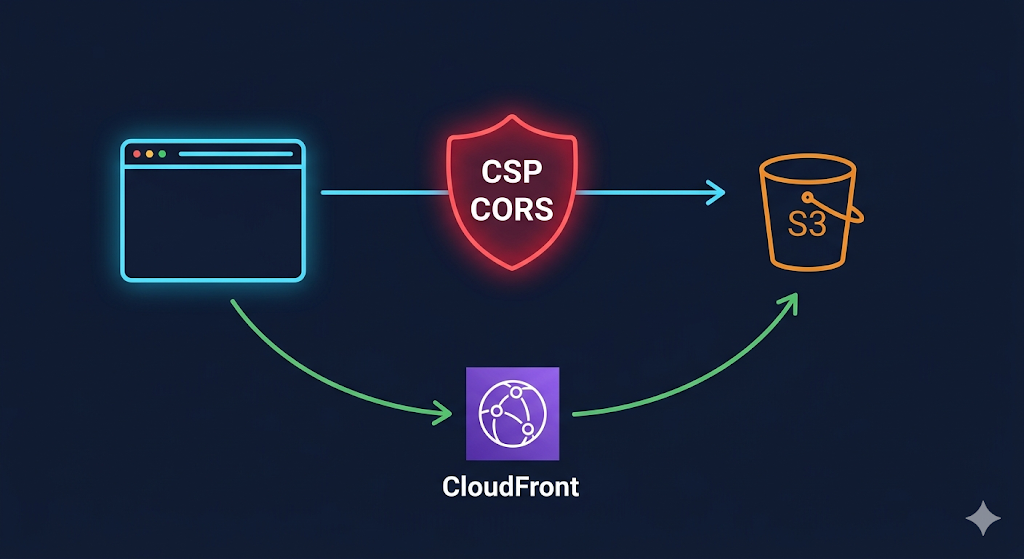
There are two independent security mechanisms that can block a cross-origin request. Both must pass for the request to succeed, and they fail in different ways:
Gatekeeper 1: Content Security Policy (CSP)
CSP is a browser-enforced allow list set via HTTP response headers (or <meta> tags) by the server that delivered the HTML page. The connect-src directive controls which domains the page's JavaScript can make network requests to.
connect-src 'self' https://auth.example.com https://api.app.example.comIf the S3 bucket domain isn’t listed → the browser refuses to even attempt the request. This happens before any network activity.
Key insight: CSP is set by the CloudFront distribution serving your frontend, not the one serving your API. It’s easy to forget this because frontend and backend teams often work in separate repos.
Gatekeeper 2: S3 CORS
If CSP allows the request, the browser sends an OPTIONS preflight to S3. S3 checks its CORS configuration:
cors_rule {
  allowed_methods = ["POST", "HEAD"]
  allowed_origins = ["https://my.app.example.com"]
  allowed_headers = ["*"]
}
If the Origin header doesn't match allowed_origins → S3 returns 403 on the preflight, and the browser blocks the actual POST.
Why It Works Locally
Your local dev server runs on http://localhost:3000. During development:
- There’s no CSP header (dev servers rarely set one)
- You may have S3 CORS set to
["*"]for testing
Both gatekeepers are effectively disabled. Production tightens both — and the upload breaks.
The Debugging Flowchart
When a presigned POST fails, walk through this:
Request fails
  │
  ├─ "Provisional headers are shown" in Network tab?
  │   └─ YES → CSP is blocking it (check Console for CSP error)
  │
  ├─ OPTIONS returns 403?
  │   └─ YES → S3 CORS misconfigured (check allowed_origins)
  │
  ├─ POST returns 403 with AccessDenied XML?
  │   └─ YES → Presigned URL issue (expired, wrong conditions, bucket policy)
  │
  └─ POST returns 204 but frontend shows error?
      └─ Check if response has CORS headers (Access-Control-Allow-Origin)
In our case, it’s the first path: CSP kills it before it starts.
Three Solutions — From Quick Fix to Production Architecture
Solution 1: Add S3 Domain to CSP (The Quick Fix)
Simply add the S3 domain to your frontend CloudFront’s connect-src:
# In your frontend's CloudFront response headers policy
content_security_policy = join("; ", [
  "default-src 'self'",
  join(" ", [
    "connect-src", "'self'",
    "https://api.app.example.com",
    "https://*.s3.us-east-1.amazonaws.com"   # ← added
  ]),
  "upgrade-insecure-requests;"
])
Pros:
- Single line change
- No backend changes
Cons:
- Exposes to the world that you use S3 (visible in response headers)
- Wildcard allows connections to any S3 bucket in the region
- Security teams will flag this in audits
Solution 2: Expose Only Your Bucket via SSM (The Scoped Fix)
Export the exact bucket domain from your infrastructure:
# In the repo that owns the S3 bucket
resource "aws_ssm_parameter" "bucket_domain" {
  name           = "/${var.environment_name}/bucket/domain"
  type           = "String"
  insecure_value = aws_s3_bucket.bucket_regional_domain_name
}
Pros:
- Scoped to your exact bucket
- Decoupled via SSM (bucket rename auto-propagates)
Cons:
- Still exposes S3 in the CSP header
- Cross-repo dependency and deploy ordering required
Solution 3: CloudFront Proxy (The Architect’s Choice)
Don’t let the browser talk to S3 at all. Instead, add a CloudFront behavior that proxies the upload through your API domain.
The Architecture Shift
Before:
Browser ──POST──→ S3 bucket (cross-origin, CSP blocks it)After:
Browser ──POST──→ api.app.example.com/{id}/purchase-order-upload
                      │
                      └──→ CloudFront behavior → S3 bucket origin
The browser only ever talks to api.app.example.com, which is already in the CSP. CloudFront forwards the presigned POST to S3 transparently.
Implementation
Step 1 — New S3 origin in the API CloudFront distribution:
origin {
  origin_id   = "s3_upload_origin"
  domain_name = nonsensitive(data.aws_ssm_parameter.bucket_domain.value)

  s3_origin_config {
    origin_access_identity = ""
  }
}
Step 2 — CloudFront Function to rewrite the path:
S3 presigned POST expects the request at /. CloudFront needs to strip the path:
resource "aws_cloudfront_function" "s3_upload_rewriter" {
  name    = "api-s3-upload-rewriter${local.environment_id_suffix}"
  runtime = "cloudfront-js-2.0"
  comment = "Rewrites upload path to / for S3 presigned POST"
  code    = <<-EOF
            function handler(event) {
              var request = event.request;
              if (request.method === 'OPTIONS') {
                return {
                  statusCode: 204,
                  statusDescription: 'NoContent'
                };
              }
              request.uri = '/';
              return request;
            }
            EOF
}
Step 3 — Cache behavior for the upload path:
ordered_cache_behavior {
  path_pattern     = "/v1/*/purchase-order-upload"
  target_origin_id = "s3_upload_origin"
  allowed_methods  = ["HEAD", "POST", "GET", "OPTIONS", "PUT", "PATCH", "DELETE"]
  cached_methods   = ["GET", "HEAD"]

  viewer_protocol_policy     = "https-only"
  cache_policy_id            = data.aws_cloudfront_cache_policy.CachingDisabled.id
  origin_request_policy_id   = data.aws_cloudfront_origin_request_policy.S3Origin.id
  response_headers_policy_id = aws_cloudfront_response_headers_policy.security_headers_policy.id

  function_association {
    event_type   = "viewer-request"
    function_arn = aws_cloudfront_function.s3_upload_rewriter.arn
  }
}
Important: This behavior must appear before the broader
/v1/*/purchaseOrders*behavior. CloudFront evaluatesordered_cache_behaviorblocks in declaration order and uses the first match.
Step 4 — Lambda returns the proxy URL instead of the S3 URL:
// Before
return {
  uploadUrl: url,  // https://bucket.s3.amazonaws.com
  fields: fields,
};

// After
const proxyUploadUrl = `${cfg.apiEndpoint}/v1/${Id}/purchase-order-upload`;
return {
  uploadUrl: proxyUploadUrl,  // https://api.app.example.com/v1/123/purchase-order-upload
  fields: fields,
};
The presigned form fields (X-Amz-Credential, X-Amz-Signature, Policy, etc.) are sent as form data by the browser and forwarded by CloudFront to S3. S3 validates the signature as normal.
Pros:
- Zero infrastructure exposure — S3 domain never reaches the browser
- No CSP changes needed
- No S3 CORS changes needed (CloudFront handles the origin mapping)
- Cleaner security audit posture
Cons:
- More moving parts (new origin, function, behavior)
- Slight latency through CloudFront (negligible for uploads)
- Three repos to coordinate for deployment
The Lesson
CORS and CSP errors in browser-to-S3 uploads are not bugs in your code — they’re the security model working as designed. The browser is doing its job: blocking requests to domains your application didn’t explicitly authorize.
The real question isn’t “how do I fix CORS?” — it’s “should my user’s browser know about my S3 bucket at all?”
If the answer is no, put CloudFront in front. Your API domain becomes the single point of contact. Your infrastructure stays invisible. And the next security audit becomes a lot shorter.
If you’ve dealt with similar CORS/CSP battles in production, I’d love to hear your approach. Drop a comment or connect with me.
메타데이터
- post_id
- a3accd544d36
- slug
- why-your-presigned-s3-upload-fails-in-production-and-the-cloudfront-fix-nobody-talks-about-a3accd544d36
- url
- https://medium.com/@sonal.sadafal/why-your-presigned-s3-upload-fails-in-production-and-the-cloudfront-fix-nobody-talks-about-a3accd544d36
- canonical_url
- https://medium.com/@sonal.sadafal/why-your-presigned-s3-upload-fails-in-production-and-the-cloudfront-fix-nobody-talks-about-a3accd544d36
- author_url
- https://medium.com/@sonal.sadafal
- status
- ok
- fetched_at
- 2026-06-09 15:37:30