(>ω<) ♡ Welcome to Waifu University ♡ (>ω<)
Scoping the Incident
(>ω<) ♡ Welcome to Waifu University ♡ (>ω<)

Scoping the Incident
What was the domain the threat actor has requested the victim to visit in order to further communications?
All system files were encrypted, so the only clue is likely the ransom note. These notes usually give instructions, such as a Tor (.onion) link and a Bitcoin wallet. They’re often placed in folders like Desktop or Downloads. With the disk image, we can check those locations to find the note and the attacker’s domain used for communication.

Communication Channel with Ransomgroup
Ans:rfosusl6qdm4zhoqbqnjxaloprld2qz35u77h4aap46rhwkouejsooqd.onion
2. What was the file name of the ransom note left behind by the ransomware?
- File System Analysis — Since we have access to the disk image, we can manually browse common directories like the Desktop or Downloads to locate the ransom note
- Sysmon Logs — By reviewing Sysmon Event ID 11 (File Creation), we can detect when and where new files were created during the ransomware activity.

Ransom note Location
Ans:RECOVER-kh1ftzx-FILES.txt
What was the file extension the ransomware added to encrypted files?
- System File Analysis (MFT): MFT is a special file used by the NTFS file system to store metadata about every file and directory on the volume like file name and Extension!
We already know that the collection happened at 2024–03–07 05:00:00 UTC
We can filter files based on their creation time, focusing on the time of incident. While reviewing these files, we often find pairs of filenames — one with the original extension and another with a new, unusual extension added by the ransomware, indicating the encrypted version.

Ans: .kh1ftzx
Initial Access via Entra ID
What was the full user agent string that was responsible for these attempts?
We need to know error code that is related to failure login i did search on google and found Microsoft documentation that has all error codes related to Azure authentication
Error Code 50126 indicates an invalid username or password, or an invalid on-premises username or password during a sign-in attempt.
To investigate this in ELK, we searched for 50126 in the azure.activitylogs.result_type field. By filtering on this field, we were able to isolate failed sign-in attempts associated with this error.
Then we added user_agent.original to see which clients were causing the failures

Useragent causing login failures
Ans: Mozilla/5.0 (Windows NT 10.0; Win64; x64) AppleWebKit/537.36 (KHTML, like Gecko) Chrome/104.0.0.0 Safari/537.36
What was the cloud provider the threat actor used to proxy their requests?
- Reviewing the fields of the authentication failure logs and you will find it parsed at source.as.organization.name AMAZON-02
- Another approach is to filter out IPs associated with failed login attempts. During our review, we identified that the user is leveraging rotating proxies to avoid account lockouts
- We take any IP from that subnet and go to VT and details tab we will find that it’s related to AMAZON-02 (AWS)

Cloud provider used in the attack
Ans: AWS
How many unique users did the threat actor attempt to authenticate with?
Review the fields in the log data, particularly in azure.signinlogs.identity, where the username is parsed. Add this field to your table or query output, and examine the unique values

Unique bruteforced users
Ans: 8
What was the User Principal Name (UPN) of the user the threat actor succeeded in accessing?
We already know the subnet being used by the attacker, so we can filter the logs based on this subnet. By reviewing the unique values in the azure.signinlogs.result_description field, we observe a specific message:
“Due to a configuration change made by your administrator, or because you moved to a new location, you must use multi-factor authentication to access the resource.”
This message indicates successful logins “Primary authentication only” are occurring from different geographic locations, suggesting the use of proxy or VPN services.
When reviewing the username field in the logs, we identify a user named Ignazio Vanderplas with the UPN:
Ans: ivanderplas1@waifu.phd
What was the most likely method the threat actor was able to authenticate to the VPN that was protected by MFA?
We Filter on the user that the attacker succeeded in accessing and review unique result codes we will find 29 request indicating Authentication failed during strong authentication request. (MFA Failure)

MFA push fatigue
Ans: MFA push fatigue
What was the IP that successfully logged into the environment?
IN the above picture you will find a signinlogs.result.description value called This error occurred due to ‘Keep me signed in’ interrupt when the user was signing-in.
Indicating a successful login “MFA verified” View the log and you will find the IP.

successful login
Ans:207.246.70.192
What was the SSH fingerprint for the IP?
Since we have the IP if we go to Shodan or VT we will find the SSH keys.
Mentioned note :Make sure to look for historical info around the time of the intrusion as IP addresses may frequently change owners
Workaround if you’re poor like me and don’t have Pro shodan account.
You can use the Wayback Machine as an alternative. I went back to a snapshot around the intrusion date and was able to retrieve a historical view of the Shodan page for the IP address in question. 😄


SSH Fingerprint
Ans: 97:2e:5d:5e:ca:d1:15:a9:51:ed:8b:0e:55:f1:6a:ee
Breaching the University
What was the hostname the threat actor was able to first access once in the network (also known as the beachhead host)?
We need to search for login success 4624 after completing MFA authentication

Time of completing MFA From attacker IP: Mar 3, 2024 @ 13:29:36.778 as shown above
Time of first login after MFA completed: Mar 3, 2024 @ 13:37:32.802 in this log we will find weird workstation name which is:283d12e66790 agent.name is : CC-JMP-01

First login
Ans: CC-JMP-01
What was the hostname of the threat actor’s device used to get into the network?
I think we already answered this question in the previous one “Workstation name”
Ans: 283d12e66790
What did the threat actor search for via a Web Browser from the initial beachhead host?
We already have an image of the beachhead machine and we know the compromised user so we can know which browsers he uses from browser cache location which is C:\Users[username]\AppData\Local\ we found edge in this path using DBbrowser for SQlite we can view the browser history

Visited URLs
Ans: what is my ip
The initial compromised user created a PowerShell process on the beachhead host. What domain did the process make a DNS query for?
Filter on sysmon event id 22 (DNS query) and image : Powershell.exe
and targetuser: WAIFU\ivanderplas1.

github.com DNS query
Ans: github.com
What was the Github repo URL the threat actor downloaded a tool from on the beachhead host?
From the previous analysis, we identified that the PowerShell process responsible for making the DNS request had a Process ID of 9100.
To investigate further, we can filter PowerShell logs (Event ID 4104) by Process ID = 9100. This will reveal every PowerShell command executed by that specific process.
Within these logs, we can see that the user downloaded a tool from github.com — specifically, SharpHound.exe. The file was renamed to s.exe and subsequently executed.

Ans: https://github.com/Flangvik/SharpCollection
Privilege Escalation
What was the name of the service the threat actor targeted?
Using Sysmon Event ID 1 with parentCommandline = cmd.exe
and the compromised user.
we found a couple of enumeration commands and the service the user is going to target.

Enumeration & PrivEsc commands
Ans: Waifu Service
What was the MITRE ATT&CK technique that the threat actor used to escalate privilege?
We see a couple of enumeration commands like findstr /i “auto
if we Google findstr /i “auto” we will find muliple results with title unquoted service path.
Mapping it to mire T1574.009.
Ans: T1574.009
What was the name of the binary the service spawned?
Sysmon event id 1 and since we know the service name which is Waifu service we can filter when process name include Waif..
we found services.exe as Parent and executable info WaifSC.exe
What the service actually spawned we can take process id and search with it as parent

Targeted service execution
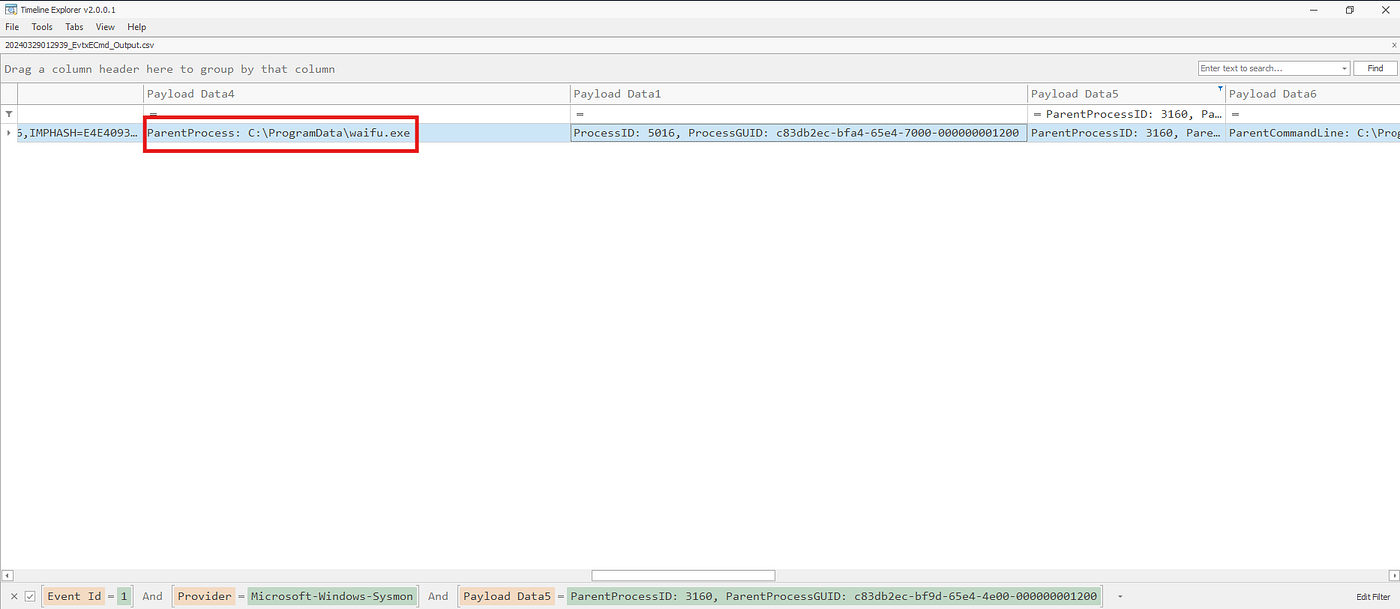
The real executable that actually run when the service executed
Ans: waifu.exe
What was the SHA1 of this binary?
Since we already have an image of the beachhead machine we can use powershell to generate SHA1 hash

Waifu.exe Hash
Ans: DC202A87712C20412AB292FB0B868CFF97B68DB3
Remote Access
What did the threat actor successfully run as NT AUTHORITY\SYSTEM under this service?
We already know the executable run by the service waifu.exe let’s see what it spawned.
In the image below it spawned msiexec.exe indicating installation. From the path we can see that it’s ScreenConnect.

Since we know screenconnect we can utilize sysmon event id 11 to see where did the installation file come from..
In the image below we see the file in Downloads directory of the compromised user.

ScreenConnect Setup Path
Ans: ScreenConnect
What was the domain the remote access tool communicated to?
Sysmon event id 22 (DNS Query) and filter on executable name and look for the queries made.

DNS Query from Screenconnect process
Ans: instance-i77ws2-relay.screenconnect.com
It looks like a threat actor replaced an existing .exe with some type of malware.
What is the full path of the exe?
Replaced an existing .exe means that the file touched the disk so can utilize sysmon event id 11 (File create) attacker might have downloaded the file using edge like he did with screenconnect.exe or he used Screenconnect itself to write files !

ScreenConnect writing files on disk
Ans: C:\Program Files\Python312\python.exe
We ran a process dump and provided it in the file malicious_process.zip
The password of the zip is the process name of the binary (example: explorer.exe).
What was the IP the beacon talks to?
Beacon ? and while checking the given tools i found a tool called CSCE — Cobalt Strike Configuration Extractor and Parser
Let’s give it a try we run it with -h to know the options

Extracting IP from malicious beacon process
Ans: 207.246.70.192
Based on the same process dump, can you identify the domain the beacon uses in the host header?
In the above picture in Host_header field
Ans: screenconnect.dev
Accessing Volume Shadow Copies
What was the timestamp of the command that the threat actor used to access a volume shadow copy of the beachhead host?
Sysmon event id 1 and filter when parentprocess is cmd.exe or powershell.exe and commandline includes words like Shadow
We also notice that the Shadow copy command was executed by .cmd batch script that is located at Screenconnect temp files!

Shadow Copies
Ans: 2024–03–05 21:23:17
What was the file name that was responsible for running the volume shadow copy command?
In the previous picture
Ans: 663bc8c1-f975–4a03-ad75–02145ad1b7c4run.cmd
Looking Around The Network
The threat actor was able to open a file that was supposed to be in a hidden share from the beachhead host.
What was the name of the file?
Open a file = sysmon event id 1 (process creation) since it’s a share we can filter on \

Secure Share
Ans: you-cant-see-this-cause-I-am-good-at-NTFS-permissions.txt
What discovery tool did the threat actor create through their beacon?
We know from Previous questions that the beacon file was the file dropped by screenconnect python.exe so let’s see what files were created and run by it.

SharpHound.exe
Ans: Sharphound.exe
Was the threat actor successful in executing this tool?
No Evidance of execution Sysmon 1 or 4688
Ans: No
What group did the malicious process enumerate on the beachhead host?
we have two imporant event ids Event id 4798: A user’s local group membership was enumerated Event id 4799:A security-enabled local group membership was enumerated.
We can Check both and sincec we already know that the malicious process made the enumeration so we can filter on that process as well.

Local Admin group Enum
What was the name of the malicious service that the threat actor attempted to install on the Domain Controller?
Event ID 7045 : New Service was installed.
Look for service running from unusual location with weirld name no description and in the timeline of the incident.

Service installation
Ans:8628f7b
What was the possible operating system distribution the threat actor is using?
The hostname of the threat actor can be logged in 4624 So we can filter on 4624 + logontype : 3 + Look for unusual hostname

Threat actor’s hostname
Ans: Parrot
What was the name of the DLL installed onto one of the domain controller’s processes to monitor for credentials?
Look for process id 7 but found no logs so we can look for event id 11 if DLL was written on disk
Filter process id 11 + user : CC-Admin and extension DLL to reduce noise.
We found AADInternals-master Azure AD Hacking and admin toolkit.

AADInternals Module
Ans: PTASpy.dll
What was the file name of the process that this DLL was injected to?
- The process was mentioned in the documentation of AADInternals
- Since there’s no sysmon 7 .. Sysmon 1 + look for the DLL it might passed as argument during the injection process.

Process Injection to collect Azure credentials
We also found the PID of the injected Process passed during injection

Injected process
Ans:AzureADConnectAuthenticationAgentService.exe
What is the likely user that had their credentials recorded by the DLL.
From documentation we know that the recorded Credentials are stored in this path by default C:\PTASpy\PTASPy.csv
We can Filter with that path and see what we can find.

PTASpy logging credentials
We found Sysmon 1 notepad.exe accessing the file.
let’s then look for authentication success after this timeline in Azure logs.

Ans:cpecht7@waifu.phd
Accessing the Good Stuff
Which account did the threat actor access the SQL server with via RDP?
Filter on 4624 authentication success Logontype 10
and we correlate user activity with the incident timeframe

CC-admin access SQL server using RDP
Ans : CC-Admin
The University admins noticed a strange file in the documents folder of the admin user for the SQL server which was created during the intrusion. What was the earliest MFT Entry ID for the file name in this path?
Filter on Documents in admin’s Path and look for string filename

Database Backup file
We see database.bak.rpt looks like a database backup file prepared for exfiltration before deploying the ransomware.
For the earliest Entry ID we Filter using filename in USNJrnl

USNJrnl — Entry Number
Ans: 369707
What was the name of the ransomware binary?
We remember from earlier that there was a secret share that had suspicious files let’s take a look again.

Ransomware file in Share
We also notice that powershell is executable print64.exe from the supersecretshare with — access-token uwuwuwuwuwuwuw
Ans: print64.exe
What was the access token provided to the binary to decrypt the payload?
Ans:uwuwuwuwuwuwuw.
The access token here serves as anti-analysis measure the file won’t work if the access token is not given as argument.
References:
메타데이터
- post_id
- a3c56b36069d
- slug
- ω-welcome-to-waifu-university-ω-a3c56b36069d
- url
- https://medium.com/@seniordark/%CF%89-welcome-to-waifu-university-%CF%89-a3c56b36069d
- canonical_url
- https://medium.com/@seniordark/%CF%89-welcome-to-waifu-university-%CF%89-a3c56b36069d
- author_url
- https://medium.com/@seniordark
- status
- ok
- fetched_at
- 2026-07-17 11:34:31





