How I turned Google Antigravity into my full AI engineering desk
Excalidraw for diagrams, Stitch for UI, Serena for token savings, Slack and ClickUp for the loop back to my team. Five MCPs, one workspace.
How I turned Google Antigravity into my full AI engineering desk
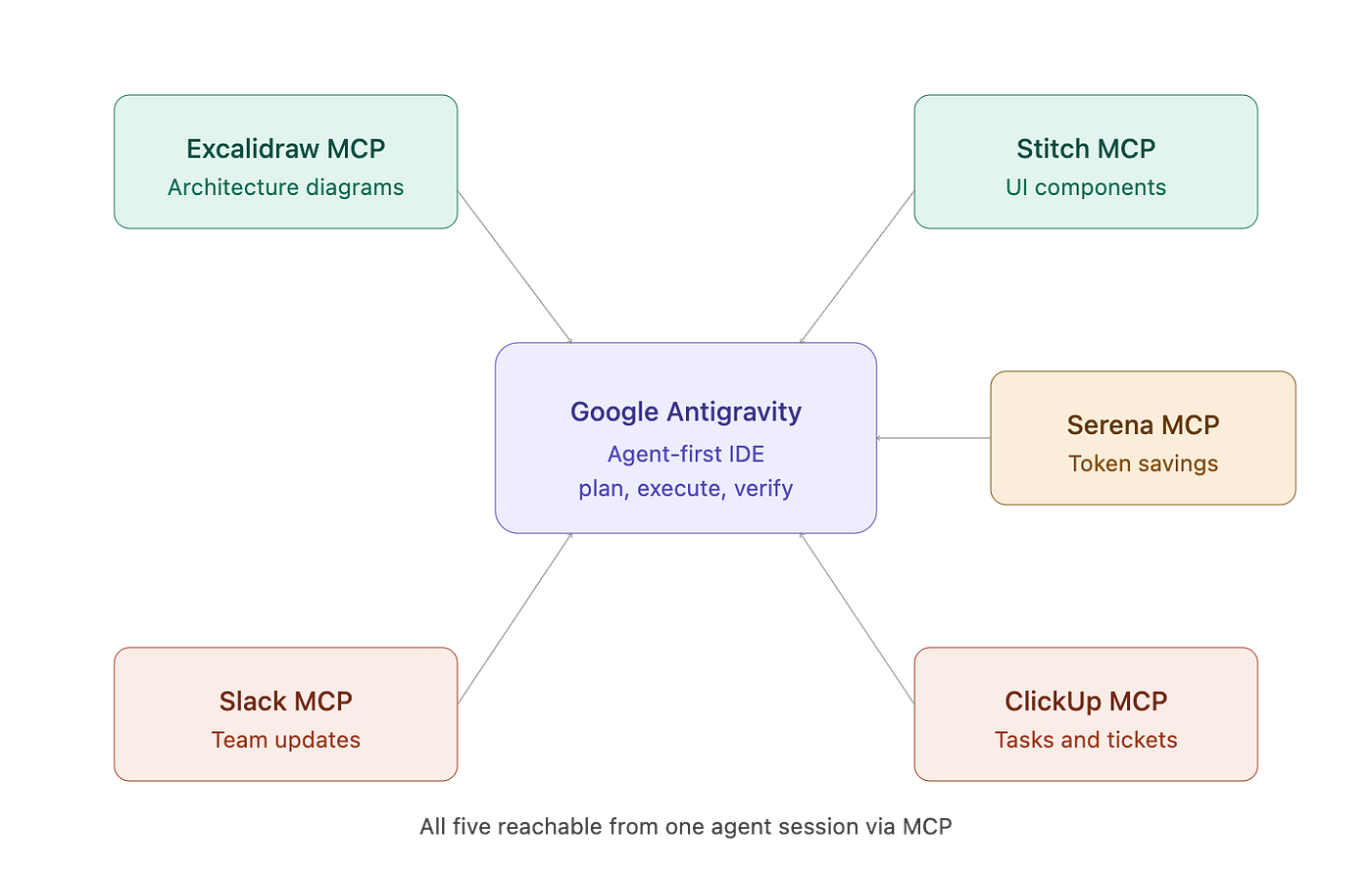
Excalidraw for diagrams, Stitch for UI, Serena for token savings, Slack and ClickUp for the loop back to my team. Five MCPs, one workspace.
Last month, I stopped switching tabs to build software.
Antigravity is Google’s agent-first IDE, and on its own, it is already good. What changed for me was wiring five MCP servers into it so the agent stopped asking me to leave the editor. Architecture diagrams, UI components, code navigation, status updates to the team, tasks in our tracker. All of it happens inside the same agent session now.
If you have read my earlier piece on Excalidraw MCP, this is the natural next step. That one was about a single integration changing how I think about diagrams. This one is about what happens when you stop treating MCPs as toys and start treating them as the actual nervous system of your workspace.
Why Antigravity sits at the center
Quick context for anyone new to it. MCP stands for Model Context Protocol. It is an open standard that lets AI agents talk to external tools without you writing a custom integration for each one. Think of it like USB-C for AI agents: one port, many devices.
Antigravity launched in November 2025 as Google’s take on agent-first development. It is a fork of VS Code, so most of your existing extensions just work. The difference is the workspace. Instead of you typing and the AI suggesting, the agent plans, executes, and verifies tasks across your editor, terminal, and browser. You approve, redirect, and architect.
The reason it works as a hub: every connected MCP server becomes a tool the agent can call mid-task. So when I ask Antigravity to “design and ship the new dashboard,” it does not stop at code. It draws the diagram, generates the UI, navigates the codebase efficiently, posts an update to my team, and creates the follow-up tickets. All in one pass.
That is the part that took me a while to internalize. The MCPs are not features I switch on and off. They are limbs.
The five MCPs I run together
Here is the stack, with what each one actually does for me day to day.
Excalidraw MCP handles every architecture diagram. I describe a system in plain English (“API gateway, three Lambdas behind it, SQS queue in between”) and the diagram renders. No more screenshotting a whiteboard and hoping people read it.
Stitch MCP handles the web UI design. I describe a component, Stitch generates it, the React or HTML lands back in my session. The visual layer is no longer a tab I forget to open.
Serena MCP is the quiet hero. It saves tokens by giving the agent IDE-like semantic search instead of forcing it to read entire files. The agent can ask for a specific symbol or all the references to a function, and Serena returns just that. On a large codebase this difference is not small (I saw my token spend drop noticeably the first week).
Slack MCP sends approach updates and progress notes to the channel I am working in. When the agent finishes a planning step or hits something it wants me to look at, it posts. I do not have to remember to update the team.
ClickUp MCP creates and updates tasks based on what just happened. Bug found during a test run, a card appears. Feature shipped, the card moves to done. The tracker reflects the actual work, not what I remember to log.
Five things, one workspace.
A walk through a real session
Yesterday I needed to ship a small change: a new metrics card on our operations dashboard. Backend hook, frontend component, diagram for the team, status in Slack, ticket closed in ClickUp. Pre-stack, that was a context-switching tax of about an hour before I even wrote the first line of useful code.
Here is roughly how the session went inside Antigravity.
I told the agent what I wanted in one prompt: build a metrics card that pulls error-rate-per-region from the existing telemetry endpoint, drop it into the dashboard, update the system diagram, post a heads-up to the team, and open a ticket for the QA pass.
The agent planned first. (Antigravity defaults to showing you a plan before it touches anything, which I have come to appreciate after a few incidents earlier this year where I let an agent run wild and regretted it.) Then it started executing.
Serena pulled the existing dashboard component structure without loading every file. Stitch generated the card with the right tokens because Claude (running inside Antigravity) had already extracted the design system into a DESIGN.md weeks ago. Excalidraw updated the diagram with the new data flow. The agent paused at the end of the implementation step, posted a summary to Slack saying “metrics card shipped, ready for QA review,” and opened a ClickUp task assigned to QA with the deployment link in the description.
Forty-three minutes from prompt to merged PR. I checked the clock because I was honestly surprised.
The part that mattered was not the speed. It was that I never left the editor. No copy-paste between Figma and Slack. No flipping to ClickUp to type out a ticket. The agent did the connective tissue work, which is usually where engineering hours quietly leak.
The configuration, end to end
If you want to wire this up yourself, here is the rough shape of the MCP config inside Antigravity. (Antigravity lets you edit the MCP config directly through the three-dots menu, top right, MCP servers.)
{
  "mcpServers": {
    "excalidraw": {
      "url": "https://mcp.excalidraw.com/mcp",
      "type": "sse"
    },
    "stitch": {
      "url": "https://stitch.googleapis.com/mcp/v1",
      "headers": {
        "Authorization": "Bearer YOUR_GOOGLE_AI_PRO_TOKEN"
      }
    },
    "serena": {
      "command": "uvx",
      "args": ["--from", "git+https://github.com/oraios/serena", "serena-mcp-server"]
    },
    "slack": {
      "command": "npx",
      "args": ["-y", "@modelcontextprotocol/server-slack"],
      "env": {
        "SLACK_BOT_TOKEN": "xoxb-your-token",
        "SLACK_TEAM_ID": "your-team-id"
      }
    },
    "clickup": {
      "command": "npx",
      "args": ["-y", "@hauptsache.net/clickup-mcp"],
      "env": {
        "CLICKUP_API_TOKEN": "your-clickup-token"
      }
    }
  }
}
A few notes from setting this up the hard way. Excalidraw is the only one that needs zero local setup, just a URL. Stitch needs a Google AI Pro account and an API token from aistudio.google.com. Serena starts a local language server, so the first run is slow on a large repo (longer than I expected, honestly, but it caches after that). Slack and ClickUp need OAuth tokens with the right scopes, and ClickUp in particular is fussy about which list IDs the agent is allowed to write to. Set those guardrails in your AGENTS.md file or the agent will eventually create a task in the wrong list and embarrass you in front of the team.
What changed in how I work
Three things, and they are not what I expected.
First, my prompts got shorter. When the agent can reach Slack and ClickUp directly, I stopped writing “and then remind me to tell the team” or “make a note to create a ticket for this.” I just say what I want and assume the rest will get logged. The agent now writes better tickets than I do because it has the full context of what just happened.
Second, my diagrams stopped being out of date. The friction of opening Excalidraw, finding the right file, updating it, exporting, sharing, used to be enough that I would skip it on small changes. Now the diagram updates itself as part of the work. Reviewers actually look at it because it actually reflects reality.
Third, and this surprised me: I started trusting the planning step. Antigravity’s plan-execute-verify loop felt like overhead at first. After a month, I rely on it. The plan is where I catch the agent before it goes off in the wrong direction, and the verify step (especially with Serena giving it precise code context) is where it catches its own mistakes before I have to.
What this is not
A magic productivity multiplier. There are still days where I fight one of these MCPs (Stitch in particular can be opinionated about React versions in ways that have cost me real time). There are still tasks where the agent is wrong, or where I would have been faster typing the code myself. The five-MCP setup is overhead until you build the muscle to use it.
It is also not a replacement for thinking. The agent is good at execution and tool calls. It is mediocre at deciding what to build. That part is still mine, and honestly it should be.
The bigger pattern
What I keep coming back to is that this stops being about any single tool. Excalidraw is great. Stitch is great. Serena, Slack, ClickUp, all useful. None of them on their own would have changed how I work.
The change is the seam between them disappearing. MCP makes the seam invisible, and Antigravity gives the agent enough autonomy to actually use all five without me having to choreograph every call.
If you spend most of your day in an editor and you have not tried wiring three or four MCPs into a single agent workspace yet, do it this week. Pick the two you switch tabs to most often and start there. The first time the agent finishes a task and you realize you never alt-tabbed once, you will get what I mean.
What is on your dock that you would wire in first?
If you’re building with a multi-agent stack and want to compare notes, I’m usually in the comments. What’s in your routing logic?
I am Sachin Sharma, building AI-powered cloud operations platforms and writing about agentic AI, DevSecOps, and leadership at the intersection of technology and people. Follow me on Medium and DevSecOps & AI Today. You can find me on LinkedIn at linkedin.com/in/rksachin5.
메타데이터
- post_id
- a430891e8148
- slug
- how-i-turned-google-antigravity-into-my-full-ai-engineering-desk-a430891e8148
- url
- https://medium.com/devsecops-ai/how-i-turned-google-antigravity-into-my-full-ai-engineering-desk-a430891e8148
- canonical_url
- https://medium.com/devsecops-ai/how-i-turned-google-antigravity-into-my-full-ai-engineering-desk-a430891e8148
- author_url
- https://medium.com/@rksachin
- status
- ok
- fetched_at
- 2026-06-26 21:52:29