Claude Code for .NET Developers: Building a Production-Grade Web API
A hands-on walkthrough that builds a Product Management Web API with Clean Architecture + CQRS (MediatR) + FluentValidation + xUnit, while…
Claude Code for .NET Developers: Building a Production-Grade Web API
A hands-on walkthrough that builds a Product Management Web API with Clean Architecture + CQRS (MediatR) + FluentValidation + xUnit, while putting five core Claude Code features to work: CLAUDE.md, Plan mode, Context management, Hooks, and Skills.
Why this article
Most introductions to AI coding assistants stop at autocomplete. This one goes further. We’ll build a real .NET 10 Web API with the kind of architecture you’d actually ship, layered, testable, and convention-driven, and along the way, you’ll learn the five Claude Code features that turn the tool from a code generator into a disciplined pair programmer that respects your project’s rules.
By the end, you’ll know not just what each feature does, but when to reach for it, illustrated against a single coherent project.
1. Installing Claude Code
Let’s get Claude Code installed. You’ll need three things:
- A Claude subscription — Pro at $20/month is the minimum.
- Node.js — required for the npm installation method.
- A terminal — Command Prompt, PowerShell, or your IDE’s integrated terminal.
This guide focuses on the CLI installation. It’s the most powerful option for developers and the one you’ll use for serious coding work.
Once installed, choose the Opus 4.7 model. It’s the most capable for complex architectural work and coding, which is exactly what this project demands.
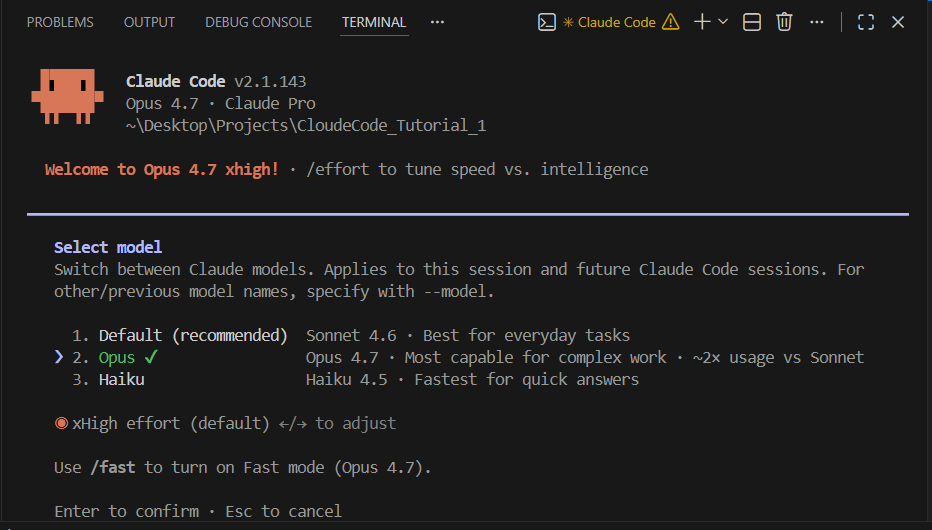
Tip: Switch models any time with the /model command inside a session. For multi-step architecture and agentic loops like the ones in this article, Opus is worth the spend.
2. The main prompt: kicking off the build
Here’s the prompt that starts everything. It’s deliberately structured so Claude Code will trigger Plan mode automatically, ask you to confirm before writing any files, and produce a clean baseline you can iterate on.
Paste this into Claude Code at the root of an empty project folder:
I want to build a Product Management Web API using .NET 10 SDK. Before writing
any code, switch to plan mode and propose the full solution structure.

REQUIREMENTS

Architecture
- Clean Architecture with four projects:
  • ProductManagement.Domain         (entities, value objects, domain events, no dependencies)
  • ProductManagement.Application    (CQRS handlers, DTOs, validators, interfaces)
  • ProductManagement.Infrastructure (EF Core 10, repositories, DbContext, migrations)
  • ProductManagement.API            (controllers, DI composition, middleware, OpenAPI)
- Test project for testing Application layer logic and validators.

Patterns and libraries
- CQRS via MediatR (latest version compatible with .NET 10)
- FluentValidation with MediatR pipeline behavior (ValidationBehavior<TRequest,TResponse>)
- Repository + Unit of Work in Infrastructure
- EF Core 10 with SQL Server provider, code-first migrations
- Built-in OpenAPI (Microsoft.AspNetCore.OpenApi) with Swagger UI support (no Swashbuckle)
- Global exception handling middleware returning ProblemDetails
- xUnit + FluentAssertions + Moq for tests
- Target framework: net10.0, C# 14, nullable enabled, implicit usings enabled

Domain
A Product aggregate with:
- Id (Guid), Name, Description, Price (Money value object: amount + currency),
  StockQuantity, Category (enum), CreatedAt, UpdatedAt, IsActive
- Domain rules: price must be > 0, name 3–200 chars, stock cannot go negative
- Domain events: ProductCreated, ProductPriceChanged, ProductStockDepleted

Use cases (CQRS)
Commands: CreateProduct, UpdateProduct, DeleteProduct
Queries:  GetProductById, GetProductsPaged (with filtering by category and search term)

API endpoints
- POST   /api/products
- GET    /api/products/{id}
- GET    /api/products?page=&pageSize=&category=&search=
- PUT    /api/products/{id}
- DELETE /api/products/{id}

Quality bar
- Every command/query has a FluentValidation validator
- Every handler has at least one happy-path and one failure xUnit test
- Domain entities have unit tests for invariants
- Solution must build with zero warnings (treat warnings as errors in Release)

DELIVERABLES FROM PLAN MODE
1. Solution and folder tree
2. NuGet packages per project with exact versions
3. Order of file creation (dependencies first)
4. List of files you will create with one-line purpose for each
5. Verification commands you will run after each phase
   (dotnet restore, dotnet build, dotnet test)

Do not write any code until I approve the plan.
The last line is doing important work: by explicitly forbidding code until approval, you force Claude into a planning conversation rather than an immediate write-spree.

3. Five Claude Code features — when and how to use each
The rest of the article walks through the five features. Each one is introduced with what it is, then a concrete moment in this project where it earns its place, then the exact artifact I’d write.
3.1 CLAUDE.md — Project memory
What it is. A markdown file at the repo root that Claude Code loads automatically into every session. It encodes the rules of your project so you stop repeating them in every prompt.
Why it matters here. Clean Architecture lives or dies by its boundaries. Without persistent rules, Claude might inject a DbContext straight into an Application-layer handler convenient, but a violation that breaks the whole point of the layering. CLAUDE.md makes that mistake impossible by stating the rule once, permanently.
Action. After your plan is approved, ask Claude to generate the file:
Generate a CLAUDE.md for this project. Include the architectural boundaries,
the CQRS conventions, naming rules, the testing requirements, and the
commands needed to build, test, and run migrations.
Commit this file. From now on every session starts already knowing your rules.
3.2 Plan mode — Think before you touch
What it is. A read-only thinking mode (/plan, or cycle with Shift+Tab) where Claude can browse and reason but cannot edit files or run mutating commands. You approve the plan before any change happens.
Why it matters here. A change like adding a new feature often touches several layers at once: the entity, a new command and handler, a validator, an endpoint, and tests in more than one project. If Claude jumps straight to editing, it’s easy to miss a layer or break an invariant. Plan mode forces the full cross-cutting change onto the table first, so you can sanity-check it before a single file changes.
Plan mode also lets Claude ask clarifying questions before generating an answer. Rather than guessing at ambiguous design decisions, it surfaces them as options: domain shape, validation behaviour, route style, and waits for your call. That short interview is often where the real architectural thinking happens.


Claude presents design options and waits for approval, it shows the “think first” discipline in action
3.3 Context management — Keep the session sharp
What it is. A small set of commands that control what’s in Claude’s working memory:
/context— inspect current usage./compact— summarize and shrink the conversation./clear— wipe and start fresh.@filename— pull a specific file into context on demand.
Why it matters here. Suppose you’ve just finished the Product CRUD loop and you’re about to start a new, unrelated feature. If you keep going, Claude’s context still carries all your CRUD discussions, exploratory diffs, and abandoned ideas from the previous work. That makes it slower and more likely to mix concerns across features.
Action — inspect first:
/context
Action — compact what’s worth keeping:
/compact Keep the architectural decisions, the final CLAUDE.md, and the final
solution structure. Drop intermediate diffs, retracted suggestions, and test
output dumps.
After compaction you’ll see a clear reduction. Now start the next feature with focused context, pulling in only the files you need as references:
Between genuinely unrelated tasks, for example, moving from “implement features” to “write the README”, just use /clear outright. The @file syntax means you only ever load what's relevant instead of letting the conversation balloon.
3.4 Hooks — Enforce quality automatically
What it is. Shell commands that run on lifecycle events such as PreToolUse, PostToolUse, and SessionStart. The key distinction: CLAUDE.md is an advisor, but hooks are mandatory; they execute whether Claude likes it or not.
Why it matters here. Claude sometimes writes a handler file and then moves on without running dotnet format or dotnet build. Three handlers later, you discover a compile error that was introduced two edits ago. A PostToolUse hook on .cs files fixes this: every C# edit triggers an immediate format-and-build check, and Claude sees the failure feedback on the spot rather than much later.
Action. Create .claude/settings.json at the repo root:
{
  "hooks": {
    "PostToolUse": [
      {
        "matcher": "Edit(**/*.cs)|Write(**/*.cs)",
        "hooks": [
          {
            "type": "command",
            "command": "dotnet format --verify-no-changes --include $file 2>&1 || dotnet format --include $file"
          }
        ]
      },
      {
        "matcher": "Edit(**/*.csproj)|Write(**/*.csproj)",
        "hooks": [
          {
            "type": "command",
            "command": "dotnet restore && dotnet build --no-restore -warnaserror"
          }
        ]
      }
    ],
    "PreToolUse": [
      {
        "matcher": "Bash(rm:*)|Bash(git push:*)",
        "hooks": [
          {
            "type": "command",
            "command": "echo 'Destructive command — confirm in chat' && exit 1"
          }
        ]
      }
    ],
    "SessionStart": [
      {
        "hooks": [
          {
            "type": "command",
            "command": "dotnet --version && echo 'Solution loaded:' && ls *.sln 2>/dev/null"
          }
        ]
      }
    ]
  }
}
What this configuration buys you:
- Every C# file edit is auto-formatted — no style drift.
- Every project-file change triggers a build with warnings-as-errors, so a broken state is caught at its source.
- Dangerous bash commands (
rm,git push) are blocked unless you re-approve them in chat. - Session start prints your .NET version and confirms the solution loaded a handy diagnostic.
3.5 Skills — Encode repeated workflows
What it is. A skill is a folder under .claude/skills/<name>/ containing a SKILL.md (the instructions) plus any supporting files, templates, examples, reference docs. The YAML frontmatter tells Claude when the skill is relevant, so it can be triggered three ways:
- Explicitly — you type
/new-feature. - Implicitly by you — you write a natural-language request that matches the skill’s description, and Claude auto-loads it.
- Implicitly by Claude — it notices the task fits and applies the skill on its own.
Why it matters here. When you write a new API endpoint, you need the code to follow a consistent structure. Left to its own devices, an AI assistant may invent its own file layout or naming each time. A skill solves this two ways: it provides the guidance that keeps the API shape consistent, and it lets you attach hard constraints the generated code must respect. The mechanical boilerplate lives in template files; your prompt stays focused on the intent and the specifics of this feature.
Below we build a new-feature skill that scaffolds a complete CQRS feature request, handler, validator, controller endpoint, and tests every time, the same way.
Step 1 — Create the skill folder
From the repo root:
mkdir -p .claude/skills/new-feature/templatesStep 2 — Write SKILL.md
This is the entry point. The frontmatter declares when to use the skill; the body is the procedure.
Create .claude/skills/new-feature/SKILL.md:
---
name: new-feature
description: Scaffold a new CQRS feature (command or query) for the Product Management API. Use whenever the user asks to add a new use case like "add ArchiveProduct command", "create a GetProductsByCategory query", or "scaffold a new feature". Handles the full set of files (request, handler, validator, controller endpoint, handler tests, validator tests) following Clean Architecture and the conventions in CLAUDE.md.
---

# new-feature — CQRS feature scaffolder

## When to use
The user wants to add a new command or query to the Application layer.
Typical triggers: "add X command", "scaffold Y query", "new feature: Z".

## What you need before scaffolding
Confirm these with the user if not already stated. Do not guess silently — ask
once, then proceed:

1. Feature name in PascalCase (e.g. ArchiveProduct, GetProductsByCategory).
2. Type: Command or Query.
3. HTTP route and verb for the endpoint.
4. Request body / route / query parameters — exact fields and types.
5. Validation rules — which fields, which constraints.
6. Domain behaviour — which aggregate methods are called; any new domain
   events; any invariants to enforce on the aggregate side.
7. Return shape — what the API responds with on success and on each failure mode.

## Procedure
1. Read CLAUDE.md and confirm the architectural rules still hold.
2. Read one existing feature as a style reference
   (e.g. src/ProductManagement.Application/Features/Products/CreateProduct/).
3. Generate each file from the matching file in templates/, substituting
   {{FeatureName}}, {{Type}} (Command|Query), and the per-feature specifics.
4. Files to create:
   - src/ProductManagement.Application/Features/Products/{{FeatureName}}/{{FeatureName}}{{Type}}.cs
   - src/ProductManagement.Application/Features/Products/{{FeatureName}}/{{FeatureName}}{{Type}}Handler.cs
   - src/ProductManagement.Application/Features/Products/{{FeatureName}}/{{FeatureName}}{{Type}}Validator.cs
   - tests/ProductManagement.Application.Tests/Features/Products/{{FeatureName}}/{{FeatureName}}{{Type}}HandlerTests.cs
   - tests/ProductManagement.Application.Tests/Features/Products/{{FeatureName}}/{{FeatureName}}{{Type}}ValidatorTests.cs
5. Update src/ProductManagement.API/Controllers/ProductsController.cs — add the
   endpoint using the verb and route specified. Wire it through MediatR. Map
   domain exceptions to ProblemDetails via the global handler; do not catch
   them locally.
6. If the user described new domain behaviour (a new aggregate method, event,
   or invariant), apply those changes to the Domain project too — and add
   Domain-level unit tests for the invariants.
7. Verify: run dotnet build -warnaserror and dotnet test. Report results.
8. Show the diff before saving. If anything is ambiguous, stop and ask.

## Constraints (non-negotiable)
- Inject IProductRepository and IUnitOfWork. Never DbContext.
- No "using Microsoft.EntityFrameworkCore" in the Application project.
- Tests use FluentAssertions (.Should()...), not raw Assert.*.
- Each handler test file covers at minimum: happy-path, validation-failure,
  not-found. Add cases for any extra failure modes.
- Validators cover every rule specified, with one test method per rule.

## Output checklist before reporting "done"
- [ ] All files created at the paths above
- [ ] Endpoint registered in ProductsController
- [ ] dotnet build -warnaserror passes
- [ ] dotnet test passes
- [ ] Diff shown to user before final save
Step 3 — Add template files
Drop the per-file scaffolds into the templates/ folder. Claude fills in the {{...}} placeholders based on your instructions.

Folder structure for the feature template files. The full template implementations can be viewed in the project’s GitHub repository.
Step 4 — Verify the skill loaded
Restart Claude Code (or run /skills if your version lists them) and confirm new-feature appears.

Using the skill: with your own free-form instructions
This is where skills beat a rigid command: you can pass natural-language instructions alongside the structured arguments. Here’s the AdjustStock feature, briefed in plain English:
/new-feature

Add AdjustStock as a Command on the Product aggregate.

Route:        POST /api/products/{id}/stock/adjust
Body:         { "delta": int }   // signed; positive adds, negative removes
Return:       204 No Content on success
Validation:   delta != 0  (FluentValidation rule, 400 with ValidationProblemDetails)
Domain:
  - Add Product.AdjustStock(int delta) method on the aggregate
  - Invariants: throw DomainException if (stock + delta) < 0, or if delta == 0
  - Raise ProductStockDepletedEvent when the resulting stock is exactly 0
  - Keep existing DepleteStock / ReplenishStock methods untouched
Failure modes to cover in handler tests:
  - Product not found        -> NotFoundException -> 404
  - Would go below zero      -> DomainException   -> 409
  - Zero delta               -> caught by validator, but aggregate also throws
The skill’s SKILL.md tells Claude how to scaffold; your message tells it what specially this feature needs. The two compose cleanly and the result follows your conventions every time.
4. Takeaways
Claude Code becomes genuinely useful for serious .NET work when you stop treating it as a one-shot generator and start configuring it like a teammate:
- CLAUDE.md is the team handbook written once, honoured always.
- Plan mode is the design review think across layers before touching code.
- Context management keeps each task focused and fast.
- Hooks are the CI guardrails that run locally, on every edit.
- Skills are reusable, model-invokable workflows that keep your code shape consistent while still accepting per-feature instructions.
Set these up once at the start of a project and every prompt afterward gets cheaper, safer, and more aligned with how you actually want your codebase to look.
메타데이터
- post_id
- a443d8fe63ec
- slug
- claude-code-for-net-developers-building-a-production-grade-web-api-a443d8fe63ec
- url
- https://medium.com/@nipunmalinga5/claude-code-for-net-developers-building-a-production-grade-web-api-a443d8fe63ec
- canonical_url
- https://medium.com/@nipunmalinga5/claude-code-for-net-developers-building-a-production-grade-web-api-a443d8fe63ec
- author_url
- https://medium.com/@nipunmalinga5
- status
- ok
- fetched_at
- 2026-07-07 09:05:48




