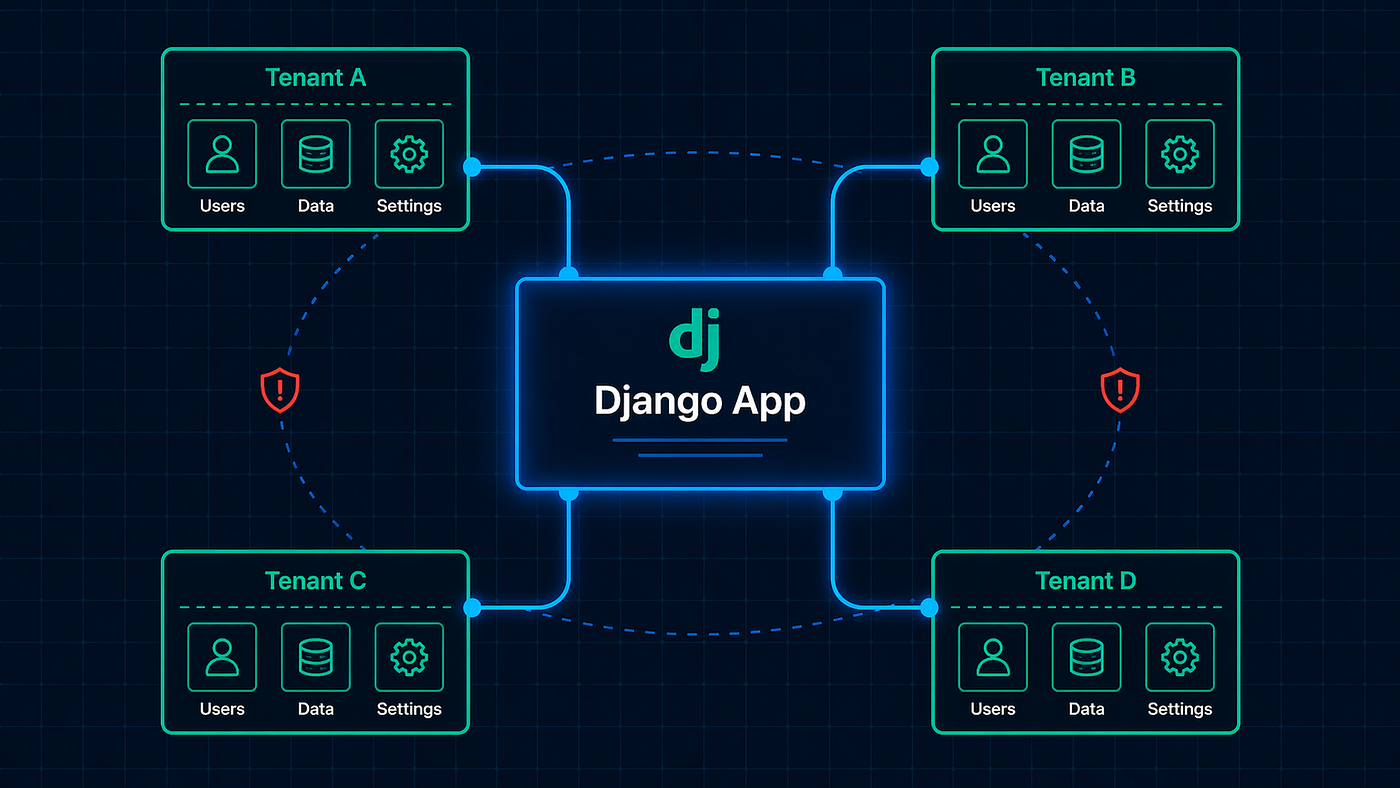
#7: Django’s Authentication Backend Chain: How Users Actually Get Authenticated
The chain of trust you’ve never inspected
#7: Django’s Authentication Backend Chain: How Users Actually Get Authenticated
The chain of trust you’ve never inspected
Photo by Onur Binay on Unsplash
Part 7 of the “**Django Under the Hood*” series — deep dives into Django’s internals, edge cases, and the mechanics that separate production-grade applications from tutorial code.*
user = authenticate(username='alice', password='secret123')This line doesn’t check a password. It starts a chain.
Django iterates through every authentication backend in AUTHENTICATION_BACKENDS, calling each one's authenticate() method until one returns a user or all fail. Most applications have one backend. Some have five.
Not a Medium member? You can read this article for free via this link: Friend Link
The mechanics matter. Which backend authenticated? What happens if two backends both recognize the user? Why does your custom backend return a valid user, but request.user stays AnonymousUser?
Understanding the authentication chain isn’t about adding features — it’s about debugging the ones that mysteriously don’t work.
Let’s trace from authenticate() to request.user.
The authenticate() Function
# django/contrib/auth/__init__.py
def authenticate(request=None, **credentials):
    for backend, backend_path in _get_backends(return_tuples=True):
        try:
            user = backend.authenticate(request, **credentials)
        except PermissionDenied:
            # Backend explicitly denied - stop the chain
            break

        if user is None:
            continue  # This backend didn't recognize the credentials

        # Success! Tag the user with the backend used
        user.backend = backend_path
        return user

    return None  # No backend authenticated the user
Three outcomes per backend:
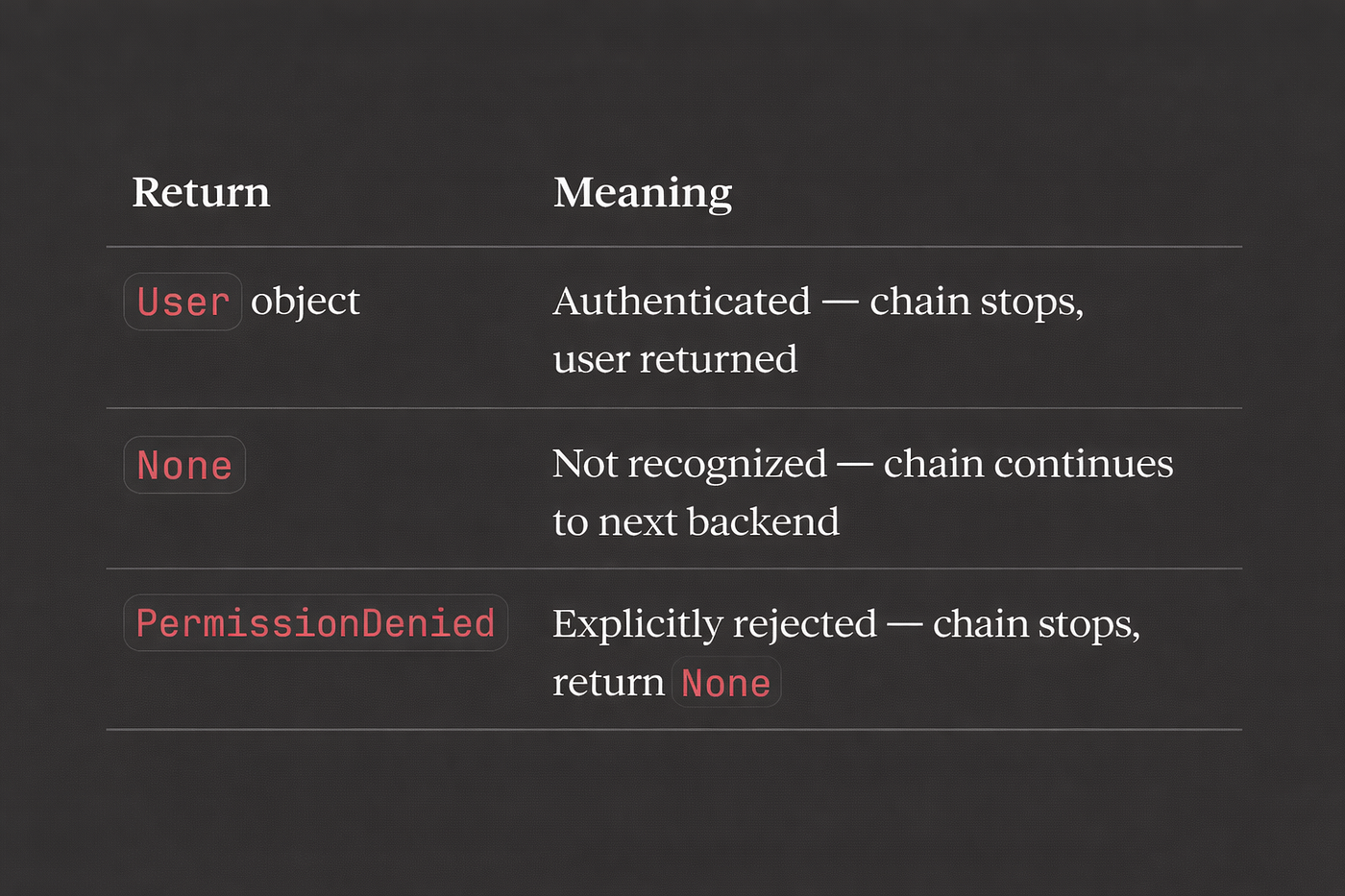
Key insight: user.backend is set to the backend path that authenticated them. This matters for login().
Backend Loading
# settings.py
AUTHENTICATION_BACKENDS = [
    'django.contrib.auth.backends.ModelBackend',
    'myapp.backends.LDAPBackend',
    'myapp.backends.TokenBackend',
]
Backends load lazily on first authentication:
# django/contrib/auth/__init__.py
def _get_backends(return_tuples=False):
    backends = []
    for backend_path in settings.AUTHENTICATION_BACKENDS:
        backend = load_backend(backend_path)  # import_string()
        backends.append((backend, backend_path) if return_tuples else backend)
    return backends

def load_backend(path):
    return import_string(path)()  # Instantiate the class
New instance per call: Each authenticate() creates fresh backend instances. Don't store state on backends.
ModelBackend: The Default
# django/contrib/auth/backends.py
class ModelBackend(BaseBackend):
    def authenticate(self, request, username=None, password=None, **kwargs):
        if username is None:
            username = kwargs.get(UserModel.USERNAME_FIELD)

        if username is None or password is None:
            return None

        try:
            user = UserModel._default_manager.get_by_natural_key(username)
        except UserModel.DoesNotExist:
            # Run password hasher to prevent timing attacks
            UserModel().set_password(password)
            return None

        if user.check_password(password) and self.user_can_authenticate(user):
            return user

        return None

    def user_can_authenticate(self, user):
        # Check is_active (can be overridden)
        is_active = getattr(user, 'is_active', None)
        return is_active or is_active is None
The Timing Attack Protection
Notice this line:
except UserModel.DoesNotExist:
    UserModel().set_password(password)  # Burn CPU time
    return None
Without it, attackers could enumerate valid usernames by measuring response times:
- User exists: Hash comparison takes time
- User doesn’t exist: Immediate return
By running the hasher anyway, both paths take similar time.
get_by_natural_key()
# django/contrib/auth/models.py
class UserManager(BaseUserManager):
    def get_by_natural_key(self, username):
        return self.get(**{self.model.USERNAME_FIELD: username})
With default User, this is get(username=username). With custom user models using email:
class CustomUser(AbstractUser):
    USERNAME_FIELD = 'email'
Now it’s get(email=username).
Custom Backends
Minimal Backend
# myapp/backends.py
class EmailBackend:
    def authenticate(self, request, email=None, password=None, **kwargs):
        try:
            user = User.objects.get(email=email)
        except User.DoesNotExist:
            return None

        if user.check_password(password):
            return user
        return None

    def get_user(self, user_id):
        try:
            return User.objects.get(pk=user_id)
        except User.DoesNotExist:
return NoneCritical: You must implement get_user(). Sessions store user IDs, and Django calls get_user() to retrieve the full user object on each request.
Token Backend
class TokenBackend:
    def authenticate(self, request, token=None, **kwargs):
        if token is None:
            return None

        try:
            auth_token = AuthToken.objects.select_related('user').get(
                key=token,
                expires_at__gt=timezone.now(),
            )
        except AuthToken.DoesNotExist:
            return None

        return auth_token.user

    def get_user(self, user_id):
        try:
            return User.objects.get(pk=user_id)
        except User.DoesNotExist:
            return None
LDAP Backend
class LDAPBackend:
    def authenticate(self, request, username=None, password=None, **kwargs):
        if not username or not password:
            return None

        # Connect to LDAP
        if not self.ldap_authenticate(username, password):
            return None

        # Get or create local user
        user, created = User.objects.get_or_create(
            username=username,
            defaults={'email': f'{username}@company.com'}
        )

        if created:
            self.sync_ldap_groups(user)

        return user

    def ldap_authenticate(self, username, password):
        # LDAP bind attempt
        ...

    def get_user(self, user_id):
        try:
            return User.objects.get(pk=user_id)
        except User.DoesNotExist:
            return None
The login() Function
authenticate() verifies credentials. login() establishes the session.
# django/contrib/auth/__init__.py
def login(request, user, backend=None):
    session_auth_hash = ''

    if user is None:
        user = request.user

    if hasattr(user, 'get_session_auth_hash'):
        session_auth_hash = user.get_session_auth_hash()

    # Determine backend
    if backend is None:
        backend = user.backend  # Set by authenticate()

    # Cycle session key for security
    if SESSION_KEY in request.session:
        if request.session[SESSION_KEY] != user.pk:
            request.session.flush()
    else:
        request.session.cycle_key()

    # Store in session
    request.session[SESSION_KEY] = user.pk
    request.session[BACKEND_SESSION_KEY] = backend
    request.session[HASH_SESSION_KEY] = session_auth_hash

    # Attach to request
    request.user = user

    # Fire signal
    user_logged_in.send(sender=user.__class__, request=request, user=user)
Session stores three things:

Why Backend Matters
request.session[BACKEND_SESSION_KEY] = backendWhen loading user from session, Django uses the stored backend:
def get_user(request):
    user_id = request.session.get(SESSION_KEY)
    backend_path = request.session.get(BACKEND_SESSION_KEY)

    if backend_path and user_id:
        backend = load_backend(backend_path)
        user = backend.get_user(user_id)  # Calls YOUR backend
        return user

    return AnonymousUser()
If you remove a backend from AUTHENTICATION_BACKENDS but users were authenticated with it, they'll become anonymous (backend can't be loaded).
Session Auth Hash: Password Change Invalidation
# django/contrib/auth/base_user.py
class AbstractBaseUser(models.Model):
    def get_session_auth_hash(self):
        key_salt = "django.contrib.auth.models.AbstractBaseUser.get_session_auth_hash"
        return salted_hmac(key_salt, self.password, algorithm='sha256').hexdigest()
The session stores a hash derived from the password. On each request:
# django/contrib/auth/middleware.py
def get_user(request):
    user = _get_user_from_session(request)

    # Verify session hash still matches
    session_hash = request.session.get(HASH_SESSION_KEY)
    session_hash_verified = (
        session_hash and
        hasattr(user, 'get_session_auth_hash') and
        constant_time_compare(session_hash, user.get_session_auth_hash())
    )

    if not session_hash_verified:
        request.session.flush()
        user = AnonymousUser()

    return user
Password change = all sessions invalidated. The hash changes, existing sessions don’t match, users get logged out everywhere.
AuthenticationMiddleware: Where request.user Comes From
# django/contrib/auth/middleware.py
class AuthenticationMiddleware:
    def __init__(self, get_response):
        self.get_response = get_response

    def __call__(self, request):
        request.user = SimpleLazyObject(lambda: get_user(request))
        return self.get_response(request)
request.user is lazy — the session isn't accessed until you use request.user.
def get_user(request):
    if not hasattr(request, '_cached_user'):
        request._cached_user = auth.get_user(request)
    return request._cached_user
Result is cached on the request. Multiple request.user accesses don't hit the session repeatedly.
Permissions: has_perm() and Backend
user.has_perm('myapp.change_article')This delegates to backends too:
# django/contrib/auth/models.py
class PermissionsMixin(models.Model):
    def has_perm(self, perm, obj=None):
        if self.is_active and self.is_superuser:
            return True  # Superuser has all permissions

        return _user_has_perm(self, perm, obj)

def _user_has_perm(user, perm, obj):
    for backend in auth.get_backends():
        if not hasattr(backend, 'has_perm'):
            continue

        if backend.has_perm(user, perm, obj):
            return True

    return False
Any backend returning True grants the permission. Unlike authenticate() which stops on first success, all backends are checked for permissions.
ModelBackend Permission Implementation
# django/contrib/auth/backends.py
class ModelBackend:
    def has_perm(self, user_obj, perm, obj=None):
        if not user_obj.is_active:
            return False
        return perm in self.get_all_permissions(user_obj, obj)

    def get_all_permissions(self, user_obj, obj=None):
        if not user_obj.is_active or user_obj.is_anonymous:
            return set()

        if not hasattr(user_obj, '_perm_cache'):
            user_obj._perm_cache = {
                *self.get_user_permissions(user_obj),
                *self.get_group_permissions(user_obj),
            }

        return user_obj._perm_cache
Permissions are cached on the user object (_perm_cache). First access queries, subsequent accesses use cache.
Custom Permission Backend
Object-level permissions:
class ObjectPermissionBackend:
    def authenticate(self, request, **kwargs):
        return None  # This backend doesn't authenticate

    def has_perm(self, user_obj, perm, obj=None):
        if obj is None:
            return False  # Only handles object permissions

        # Check object-specific permission table
        return ObjectPermission.objects.filter(
            user=user_obj,
            permission=perm,
            content_type=ContentType.objects.get_for_model(obj),
            object_id=obj.pk,
        ).exists()
# settings.py
AUTHENTICATION_BACKENDS = [
'django.contrib.auth.backends.ModelBackend', # Model-level perms
'myapp.backends.ObjectPermissionBackend', # Object-level perms
]The Anonymous User
# django/contrib/auth/models.py
class AnonymousUser:
    id = None
    pk = None
    username = ''
    is_staff = False
    is_active = False
    is_superuser = False

    def __str__(self):
        return 'AnonymousUser'

    def save(self):
        raise NotImplementedError

    def delete(self):
        raise NotImplementedError

    def has_perm(self, perm, obj=None):
        return _user_has_perm(self, perm, obj=obj)

    @property
    def is_anonymous(self):
        return True

    @property
    def is_authenticated(self):
        return False
AnonymousUser mimics the User interface but all permissions are False (by default). You can create a backend that grants permissions to anonymous users if needed.
Common Issues
Issue 1: Custom Backend Not Working
# Backend
class MyBackend:
    def authenticate(self, request, **credentials):
        user = User.objects.get(...)
return user # Returns user but login fails!Cause: Missing get_user() method.
class MyBackend:
    def authenticate(self, request, **credentials):
        ...

    def get_user(self, user_id):  # REQUIRED
        try:
            return User.objects.get(pk=user_id)
        except User.DoesNotExist:
            return None
Issue 2: User Authenticated but is_anonymous
user = authenticate(username='alice', password='secret')
print(user)  # <User: alice>
print(request.user.is_authenticated) # False!Cause: Forgot to call login().
user = authenticate(request=request, username='alice', password='secret')
if user:
    login(request, user)  # Don't forget this!
Issue 3: Sessions Invalidated Unexpectedly
Cause: Password changed, session hash no longer matches.
# After password change
user.set_password('new_password')
user.save()

# Re-login to create new session hash
login(request, user)  # Updates session hash
Issue 4: Multiple Backends, Wrong One Used
AUTHENTICATION_BACKENDS = [
    'myapp.backends.LDAPBackend',
    'django.contrib.auth.backends.ModelBackend',
]
Both backends might recognize the same username. Order matters — first success wins.
Fix: Make backends more specific:
class LDAPBackend:
    def authenticate(self, request, username=None, password=None, **kwargs):
        if not username.endswith('@company.com'):
            return None  # Let ModelBackend handle non-LDAP users
        ...
Issue 5: Backend Removed, Users Logged Out
# Before
AUTHENTICATION_BACKENDS = [
    'myapp.backends.OldBackend',  # Users authenticated with this
    'django.contrib.auth.backends.ModelBackend',
]

# After removing OldBackend
AUTHENTICATION_BACKENDS = [
    'django.contrib.auth.backends.ModelBackend',
]
# Users who were authenticated via OldBackend become AnonymousUser!Fix: Migrate session backend references, or let users re-login.
Authentication Flow Diagram

What’s Next
This was the authentication backend chain — from credentials to session.
Next in the series: Static Files and WhiteNoise Internals — how Django finds and serves static files, the staticfiles finders, manifest storage, and why WhiteNoise is faster than you’d expect.
Series: Django Under the Hood
- What Actually Happens When a Request Hits Your Server
- The ORM Query Compiler
- Connection Management and the Database Wrapper
- Signal Dispatch Internals
- Template Engine Compilation
- Form and Validation Pipeline
- Authentication Backend Chain ← You are here
- Static Files and WhiteNoise Internals (coming next)
- Migration System Deep Dive
- Test Client and Request Factory Mechanics
Thanks for reading! ❤
If this helped you, consider clapping (50 👏 s), following, or sharing it. A writer without readers is just talking to themselves — so your time means everything.
Let’s keep building better, together.
메타데이터
- post_id
- a48da5bb43f4
- slug
- 7-djangos-authentication-backend-chain-how-users-actually-get-authenticated-a48da5bb43f4
- url
- https://medium.com/backend-engineers-club/7-djangos-authentication-backend-chain-how-users-actually-get-authenticated-a48da5bb43f4
- canonical_url
- https://medium.com/backend-engineers-club/7-djangos-authentication-backend-chain-how-users-actually-get-authenticated-a48da5bb43f4
- author_url
- https://medium.com/@anas-issath
- status
- ok
- fetched_at
- 2026-09-14 18:53:06