Communications between pods in K8S
Part 1 : Using a single subnet
Communications between pods in Kubernetes
Part 1 : Communications in a single subnet
Author : Marie F. from Kubway.
Introduction
In this 2 parts story, we will see how communications between pods in Kubernetes are routed in different contexts when using Calico as a CNI.
- Pod to pod communication using an underlay in a single subnet (that one)
- Pod to pod communication using an underlay with BGP
In an other story, we will see how communications between pods and services are managed in a cluster.
For that, we will use TCPDUMP, Wireshark and linux command as traceroute for watching the packets. In this first part, we’ll have a look on the traffic between 2 containers/pods which are located on nodes on the same subnet. On the second part, we will use nodes in different subnet separated by routers and using BGP, with or without VXLAN.
Three cases of communications are studied in this first part :
- 2 containers in the same pod.
- 2 containers in 2 different pods running on the same node.
- 2 containers in 2 different pods running on 2 different nodes.

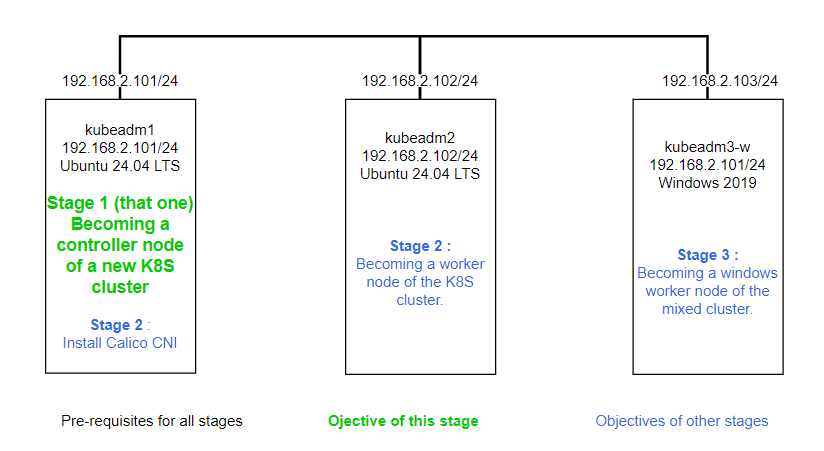
Kubernetes cluster and Calico installation
We will not explain that in that story in detail. If you don’t know how to do, you can read my previous stories which are https://medium.com/@Kubway/installing-the-first-node-of-a-kubernetes-cluster-with-kubeadm-c116ab0cc38b and https://medium.com/@Kubway/installing-and-understanding-calico-on-a-kubernetes-cluster-337fa7cd8ba2
In this part, I used pod-network-cidr=10.245.0.0/16 and service-cidr=10.97.0.0/23 when I initialized the cluster.
sudo kubeadm init --pod-network-cidr=10.245.0.0/16 --service-cidr 10.97.0.0/23And during the Calico installation with operator, I only modified cidr ipPools in custom-resources.yaml
# Change cidr ipPools when cluster is initialized with 10.244.0.0/24 for the pods CIDR
sudo sed -i 's+192.168.0.0/16+10.245.0.0/24+' custom-resources.yaml
Encapsulation value stay unchanged with “VXLANCrossSubnet” value. There will not happen encapsulation because all pods will be in the same subnet, you can change to None if you prefer.
Because we will not use BGP during the 3 cases, it is better to stop the process on the cluster.
kubectl patch installation default --type=merge -p '{"spec": {"calicoNetwork": {"bgp": "Disabled"}}}'Case 1 : Communication within a pod
In this first case, we create a communication between two containers in the same pod. The Ip address is assigned to the pod, not to the container, that means the communication can use pod IP address or loopback 127.0.0.1.
At this time, kubeadm1 is the only node in the cluster and it is a controller, so you have tu untaint the node first. Otherwise, the pod will stay in Pending state with no node available.
k taint node kubeadm1 node-role.kubernetes.io/control-plane-
Create one pod with two containers
kubectl apply -f - << EOF
apiVersion: v1
kind: Pod
metadata:
  creationTimestamp: null
  labels:
    run: monpod
  name: monpod
spec:
  volumes:
  - name: vol # This volume is to store a .pcap file on the node for tcpdump
    hostPath:
      path: /tcpdump
  containers:
  - args:
    - sleep
    - 1d
    image: alpine
    name: c1
  - name: c2
    image: nginx
    volumeMounts:
    - name: vol
      mountPath: /tcpdump
    resources: {}
  dnsPolicy: ClusterFirst
  restartPolicy: Always
status: {}
EOF
Showing the pod with its address

Access container2 from container1 and capture traffic
# Add curl in container1
k exec -it monpod -c=c1 -- apk update
k exec -it monpod -c=c1 -- apk add curl
# Add tcpdump in container2
k exec -it monpod -c=c2 -- apt update
k exec -it monpod -c=c2 -- apt install -y tcpdump
# Capture interesting packets in container2
k exec -it monpod -c=c2 -- tcpdump -i lo  port 80 -w /tcpdump/intrapod.pcap
# You will have to stop it with CTRL C
# Generate trafic from another session from container1 to container2
k exec -it monpod -c=c1 -- curl 10.245.0.92 # You can use 127.0.0.1Analyze captured traffic with wireshark

As you can see source and destination IP addresses are the same. It can be the pod address like there or 127.0.0.1 if you used it in curl.
Case 2 : Communication between 2 pods running in the same node
In this case, we have a communication between containers which are not on the same pod but on the same node.

Create the 2 pods
# Create a pod for curl
k run pod-alpine --image alpine -- sleep 1d

# Create a pod for nginx and tcpdump
kubectl apply -f - << EOF
apiVersion: v1
kind: Pod
metadata:
  creationTimestamp: null
  labels:
    run: pod-nginx
  name: pod-nginx
spec:
  volumes:
  - name: vol # This persistent volume will be used to store pcap file
    hostPath:
      path: /tcpdump
  containers:
  - image: nginx
    name: container-nginx
    volumeMounts:
    - name: vol
      mountPath: /tcpdump
    resources: {}
  dnsPolicy: ClusterFirst
  restartPolicy: Always
status: {}
EOF
When pods are ready, install curl in pod-alpine and tcpdump in pod-nginx
k exec -it pod-alpine -- apk update
k exec -it pod-alpine -- apk add curl
k exec -it pod-nginx -- apt update
k exec -it pod-nginx -- apt install -y tcpdump
Showing the 2 pods with their respective addresses

Capture http traffic from pod-alpine to pod-nginx
k exec -it pod-nginx -- tcpdump src 10.245.0.85 and port 80 -w /tcpdump/interpod.pcap
# Do a CTRL C to stop this process after generating traffic in the next step
Generate traffic from pod-alpine to pod-nginx using a second session on kubeadm1.
k exec -it pod-alpine - curl http://10-245-0-91.default.pod # Use pod IP or DNS nameAnalyze captured traffic with wireshark. Source address is the one of pod-alpine and destination address the one of pod-nginx.

Case 3 : Communication between 2 pods in 2 different nodes
We have first to add a worker node in the cluster.
# From kubeadm1
kubeadm token create --print-join-command
# From kubeadm2
sudo kubeadm join 192.168.16.101:6443 --token njz456.iiej***y4 --discovery-token-ca-cert-hash sha256:abae89****71f0d
Create 2 pods with the same images than in the previous case but in different nodes. The news pods should be sheduled first on the worker node kubeadm2. You can use spec.containers.nodeName field to bypass the sheduler if needed for selecting a node for a pod. You can play with cordon/uncordon nodes too.
...
spec:
  containers:
  - name: pod-alpine
    image: alpine
  nodeName: kubeadm1
...

Check pods are in different nodes and when they are ready, install curl in pod-alpine and tcpdump in pod-nginx (see previous case). Notice the pods IP addresses are within a new block for the new node, have a look there if you are interested in how Calico Ipam works.


Capture http traffic from pod-alpine to pod-nginx
k exec -it pod-nginx -- tcpdump src 10.245.0.100 and port 80 -w /tcpdump/interpod.pcap
# Do a CTRL C to stop this process after generating traffic in the next step
Generate traffic from pod-alpine to pod-nginx from a second session.
k exec -it pod-alpine -- curl http://10-245-0-194.default.pod # Use pod IP or DNS nameAnalyze captured traffic with Wireshark. Notice that even the traffic is going throught the network 192.168.16.0/24, source and destination addresses remains the same. Nodes acts as routers and there is no translation in the pass.

traceroute show the path

Conclusion
In all cases :
- source and destination addresses remains the same, the ones of the pods which can be the same in the first case. Only routing can happen if needed (case 3).
- VXLAN tunnelling not happen because we configured Calico in “VXLANCrossSubnet” mode and the nodes are in the same subnet.
메타데이터
- post_id
- a4bf633dba03
- slug
- communications-between-pods-in-k8s-a4bf633dba03
- url
- https://medium.com/@Kubway/communications-between-pods-in-k8s-a4bf633dba03
- canonical_url
- https://medium.com/@Kubway/communications-between-pods-in-k8s-a4bf633dba03
- author_url
- https://medium.com/@Kubway
- status
- ok
- fetched_at
- 2026-06-17 13:50:26