Tweaking native-federation | Part II: Sharing externals
This article series is meant to provide a peek under the hood of native federation, as well as some tips and tricks on how you can optimize…
Tweaking native-federation | Part II: Sharing externals
This article series is meant to provide a peek under the hood of native federation, as well as some tips and tricks on how you can optimize your native-federation architecture setup. This part will show how to optimally share externals.
Read the other parts here:
Note: Currently, the most supported builder is the Angular one so I will use that one for the examples. We are planning on supporting more builders in the future.
One last mention, this article series contains an up-to-date explanation of the native-federation builder (>21.0.0, and >20.3.0). All core concepts of native-federation can be found in the enterprise-angular e-book from Manfred Steyer.
https://www.angulararchitects.io/en/ebooks/micro-frontends-and-moduliths-with-angular/
Photo by Vitaly Gariev on Unsplash
While the previous part explained the basic components of native federation, this part will dive deeper in the features released in ‘v21.0.4’. These features allows for sharing externals to the max.. but what does that mean?
To follow along you can setup an Angular remote with native federation installed. Alternatively, I prepared a repository here:
The basics
Micro frontends can share externals in native federation to prevent code duplication. To really see the benefit of this, we’ll start with a micro frontend that is not sharing any externals:
// projects/mfe1/federation.config.js

const { withNativeFederation, share } = require('@angular-architects/native-federation/config');

module.exports = withNativeFederation({
  name: 'mfe1',
  exposes: {
    './Component': './projects/mfe1/src/bootstrap.ts',
  },
  shared: {
    // no sharing
  },
  skip: []
});
When the ng build mfe1 command runs, the dist/mfe1/browser folder will be populated with the micro frontend and a manifest file. (the remoteEntry.json ) This file is important since it shows what’s being shared by the micro frontend and currently it’s.. nothing.
// dist/mfe1/browser/remoteEntry.json
{
  "name": "mfe1",
  "shared": [],
  "exposes": [
    {
      "key": "./Component",
      "outFileName": "Component-5EECHNWY.js"
    }
  ]
}
This is good since, the ESbuild and angular plugin will compress this file to the smallest bundle possible. All unused code is removed and only the essentials are included into this single bundle. However, when we want to create another micro frontend, native federation will bundle Angular again in that second micro frontend leading to duplicate code… For two micro frontends this might not be a big deal but how about five, six or twenty?
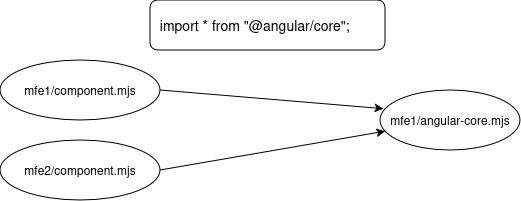
Secondly, this also means that Angular (state) is also not being shared between the micro frontends which includes the injection context. (I generally advise against sharing state though) Now, how do we solve this? Let’s try to share the Angular core library:
// projects/mfe1/federation.config.js

const { withNativeFederation, share } = require('@angular-architects/native-federation/config');

module.exports = withNativeFederation({
  name: 'mfe1',
  exposes: {
    './Component': './projects/mfe1/src/bootstrap.ts',
  },
  shared: {
    ...share({
      "@angular/core": {
        singleton: true,
        strictVersion: true,
        requiredVersion: 'auto'
      }
    })
  },
  skip: []
});
This will result in Angular being extracted from the micro frontend and bundled into a separate file. After the build ran again, the remoteEntry is significantly different:
// dist/mfe1/browser/remoteEntry.json
{
  "name": "mfe1",
  "shared": [
    {
      "packageName": "@angular/core",
      "outFileName": "_angular_core.AbRbEARs0K.js",
      "requiredVersion": "^21.0.6",
      "singleton": true,
      "strictVersion": true,
      "version": "21.0.6"
    },
    {
      "packageName": "@angular/core/event-dispatch-contract.min.js",
      "outFileName": "_angular_core_event_dispatch_contract_min_js.0fe5hMBbIz.js",
      "requiredVersion": "^21.0.6",
      "singleton": true,
      "strictVersion": true,
      "version": "21.0.6"
    },
    {
      "packageName": "@angular/core/primitives/di",
      "outFileName": "_angular_core_primitives_di.NxFFDSa_NF.js",
      "requiredVersion": "^21.0.6",
      "singleton": true,
      "strictVersion": true,
      "version": "21.0.6"
    },
    {
      "packageName": "@angular/core/primitives/event-dispatch",
      "outFileName": "_angular_core_primitives_event_dispatch.8BTvFGqMkI.js",
      "requiredVersion": "^21.0.6",
      "singleton": true,
      "strictVersion": true,
      "version": "21.0.6"
    },
    {
      "packageName": "@angular/core/primitives/signals",
      "outFileName": "_angular_core_primitives_signals.TdNLEFoKMG.js",
      "requiredVersion": "^21.0.6",
      "singleton": true,
      "strictVersion": true,
      "version": "21.0.6"
    },
    {
      "packageName": "@angular/core/rxjs-interop",
      "outFileName": "_angular_core_rxjs_interop.V01fBJixWh.js",
      "requiredVersion": "^21.0.6",
      "singleton": true,
      "strictVersion": true,
      "version": "21.0.6"
    },
    {
      "singleton": true,
      "strictVersion": false,
      "requiredVersion": "0.0.0",
      "packageName": "@nf-internal/chunk-PVTTTEYM",
      "outFileName": "chunk-PVTTTEYM.js"
    },
    // Other chunks omitted for clarity
  ],
  "exposes": [
    {
      "key": "./Component",
      "outFileName": "Component-5V6B6VHU.js"
    }
  ]
}
In the remoteEntry file, we’ll see some entry points and some internal chunks. By default “includeSecondaries” is set to true, which leads to the “share” helper investigating the angular/core library and exporting the secondary entrypoints (like “@angular/core/primitives/di”).
All discovered shared code between these “externals” is put into separately shared chunks by ESbuild to improve performance. Now how does Native federation know which secondary entrypoints to take? Usually by scanning the package.json in the node_modules dependency.
Now we can disable the secondaries like this:
const { withNativeFederation, share } = require('@angular-architects/native-federation/config');

module.exports = withNativeFederation({
  name: 'mfe1',
  exposes: {
    './Component': './projects/mfe1/src/bootstrap.ts',
  },
  shared: {
    ...share({
      "@angular/core": {
        singleton: true,
        strictVersion: true,
        requiredVersion: 'auto',
        includeSecondaries: false
      }
    })
  },
skip: []
});
Which will result into something like this:
{
  "name": "mfe1",
  "shared": [
    {
      "packageName": "@angular/core",
      "outFileName": "_angular_core.1iUQTNxTxD.js",
      "requiredVersion": "auto",
      "singleton": true,
      "strictVersion": true,
      "version": "21.0.6"
    }
  ],
  "exposes": [
    {
      "key": "./Component",
      "outFileName": "Component-5V6B6VHU.js"
    }
  ]
}
Now, but when you run this code using ng serve mfe1 , it crashes?

A crash in the browser
This is actually a flaw/feature in ESbuild. As explained in the previous part, the micro frontend is bundled separately from the externals. Therefore, when ESbuild bundles the micro frontend, it treats “@angular/core” as an external, and for ESbuild that means “@angular/core/*” so also “@angular/core/primitives/signals” which the browser now tries to import at runtime. However, the importmap only works with exact matches so it wont look for the code in “@angular/core” resulting in a crash.
note: This error only occurs if secondary entrypoints are used or imported that are not being shared like in the example above.
Wildcard exports
Some packages use wildcard exports, RxJs is a fine example for this as you can see in their exported package.json (look for the ‘internal’ export):
{
  "name": "rxjs",
  "version": "7.8.2",
  "description": "Reactive Extensions for modern JavaScript",
  "main": "./dist/cjs/index.js",
  "module": "./dist/esm5/index.js",
  "es2015": "./dist/esm/index.js",
  "types": "index.d.ts",
  "typesVersions": {
    ">=4.2": {
      "*": [
        "dist/types/*"
      ]
    }
  },
  "sideEffects": false,
  "exports": {
    ".": {
      "types": "./dist/types/index.d.ts",
      "node": "./dist/cjs/index.js",
      "require": "./dist/cjs/index.js",
      "es2015": "./dist/esm/index.js",
      "default": "./dist/esm5/index.js"
    },
    "./ajax": {
      "types": "./dist/types/ajax/index.d.ts",
      "node": "./dist/cjs/ajax/index.js",
      "require": "./dist/cjs/ajax/index.js",
      "es2015": "./dist/esm/ajax/index.js",
      "default": "./dist/esm5/ajax/index.js"
    },
    "./fetch": {
      "types": "./dist/types/fetch/index.d.ts",
      "node": "./dist/cjs/fetch/index.js",
      "require": "./dist/cjs/fetch/index.js",
      "es2015": "./dist/esm/fetch/index.js",
      "default": "./dist/esm5/fetch/index.js"
    },
    "./operators": {
      "types": "./dist/types/operators/index.d.ts",
      "node": "./dist/cjs/operators/index.js",
      "require": "./dist/cjs/operators/index.js",
      "es2015": "./dist/esm/operators/index.js",
      "default": "./dist/esm5/operators/index.js"
    },
    "./testing": {
      "types": "./dist/types/testing/index.d.ts",
      "node": "./dist/cjs/testing/index.js",
      "require": "./dist/cjs/testing/index.js",
      "es2015": "./dist/esm/testing/index.js",
      "default": "./dist/esm5/testing/index.js"
    },
    "./webSocket": {
      "types": "./dist/types/webSocket/index.d.ts",
      "node": "./dist/cjs/webSocket/index.js",
      "require": "./dist/cjs/webSocket/index.js",
      "es2015": "./dist/esm/webSocket/index.js",
      "default": "./dist/esm5/webSocket/index.js"
    },
    "./internal/*": {
      "types": "./dist/types/internal/*.d.ts",
      "node": "./dist/cjs/internal/*.js",
      "require": "./dist/cjs/internal/*.js",
      "es2015": "./dist/esm/internal/*.js",
      "default": "./dist/esm5/internal/*.js"
    },
    "./package.json": "./package.json"
  },
  "config": {
    "commitizen": {
      "path": "cz-conventional-changelog"
    }
  },
  // The rest is omitted for clarity
}
A wildcard (*) means “all files in this folder are fair game” which is nice for easy exporting of smaller submodules.. until you need to export all of them as separate entrypoints/externals in your remoteEntry file. This is one of the reasons why “ignoreUnusedDeps” exist.
By default it is not possible to use wildcard (or Glob) exports at runtime because when we export RxJs:
const { withNativeFederation, share } = require('@angular-architects/native-federation/config');

module.exports = withNativeFederation({
  name: 'mfe1',
  exposes: {
    './Component': './projects/mfe1/src/bootstrap.ts',
  },
  shared: {
    ...share({
      "rxjs":  {
        singleton: true,
        strictVersion: true,
        requiredVersion: 'auto'
      }
    })

  },
  skip: [
    // 'rxjs/ajax',
    // 'rxjs/fetch',
    'rxjs/testing',
    // 'rxjs/webSocket',
    (pkg) => pkg.startsWith('vanilla-native-federation'),
  ]
});
Only the non-wildcard exports are included? Besides that, Native federation has also excluded most entrypoints like “testing” for convenience (as you can see in the SKIP array). Let’s see what this config produces in the exported remoteEntry metadata file:
{
  "name": "mfe1",
  "shared": [
    {
      "packageName": "rxjs",
      "outFileName": "rxjs.7eDkF4IOMS.js",
      "requiredVersion": "~7.8.0",
      "singleton": true,
      "strictVersion": true,
      "version": "7.8.2"
    },
    {
      "packageName": "rxjs/ajax",
      "outFileName": "rxjs_ajax.NpZd2JbL7a.js",
      "requiredVersion": "~7.8.0",
      "singleton": true,
      "strictVersion": true,
      "version": "7.8.2"
    },
    {
      "packageName": "rxjs/fetch",
      "outFileName": "rxjs_fetch.L1wq58Q0wx.js",
      "requiredVersion": "~7.8.0",
      "singleton": true,
      "strictVersion": true,
      "version": "7.8.2"
    },
    {
      "packageName": "rxjs/operators",
      "outFileName": "rxjs_operators._XyEK9YZce.js",
      "requiredVersion": "~7.8.0",
      "singleton": true,
      "strictVersion": true,
      "version": "7.8.2"
    },
    {
      "packageName": "rxjs/webSocket",
      "outFileName": "rxjs_webSocket.t06ynecuVB.js",
      "requiredVersion": "~7.8.0",
      "singleton": true,
      "strictVersion": true,
      "version": "7.8.2"
    },
    {
      "singleton": true,
      "strictVersion": false,
      "requiredVersion": "0.0.0",
      "packageName": "@nf-internal/chunk-Z66JL3RI",
      "outFileName": "chunk-Z66JL3RI.js"
    },
    // other chunks omitted

  ],
  "exposes": [
    {
      "key": "./Component",
      "outFileName": "Component-CWNUCOSQ.js"
    }
  ]
}
As you can see, only the hardcoded exports are included in the final remoteEntry. If we import something from the main RxJs bundle, there won’t be any issue since it is now nicely exported.
// projects/mfe1/src/app/app.component.ts

import { Component, signal } from '@angular/core';
import { RouterOutlet } from '@angular/router';
import { of } from 'rxjs';
@Component({
  selector: 'app-mfe1',
  imports: [RouterOutlet],
  templateUrl: './app.component.html',
  styleUrls: ['./app.component.scss'],
})
export class AppComponent {
  title = signal('mfe1');
  test = of("test");
}
But when we change to the internal export:
// projects/mfe1/src/app/app.component.ts

import { Component, signal } from '@angular/core';
import { RouterOutlet } from '@angular/router';
import { of } from 'rxjs/internal/observable/of';

@Component({
  selector: 'app-mfe1',
  imports: [RouterOutlet],
  templateUrl: './app.component.html',
  styleUrls: ['./app.component.scss'],
})
export class AppComponent {
  title = signal('mfe1');
  test = of("test");
}
Suddenly the crash is happening again…

The crash is happening again for RxJs
Since native-federation version 21.0.4, it is possible to solve this by allowing the builder to process “glob” exports!
const { withNativeFederation, share } = require('@angular-architects/native-federation/config');

module.exports = withNativeFederation({
  name: 'mfe1',
  exposes: {
    './Component': './projects/mfe1/src/bootstrap.ts',
  },
  shared: {
    ...share({
      "rxjs":  {
        singleton: true,
        strictVersion: true,
        requiredVersion: 'auto',
        includeSecondaries: {resolveGlob: true}
      }
    })
  },
  skip: [
    // 'rxjs/ajax',
    // 'rxjs/fetch',
    'rxjs/testing',
    // 'rxjs/webSocket',
    (pkg) => pkg.startsWith('vanilla-native-federation'),
  ]
});
But this comes with a cost, since now everything that within the glob/wildcard is exported as separate bundle (remember? all files in the internal folder are fair game now… Recursively):
{
  "name": "mfe1",
  "shared": [
    {
      "packageName": "rxjs",
      "outFileName": "rxjs.Q2t-6f4C03-dev.js",
      "requiredVersion": "~7.8.0",
      "singleton": true,
      "strictVersion": true,
      "version": "7.8.2"
    },
    {
      "packageName": "rxjs/ajax",
      "outFileName": "rxjs_ajax.0X_cwHIB_5-dev.js",
      "requiredVersion": "~7.8.0",
      "singleton": true,
      "strictVersion": true,
      "version": "7.8.2"
    },
    {
      "packageName": "rxjs/fetch",
      "outFileName": "rxjs_fetch.eyUs0yz8cj-dev.js",
      "requiredVersion": "~7.8.0",
      "singleton": true,
      "strictVersion": true,
      "version": "7.8.2"
    },
    {
      "packageName": "rxjs/operators",
      "outFileName": "rxjs_operators.ZMXAn4kcoj-dev.js",
      "requiredVersion": "~7.8.0",
      "singleton": true,
      "strictVersion": true,
      "version": "7.8.2"
    },
    {
      "packageName": "rxjs/webSocket",
      "outFileName": "rxjs_webSocket.andTnNxDzj-dev.js",
      "requiredVersion": "~7.8.0",
      "singleton": true,
      "strictVersion": true,
      "version": "7.8.2"
    },
    {
      "packageName": "rxjs/internal/AnyCatcher",
      "outFileName": "rxjs_internal_AnyCatcher.LFIs5MAGLP-dev.js",
      "requiredVersion": "~7.8.0",
      "singleton": true,
      "strictVersion": true,
      "version": "7.8.0"
    },
    {
      "packageName": "rxjs/internal/AsyncSubject",
      "outFileName": "rxjs_internal_AsyncSubject.eeP6d3K2Qp-dev.js",
      "requiredVersion": "~7.8.0",
      "singleton": true,
      "strictVersion": true,
      "version": "7.8.0"
    },
    {
      "packageName": "rxjs/internal/BehaviorSubject",
      "outFileName": "rxjs_internal_BehaviorSubject.ugi0QclFx8-dev.js",
      "requiredVersion": "~7.8.0",
      "singleton": true,
      "strictVersion": true,
      "version": "7.8.0"
    },
    {
      "packageName": "rxjs/internal/Notification",
      "outFileName": "rxjs_internal_Notification.5q--4WuFDH-dev.js",
      "requiredVersion": "~7.8.0",
      "singleton": true,
      "strictVersion": true,
      "version": "7.8.0"
    },
    // And about 380 entries more... I think we get the picture.
  ],
  "exposes": [
    {
      "key": "./Component",
      "outFileName": "Component.js",
      "dev": {
        "entryPoint": "/home/auke/Projects/Personal/native-federation-examples-ng/projects/mfe1/src/bootstrap.ts"
      }
    }
  ],
  "buildNotificationsEndpoint": "/@angular-architects/native-federation:build-notifications"
}
We can avoid this by allowing native-federation to check which entries are being used! This is done by an older feature called “ignoreUnusedDeps” and it helps to only share what you’re actually using.
const { withNativeFederation, share } = require('@angular-architects/native-federation/config');

module.exports = withNativeFederation({

  name: 'mfe1',

  exposes: {
    './Component': './projects/mfe1/src/bootstrap.ts',
  },

  shared: {
    ...share({
      "rxjs":  {
        singleton: true,
        strictVersion: true,
        requiredVersion: 'auto',
        includeSecondaries: {resolveGlob: true}
      }
    })

  },
  skip: [
    // 'rxjs/ajax',
    // 'rxjs/fetch',
    'rxjs/testing',
    // 'rxjs/webSocket',
    (pkg) => pkg.startsWith('vanilla-native-federation'),
  ],
  features: {
    ignoreUnusedDeps: true
  }
});
Finally, it is also possible to exclude certain parts of the glob that you are sure of you won’t use:
const { withNativeFederation, share } = require('@angular-architects/native-federation/config');

module.exports = withNativeFederation({

  name: 'mfe1',

  exposes: {
    './Component': './projects/mfe1/src/bootstrap.ts',
  },

  shared: {
    ...share({
      "rxjs":  {
        singleton: true,
        strictVersion: true,
        requiredVersion: 'auto',
        includeSecondaries: {resolveGlob: true, skip: ['rxjs/internal/testing/*']}
      }
    })

  },
  skip: [
    // 'rxjs/ajax',
    // 'rxjs/fetch',
    'rxjs/testing',
    // 'rxjs/webSocket',
    (pkg) => pkg.startsWith('vanilla-native-federation'),
  ],
});
Pseudo-treeshaking
Why would anyone use “rxjs/internal/*” instead of just using the main “rxjs” entrypoint? The answer is simple! When you’re sharing an external, you’re losing the ability to treeshake that library… Because ESbuild has no idea what to include and what to exclude. It only knows which micro frontends use what at runtime. That means that the “rxjs” entrypoint contains well.. everything. Which is bad for performance if you’re only using the “of” object. Therefore, only using an internal export of that particular object might improve performance. I call this process pseudo-treeshaking.
In general, it really helps to think about which externals you really want to share, and what parts you (don’t) want to share. If only one micro frontend is using a single or two objects of RxJs, why bother sharing that dependency at all? It’ll save you a couple of bytes at most.
The real answer to know which dependencies to share and how is to measure the overall performance, and just try to find out what works for your architecture.
The downside of treeshaking
Let’s talk a bit about the downsides and caveats regarding dependency treeshaking. Because it might not be benefitial for all dependencies you share. While it is nice to keep your micro frontend bundles as small as possible and only share what you’re actually using, it comes with a cost.
Let’s say you have two micro frontends with each a different Angular version, ‘21.0.1’ and ‘21.0.2’. The orchestrator will make sure that, if you allow it to, both micro frontends will use ‘v21.0.2'. But what if the micro frontend that shares v21.0.2 is not using the import * from @angular/core/rxjs-interop entrypoint? When that happens, and the “ignoreUnusedDeps” is enabled, the secondary entrypoint is also not being shared by that micro frontend:
const { withNativeFederation, share } = require('@angular-architects/native-federation/config');

module.exports = withNativeFederation({
  name: 'mfe1',
  exposes: {
    './Component': './projects/mfe1/src/bootstrap.ts',
  },
  shared: {
    ...share({
      "@angular/core": {
        singleton: true,
        strictVersion: true,
        requiredVersion: 'auto'
      }
    })
  },
  skip: [],
  features: {
    ignoreUnusedDeps: true
  }
});
Resulting in a remoteEntry.json that looks like this:
{
  "name": "mfe1",
  "shared": [
    {
      "packageName": "@angular/core",
      "outFileName": "_angular_core.ylV3hbXXny.js",
      "requiredVersion": "^21.0.6",
      "singleton": true,
      "strictVersion": true,
      "version": "21.0.6"
    },
    {
      "packageName": "@angular/core/primitives/di",
      "outFileName": "_angular_core_primitives_di.vSzwlX8M91.js",
      "requiredVersion": "^21.0.6",
      "singleton": true,
      "strictVersion": true,
      "version": "21.0.6"
    },
    {
      "packageName": "@angular/core/primitives/signals",
      "outFileName": "_angular_core_primitives_signals.TrU7pSvgfp.js",
      "requiredVersion": "^21.0.6",
      "singleton": true,
      "strictVersion": true,
      "version": "21.0.6"
    },
    // chunks omitted
  ],
  "exposes": [
    {
      "key": "./Component",
      "outFileName": "Component-MPEZFG3D.js"
    }
  ]
}
Sure, some primitives are included but the @angular/core/rxjs-interop entrypoint is missing. This is okay for that particular micro frontend because it is not using the entrypoint. But what if the other micro frontend is? Then it will expose the entrypoint from its own Angular which in this case is the “v21.0.1”. That means that Angular is being torn apart with some entrypoints being 21.0.1 and some being 21.0.2.
This is a very error-prone situation where you generally don’t want to be. Therefore, it is best to opt-out of the “ignoreUnusedDeps” feature for core libraries like Angular to make sure all secondary entrypoints are shared and from the same external:
const { withNativeFederation, share } = require('@angular-architects/native-federation/config');

module.exports = withNativeFederation({
  name: 'mfe1',
  exposes: {
    './Component': './projects/mfe1/src/bootstrap.ts',
  },
  shared: {
    ...share({
      "@angular/core": {
        singleton: true,
        strictVersion: true,
        requiredVersion: 'auto',
        includeSecondaries: {keepAll: true}
      }
    })
  },
  skip: [ ],
  features: {
    ignoreUnusedDeps: true
  }
});
The “keepAll” setting will bring back the unused secondary entrypoints from that particular package:
{
  "name": "mfe1",
  "shared": [
    {
      "packageName": "@angular/core",
      "outFileName": "_angular_core.DPw1KVtmMc.js",
      "requiredVersion": "^21.0.6",
      "singleton": true,
      "strictVersion": true,
      "version": "21.0.6"
    },
    {
      "packageName": "@angular/core/event-dispatch-contract.min.js",
      "outFileName": "_angular_core_event_dispatch_contract_min_js.3l1Naextzf.js",
      "requiredVersion": "^21.0.6",
      "singleton": true,
      "strictVersion": true,
      "version": "21.0.6"
    },
    {
      "packageName": "@angular/core/primitives/di",
      "outFileName": "_angular_core_primitives_di.4EDGu_v0C7.js",
      "requiredVersion": "^21.0.6",
      "singleton": true,
      "strictVersion": true,
      "version": "21.0.6"
    },
    {
      "packageName": "@angular/core/primitives/event-dispatch",
      "outFileName": "_angular_core_primitives_event_dispatch.X_FP7X5JTv.js",
      "requiredVersion": "^21.0.6",
      "singleton": true,
      "strictVersion": true,
      "version": "21.0.6"
    },
    {
      "packageName": "@angular/core/primitives/signals",
      "outFileName": "_angular_core_primitives_signals.MIhqYQtnnw.js",
      "requiredVersion": "^21.0.6",
      "singleton": true,
      "strictVersion": true,
      "version": "21.0.6"
    },
    {
      "packageName": "@angular/core/rxjs-interop",   // Siuuuu
      "outFileName": "_angular_core_rxjs_interop.EEexvsIBbs.js",
      "requiredVersion": "^21.0.6",
      "singleton": true,
      "strictVersion": true,
      "version": "21.0.6"
    },
    // chunks omitted
  ],
  "exposes": [
    {
      "key": "./Component",
      "outFileName": "Component-MPEZFG3D.js"
    }
  ]
}
So there you have it, these flags introduced in v21.0.4 allow you to tweak the externals to your likings. These pair nicely with the existing “shareAll” helper.
Just share everything
If you just want to share all dependencies, you can use the “shareAll” helper which will iterate through your root package.json and execute the “share” helper for all the packages found in the “dependencies” property.
const { withNativeFederation, share } = require('@angular-architects/native-federation/config');

module.exports = withNativeFederation({
  name: 'mfe1',
  exposes: {
    './Component': './projects/mfe1/src/bootstrap.ts',
  },
  shared: {
    ...shareAll({ singleton: true, strictVersion: true, requiredVersion: 'auto' }),
  },
  skip: [ ],
  features: {
    ignoreUnusedDeps: true
  }
});
However, this might be a bit too aggressive. If you want to skip certain packages like ‘vanilla-native-federation’ you can add a lambda to filter out all entrypoints that starts with that package name, or if you want to filter out specific entrypoints like “rxjs/testing” you can also provide the full name in the “skip” array:
const { withNativeFederation, share } = require('@angular-architects/native-federation/config');

module.exports = withNativeFederation({
  name: 'mfe1',
  exposes: {
    './Component': './projects/mfe1/src/bootstrap.ts',
  },
  shared: {
    ...shareAll(
      {
        singleton: true,
        strictVersion: true,
        requiredVersion: 'auto'
      }
    )
  },
  skip: [
    'rxjs/ajax',
    'rxjs/fetch',
    'rxjs/testing',
    'rxjs/webSocket',
    (pkg) => pkg.startsWith('vanilla-native-federation'),
    // Add further packages you don't need at runtime
  ],
  features: {
    ignoreUnusedDeps: true
  }
});
shareAll overrides
Now that we’ve seen all parts individually, it is time to see how it all comes together. So suppose you want to finetune your micro frontend to process only the externals that you want to share. You can use overrides for specific packages that contain different rules than the “default”.
const { withNativeFederation, share } = require('@angular-architects/native-federation/config');

module.exports = withNativeFederation({
  name: 'mfe1',
  exposes: {
    './Component': './projects/mfe1/src/bootstrap.ts',
  },
  shared: {
    ...shareAll(
      {
        singleton: true,
        strictVersion: true,
        requiredVersion: 'auto'
      },
      {
        overrides: {
          "@angular/core": {
            singleton: true,
            strictVersion: true,
            requiredVersion: 'auto',
            includeSecondaries: {keepAll: true}
          },
          "rxjs":  {
            singleton: true,
            strictVersion: true,
            requiredVersion: 'auto',
            includeSecondaries: {resolveGlob: true}
          }
        }
      }
    )
  },
  skip: [
    'rxjs/ajax',
    'rxjs/fetch',
    'rxjs/testing',
    'rxjs/webSocket',
    (pkg) => pkg.startsWith('vanilla-native-federation'),
    // Add further packages you don't need at runtime
  ],
  features: {
    ignoreUnusedDeps: true
  }
});
note: To make things clear. “skip” is not skipping the external entirely. (if that would happen, the micro frontend wouldn’t be able to run on it’s own) But rather it is only skipping the sharing of the external. All skipped entrypoints are bundled into the micro frontend or other external entrypoints.
Final words
The goal of this article was to show you how you can optimally share the externals of your native-federation setup. Now it is up to you to measure and find out what combination works best for you! We will continue to evolve the externals sharing system but for now, this is how it works.
In the next article I will explain the different build types of externals and how they might help in the future.
메타데이터
- post_id
- a4e1d3711230
- slug
- tweaking-native-federation-part-ii-sharing-externals-a4e1d3711230
- url
- https://medium.com/@auke997/tweaking-native-federation-part-ii-sharing-externals-a4e1d3711230
- canonical_url
- https://medium.com/@auke997/tweaking-native-federation-part-ii-sharing-externals-a4e1d3711230
- author_url
- https://medium.com/@auke997
- status
- ok
- fetched_at
- 2026-07-28 02:32:30