Let the quotes motivate you
A Python Automation Script using win10toast package
Let the quotes motivate you

Photo by Drew Beamer on Unsplash
When you are working on a personal project after office hours and continuously resolving errors to make your code work, a little motivation could help you through. As part of this article, we would use the win10toast python package to generate notifications with motivational quotes on any Windows machine.
[embed]
I am writing this article as part of my pursuit of learning python automation, linking below some of my previous articles on the same topic.
[embed]How to make Python read you a book! Python Automation Idea you can implement!blog.jovian.ai
[embed]Job suggesting python script Using web scraping and pandas data frameblog.jovian.ai
[embed]Automating Memory Cleanup Using Python For both macOS and windows devicesblog.jovian.ai
As stated on their website win10toast is an easy-to-use Python library for displaying Windows 10 Toast Notifications which is useful for Windows GUI development.
The syntax for generating notifications on your machine using win10toast is pretty simple.
You would first have to install the win10toast package on your machine, and next import the ToastNotifier class.
The below lines of code would instantly generate a notification.
from win10toast import ToastNotifier
n = ToastNotifier()
n.show_toast("Reminder", "You got this", duration=10)
The first argument in the show_toast method would become the header of your notification, the second argument would form the message body and the duration would specify how long you would want the notification to remain on your screen before disappearing. The duration is to be mentioned in seconds. So, the above code would generate a notification for 10 seconds as below.
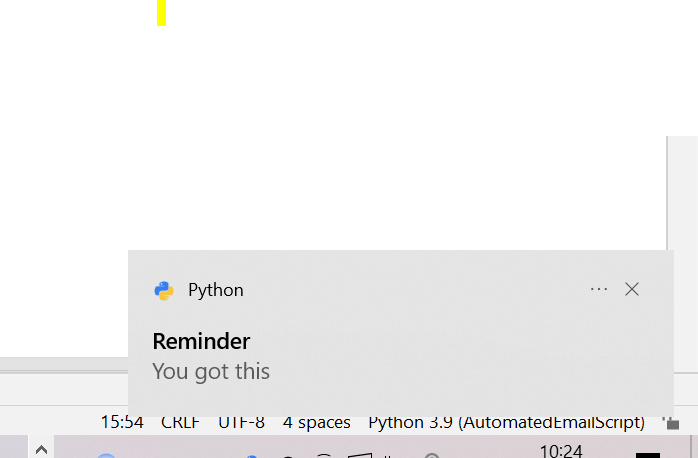
Image by Author
Now, because we need to display inspirational quotes after some intervals we would use the sleep method from the time package in python, to let the next line of code execute after some time specified in seconds.
The entire script which would generate three notifications at an interval of 10 seconds with the provided quotes in the all_mesg list:
# import win10toast
from win10toast import ToastNotifier
import time
# create an object to ToastNotifier class
n = ToastNotifier()
all_mesg = ["You can get everything in life you want if you will just help enough other people get what they want. —Zig Ziglar",
"The best way out is always through. ―Robert Frost",
"If there is no struggle, there is no progress. —Frederick Douglass,"
]
for m in all_mesg:
    n.show_toast("Heya Mate", m, duration=10)
    time.sleep(10)
Further Improvements:
- You could use web scraping to collect a good number of quotes to display in notifications.
- Use a cron job to automate the execution of the script when you sit to study/ work every day.
Note from the author:
I am still learning Python automation, any suggestions from you would be highly appreciated. Hope I have earned the privilege of your time :)
[embed]
메타데이터
- post_id
- a59f4a3b59ff
- slug
- let-the-quotes-motivate-you-a59f4a3b59ff
- url
- https://medium.com/@gghantiwala/let-the-quotes-motivate-you-a59f4a3b59ff
- canonical_url
- https://medium.com/@gghantiwala/let-the-quotes-motivate-you-a59f4a3b59ff
- author_url
- https://medium.com/@gghantiwala
- status
- ok
- fetched_at
- 2026-07-26 14:13:14