Non-Compliance Detection and Auto Remediation — Anakage Technologies
Introduction
Non-Compliance Detection and Auto Remediation — Anakage Technologies
Introduction
End point Non Compliance detection & auto-remediation app is a Windows OS client server application where compliance criteria across multiple Agents installed at end points can be monitored and any deviation rectified automatically. All detected non-compliance and remediation status across multiple Products is reported in one single view providing Enterprise wide view.
Compliance Parameters details
The dashboard displays Product wise a set of monitored parameters and settings as detected at end points. The product categories on which compliance parameters are configurable and can be categorized as following:
- Protection: Antivirus, Firewall, Hard drive encryption
- Operating system: Windows
- Software: Java, Chrome, Browser, MS Office, Flash
- Network: Secure web etc.
- Data Loss Prevention: Symantec
- System: Patching, Disc space
- Communication management and tracking: Video or any text based reminder with action enforcement mechanisms on end users
Illustrative view of Products and monitored Parameters
The following is the summary of the available metrics and corresponding configurations
Antivirus (Symantec)
Devices without a corporate antivirus represent a security risk. Even if a device has the corporate security solution installed, it is important to verify that this product is working correctly
· Version
· Non-infection
· Service installed & running
· Update
· Scan and auto protect compliance
Data loss prevention (Symantec)
DLP and data protection purposes in accordance with applicable laws and internal policies in information security
· Installed
· Version
· Files
· Service running
Patching
Trying to manually manage patches is not only a huge headache but also a major risk for organization. even with a patch management software, organizations with multiple servers and computers, ensuring that all of them are updated must be ensured
· Patching
· Disk space
· SCCM scan
OS
Running a non-standard OS can result in security issues as IT services are usually tested on a limited set of operating systems
· Version
How the Platform works
Deployment mode
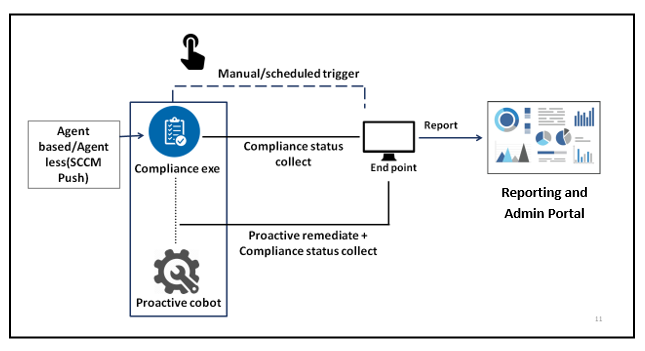
Anakage compliance platform provides both agent based (installed at end point) and agent less (by scheduled push through SCCM or through distribution platforms) solutions
Compliance exe runs on the end points at the schedule specified from SCCM and after run and post actions, it self destructs leaving zero footprints. So no exe installation is required at the end points. And all the performed compliance task actions get reported on the reporting portal.
Agent based exe is installed at the end points (installation can be done through SCCM or other software distribution tools) and checks compliance status at predefined intervals.
Environment
Designed for centralized environments
Best for frequently disconnected machines or machines in the DMZ
Authority
A central authority does all the deploying and scanning which has to be defined and monitored in-house
Each agent does its own scanning and deploying based on policies defined on the central console
Software distribution mechanism and Network coverage
Ideal for networks with large amounts of bandwidth and good SCCM(or other software distribution tool) coverage
Ideal for distributed networks with remote locations that have limited bandwidth
Features
1. Regulatory Remediation Integration: Compliance remediation with both scheduled and manual triggering
Not only it collects and report compliance status, Compliance remediation and automation platform comes with the capability to remediate issues for certain metric parameters. Solution fixation can be either scheduled (agent initiated) or manual (admin initiated). The manual solution fixation can be invoked from admin portal.
In admin portal, all the compliance parameter statuses get reported. For a particular compliance parameter, i.e. antivirus scan compliant- if there are a few end points which are not antivirus scan compliant, it will appear as ‘fail’ entries.

If the ‘fail’ button is clicked, it will show the details of the end points for which the compliance failed. Admin can manually trigger compliance solution for the ‘fail’ entries by clicking on the ‘Fix’ button.

Upon clicking the ‘Fix’ button , a screen will come up allowing admin to select end points and action type.


2. Complete Enterprise wide Compliance Reporting in one single dashboard 3. Multi attribute Reporting and Visualization
All the predefined compliance parameters can be monitored from one central dashboard without any need for scripting or coding.
In the reporting portal, it is possible to view the report from different aspects- compliance status for different products with the corresponding end point and location facility/business unit details helping admin to follow the evolution of the compliance status and check if the overall compliance is improving or regressing. Options of reporting at Solution level, individual Product parameter level besides Facility, geography or Business unit wise are also available

It shows the product wise drop down for which the compliance status is checked.

Under any product it shows the particular parameter compliance status which are configured. Like for ‘secure web’ product, the compliance parameters are ‘installed’ (installed properly or not) or ‘version’ (version updated or not) — against these parameters it will show the compliance status.
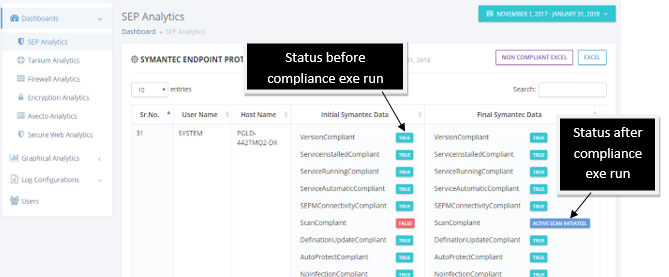
There are options to have dashboards showing the compliance status at Parameter level before and after running the compliance exe (weather manual or scheduled). If some parameter shows ‘false’ (non compliant) before running the exe (in initial data), it gets remediated (if possible) and the taken actions also gets reported (in final data).

It shows the compliance data for different locations or business units providing a precise view of compliance for different segments of the organization.
All these reports can be downloaded from the portal and on the basis of the report; the IT Ops/Info Sec can inform engineers to take required actions.
Experience Non-Compliance Detection and Auto Remediation and discover what Anakage can do for your organization.
Originally published at https://www.atoallinks.com on September 3, 2022.
메타데이터
- post_id
- a5abb83c5bb
- slug
- non-compliance-detection-and-auto-remediation-anakage-technologies-a5abb83c5bb
- url
- https://medium.com/@anakage/non-compliance-detection-and-auto-remediation-anakage-technologies-a5abb83c5bb
- canonical_url
- https://medium.com/@anakage/non-compliance-detection-and-auto-remediation-anakage-technologies-a5abb83c5bb
- author_url
- https://medium.com/@anakage
- status
- ok
- fetched_at
- 2026-06-09 15:37:30






