Mac self-service application — IT for digital transformations — Anakage
Mac self-service application is made for enterprises, wanting to empower their Mac users to self-resolve issues thereby reducing employee…
Mac self-service application — IT for digital transformations — Anakage
Mac self-service application is made for enterprises, wanting to empower their Mac users to self-resolve issues thereby reducing employee downtime and workload of IT Help Desk . It is an offline application installed on MAC machines with a searchable user interface for users to search and run solutions for commonly recurring issues.
As Mac continues to grow in popularity around the world, enterprises need to think about self-service of end user issues on Mac machines. Sure, there are many Mac solutions to choose from but most are for B2C retail consumers. You will also get a list of such free apps however most of these are not meant for enterprise users from a security stand point and may not handle enterprise specific issues. You can read more about security for Mac here.
Why Enterprises consider Mac machines, for IT help desk?
MacOS can be bound to a domain (including Active Directory), it would be shipped with full disk encryption (called FileVault) and even protects against malware (utilizing XProtect) as soon as the device is turned on — with no additional software required.
Plus, they’re also three times less expensive, if you are using it for a long term.
To sum-up, below are the points that drives the Enterprises to use Mac machines, for a long term.
i) Ease of use
ii) Employee’s choice for his productivity
iii) Inbuilt tools that macOS provides
iv) Transparent TCO (total cost of ownership)
Why self-service and Why Anakage?
Surveyed service leaders report that as much as 40% of today’s live volume could be resolved in self-service channels.
There are not many macOS IT help desk apps which are made exclusively for enterprises.
Anakage provides an enterprise grade secured Self service application, which can addresses beyond the clean up and generic solutions which are specific to your workplace. It can guide the users in-app, opening up the required tabs or resolve the issue with one-click of the user. For example, your organization may want the employee to change the internet proxy connection, when your employee moves between home and office or MS Office products like MS Outlook/Word/PowerPoint which does not work/gets hanged. Your employee may raise a ticket to resolve such issues, which can be easily resolved using Anakage Self-service offline application. We call it offline because it does not require internet connection to run solutions!
Anakage follows OWASP Top 10 Security Vulnerabilities . All solutions are digitally signed ensuring that the solutions are tamper-proof.
Below is how the app looks within the Mac machine.
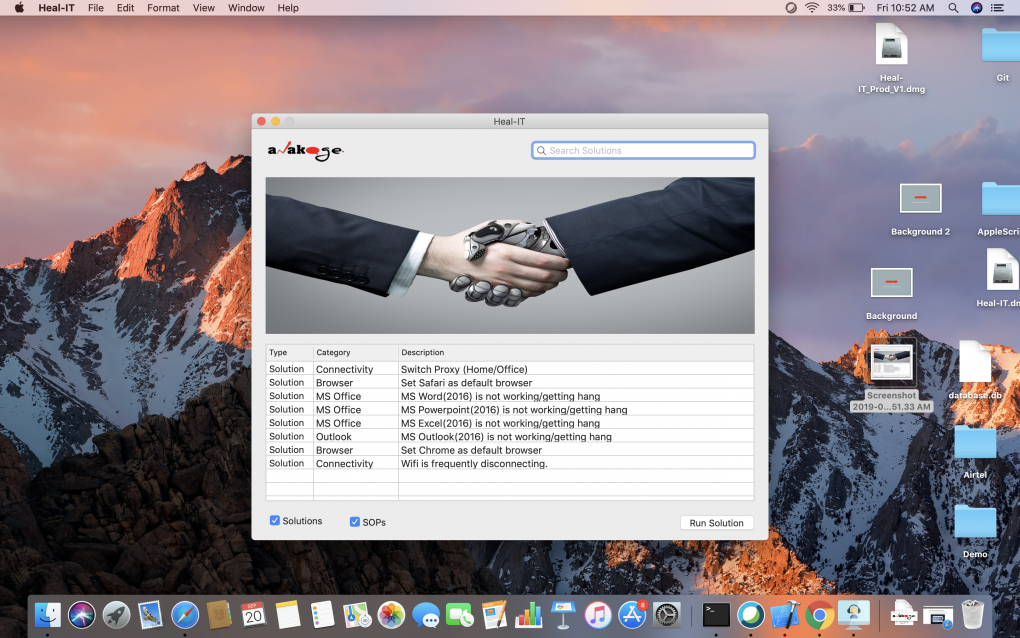
Below is the User-interface, to run the solutions.

Enterprises can track the solutions usage and the success or failure rate of the solutions using the analytics dashboard, shown below.

List of out of the box macOS Solutions
Benefits
-
Reduce incidents at source by self-service.
-
Reduce MTTR (mean time to resolve)
-
Increase your ROI on End User Support Automation by covering Windows, Mac system issues and even Application user support using a single platform.
Click here to get in touch with us to know more about how we can help you with Mac self service application.
Originally published at https://anakage.com on April 24, 2020.
메타데이터
- post_id
- a5d881e2f2cd
- slug
- mac-self-service-application-it-for-digital-transformations-anakage-a5d881e2f2cd
- url
- https://medium.com/@anakage/mac-self-service-application-it-for-digital-transformations-anakage-a5d881e2f2cd
- canonical_url
- https://medium.com/@anakage/mac-self-service-application-it-for-digital-transformations-anakage-a5d881e2f2cd
- author_url
- https://medium.com/@anakage
- status
- ok
- fetched_at
- 2026-06-09 15:37:30