How to build Oracle Visual Builder app by referring to Oracle JET Cookbook
The Oracle JET Cookbook includes an implementation of each JET component, along with samples that demonstrate how to implement common usage…
How to build Oracle Visual Builder app by referring to Oracle JET Cookbook

The Oracle JET Cookbook includes an implementation of each JET component, along with samples that demonstrate how to implement common usage patterns using one or more of the JET components.
Each cookbook demo includes a brief introduction, the demo implementation, and, following the implementation, tabs (Info, demo.html, and so on) that describe how to implement the demo, show the source HTML, JavaScript/TypeScript, and, where applicable, the CSS and JSON.
However, some people get confused about how to use these demos within an Oracle VB application. Let’s take an example from the JET Cookbook and go through it step by step to see how it can be used in Oracle VB.
The example we will be working on is the oj-table you can find it in the link below:
[embed]JET Developer Cookbook Edit descriptionwww.oracle.com
As you can see below, the example is divided to Info, demo.html, demo.js, demo.css and departmentData.json
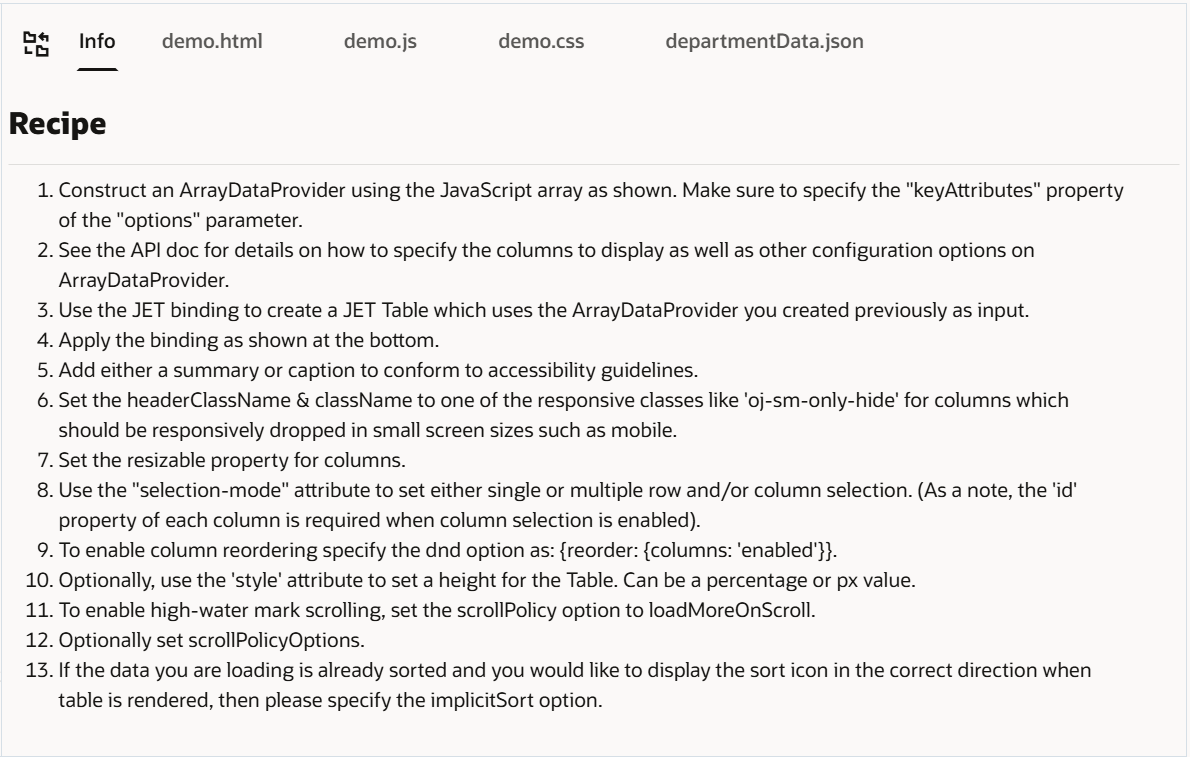
- The “Info” explains everything done in the example step by step.
- demo.html is what you need to put in your VB application’s html page.
- demo.js deals with the variables and data, so in VB some parts will be created in the variables tab of the page and if there is any manipulation with data using javascript functions, you will write these functions in the Javascript tab of your VB app.
- demo.css is for any custom css classes and you can add them in app.css file in your VB app.
- departmentData.json is used to populate your array variable and we will talk about how to use it in VB app later in this blog.
After creating your VB app, the first step in “Info” is to construct an ArrayDataProvider

In the demo.js, the dataprovider variable us the ArrayDataProvider which is populated with deptArray and the key of this ArrayDataProvider is ‘DepartmentId’
So, from where does the deptArray gets the values?
As you can see in the “require”, deptData takes the values from departmentData.json file

We will do the same in our VB application, go to “Types” and create a new one with the same structure

We will now create the deptArray and assign the data in departmentData.json to it as default value

Then create your ArrayDataProvider of the created type and select the keyAttribute to be “DepartmentId” and select Bind Data to Variable and choose the deptArray variable

Now, we will copy the class in demo.css to the app.css

And the last step is to copy the oj-table component from demo.html to our main-start HTML in the VB app and replace the data=”[[dataprovider]]” with the name of our variable in the app
<oj-table
            id="table"
            aria-label="Departments Table"
            accessibility.row-header="depName"
            data="[[ $variables.dataprovider ]]"
            selection-mode='{"row": "multiple", "column": "multiple"}'
            dnd='{"reorder": {"columns": "enabled"}}'
            scroll-policy="loadMoreOnScroll"
            scroll-policy-options='{"fetchSize": 10}'
            columns='[{"headerText": "Department Id",
                       "field": "DepartmentId",
                       "headerClassName": "oj-sm-only-hide",
                       "className": "oj-sm-only-hide",
                       "resizable": "enabled",
                       "id": "depId"},
                      {"headerText": "Department Name",
                       "field": "DepartmentName",
                       "resizable": "enabled",
                       "id": "depName"},
                      {"headerText": "Location Id",
                       "field": "LocationId",
                       "headerClassName": "oj-sm-only-hide",
                       "className": "oj-sm-only-hide",
                       "resizable": "enabled",
                       "id": "locId"},
                      {"headerText": "Manager Id",
                       "field": "ManagerId",
                       "resizable": "enabled",
                       "id": "manId"},
                      {"headerText": "Employee Count",
                       "field": "EmployeeCount",
                       "headerClassName": "oj-md-down-hide",
                       "className": "oj-md-down-hide",
                       "resizable": "enabled",
                       "id": "empCount"}]'
            class="demo-table-container"></oj-table>
and now run the app ▶️ to see the same example from the cookbook running in your VB app

I hope you found this clear and helpful 😃
메타데이터
- post_id
- a5e2565db5f3
- slug
- how-to-build-oracle-visual-builder-app-by-referring-to-oracle-jet-cookbook-a5e2565db5f3
- url
- https://medium.com/@nadabashar6/how-to-build-oracle-visual-builder-app-by-referring-to-oracle-jet-cookbook-a5e2565db5f3
- canonical_url
- https://medium.com/@nadabashar6/how-to-build-oracle-visual-builder-app-by-referring-to-oracle-jet-cookbook-a5e2565db5f3
- author_url
- https://medium.com/@nadabashar6
- status
- ok
- fetched_at
- 2026-07-15 12:14:37