Streaming AI Responses in Flutter: A Practical and Simple Guide with Firebase Genkit
The original version in Spanish
Streaming AI Responses in Flutter: A Practical and Simple Guide with Firebase Genkit
Photo by Trà My on Unsplash
The original version in Spanish
If you’ve tried to integrate Large Language Models (LLMs) like Gemini or GPT into your mobile apps, you’ve likely encountered two major hurdles: securing your API keys and the complexity of handling streaming responses so the UI doesn’t “freeze” while waiting.
Making manual REST calls from the mobile client often exposes credentials and requires writing a lot of boilerplate to handle complex asynchronous data flows. This is where Firebase Genkit comes in.
In this article, we’ll quickly explore what the Genkit Dart SDK is, why it’s a paradigm shift in AI app development, and implement step-by-step a simple Flutter application that consumes a generative API in real-time.
Understanding the Genkit Client-Server Paradigm
Genkit isn’t just an SDK; it’s a comprehensive Firebase framework that promotes a secure architecture. Instead of the Flutter app talking directly to the LLM (an approach that has been superseded by the official recommendation to use Firebase Vertex AI or, ideally, backend orchestration), Genkit moves all the orchestration (prompt management, RAG, tool usage) to a backend (Node.js, Go, or Python) through what it calls “Flows.”
What is a Flow?
A Flow is a strongly-typed and orchestrated function that resides on your server. Think of it as a “smart endpoint” that can receive a topic, fetch information from a database, and generate a response using an LLM — all in one secure step. In this project, we’ve implemented a Mock Backend in Node.js that simulates this behavior, allowing you to test real-time data streaming without needing to configure a real Gemini or OpenAI API key.
What is Dart’s role in all this? To act as a smart and secure consumer. The Genkit Dart SDK handles:
- Type-safety: You know exactly what you’re sending and receiving, with no JSON structure guesswork.
- Native Streaming: It handles Server-Sent Events (SSE) “out-of-the-box,” enabling real-time UI updates.
- Integrated Security: It works alongside Firebase App Check and Auth, ensuring only legitimate users consume your AI quota.
Hands-on: Building “TechExplainAI”
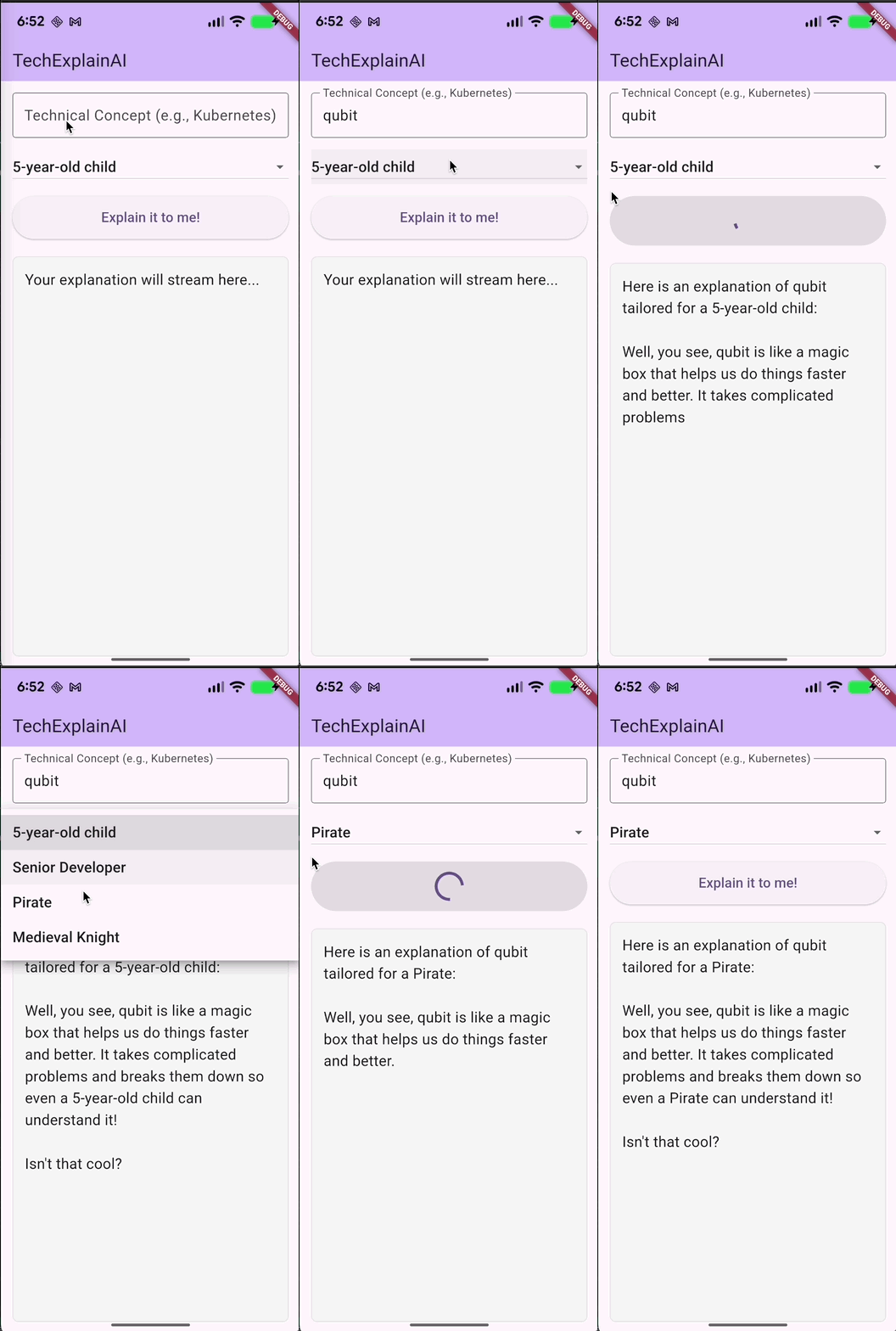
To illustrate this flow cleanly, we’ll create TechExplainAI: an app where the user enters a technical concept and chooses a “persona” (e.g., explain it like I’m 5), and the app displays the generated explanation progressively. We’ll use a super lightweight MVVM architecture with providerto keep the streaming logic decoupled from the View.
1. Quick Setup
In your Flutter project, add the dependencies:
flutter pub add genkit provider2. The ViewModel: Defining Strong Contracts and State
Unlike the “good old” but tedious use of the standard HTTPpackage, with Genkit, we explicitly define our RemoteAction. This object represents the typed connection to our server.
We’ll create the TechExplainViewModel class with the connection logic and host selection:
import 'dart:io';
import 'package:flutter/foundation.dart';
import 'package:genkit/client.dart';

class TechExplainViewModel extends ChangeNotifier {
  late final RemoteAction<String, String> _explainAction;
  late final String _baseUrl;

  String _currentResponse = '';
  String get currentResponse => _currentResponse;

  bool _isLoading = false;
  bool get isLoading => _isLoading;

  TechExplainViewModel() {
    // Host Configuration:
    // 1. REAL DEVICE (Android/iOS) via Wi-Fi: Your local IP (e.g., 192.168.1.105).
    // 2. ANDROID EMULATOR: 10.0.2.2.
    // 3. IOS SIMULATOR or ANDROID USB (adb reverse): 127.0.0.1.
    const host = '192.168.68.105';
    _baseUrl = 'http://$host:3400/explainConceptFlow';

    // Initialize the connection
    _explainAction = defineRemoteAction<String, String>(
      url: _baseUrl,
      fromResponse: (json) => json as String? ?? '',
      fromStreamChunk: (json) => json as String? ?? '',
    );
  }

// Flexibility Pro-tip: While we use `String` here for simplicity,
// in real-world projects you could define a
// `RemoteAction<Map<String, dynamic>, MyResultClass>` to handle complex
// data structures with full type-safety for both requests and responses.
By doing this, the Dart compiler already knows which data types to expect, eliminating runtime errors.
3. The Magic of Streaming in Flutter
Now we add the fetchExplanationfunction. Using our remote action’s streammethod, the process becomes as simple as iterating over a standard Dart asynchronous Stream:
Future<void> fetchExplanation(String topic, String persona) async {
    if (topic.trim().isEmpty) return;

    _currentResponse = '';
    _isLoading = true;
    notifyListeners();

    try {
      final requestPayload = {
        'topic': topic.trim(),
        'persona': persona,
      };

      // Invoke the stream specifying the input type (Map)
      final actionStream = _explainAction.stream<Map<String, dynamic>>(
        input: requestPayload,
      );

      // Listen to chunks in real-time
      await for (final chunk in actionStream) {
        _currentResponse += chunk;
        notifyListeners(); // Update UI chunk by chunk
      }
    } catch (e) {
      _currentResponse = 'Error: $e\n(Check if backend is reachable at $_baseUrl)';
    } finally {
      _isLoading = false;
      notifyListeners();
    }
  }
}
With await for, Genkit handles the underlying HTTP connection (Server-Sent Events) and parses the server’s data events, delivering clean pieces of information.
4. The View (Consuming the ViewModel)
In your UI, simply call the ViewModel, and the screen will update itself.
ElevatedButton(
  onPressed: viewModel.isLoading
    ? null
    : () => viewModel.fetchExplanation(
              _topicController.text,
              _selectedPersona
            ),
  child: Text('Explain it to me!'),
)

// And to display the text:
Text(viewModel.currentResponse)
The result
Conclusions
Developing AI features in mobile applications doesn’t have to be a nightmare of state management and JSON parsing. By delegating LLM orchestration to the server and leveraging the Genkit Dart SDK on the client with a clean MVVM pattern, we get a reactive, testable, and secure application.
You can find the full project, including the test backend, in our GitHub repository: genkit-tech-explain-ai
메타데이터
- post_id
- a699e1ff9e4e
- slug
- streaming-ai-responses-in-flutter-a-practical-and-simple-guide-with-firebase-genkit-a699e1ff9e4e
- url
- https://medium.com/@cdmunoz/streaming-ai-responses-in-flutter-a-practical-and-simple-guide-with-firebase-genkit-a699e1ff9e4e
- canonical_url
- https://medium.com/@cdmunoz/streaming-ai-responses-in-flutter-a-practical-and-simple-guide-with-firebase-genkit-a699e1ff9e4e
- author_url
- https://medium.com/@cdmunoz
- status
- ok
- fetched_at
- 2026-06-13 07:35:29