Cloud vs Local Workstation for Revit: A Detailed Comparison
Revit has become the backbone of modern architectural, engineering, and construction workflows. Firms rely on it to manage complex building…
Cloud vs Local Workstation for Revit: A Detailed Comparison
Revit has become the backbone of modern architectural, engineering, and construction workflows. Firms rely on it to manage complex building models, collaborate across disciplines, and deliver projects faster. However, Revit’s performance depends heavily on the workstation environment.
Many firms still use local workstations installed in offices. Others are shifting to cloud-based Revit workstations to support remote teams and reduce infrastructure strain. This shift raises an important question. Which setup delivers better performance, flexibility, and long-term value?
This guide offers a detailed comparison of cloud vs local workstation for Revit. You will learn how each model works, where it performs well, where it falls short, and which option fits different business scenarios.
Why Revit Workstation Choices Matter in the Modern AEC Environment?
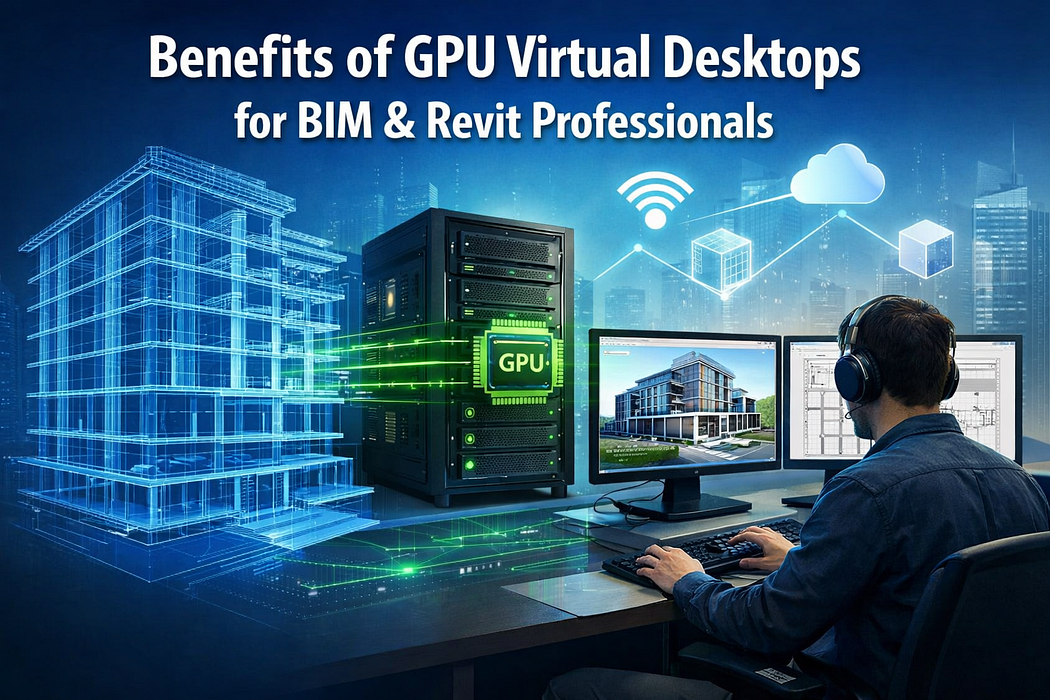
Revit projects have grown more complex over the years. Models are larger and file sizes are heavier than ever, placing greater strain on the systems that run them. At the same time, teams are no longer confined to a single office. AEC firms now collaborate across multiple locations and devices while working on the same Revit project.
This shift toward connected workflows has delivered clear benefits, but only when the underlying infrastructure can keep pace with these demands. Firms using integrated Revit environments with tools such as Autodesk BIM 360 have reported noticeable improvements in coordination and delivery speed, including:
- A 30 percent reduction in coordination issues at Jacobs Engineering Group
- A 40 percent decrease in time spent on revisions and approvals at HOK
Source: AlterSquare
These outcomes show how strongly modern Revit collaboration depends on consistent performance, fast access, and system reliability.
Alongside this, hybrid and remote work have become standard across the AEC industry. Many engineering firms now support remote design workflows as part of everyday operations rather than as an exception.
Web-based design and review tools have further reduced operational friction, with studies showing a 73 percent reduction in meeting and travel costs compared to traditional review methods. This benefit is especially relevant for teams working across offices or geographic regions. Together, these changes place new demands on Revit infrastructure. A workstation that worked well five years ago may now struggle to keep up due to:
- Performance bottlenecks with larger models
- File synchronization delays across teams
- Hardware limitations that restrict scalability
As a result, choosing the right Revit workstation setup is no longer just an IT preference; it’s a business decision.
How Do Local Revit Workstations Work?
A local workstation for Revit is a physical desktop or laptop installed at the user’s location. The system runs Revit using local CPU, RAM, storage, and GPU resources. Project files usually sit on local servers or network-attached storage inside the office.
IT teams manage hardware upgrades, software updates, backups, and security internally. Access typically depends on office networks or VPNs when working remotely.
How Do Cloud Revit Environments Work?
A cloud workstation for Revit runs on high-performance virtual machines hosted in secure cloud data centers. Users access Revit through a remote desktop interface. The processing power, storage, and GPU resources live in the cloud rather than on local devices.
Users can log in from laptops, thin clients, or even tablets while experiencing workstation-level performance.
Cloud-based Revit environments centralize project data and applications. All users connect to the same secure environment. Files stay in the cloud, which reduces sync delays and duplication.
Cloud vs. Local Workstation for Revit: What’s the Difference?
1. Integrations
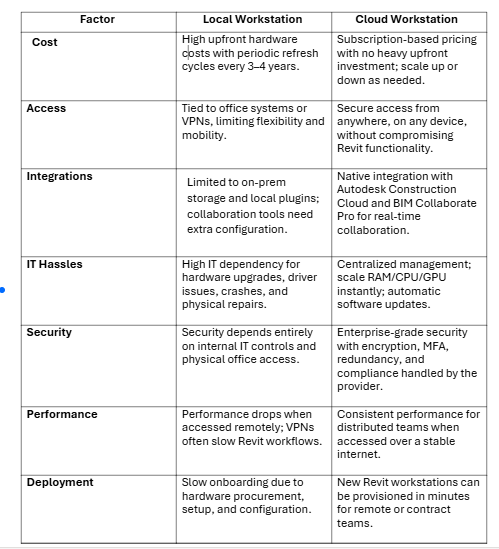
Local and cloud workstations both run Revit natively, but they differ in how they connect with supporting tools and platforms.
A local workstation is best suited for integrations that require direct, high-speed access to on-site hardware. It works seamlessly with GPU-intensive third-party rendering tools such as Enscape, V-Ray, and Twinmotion, which rely on local processing power for real-time visualization.
It also integrates easily with on-premise document management systems and network-attached storage (NAS), making them ideal for firms with established internal infrastructure.
However, a cloud workstation integrates smoothly with cloud storage platforms like Google Drive and Dropbox, and more importantly, with Autodesk Construction Cloud (ACC). This environment supports Revit Cloud Worksharing and BIM Collaborate Pro, which have become standard for distributed project teams in 2026, enabling centralized data access and real-time collaboration across locations.
2. Deployment & Access
The primary difference between the cloud and local workstations lies in where Revit is processed and how users access it. A local workstation is a desktop-based setup installed on physical office machines. Firms handle hardware procurement, system updates, maintenance, and security internally.
Moreover, access typically requires on-site presence or a VPN connection, which can introduce latency, network bottlenecks, and performance degradation, especially when working remotely.
In a cloud workstation, a third-party provider manages hosting, updates, and the underlying infrastructure. Users access the workstation through a web browser or thin client from almost any device. This model supports remote work, global access, and flexible collaboration without dependence on physical office systems.
3. Security
Both approaches offer strong security, but responsibility is distributed differently. With a local workstation, firms retain full control over physical and network security. Protection depends on internal IT policies, including firewalls, office access controls, encrypted local storage (such as AES-256), and continuous network monitoring. Also, compliance and data breach prevention remain the firm’s responsibility.
A cloud workstation relies on the provider’s enterprise-grade security infrastructure. This typically includes multi-factor authentication, TLS encryption, regular vulnerability scanning, and meeting ISO 27001 compliance standards. Data is stored in redundant, secure data centers, shifting the security burden from internal hardware management to user access control and provider trust.
4. IT Hassles & Cost
IT management for local workstations requires hands-on involvement, including hardware upgrades, driver maintenance, and physical troubleshooting. Cloud workstations reduce this burden by shifting infrastructure management to the provider, allowing IT teams to focus on user access, permissions, and scaling system resources through a centralized console.
From a cost perspective, local workstations follow a high upfront capital expenditure (CapEx) model with relatively lower recurring costs. Cloud workstations operate on a subscription-based operational expenditure (OpEx) model, eliminating large initial investments but requiring ongoing payments. Additional charges, such as data egress fees for transferring large files out of the cloud, may increase long-term costs.
5. Performance & Support
Performance consistency and support models differ based on infrastructure dependency. A local workstation delivers immediate, zero-latency performance for drafting and modeling since all processing occurs on the machine itself. This setup provides predictable performance but may require occasional technical support for hardware failures, such as GPU issues.
A cloud workstation runs Revit remotely, so performance depends on both the internet connection and the complexity of the models. Smooth navigation, rendering, and real-time collaboration generally require latency below 50 milliseconds; higher latency can cause noticeable lag when zooming, rotating, or opening large project files.
The cloud provider also provides support and focuses on maintaining the virtual workstation, ensuring stable connectivity, and troubleshooting software performance, rather than physical hardware issues.
6. Complexity & Functionality
Both environments run the same Revit software, but project handling differs based on the delivery method. A local workstation is not suited for highly complex projects involving large models and intensive rendering workloads, where dedicated local processing power is critical. It supports traditional desktop workflows efficiently and performs reliably under sustained computational demand.
Whereas cloud workstations are capable of handling complex models. They are optimized for firms that prioritize accessibility, scalability, and collaboration. It simplifies IT infrastructure for organizations managing remote teams or multiple project locations, providing a flexible environment for distributed design and project coordination.
Local vs. Cloud Workstation for Revit: Quick Comparison
Which One to Choose for Your Business?
Choosing between a cloud and a local workstation for Revit depends on your firm’s team structure, collaboration needs, and long-term growth plans. Cloud workstations are better suited for firms that rely on Revit Cloud Worksharing, remote collaboration, and scalable infrastructure, while local workstations are more restrictive and work best only for teams operating entirely from a single office with fixed hardware.
Evaluate your project complexity, workforce distribution, and IT capacity to determine which approach delivers the flexibility and performance your business requires.
메타데이터
- post_id
- a6ffdf2aee2b
- slug
- cloud-vs-local-workstation-for-revit-a-detailed-comparison-a6ffdf2aee2b
- url
- https://medium.com/@ishikabadola2001/cloud-vs-local-workstation-for-revit-a-detailed-comparison-a6ffdf2aee2b
- canonical_url
- https://medium.com/@ishikabadola2001/cloud-vs-local-workstation-for-revit-a-detailed-comparison-a6ffdf2aee2b
- author_url
- https://medium.com/@ishikabadola2001
- status
- ok
- fetched_at
- 2026-06-12 18:14:10