Designing Software Integrations: The Foundation Every Developer Should Know (Part 1)
Discover how applications exchange data, how authentication and authorization fit together, and the universal workflow behind almost every…
Designing Software Integrations: The Foundation Every Developer Should Know (Part 1)
Discover how applications exchange data, how authentication and authorization fit together, and the universal workflow behind almost every third-party integration.
Whether you’re integrating with Google, Microsoft, Slack, Salesforce, GitHub, or any other platform, every successful integration follows the same foundation. Once you understand these fundamentals, learning a new API becomes much easier.
Imagine This…
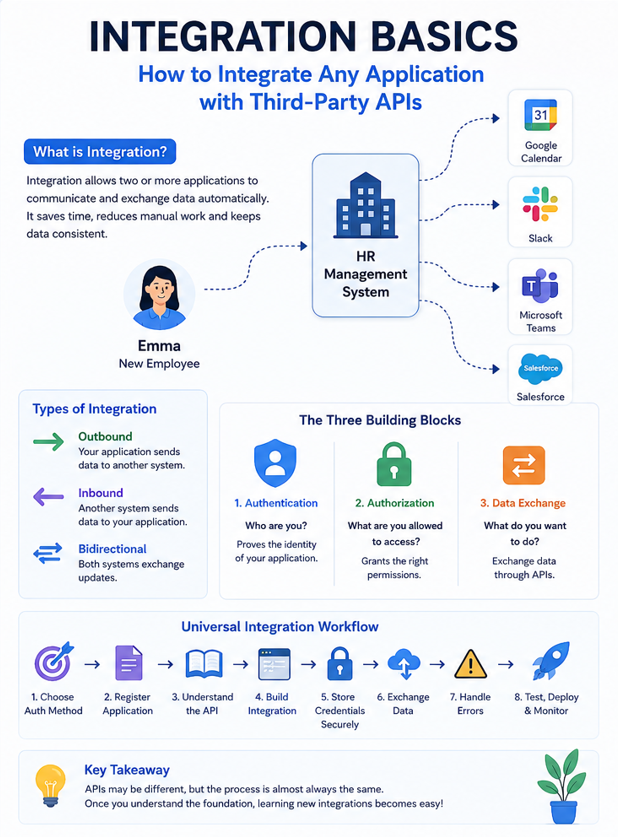
You’re building an HR Management System for a company. On Monday morning, a new employee named Emma joins the organization. As soon as HR clicks “Create Employee”, several things need to happen automatically:
- A welcome meeting should be added to Emma’s Google Calendar.
- A company Slack account should be created.
- Her Microsoft Teams account should be provisioned.
- A Salesforce contact should be created for future customer engagement.
- The payroll system should receive her employee information.
To the HR manager, this feels like a single click. Behind the scenes, however, your application is communicating with five completely different systems, each with its own security, APIs, and rules.
So how does this actually work? The answer is integration.
Whether you’re connecting to Google Calendar, Slack, Microsoft Teams, Salesforce, Stripe, GitHub, or any other third-party application, the overall integration process is surprisingly similar. The API endpoints may differ, but the thought process remains the same.
In this article, we’ll explore the foundation that every developer should understand before building any integration.
What Is an Integration?
An integration allows two or more applications to communicate and exchange data automatically without requiring users to perform the same task multiple times.
Instead of manually entering the same information into different systems, integrations keep applications connected and synchronized.
For example, when Emma joins the company:
Employee Created
                     │
                     ▼
           HR Management System
      ┌────────┼─────────┬──────────┐
      ▼        ▼         ▼          ▼
 Google     Slack    Microsoft   Payroll
Calendar              Teams       System
The HR system becomes the source of truth, while the other applications automatically receive the information they need. This eliminates repetitive work, reduces human error, and keeps data consistent across multiple platforms.
The Three Common Types of Integrations
Not every integration works the same way. Depending on the business requirement, applications exchange information in different directions.
1. Outbound Integration
An outbound integration occurs when your application sends information to another system.
Imagine Emma has just joined the company.
As soon as HR creates her profile, your application immediately:
- Creates her Google Calendar events
- Sends a welcome message to Slack
- Creates her Microsoft Teams account
HR System
     │
Employee Created
     │
     ▼
 Google • Slack • Microsoft Teams
Your application is initiating the communication.
2. Inbound Integration
Sometimes the communication flows in the opposite direction.
Suppose Emma updates her phone number in Microsoft Teams. Instead of HR updating the information manually, Microsoft Teams notifies your HR application so both systems stay consistent.
Microsoft Teams
        │
 Profile Updated
        │
        ▼
 HR Management System
In this case, your application is receiving information from another application.
3. Bidirectional Integration
Many enterprise integrations work in both directions.
For example:
- HR updates Emma’s department.
- Microsoft Teams updates her display picture.
- Slack updates her status.
Both systems continuously exchange information so that users always see the latest data regardless of where the update was made.
 HR System  ⇄  Microsoft Teams
 HR System  ⇄  Slack
 HR System  ⇄  Google Workspace
Bidirectional integrations provide the best user experience, but they also introduce additional complexity, such as handling duplicate updates and synchronization conflicts.
Every Integration Has Three Building Blocks
No matter which platform you’re integrating with, every integration is built on three fundamental concepts.
Your HR application wants to create a Google Calendar event for Emma’s onboarding session. Before Google accepts the request, it asks three important questions.
1. Authentication — “Who are you?”
Before allowing access, the external application needs to verify the identity of your application. Think of authentication like showing your ID card before entering a secure office building. Only verified applications are allowed to communicate with the external system.
Common authentication methods include:
- OAuth 2.0
- API Keys
- Service Accounts
- Username and Password (mostly legacy systems)
Without authentication, the external application has no way of knowing who is making the request.
2. Authorization — “What are you allowed to do?”
Being identified doesn’t automatically grant full access.
Once Google recognizes your application, it asks another question:
“What permissions has the user approved?”
For example, your HR application might request permission to:
- Create calendar events
- Read employee calendars
- Update existing events
However, it should not request unnecessary permissions such as reading emails or deleting files if those features aren’t required.
A good integration always follows the principle of least privilege — request only the permissions needed to perform the intended task.
3. Data Exchange — “What do you want to do?”
Once authentication succeeds and authorization is approved, the two applications can finally communicate.
This communication happens through APIs.
Typical API operations include: Creating , Reading, Updating and Deleting data
For example, your HR system might send the following request:
“Create a Google Calendar event for Emma’s onboarding meeting on Monday at 10:00 AM.”
Google processes the request and returns a response confirming whether the event was successfully created.
This exchange of requests and responses is the heart of every integration.
The Universal Integration Workflow
 Choose Authentication Method
            │
            ▼
Register Your Application
            │
            ▼
    Understand the API
            │
            ▼
   Build the Integration
            │
            ▼
 Store Credentials Securely
            │
            ▼
      Exchange Data
            │
            ▼
      Handle Errors
            │
            ▼
      Test Thoroughly
            │
            ▼
     Deploy & Monitor
Let’s now focus on the first three steps, which lay the foundation for every successful integration.
Step 1 — Choose the Right Authentication Method
The first decision is how your application will identify itself.
Different platforms support different authentication methods depending on the use case.
OAuth 2.0
This is the most common authentication mechanism used today. It’s ideal when users need to grant permission to your application. Examples include: Google, Microsoft, Slack, Salesforce, GitHub
When Emma clicks “Connect Google Calendar”, she is redirected to Google’s login page, where she chooses whether to allow your HR application to access her calendar. Your application never sees her password. It only receives permission to access the approved resources.
API Keys
Some APIs simply require your application to send a unique key with every request. API Keys are commonly used for: Internal APIs, Weather APIs, Maps APIs, Partner integrations. They identify the application but usually don’t represent a specific user.
Service Accounts
Sometimes no user is involved at all. For example, every night at midnight your HR system exports payroll data to another internal application. Since this process runs automatically, it uses a Service Account instead of asking a user to log in every night. Service Accounts are commonly used for: Scheduled jobs, Background services, System-to-system communication
Username and Password
Older systems sometimes still rely on usernames and passwords for authentication. While modern applications have largely adopted OAuth or other token-based methods, you’ll occasionally encounter this approach when working with legacy or internal systems.
Step 2 — Register Your Application
Before an external application allows communication, it usually requires you to register your application. Think of it as creating an identity for your software. Depending on the platform, this typically involves:
- Creating an application
- Enabling the required APIs
- Generating credentials
- Configuring callback URLs (for OAuth)
- Defining required permissions
Although every platform has a different developer portal, the objective is always the same:
“Tell us who your application is before you start using our APIs.”
Step 3 — Understand the API Before Writing Code
One of the biggest mistakes developers make is jumping directly into coding. A better approach is to spend time understanding the API documentation first.
Some of the most important questions to answer are:
- How does authentication work?
- Which endpoints should I call?
- What request format is expected?
- What does the response look like?
- Are there any rate limits?
- Does the API support pagination?
- How are errors returned?
Investing time in understanding the documentation often saves hours of debugging later.
So…
What’s Coming in Part 2?
Now that we’ve laid the foundation, we’ll build a production-ready integration.
In **Part 2**, we’ll cover: Building the integration step by step, Secure credential storage, OAuth flow explained with a real example, Data synchronization strategies, Error handling and retry mechanisms, Common mistakes developers make.
Continue Reading
If you’re new to authentication and integrations, you may also find these articles helpful:
- **OAuth Made Simple: A Quick Guide to Authorization Codes, Access Tokens & Refresh Tokens**
- **SSO vs SAML: Understanding the Difference with Real-World Examples**
These articles build on the concepts introduced here and dive deeper into the technologies you’ll encounter while building real-world integrations.
메타데이터
- post_id
- a78a56984182
- slug
- integration-basics-how-to-integrate-any-application-with-third-party-apis-part-1-a78a56984182
- url
- https://medium.com/@mankucharu16/integration-basics-how-to-integrate-any-application-with-third-party-apis-part-1-a78a56984182
- canonical_url
- https://medium.com/@mankucharu16/integration-basics-how-to-integrate-any-application-with-third-party-apis-part-1-a78a56984182
- author_url
- https://medium.com/@mankucharu16
- status
- ok
- fetched_at
- 2026-07-14 02:41:57