How I Built a Browser-Based Beat Maker From Scratch Using Nothing But Vanilla JavaScript and the…
AI Didn’t Want to Give Me Exact MIDI Notes — It Didn’t Know It Was Dealing With a Musician :D
How I Built a Browser-Based Beat Maker From Scratch Using Nothing But Vanilla JavaScript and the Web Audio API
AI Didn’t Want to Give Me Exact MIDI Notes — It Didn’t Know It Was Dealing With a Musician :D
There’s a moment every developer knows — the moment you discover something in the browser that makes you think “wait, you can do THAT?” For me, that moment was the Web Audio API.
I wanted to make music. Not by loading .mp3 files. Not by embedding SoundCloud players. I wanted the browser itself to synthesize sound from nothing — oscillators, noise, waveforms, frequencies. Real sound generation. No libraries, no frameworks, no external audio files.
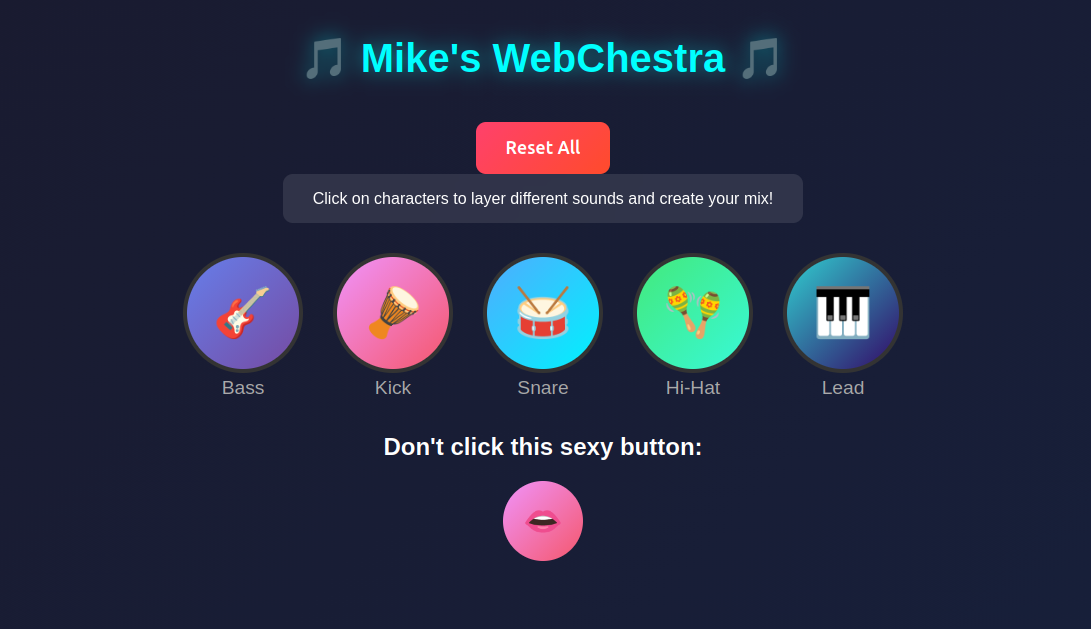
The result is WebChestra — a pure JavaScript, browser-based music mixer inspired by Incredibox and Sprunki Beats. Click emoji characters, layer instruments, build a beat. Zero dependencies.
The Pain: Web Audio API Is Powerful but Unforgiving
Let me be honest about the journey. The Web Audio API is incredibly capable — but it’s also incredibly low-level. There’s no playNote("C3") function. There's no createKickDrum(). You get raw oscillators, gain nodes, and biquad filters. You are the synthesizer.
Pain Point #1: Everything Is Frequencies
Want a bass note? You need to know that G2 is 98.00 Hz, C3 is 130.81 Hz, and D2 is 73.42 Hz. There’s no shortcut. You’re working with the physics of sound:
A4 = 440 Hz (standard tuning reference)
Each octave = 2x the frequency
Each semitone = multiply by 2^(1/12) ~ 1.0595
I manually mapped out every note frequency for both the bass (triangle wave, 73–196 Hz range) and lead synth (square wave, 392–880 Hz range). Nine notes each, painstakingly chosen to harmonize together.
Pain Point #2: Drums Don’t Exist — You Build Them
There’s no drum sample in the Web Audio API. A kick drum? That’s a sine wave oscillator that pitch-bends from 150 Hz down to 55 Hz in 100 milliseconds, passed through a lowpass filter at 500 Hz. A snare? White noise (literally Math.random() * 2 - 1 pumped into an audio buffer) filtered through a 10 kHz bandpass filter. Hi-hat? Same white noise, but through a 5 kHz highpass filter to get that sizzle.
// This is how you make a kick drum from nothing:
osc.frequency.setValueAtTime(150, audioContext.currentTime);
osc.frequency.exponentialRampToValueAtTime(55, currentTime + 0.1);
Every sound is built from first principles.
Pain Point #3: Timing Is Harder Than You Think
I used setInterval() running at 200ms per beat (effectively 300 BPM). It works — but JavaScript's event loop doesn't guarantee precise timing. Over long sessions, you can hear subtle drift. The "proper" solution is scheduling notes ahead of time using audioContext.currentTime, but for a fun experiment, setInterval gets the job done.
Pain Point #4: Volume Balancing Is Trial and Error
The lead synth at full volume obliterates everything else. I ended up with the bass at gain 0.4 and the lead at 0.05 — an 8x difference. There’s no mixing console. You tweak numbers, reload, listen, repeat. Over and over.
The Architecture: One File, Zero Dependencies
The entire project lives in a single index.html file. HTML structure, CSS styling, JavaScript logic — all together. Pragmatic? Yes. Production-ready? No. But it means you can literally download one file, open it in a browser, and make music.
Five Instruments, Two Sound Engines
Melodic instruments (Bass and Lead) use oscillator nodes with predefined frequency arrays and 64-beat pattern loops:
- Bass: Triangle wave — warm, rounded, sits underneath everything
- Lead: Square wave — bright, hollow, chiptune-like, cuts through the mix
Percussion (Kick, Snare, Hi-Hat) use generated white noise buffers filtered through biquad filters, running on an 8-beat loop:
- Kick: Sine wave with pitch bend + lowpass filter
- Snare: White noise + bandpass filter at 10 kHz
- Hi-Hat: White noise + highpass filter at 5 kHz
The pattern system encodes notes as arrays of integers — 0 means silence, 1–9 maps to a specific note index. Drums and melodic lines sync through modulo operations (currentBeat % 8 for drums, currentBeat % 64 for melodic).
Where AI Fell Short (and Where Being a Musician Mattered)
Here’s the part I enjoyed the most. When I tried to get AI assistance with the musical note frequencies and patterns, it was reluctant to provide exact frequency values for specific notes. It wanted to generalize, abstract, hand-wave.
But I’m a musician. I know what G2 sounds like. I know the difference between a triangle wave bass and a square wave bass. I know that a snare needs that bandpass filter crack, not a lowpass mush.
The AI didn’t know it was dealing with someone who would actually listen to the output and know if it was wrong.
So I did what any stubborn musician-developer would do: I looked up the frequency tables myself, tuned by ear, iterated on patterns until the groove felt right, and balanced volumes until the mix breathed.
The lesson: AI is a tool, not a producer. It can scaffold code, but it can’t tell you if the beat slaps.
What Could Be Better
I’m honest about the rough edges. Here’s what I’d improve:
- Proper audio scheduling — Replace
setIntervalwith Web Audio API clock-based scheduling for sample-accurate timing - Tempo control — Currently hardcoded at 300 BPM, should be adjustable
- Volume sliders — Per-instrument mixing instead of hardcoded gain values
- MIDI input support —
navigator.requestMIDIAccess()would let you plug in a keyboard - Pattern editor UI — Visual grid to edit beat patterns instead of changing code
- Code modularization — Break the monolithic HTML file into proper modules
- More waveforms and effects — Reverb, delay, distortion using Web Audio’s
ConvolverNodeandWaveShaperNode - Mobile optimization — Touch interactions and responsive layout tweaks
- Save/load compositions — Export your mix as JSON or even render to WAV using
OfflineAudioContext
Try It
WebChestra — Live Demo Watch the Video Demo Source Code on GitHub
No installs. No sign-ups. Just open your browser, click some emojis, and make a beat.
Built with nothing but curiosity, a browser, and stubbornness.
메타데이터
- post_id
- a87f2ee8c451
- slug
- how-i-built-a-browser-based-beat-maker-from-scratch-using-nothing-but-vanilla-javascript-and-the-a87f2ee8c451
- url
- https://medium.com/@mecreate/how-i-built-a-browser-based-beat-maker-from-scratch-using-nothing-but-vanilla-javascript-and-the-a87f2ee8c451
- canonical_url
- https://medium.com/@mecreate/how-i-built-a-browser-based-beat-maker-from-scratch-using-nothing-but-vanilla-javascript-and-the-a87f2ee8c451
- author_url
- https://medium.com/@mecreate
- status
- ok
- fetched_at
- 2026-06-23 03:48:11