Which GPU Should You Choose for Computer Vision Training?
A practical comparison of the H100, A100, L4, T4, and Google TPUs for PyTorch, TensorFlow, and JAX workloads.
Which GPU Should You Choose for Computer Vision Training?
A practical comparison of the H100, A100, L4, T4, and Google TPUs for PyTorch, TensorFlow, and JAX workloads.
H100 vs A100 vs L4 vs T4 vs TPU
You open your cloud notebook, navigate to the hardware accelerator settings, and suddenly face a long list of options:
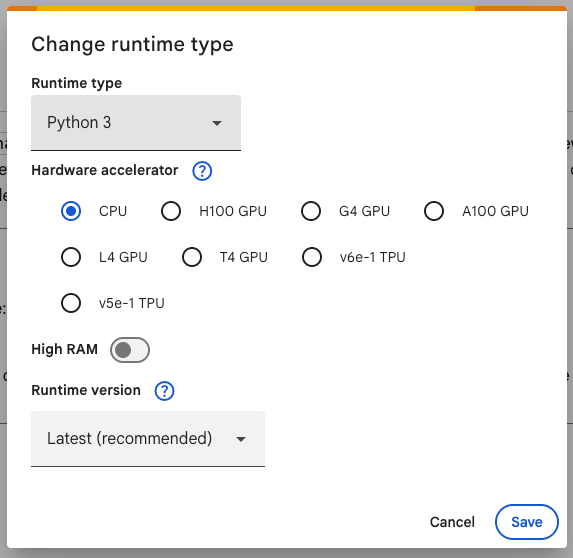
Google Colab Runtime Options
- H100 GPU
- A100 GPU
- L4 GPU
- T4 GPU
- G4 GPU
- TPU v6e
- TPU v5e
- CPU
Which one should you choose for computer vision training?
The easy answer is:
Pick the H100. It is the fastest.
The better answer is:
Pick the fastest accelerator that works efficiently with your model, framework, dataset, and budget.
Let us break it down.
My Overall Ranking for Typical Computer Vision Training
For a standard PyTorch computer vision pipeline, I (or my claude code) would generally rank the options like this:
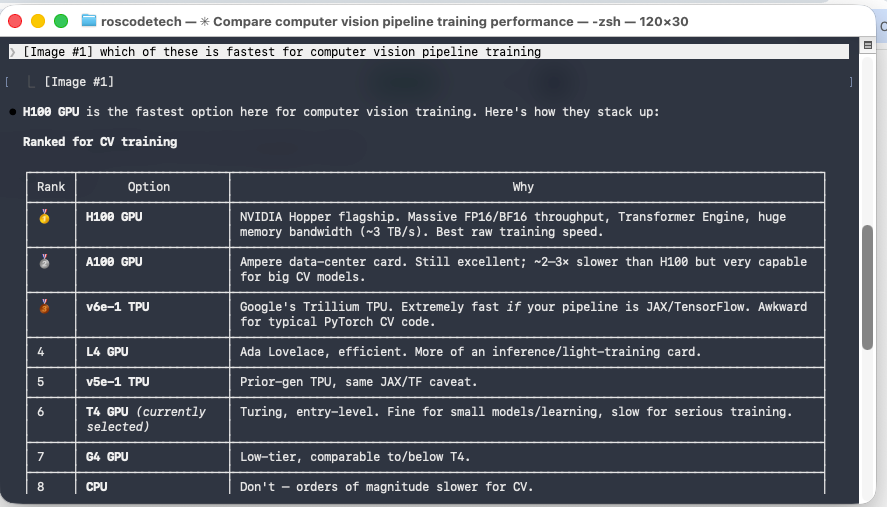
Claude Code’s tier list
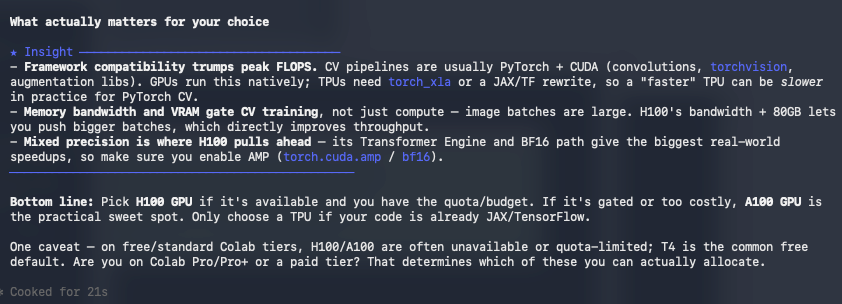
Claude results
- H100 GPU
- A100 GPU
- TPU v6e
- L4 GPU
- TPU v5e
- T4 GPU
- G4 GPU
- CPU
This ranking is not absolute.
A TPU can outperform a GPU under the right conditions, and a cheaper GPU may offer better value than an H100 for a smaller model.
However, for most existing PyTorch computer vision projects, the H100 and A100 are usually the safest high-performance choices.
1. H100 GPU: The Raw Performance Winner
The NVIDIA H100 is built on NVIDIA’s Hopper architecture and is designed for demanding artificial intelligence and high-performance computing workloads.
It offers:
- Extremely high mixed-precision throughput
- Support for FP16, BF16, and FP8
- Very high memory bandwidth
- Large GPU memory configurations
- Tensor Cores optimised for deep learning
- Excellent support through CUDA and PyTorch
For large image models, high-resolution inputs, segmentation tasks, object detection, and large batch sizes, the H100 gives you room to push the training pipeline harder.
Its high memory bandwidth is particularly valuable because computer vision training does not only depend on raw mathematical operations. Large image tensors, activations, gradients, and model parameters must constantly move through memory.
Best for:
- Large computer vision models
- High-resolution image training
- Object detection and segmentation
- Large batch sizes
- Vision Transformers
- Multi-GPU training
- Researchers prioritising training speed
The downside:
The H100 is expensive and may be difficult to access.
It is also overkill for many small datasets and lightweight models. Paying for an H100 while your data loader, augmentations, or storage pipeline bottlenecks the training process is simply burning money faster.
2. A100 GPU: The Practical Powerhouse
The NVIDIA A100 remains an excellent accelerator for deep learning.
It provides strong mixed-precision performance, high memory bandwidth, mature CUDA support, and configurations with up to 80 GB of GPU memory.
For many computer vision projects, the A100 is the practical sweet spot.
It is powerful enough for serious training while often being more available and affordable than the H100.
Best for:
- ResNet, EfficientNet, and ConvNeXt models
- YOLO training
- Image segmentation
- Fine-grained image classification
- Medical imaging
- Medium-to-large datasets
- Large PyTorch workloads
The A100 may take longer than an H100 to complete the same training run, but that does not automatically make it worse value.
The metric that matters is not only:
How quickly did the model finish?
It is also:
How much did the completed training run cost?
A slightly slower accelerator can be the better choice when its hourly cost is significantly lower.
3. TPU v6e: Extremely Powerful, but Framework-Dependent
Google’s TPU v6e, also known as Trillium, is a serious machine-learning accelerator.
It is designed for workloads including:
- Transformer training
- Text-to-image systems
- Convolutional neural networks
- Fine-tuning
- Model serving
On paper, it offers massive computational performance.
However, your software pipeline matters.
TPUs are most natural when using:
- JAX
- TensorFlow
- XLA-compatible operations
PyTorch can run on TPUs through PyTorch/XLA, but an existing CUDA-based project may require changes.
Some custom CUDA extensions, third-party augmentation libraries, or unsupported operations may not transfer cleanly.
Therefore, a theoretically faster TPU can produce a slower development experience if you spend hours rewriting and debugging the pipeline.
Choose a TPU when:
- Your project already uses JAX or TensorFlow
- Your model is compatible with XLA
- You are willing to optimise specifically for TPU execution
- You are scaling across multiple TPU chips
Avoid choosing it purely because the specifications look impressive.
Developer time matters too.
4. L4 GPU: Efficient and Useful, but Not the Training King
The NVIDIA L4 is based on the Ada Lovelace architecture.
It is highly efficient and particularly strong for:
- Inference
- Video processing
- Model serving
- Smaller training workloads
- Fine-tuning
- Prototyping
The L4 can absolutely train computer vision models, but it is not designed to challenge an H100 or A100 in large-scale training.
It becomes appealing when you do not need enormous GPU memory or maximum training speed.
For lightweight models, experiments, and budget-aware workloads, an L4 may provide perfectly adequate performance.
5. TPU v5e: Capable, but Behind Trillium
The TPU v5e is an earlier-generation Google accelerator.
It remains useful for TensorFlow and JAX workloads, particularly when cost efficiency and TPU scaling are important.
However, if TPU v6e is available at a reasonable cost, v6e is generally the more attractive option.
The same compatibility warning applies:
Do not move a working CUDA pipeline to a TPU without accounting for the engineering effort.
6. T4 GPU: Good for Learning and Smaller Experiments
The NVIDIA T4 is common in cloud notebooks and has helped make GPU computing widely accessible.
It remains useful for:
- Learning PyTorch
- Small image-classification projects
- Basic YOLO training
- Inference
- Testing code
- Developing a pipeline before scaling up
However, it is now an older accelerator.
Training large computer vision models on high-resolution images can become painfully slow, and its limited memory can force you to reduce the batch size or image resolution.
A T4 is not useless.
It is simply no longer the first choice for demanding training when newer hardware is available.
7. G4 GPU: Check What You Are Actually Receiving
“G4” may refer to a cloud machine family rather than one universally identical accelerator.
That makes direct comparisons difficult.
Before selecting it, inspect:
- The underlying GPU model
- Available GPU memory
- CUDA support
- Hourly price
- Whether the GPU is dedicated or fractional
Never choose an accelerator based only on the cloud provider’s machine-family name.
Check the actual hardware.
8. CPU: Avoid It for Serious Deep-Learning Training
A CPU is useful for:
- Preparing datasets
- Testing code
- Debugging
- Running small inference workloads
- Verifying that a pipeline works
It is generally a poor choice for training modern deep-learning computer vision models.
Convolutional networks and Vision Transformers depend heavily on parallel mathematical operations. GPUs and TPUs are specifically designed to accelerate those operations.
Training that takes minutes or hours on a GPU may take dramatically longer on a CPU.
Framework Compatibility Can Matter More Than Peak FLOPS
The fastest chip on a specification sheet is not automatically the fastest accelerator for your project.
Suppose your computer vision pipeline uses:
- PyTorch
- Torchvision
- CUDA augmentations
- Custom CUDA extensions
- Ultralytics YOLO
- OpenCV preprocessing
- NVIDIA-specific libraries
An NVIDIA GPU will probably offer the smoothest experience.
By contrast, a TPU may require framework changes, operation replacements, or a different distributed-training strategy.
That engineering cost must form part of the comparison.
GPU Memory Is Not the Same as GPU Speed
A faster GPU does not solve every problem.
GPU memory determines whether your workload fits.
Computer vision training can consume large amounts of memory because it must store:
- Input images
- Model parameters
- Activations
- Gradients
- Optimiser states
- Temporary tensors
Memory usage increases rapidly when you raise:
- Image resolution
- Batch size
- Model size
- Number of output classes
- Augmentation complexity
Running out of memory can force you to reduce the batch size, use gradient accumulation, apply activation checkpointing, or reduce the input resolution.
Sometimes a slower GPU with more available memory is more useful than a faster device with insufficient memory.
Mixed Precision Is Essential
Modern accelerators achieve their best deep-learning performance when using mixed precision.
Instead of performing every operation in FP32, mixed-precision training uses formats such as FP16 or BF16 where appropriate.
In PyTorch, automatic mixed precision can significantly improve throughput and reduce memory usage.
A simplified example looks like this:
import torchdevice = torch.device("cuda" if torch.cuda.is_available() else "cpu")
model = model.to(device)scaler = torch.amp.GradScaler("cuda")for images, labels in train_loader:
images = images.to(device, non_blocking=True)
labels = labels.to(device, non_blocking=True) optimiser.zero_grad(set_to_none=True) with torch.autocast(device_type="cuda", dtype=torch.float16):
predictions = model(images)
loss = criterion(predictions, labels) scaler.scale(loss).backward()
scaler.step(optimiser)
scaler.update()For hardware with strong BF16 support, BF16 may be preferable because it provides a wider numerical range than FP16.
Always confirm that the model and operations behave correctly before relying on mixed precision for a full training run.
Do Not Ignore the Data Pipeline
A powerful GPU can still sit idle while waiting for data.
Common bottlenecks include:
- Images stored on slow network storage
- Excessive CPU-based augmentations
- Too few data-loader workers
- Slow image decoding
- Small batch sizes
- Constant transfers between CPU and GPU
- Logging every training step
- Saving checkpoints too frequently
Before paying for a faster GPU, monitor its utilisation.
If utilisation remains low, the GPU may not be the real bottleneck.
For PyTorch, useful improvements can include:
train_loader = DataLoader(
    dataset,
    batch_size=batch_size,
    shuffle=True,
    num_workers=8,
    pin_memory=True,
    persistent_workers=True,
)
The ideal number of workers depends on the available CPU cores, memory, storage, and augmentation workload.
More workers are not always better.
Benchmark Your Own Model
Generic rankings are useful, but your own benchmark is more valuable.
Run a small, controlled test on each realistic option.
Measure:
- Training images processed per second
- Time per epoch
- Maximum usable batch size
- GPU utilisation
- GPU memory usage
- Total cost per epoch
- Estimated cost for the full run
- Time spent adapting the code
A simple comparison table might look like this:
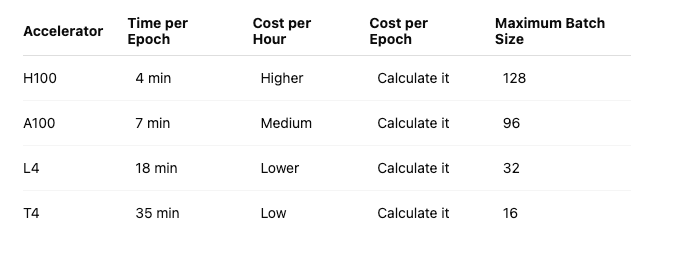
These figures are only illustrative.
The results will depend on your model, resolution, data pipeline, framework, and cloud provider.
My Practical Recommendation
Choose the H100 when:
- Maximum training speed matters
- The project is large enough to use it properly
- You need substantial GPU memory
- Your budget allows it
- Your pipeline is already optimised
Choose the A100 when:
- You need excellent performance without paying for the absolute top option
- You are training serious PyTorch computer vision models
- You need 40 GB or 80 GB of GPU memory
- You want mature CUDA compatibility
Choose TPU v6e when:
- Your code is already written for JAX, TensorFlow, or XLA
- You understand TPU scaling
- You are prepared to optimise specifically for the TPU
Choose the L4 when:
- You are prototyping
- The model is relatively small
- Inference is also an important part of the workload
- Efficiency matters more than maximum training speed
Choose the T4 when:
- You are learning
- It is the only free accelerator available
- You are testing a smaller model
- You want to verify the pipeline before paying for stronger hardware
Final Verdict
For a typical PyTorch computer vision project:
Choose the H100 for maximum speed.
Choose the A100 for an excellent balance of performance, compatibility, and practicality.
Choose TPU v6e when your software stack is already designed for TPUs.
Choose the L4 or T4 for smaller experiments and tighter budgets.
The biggest mistake is selecting hardware based only on peak performance figures.
The best accelerator is the one that gives you the lowest practical cost for a correct, completed training run.
That calculation includes compute time, memory limitations, framework compatibility, code changes, and developer time.
A powerful accelerator cannot rescue an inefficient pipeline.
Optimise the entire system, not merely the chip.
References
Technical details in this article were checked against official documentation from NVIDIA and Google Cloud for the H100, A100, L4, T4, and TPU v6e accelerators.
Thank you for taking the time to read this article!
For more articles covering computer vision, artificial intelligence, machine learning, Python, Flutter, and software engineering, follow Roscoe Kerby [ROSCODE] on Medium.
Website: runtime.withroscoe.com LinkedIn: linkedin.com/in/roscoekerby GitHub: github.com/roscoekerby Medium: medium.com/@roscoe.kerby
Feel free to follow me on Medium, leave a clap, and reach out on LinkedIn or Instagram for collaborations and technical discussions.
Your partner in code, Roscode
Update (even claude code makes mistakes) hence why I checked it against ChatGPT and Claude:
Yes — that row is wrong, and specifically the “comparable to/below T4” description is the clearest error.
The T4 is a 2018 Turing card with 16 GB. Colab’s G4 is the NVIDIA RTX PRO 6000 Blackwell with 96 GB and FP8/FP4 support. Calling it “low-tier, comparable to/below T4” has it almost exactly backwards — it’s one of the most capable cards in that entire dropdown by memory, and architecturally it’s two generations newer than the T4.
To be fair to Claude Code (and to me, since I made the same mistake one message ago), this is an easy trap: “G4” on AWS is an old T4/AMD entry-level family, so “G4 ≈ T4, low-tier” is a reasonable-sounding inference if you don’t catch that Google’s G4 is a totally different, newer machine series wearing the same name. But it’s still wrong for the Colab context the article is about.
Where it should actually sit: G4 belongs near the top, not at #7. For memory-bound CV training its 96 GB beats the A100’s 80 GB, so it should rank above L4, both TPUs, and T4 without question. The only honest hesitation is whether it tops the A100, and that comes down to the nuance we found — Google positions G4 for inference and single-host tuning, and FP16 on G4 runs on standard CUDA cores rather than Tensor Cores, so for pure mixed-precision training throughput the A100/H100 Tensor-Core path can still edge it even with less VRAM. So a defensible placement is roughly #3–#4: behind H100 and A100 on raw training speed, but clearly ahead of L4/T4/v5e, and arguably tied with or ahead of A100 whenever the bottleneck is memory rather than compute.
So the corrected row would read something like: G4 GPU — NVIDIA RTX PRO 6000 Blackwell, 96 GB. Blackwell architecture with FP8/FP4 support; huge VRAM headroom for high-res/large-batch CV. Positioned for inference and single-host tuning, and FP16 uses CUDA cores rather than Tensor Cores, so A100/H100 can still win on pure training throughput.
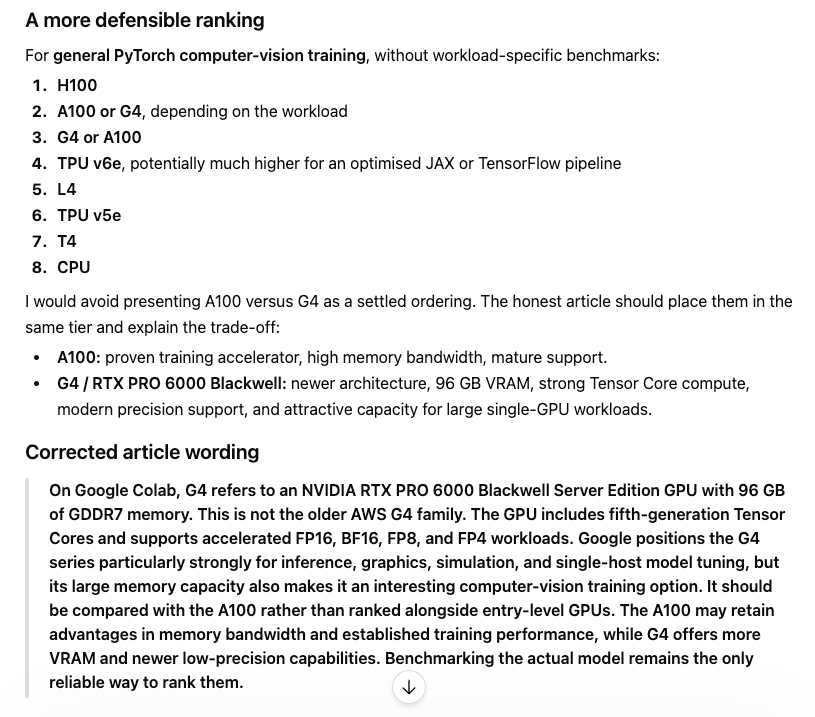
ChatGPT input to the situation
메타데이터
- post_id
- a8a9e97d2bf5
- slug
- which-gpu-should-you-choose-for-computer-vision-training-a8a9e97d2bf5
- url
- https://towardsdev.com/which-gpu-should-you-choose-for-computer-vision-training-a8a9e97d2bf5
- canonical_url
- https://towardsdev.com/which-gpu-should-you-choose-for-computer-vision-training-a8a9e97d2bf5
- author_url
- https://medium.com/@roscoe.kerby
- status
- ok
- fetched_at
- 2026-06-22 17:31:34