The other important file in Python project — Dockerfile
It is very annoying to handle the open-source library version conflict while running the data pipeline. That is why we need DOCKER!
The other important file in Python project — Dockerfile
It is very annoying to handle the open-source library version conflict while running the data pipeline. That is why we need DOCKER!

Docker creates different containers to avoid version conflict. The container itself can be considered an independent development environment, the setting in another container does not affect another container. That’s why, create an Dockerfile in python project is important
What is Dockerfile?
A Dockerfile is a simple text document that contains the commands and instructions that a user could call on the command line. These commands/instructions are used to perform actions to create a new docker image.
How to write a Dockerfile?
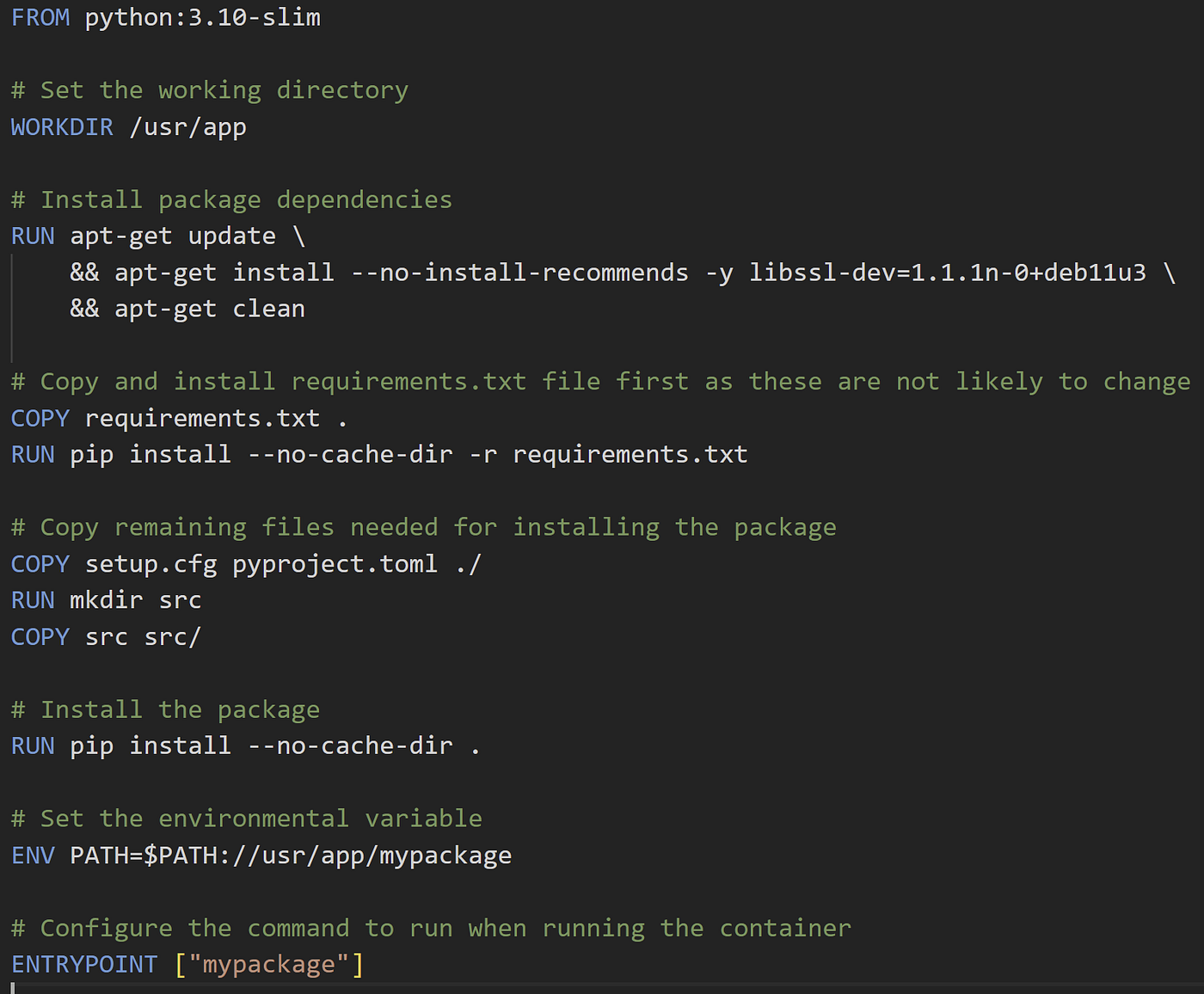
the example as below
FROM
FROM is the keyword to start with specifying our base image. Based on different needs, you can find the images on docker.hub. You can find some images from Ubuntu, Python, R … and so on. The best practice of docker images is Create the environment only when you need it. Choosing the proper image can save the build time and space.
In our case, we chose python3:10-slim, which is very light.
WORKDIR
Set the working directly. WORKDIR can be specified multiple times in a Dockerfile. If the directory does not exists in the image, Docker will create it for you.
RUN
RUNis used to run commands against the image. IIn our case, we first install the necessary libaray

install the linux library
COPY
cp does not work directly in Dockerfile, COPY is the correct syntax to copy the file from local to the image

Here we copied the requirement.txt from current local location to the image, and then install the package form requirement.txt
ENV
The ENV instruction sets the environment variable <key> to the value <value> . It is like export in linux.
ENTRYPOINT
ENTRYPOINTis the instruction to specify what component is to be run when you start the docker image. There are 2 forms of writing the ENTRYPOINT
The exec form, which is the preferred form:
ENTRYPOINT ["executable", "param1", "param2"]The shell form:
ENTRYPOINT command param1 param2In our case, we run mypackagewhen we start the image.
You can also use CMDto excute a default executable for a Docker image. There are some differences between CMD and ENTRYPOINT
In a Dockerfile, you must have at least one CMDOR ENTRYPOINT . However, there are some cases where it makes sense to use CMDANDENTRYPOINT together.
Final Step
After we finished the Dockerfile, we can use docker build and docker run to run our pieline in the isolate development!

Have fun!
[embed]Mlearning.ai Submission Suggestions How to become a writer on Mlearning.aimedium.com
메타데이터
- post_id
- a8bacc6c152d
- slug
- the-other-important-file-in-python-project-dockerfile-a8bacc6c152d
- url
- https://medium.com/@n124080/the-other-important-file-in-python-project-dockerfile-a8bacc6c152d
- canonical_url
- https://medium.com/@n124080/the-other-important-file-in-python-project-dockerfile-a8bacc6c152d
- author_url
- https://medium.com/@n124080
- status
- ok
- fetched_at
- 2026-06-15 20:49:13