Part 2: The Android Vault — Hardware-Backed Token Storage
Moving beyond SharedPreferences: A Staff-level guide to securing JWTs using the Android Keystore, TEE, and StrongBox isolation.
Part 2: The Android Vault — Hardware-Backed Token Storage
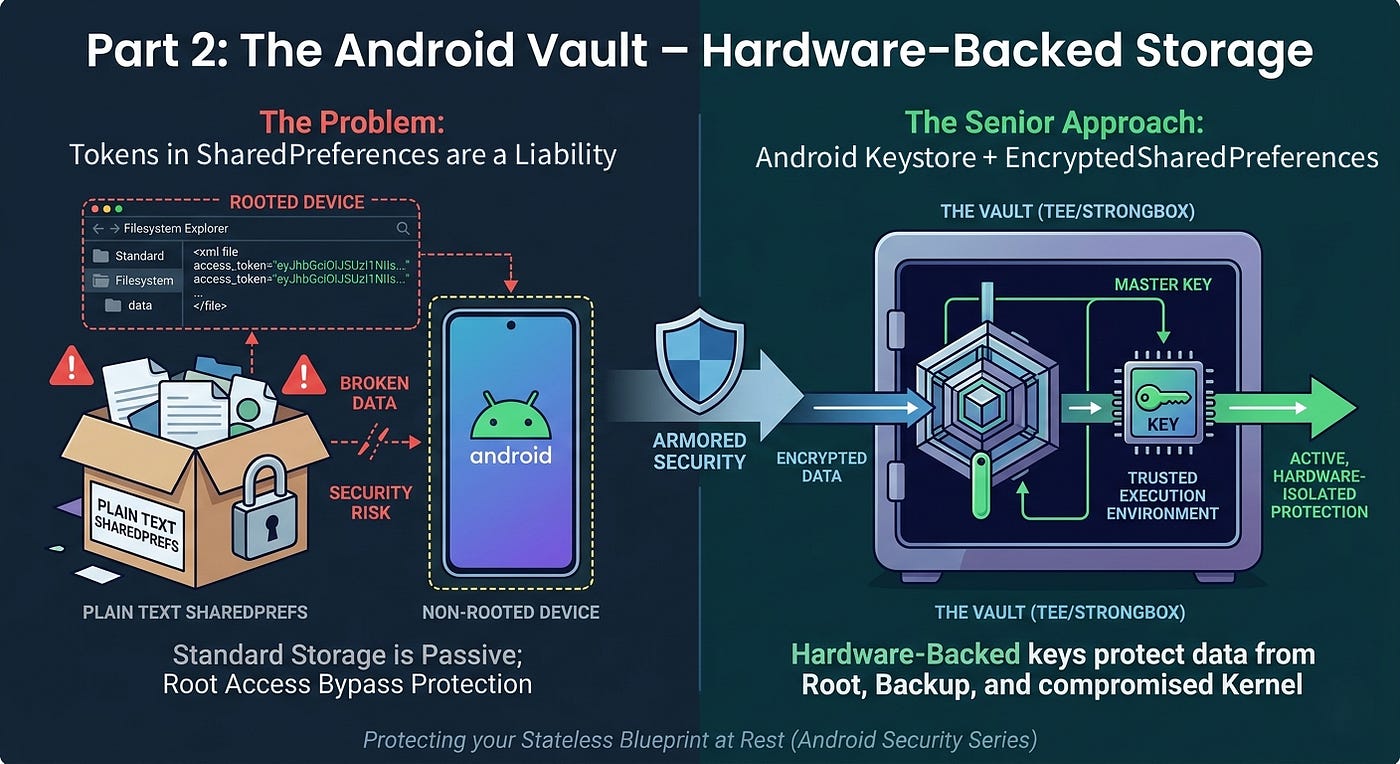
The Android Vault — Hardware-Backed Token Storage
Not a Medium Member? “Read For Free”
Previous Part: Part 1: The Stateless Blueprint — Scaling Android Auth for 5M+ Users
In Part 1: The Stateless Blueprint, we designed a stateless architecture for 5 million users. We moved the “state” from the server to a signed JWT. However, a stateless architecture is only as resilient as the client’s ability to protect that token.
If an attacker extracts a long-lived JWT from an Android device, your backend scale is irrelevant — you have an Account Takeover (ATO) crisis. Today, we build the Android Vault.
🛑 The Threat Model: Why Standard Storage Fails
Mid-level implementations often rely on the Android Sandbox to keep SharedPreferences safe. But a Staff Engineer designs for a broader threat model:
- Rooted Device Access: On rooted devices, the sandbox is bypassed. An attacker can read your JWT in plain text at
/data/data/com.yourapp/shared_prefs/. - Backup Extraction: ADB or Cloud backups contain sensitive XML files. If
allowBackupis true, your session tokens can be extracted and analyzed offline. - Memory Dumps: If the Android Kernel is compromised, software-based encryption can be defeated by dumping the app’s heap memory.
We are defending against attackers with filesystem access and backup access. We need active, hardware-isolated protection.
🏛️ The Android Keystore System
A common architectural misconception is that the Keystore “stores” your tokens. It does not.
The Android Keystore is a secure system that manages cryptographic keys. On supported devices, the actual private key material is designed to never leave the secure hardware boundary. Instead of your app “holding” the key, you send data into the Keystore; the hardware signs or encrypts it and returns the result to your app.
TEE, SE, and StrongBox
On modern devices, the Keystore operates in a Trusted Execution Environment (TEE) or a Secure Element (SE) — dedicated silicon isolated from the main Android OS.
Staff-Level Upgrade: StrongBox Introduced in Android 9, StrongBox is a discrete hardware chip (like the Titan M). While stronger hardware isolation can introduce latency (and should be reserved for high-value secrets), it provides the highest level of physical isolation available on mobile.
🛠️ Implementation: EncryptedSharedPreferences
To implement secure token storage in Android apps, we use the Jetpack Security library. It abstracts the Keystore integration, preventing common crypto mistakes like “IV Reuse.”
Step 1: The Secure Storage Matrix

The Secure Storage Matrix
Step 2: The Production-Grade Vault
We use a Master Key — residing in hardware — to encrypt the sub-keys that protect our SharedPreferences.
import android.content.Context
import androidx.security.crypto.EncryptedSharedPreferences
import androidx.security.crypto.MasterKey

object SecureVault {
    private const val VAULT_FILE = "secure_auth_prefs"

    fun getAuthenticatedPrefs(context: Context): SharedPreferences {
        return try {
            // Step 1: Initialize Master Key with Hardware-Backing
            val masterKey = MasterKey.Builder(context)
                .setKeyScheme(MasterKey.KeyScheme.AES256_GCM)
                // Note: StrongBox may throw on unsupported hardware;
                // production apps should fallback gracefully to TEE.
                // .setRequestStrongBoxBacked(true)
                .build()

            // Step 2: Create the encrypted wrapper
            EncryptedSharedPreferences.create(
                context,
                VAULT_FILE,
                masterKey,
                EncryptedSharedPreferences.PrefKeyEncryptionScheme.AES256_SIV,
                EncryptedSharedPreferences.PrefValueEncryptionScheme.AES256_GCM
            )
        } catch (e: Exception) {
            // STAFF CRITICAL: Never fall back to unencrypted SharedPreferences.
            // This silently downgrades security and creates a massive vulnerability.
            // Recovery: Clear session state and force re-authentication.
            throw IllegalStateException("Secure hardware storage unavailable or corrupted")
        }
    }
}
🔍 Deep Dive: Attack Scenarios
Understanding the “How” is just as important as the “What” for Senior roles:
- Scenario A (Rooted Device): An attacker attempts to read
/data/data/com.yourapp/shared_prefs/secure_auth_prefs.xml. They find encrypted blobs. Without the hardware-bound key inside the TEE, the data is unreadable. - Scenario B (Backup Extraction): An attacker pulls a cloud backup. Because the Master Key is hardware-bound to the original physical chip, the ciphertext cannot be decrypted on a different device.
🚨 Common Mistakes to Avoid
- Silent Security Downgrades: Falling back to unencrypted storage when the Keystore fails is a “fireable offense” in Fintech. Always fail-closed.
- Storing Large Data: Keystore operations involve IPC (Inter-Process Communication). Store your Refresh Token with highest priority, but keep non-sensitive UI state in standard prefs.
- Ignoring allowBackup: Set
android:allowBackup="false"in your Manifest. We prefer the friction of a re-login over the risk of sensitive ciphertext sitting in a user's personal cloud.
🔚 Next Steps
With our tokens stored in a hardware-backed vault, they are shielded from extraction. But secure storage is useless if our networking layer is prone to race conditions.
In Part 3, we will look at the **Interceptor Pattern. We’ll build a concurrent-safe OkHttp architecture using Kotlin Mutex** to handle token refreshes across 5M+ active sessions.
🙋♂️ Frequently Asked Questions (FAQs)
What happens if the hardware key is lost (e.g., OS update)?
Decryption will fail. Your app must catch this, clear the corrupted vault, and log the user out. It is a one-time friction point for a massive security gain.
Is it possible to extract keys from the Keystore?
On modern devices with TEE or StrongBox, extracting private keys via software is considered infeasible. It would require silicon-level physical laboratory attacks.
Should I use StrongBox for everything?
No. Because StrongBox is a discrete chip, the communication is slower than the TEE. Reserve it for the most sensitive secrets, like the Refresh Token or biometric-linked keys.
💬 Join the Discussion
- Does your app currently “fail-closed” or “fail-open” when storage encryption fails?
- Have you checked your app’s
allowBackupsettings recently? - How are you handling the latency trade-offs of StrongBox in your high-security flows?
Next Up: Part 3: The Interceptor Pattern — Mastering Transport & Concurrency
📱 Go Beyond Using Jetpack Compose
If you’re building on Android, understanding what happens under the hood separates developers who use Compose from those who master it. I highly recommend “Mastering Jetpack Compose Internals”. It’s a deep, architecture-first walkthrough of the composition tree, the slot table, snapshot state, and the runtime that powers modern Android UI — capped off with a full case study building a real app called Mosaic.
- E-book: Available on Google Play
- Kindle Edition: Available on Amazon
- Also available in Paperback & Hardcover
메타데이터
- post_id
- a8beec566d81
- slug
- part-2-the-android-vault-hardware-backed-token-storage-a8beec566d81
- url
- https://blog.stackademic.com/part-2-the-android-vault-hardware-backed-token-storage-a8beec566d81
- canonical_url
- https://blog.stackademic.com/part-2-the-android-vault-hardware-backed-token-storage-a8beec566d81
- author_url
- https://medium.com/@sivavishnu0705
- status
- ok
- fetched_at
- 2026-08-03 14:04:03










